Overview
We will build a very simple Pub/Sub messaging system using the Azure sdk 1.6. I built this for a demo, so for production ready solutions you will need to alter how you define your message types, e.g. interfaces etc.
Below is an idea how topics work, basically they similar to queues, except a topic is broken down into subscriptions, so the publisher pushes messages to the Topic (Just like you would with a queue) and the subscriber will subscribe to a subscription.
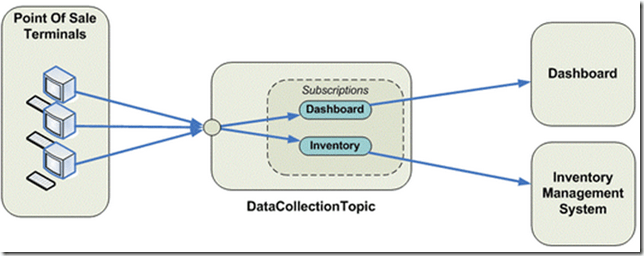
So, in the above, we can see a publisher/subscriber messaging bus.
Filtering
Another nice feature is that you can attach metadata to messages via a IDictionary<string, object> property to include additional metadata for messages, e.g. messageType
This means, you can then create subscription rule filters based on properties that are on the message, all messages are cast to BrokeredMessage before they are sent on the bus. Generics are used on the subscriber to cast the message back to it’s original type.
This sample code that I have provided has filtering on the CUSTOMER subscription, which only takes messages with a MessageType = ‘BigOrder’.
Domain Modelling Rules
I like the idea of the service bus filtering ONLY on MessageType and NEVER on business domain rules e.g. Quantity > 100 etc, why? The Service Bus should never have rules that belong to a business domain, all logic for deciding what “TYPE” of message it is should be done before it is pushed onto the bus, if you stick to this, you will keep your service bus lean and mean.
The Code
I have a sample application you can download from:
https://bitbucket.org/romiko/appfabricpubsubdemo
or clone it with mecurial.
I also included asynchronous operations. Remember that Azure Appfabric Topics only support partial transactions. If you want full transaction support, check out NServiceBus. I highly recommend the use of NServiceBus with AppFabric for full transactional and guaranteed message delivery for .Net publishers and subscribers.
hg clone https://bitbucket.org/romiko/appfabricpubsubdemo
Sample output
Below are screenshots of what you should see when running the code, after updating the AcountDetails.cs file with your appfabric account details.
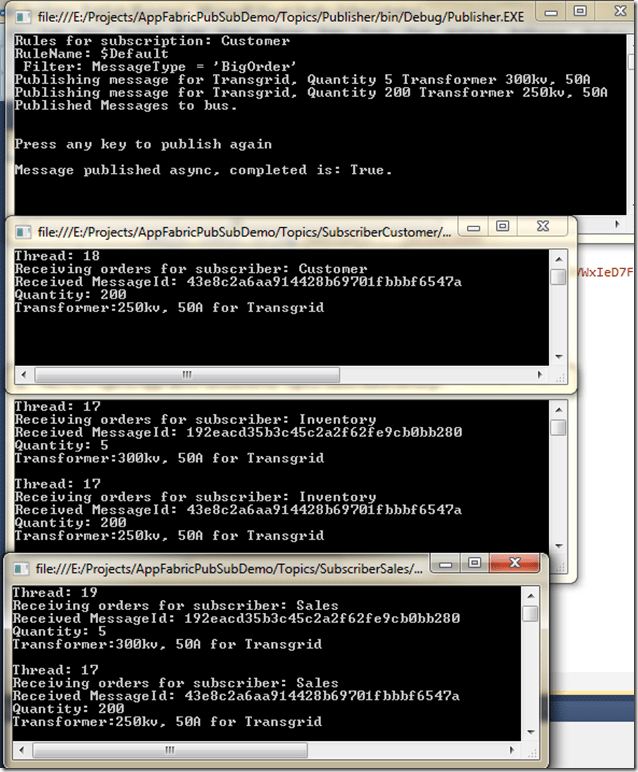
Notice:
One publisher – sending a small and big order
2 subscribers that get both messages
1 subscriber only getting the big order using the subscription filtering.
Subscription
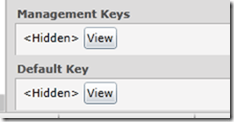
You will need an Azure subscription to try out the demo, once you have the subscription, update the AccountDetails.cs file with your credentials. Namespace, Name and Key, this can all be found in the Azure portal management. Check the default key.
.

One the right pain will be the properties for the namespace, including the Management keys which you can use to get started, by using the default name of owner, or you can play with access control and create a user account and key.
Service Bus Explorer
I recommend you check out Servicebus Explorer
Here I use the explorer tool to see the message filters on the customer subscription, which only takes big orders.

Message Factory
using System;
using Microsoft.ServiceBus;
using Microsoft.ServiceBus.Messaging;

namespace Logic
{
    public class MyMessagingFactory : IDisposable
    {
        private MessagingFactory factory;
        public NamespaceManager NamespaceManager { get; set; }

        public MyMessagingFactory()
        {
            var credentials =
               TokenProvider.CreateSharedSecretTokenProvider
                   (AccountDetails.Name, AccountDetails.Key);

            var serviceBusUri = ServiceBusEnvironment.CreateServiceUri
                ("sb", AccountDetails.Namespace, string.Empty);

            factory  = MessagingFactory.Create
                (serviceBusUri, credentials);

            NamespaceManager = new NamespaceManager(serviceBusUri, credentials);
        }


        public TopicClient GetTopicPublisherClient()
        {
            var topicClient =
                factory.CreateTopicClient("romikostopictransgrid");

            return topicClient;
        }

        public SubscriptionClient GetTopicSubscriptionClient(SubscriptionName subscription)
        {
            var topicSubscriptionClient =
                factory.CreateSubscriptionClient("romikostopictransgrid", subscription.ToString(), ReceiveMode.ReceiveAndDelete);


            return topicSubscriptionClient;
        }

        public void Dispose()
        {
            factory.Close();
        }
    }
}
Publisher
using System;
using Microsoft.ServiceBus.Messaging;
using Messages;

namespace Logic.Publish
{
    public class PublisherClient
    {
        public void SendTransformerOrder(TopicClient topicClient)
        {
            const string format = "Publishing message for {0}, Quantity {1} Transformer {2}";
            var orderIn1 = new TransformerOrder
                               {
                    Name = "Transgrid",
                    Transformer = "300kv, 50A",
                    Quantity = 5,
                    MessageType = MessageType.SmallOrder
                };

            var orderInMsg1 = new BrokeredMessage(orderIn1);
            orderInMsg1.Properties["MessageType"] = orderIn1.MessageType.ToString();
            Console.WriteLine(format, orderIn1.Name, orderIn1.Quantity, orderIn1.Transformer);

            topicClient.Send(orderInMsg1);

            var orderIn2 = new TransformerOrder
                               {
                    Name = "Transgrid",
                    Transformer = "250kv, 50A",
                    Quantity = 200,
                    MessageType = MessageType.BigOrder
                };

            var orderInMsg2 = new BrokeredMessage(orderIn2);
            orderInMsg2.Properties["MessageType"] = orderIn2.MessageType.ToString();

            orderInMsg2.Properties["Quatity"] = orderIn2.Quantity;


            Console.WriteLine(format, orderIn2.Name, orderIn2.Quantity, orderIn2.Transformer);

            //topicClient.Send(orderInMsg2);
            topicClient.BeginSend(orderInMsg2, a =>
                Console.WriteLine(string.Format("\r\nMessage published async, completed is: {0}.", a.IsCompleted)),
                topicClient);

        }
    }
}
Subscriber
using System;
using System.Linq;
using Microsoft.ServiceBus.Messaging;
using Messages;

namespace Logic.Subscription
{
    public class SubscriptionManager
    {
        public static void CreateSubscriptionsIfNotExists(string topicPath, MyMessagingFactory factory)
        {
            var sales = SubscriptionName.Sales.ToString();
            if (!factory.NamespaceManager.SubscriptionExists(topicPath, sales))
                factory.NamespaceManager.CreateSubscription(topicPath, sales);

            var customer = SubscriptionName.Customer.ToString();
            if (!factory.NamespaceManager.SubscriptionExists(topicPath, customer))
            {
                var rule = new RuleDescription
                {
                    Name = "bigorder",
                    Filter = new SqlFilter(string.Format("MessageType = '{0}'", MessageType.BigOrder))
                };
                factory.NamespaceManager.CreateSubscription(topicPath, customer, rule);
            }

            var inventory = SubscriptionName.Inventory.ToString();
            if (!factory.NamespaceManager.SubscriptionExists(topicPath, inventory))
                factory.NamespaceManager.CreateSubscription(topicPath, inventory);
        }

        public static void ShowRules(string topicPath, MyMessagingFactory factory)
        {
            var currentRules = factory.NamespaceManager.GetRules(topicPath, SubscriptionName.Customer.ToString()).ToList();

            Console.WriteLine(string.Format("Rules for subscription: {0}", "Customer"));
            foreach (var result in currentRules)
            {
                var filter = (SqlFilter)result.Filter;
                Console.Write(string.Format("RuleName: {0}\r\n Filter: {1}\r\n", result.Name, filter.SqlExpression));
            }
        }
    }
}
using System;
using System.Threading;
using Microsoft.ServiceBus.Messaging;
using Messages;

namespace Logic.Subscription
{
    public class Subscriber
    {
        public void ReceiveTransformerOrder(SubscriptionClient client)
        {
            GetMessages(client);
        }

        private static void GetMessages(SubscriptionClient client)
        {
                //var orderOutMsg = client.Receive(TimeSpan.FromSeconds(5));
                client.BeginReceive(ReceiveDone, client);
        }

        public static void ReceiveDone(IAsyncResult result)
        {
            var subscriptionClient = result.AsyncState as SubscriptionClient;
            if (subscriptionClient == null)
            {
                Console.WriteLine("Async Subscriber got no data.");
                return;
            }

            var brokeredMessage = subscriptionClient.EndReceive(result);

            if (brokeredMessage != null)
            {
                var messageId = brokeredMessage.MessageId;
                var orderOut = brokeredMessage.GetBody<
                    TransformerOrder>();

                Console.WriteLine("Thread: {0}{6}" +
                                  "Receiving orders for subscriber: {1}{6}" +
                                  "Received MessageId: {2}{6}" +
                                  "Quantity: {3}{6}" +
                                  "Transformer:{4} for {5}{6}",
                                  Thread.CurrentThread.ManagedThreadId,
                                  subscriptionClient.Name, messageId,
                                  orderOut.Quantity, orderOut.Transformer, orderOut.Name, Environment.NewLine);
            }
            subscriptionClient.Close();
        }
    }
}
Message
using System.Runtime.Serialization;

namespace Messages
{
    [DataContract]
    public class TransformerOrder
    {
        [DataMember]
        public string Name { get; set; }

        [DataMember]
        public string Transformer { get; set; }

        [DataMember]
        public int Quantity { get; set; }

        [DataMember]
        public string Color { get; set; }

        [DataMember]
        public MessageType MessageType{ get; set; }
    }
}
Sample Publisher
using System;
using Logic;
using Logic.Publish;
using Logic.Subscription;

namespace Publisher
{
    class Program
    {
        const string TopicPath = "romikostopictransgrid";
        static void Main()
        {

            using (var factory = new MyMessagingFactory())
            {
                SubscriptionManager.CreateSubscriptionsIfNotExists(TopicPath, factory);
                SubscriptionManager.ShowRules(TopicPath, factory);
                PublishMessage(factory);
            }
        }

        private static void PublishMessage(MyMessagingFactory factory)
        {
            var queue = factory.GetTopicPublisherClient();
            var publisher = new PublisherClient();
            publisher.SendTransformerOrder(queue);
            Console.WriteLine("Published Messages to bus.");
            Console.WriteLine(Environment.NewLine);
            Console.WriteLine("Press any key to publish again");
            Console.ReadLine();
            PublishMessage(factory);
        }

    }
}
Sample Subscriber
using System;
using System.Threading;
using Logic;
using Logic.Subscription;

namespace SubscriberCustomer
{
    class Program
    {
        static void Main()
        {
            using (var factory = new MyMessagingFactory())
            while (true)
            {
                SubscribeToMessages(factory);
                Thread.Sleep(TimeSpan.FromMilliseconds(500));
            }
        }

        private static void SubscribeToMessages(MyMessagingFactory factory)
        {
            var subscriptionCustomer = factory.GetTopicSubscriptionClient(SubscriptionName.Customer);
            var subscriber = new Subscriber();
            subscriber.ReceiveTransformerOrder(subscriptionCustomer);
        }
    }
}


 Romiko Derbynew