
Optimizing Terraform’s performance, especially for plan and apply operations can involve several strategies. Here are some tips to help speed up these commands:
- Parallelism Adjustment: Terraform performs operations concurrently. You can adjust the number of concurrent operations with the
-parallelismflag. However, increasing this number can lead to higher memory and CPU usage. Find a balance that suits your machine or CI/CD runner specifications. - Targeted Terraform Runs: If you know exactly which resources need updating, you can use the
-targetoption to run Terraform on specific resources. This reduces the time spent planning and applying by focusing on a subset of your resources. - Incremental Changes: Apply small, incremental changes to your infrastructure rather than large updates. Smaller changes will be quicker to plan and apply.
- Module Optimization: Break down your configurations into smaller, reusable modules. This modular approach helps Terraform to process less at any given time.
- State Management: Store the Terraform state in a remote backend that supports state locking and consistent reads, such as Azure Blob Storage with state locking enabled. For large infrastructures, consider breaking your configuration into smaller, independent state files to reduce read/write times.
- Resource Deferment: Some resources may be inherently slow to create or update due to the nature of the service provider. If possible, manage these resources separately and apply them in different runs.
- Minimize Dependencies: Avoid creating unnecessary dependencies between resources. Terraform can’t parallelize dependent resources, so the fewer interdependencies, the more it can do in parallel.
- Use Provider Features: For providers like AWS, use features like
depends_onto create explicit dependencies to help Terraform better plan parallelism. - Optimize Resource Usage: Check your resources’ performance on the CI/CD runner or environment where Terraform runs. Upgrading the machine or allocating more CPU/memory might be necessary if you’re consistently seeing exit codes like
137. - Refactor and Review Configurations: Over time, configurations can become inefficient or bloated. Regularly review and refactor Terraform code to simplify and remove unnecessary complexity.
- Leverage Data Sources: Prefer data sources over resources for read-only operations where possible, as they can be quicker to evaluate.
- Use Terraform Cloud: If you’re using open-source Terraform, consider using Terraform Cloud or Terraform Enterprise for more robust state management and operations.
- Caching: Some CI/CD systems support caching between runs. If you’re running Terraform in a CI/CD pipeline, make sure to cache the
.terraformdirectory to avoid re-downloading plugins and modules. - Avoid Unnecessary Outputs: Excessive use of outputs, especially when they contain large amounts of data, can slow down Terraform’s performance. Keep outputs to the minimum necessary.
- Profile Apply Time: Use
TF_LOG=TRACEfor a one-off apply to see where time is being spent. Be aware this will generate a lot of logs but can be useful to spot any bottlenecks.
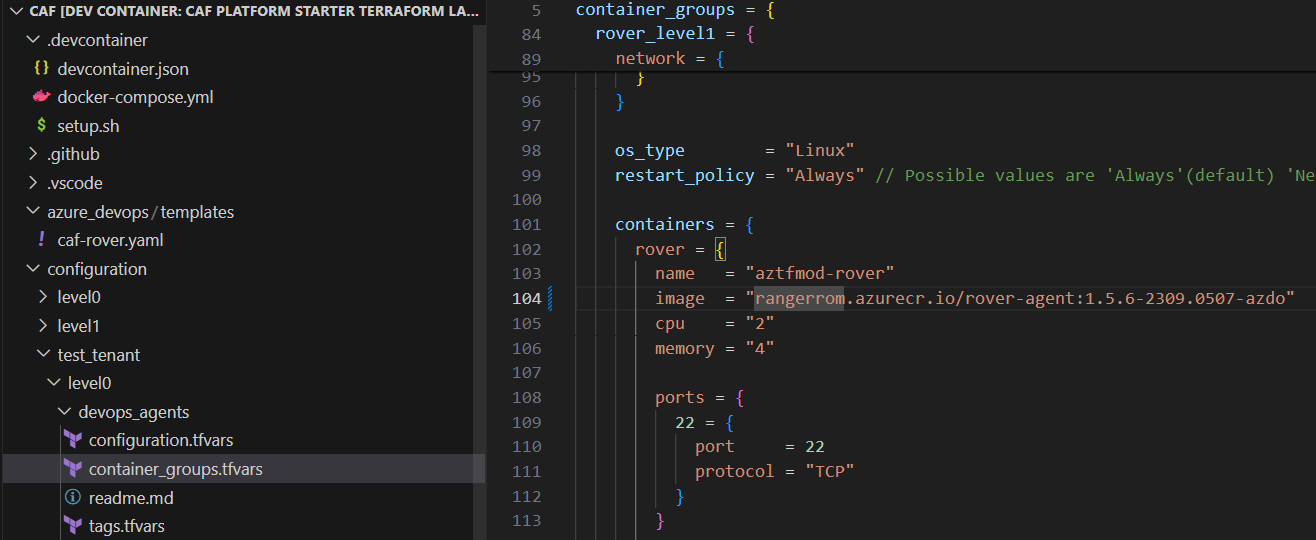
Lastly, upgrade your DevOps agent CPU and Memory. I ran into Terraform exit code 137 and upgraded the CPU and Memory, which helped the DevOps Agents a lot.

and Now...
CAF Rover Terraform Pipeline Resuse
parameters:
- name: job
  type: string
  default: ''
- name: displayName
  type: string
  default: ''
- name: environment
  type: string
  values:
  - Production
  - Test
  default: Test
- name: launchpad
  type: boolean
  default: false
- name: agentPool
  type: string
- name: agentClientId
  type: string
- name: landingZoneDir
  type: string
- name: configurationDir
  type: string
- name: level
  type: number
  values:
  - 0
  - 1
  - 2
  - 3
  - 4
- name: tfstate
  type: string
- name: action
  type: string
  values:
    - plan
    - apply
  default: plan
- name: dependsOn
  type: string
  default: ''
- name: tfstateSubscriptionId
  type: string
  default: ''
- name: targetSubscription
  type: string
  default: ''
- name: token
  type: string
  default: ''


jobs:
- ${{ if ne(parameters.action, 'plan') }}:
  - job: "${{ parameters.job }}waitForValidation"
    ${{ if not(eq(parameters.dependsOn, '')) }}:
      dependsOn: ${{ parameters.dependsOn }}
      condition: and(not(failed()), not(canceled()))
    displayName: "Wait for manual approval"
    pool: "server"
    timeoutInMinutes: "4320" # job times out in 3 days
    steps:
      - task: ManualValidation@0
        timeoutInMinutes: "1440" # task times out in 1 day
        inputs:
          notifyUsers: ''
          instructions: "Confirm ${{ parameters.job }}"
          onTimeout: "reject"

- job: ${{ parameters.job }}
  variables:
    ${{ if eq(parameters.launchpad, true) }}:
      launchpad_opt: "-launchpad"
      level_opt: '-level level0'
    ${{ if not(eq(parameters.launchpad, true)) }}:
      launchpad_opt: ''
      level_opt: "-level level${{ parameters.level }}"
    ${{ if not(eq(parameters.tfstateSubscriptionId, '')) }}:
      tfstate_opt: "-tfstate_subscription_id ${{ parameters.tfstateSubscriptionId }}"
    ${{ if not(eq(parameters.targetSubscription, '')) }}:
      target_opt: "-target_subscription ${{ parameters.targetSubscription }}"
    ${{ if not(eq(parameters.token, '')) }}:
      set_token: "export TF_VAR_token=${{ parameters.token }}"

  pool: ${{ parameters.agentPool }}
  displayName: ${{ parameters.displayName }}
  ${{ if eq(parameters.action, 'plan') }}:
    dependsOn: ${{ parameters.dependsOn }}
    condition: and(not(failed()), not(canceled()))
  ${{ if ne(parameters.action, 'plan') }}:
    dependsOn: "${{ parameters.job }}waitForValidation"
    condition: and(not(failed()), not(canceled()))


  steps:
  - checkout: self
    path: s/tf
  - checkout: caf-terraform-landingzones
    path: s/tf/landingzones
  - checkout: terraform-azurerm-caf
  - bash: |
        git config --global http.https://edg-technology.visualstudio.com.extraheader "AUTHORIZATION: bearer $(System.AccessToken)"
  - bash: |
        ${{ variables.set_token }}

        az login --identity -u ${{parameters.agentClientId}} -o none

        /tf/rover/rover.sh \
        -lz $(Pipeline.Workspace)/s/tf/landingzones/${{ parameters.landingZoneDir }} \
        ${{ variables.tfstate_opt }} \
        ${{ variables.target_opt }} \
        ${{ variables.launchpad_opt }} \
        -var-folder $(Pipeline.Workspace)/s/tf/${{ parameters.configurationDir }} \
        -parallelism 20 \
        -tfstate ${{ parameters.tfstate }} \
        -env ${{ parameters.environment }} \
        ${{ variables.level_opt }} \
        -a ${{ parameters.action }}

        retVal=$?
        if [ $retVal -eq 137 ]; then
          echo "The process was killed, possibly due to a CPU or memory issue."
          exit $retVal
        elif [ $retVal -ne 1  ]; then
          exit 0
        fi
    failOnStderr: true
    displayName: ${{ parameters.displayName }}
- Uncategorized
 Romiko Derbynew