Author: Romiko Derbynew

Musings on Cantilever Stiffness in Electron/Atomic Force Microscopes

The equation for stiffness is:
clip_image002

Where a is the width, b is the thickness and l is the length. This has an effect on mass which in turn will affect resonant frequency.

However, these cancel each other’s effect on stiffness if increases simultaneously. So something else besides stiffness must be responsible for the benefits of ATM work, which is indeed the relationship between mass and resonant frequency.

However a high stiffness cantilever in Non-Contact mode ensures the attractive force between the surface and the tip do not cause the cantilever to “bend” and succumb to the attractive force.

Short and thin cantilevers made from Silicon on Oxide wafers have a low force constant which is suitable for probing, especially soft samples when working in Non-Contact/tapping mode, since excessive force is not applied to the surface being scanned.

Angular velocity can be used to obtain the Frequency:

fo0/2π

The angular velocity equation for a cantilever is:
clip_image004

From the above equation we can see that smaller values for length and thickness of the cantilever structure then the higher the frequency will be.

The intrinsic high resonance frequency is most useful in Non-contact/tapping mode, since the tip is not in contact, and the oscillation induced on the tip by the piezoelectric actuator allows the tip to “linger” a little longer closer to the surface. Lower frequency modes means the tip will spend less time at the closest point to the surface in the oscillation cycle. This ensures that effects of vibrations from the surroundings are minimised and a high image acquisition rate (due to increasing the time the tip is closest to the surface). Thermal noise is also reduced.

Fabrication of short and thin silicon cantilevers for AFM with SOI wafers

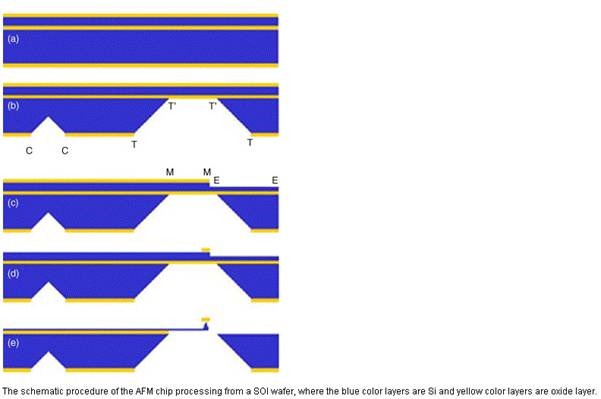
clip_image002

Sensors and Actuators A: Physical, (2006)

Step 1: Forming the handles

Stage (a) Preparation

Silicon wafers with a <1 00 > orientation (Horizontal Alignment) are used and the top most layer of Silicon will be used to form the tip.

Oxide layer is deposited between two layers of silicone and also at the top and bottom of the wafer by thermal oxidation at 1000 ⁰C.

The thermal oxide layers act as a mask at the handle side and at the top side where the tip will be defined, it also protects the silicon layer that will become the cantilever when the trenches/cleaving lines (T, C) are formed.

Stage (b) Etch Trenches

The trench lines are formed using convention lithographic techniques, by forming a photoresist on the bottom of the wafer.

Chemical hydrofluoric wet etching is used to open the sections of the oxide layer on the exposed regions of the photoresist, this etch technique cannot be used on the silicon itself as the rate of etching is too slow.

Once the oxide layers are removed from the trench pattern, then Tetra-methyl ammonium hydroxide (TMAH) wet etching is used on the Si handle layer. TMAH is better than Potassium hydroxide as KOH will destroy the oxide layer which acts as a mask here.

The etching depth is controlled by duration of the wet etch, the trenches are etched in around 12 hours and the cleaving (C) in a shorter time period to have a reduced depth as compared to the T.

Note that TMAH does not etch the oxide layer and hence this layer is left in the trench (T).

Step 2: Defining the cantilevers

Stage (c)

Conventional lithographic techniques are used to pattern the trench area of the device layer side, so that accurate alignment of the cantilever with the respect to the trench (‘T) can be achieved.

· KOH wet etching is used to etch the cantilever in a 60⁰C water bath (E)

The depth of etching is controlled by the duration and reactants used.

Stage (d)

· The cantilever mesa (M) and (E) are then etched together, a suitable photoresist and photomask is used to ensure some of the oxide layer is not etched using isotropic etching.

This stage ensures the cantilever is strong enough to withhold tensions and stress caused by spinning photoresist and other subsequent steps, thus ensuring the alignment is accurate throughout the process.

Step 3: Forming the tips and cantilevers together

Stage (e)

· KOH wet etching is used.

· The etching rate will be uniform, therefore when the (E) part of the device is totally etched off, the etch process is topped immediately. This provides the necessary sign to stop etching and will ensure a thin cantilever is left as the (M) part is thicker than the (E) part.

· Thermal oxidation can be used to sharpen the tip, reduce thickness and balance the stress in the cantilever. The above process is easily to control due to several hours needed for etching and oxidising! Therefore quantitative monitoring processes can be established during production.

Atom Force Microscope Tip

clip_image002

Dip-Pen illustration (Dip-Pen Lithography, 2008)

The tip of an Atomic Force Microscope is coated with a thin film of thiol molecules that are insoluble in water but react with a gold surface.

When the device is exposed to an atmosphere with high saturation of water vapour, then tiny water molecules will condense between the tip of the microscope and gold surface. Surface tension ensures there is a constant fixed distance between the tip and the surface, as the tip moves across the surface, a bridge is formed and the thiol molecules can move onto the gold surface, where they stay fixed due to a chemical reaction.

This technique is slow and cumbersome and can however create features a few nanometers across. So this device can even build smaller wires that are only one atom wide.

plupload property items will be lost if you use Resize in Script Code.

Hi,

There is a small bug in PLUpload, a tool I highly recommend to use to upload files to MVC 3. It works really well.

The place to download the tool is from:

http://www.plupload.com/

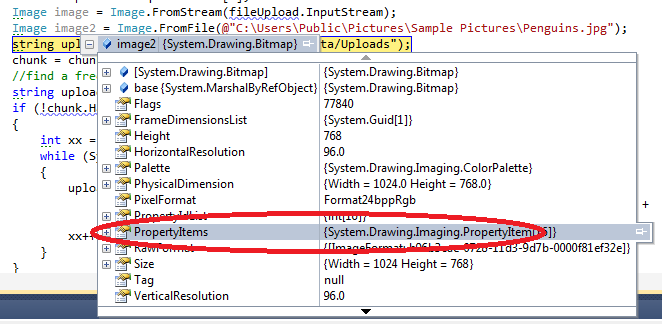
Now, ensure this is disabled or commented out, else you will LOSE all image properties, such as camera settings and GPS. So ensure        // resize: { width: 320, height: 240, quality: 90 } is not used!

<script type="text/javascript">
    // Convert divs to queue widgets when the DOM is ready
    $(function () {
        $("#uploader").plupload({
            // General settings
            runtimes: ‘flash,html5,browserplus,silverlight,gears,html4’,
            url: ‘home/upload’,
            max_file_size: ‘1000mb’,
            max_file_count: 20, // user can add no more then 20 files at a time
            chunk_size: ‘1mb’,
            unique_names: true,
            multiple_queues: true,

            // Resize images on clientside if we can
           // resize: { width: 320, height: 240, quality: 90 },

            // Rename files by clicking on their titles
            rename: true,

            // Sort files
            sortable: true,

            // Specify what files to browse for
            filters: [
            { title: "Image files", extensions: "jpg,gif,png" },
            { title: "Zip files", extensions: "zip,avi" }
        ],

            // Flash settings
            flash_swf_url: ‘/Scripts/plupload/plupload.flash.swf’,

            // Silverlight settings
            silverlight_xap_url: ‘/Scripts/plupload/plupload.silverlight.xap’
        });

        // Client side form validation
        $(‘form’).submit(function (e) {
            var uploader = $(‘#uploader’).plupload(‘getUploader’);

            // Validate number of uploaded files
            if (uploader.total.uploaded == 0) {
                // Files in queue upload them first
                if (uploader.files.length > 0) {
                    // When all files are uploaded submit form
                    uploader.bind(‘UploadProgress’, function () {
                        if (uploader.total.uploaded == uploader.files.length)
                            $(‘form’).submit();
                    });

                    uploader.start();
                } else
                    alert(‘You must at least upload one file.’);

                e.preventDefault();
            }
        });

    });
</script>


If it is not commented out, the property list of the image will only have two items.

image

UPDATE 24/02/2011: It does keep properties with Image Resize if HTML 5 is being used, FLASH and SILVERLIGHT does not work currently with it, so if in doubt, use HTML 5 first.

Azure Blob Storage Helper Class and Shared Access Policy

Hi,

I have create a simple helper class that can be used to Upload Blobs to a public and private container. It then also allows you to grant users Temporary access at the blob level for 2 days. This is nice when you want to provide a download link that will expire.

Below is the class

using System.IO;
using Microsoft.WindowsAzure;
using Microsoft.WindowsAzure.StorageClient;


namespace Common.Azure
{
    public interface IStorage
    {

        string ContainerThumbnails { get; }
        string ContainerPhotos { get; }

        CloudStorageAccount StorageAccountInfo { get; set; }
        CloudBlobClient BlobClient { get; set; }

        CloudBlob UploadBlob(string blobUri, Stream stream, string containerName, bool isPublic);
        string GetSharedAccessSignatureToDownloadBlob(string blobUri, string containerName, string userName);
    }
}


using System;
using System.Configuration;
using System.IO;
using Microsoft.WindowsAzure;
using Microsoft.WindowsAzure.ServiceRuntime;
using Microsoft.WindowsAzure.StorageClient;

namespace Common.Azure
{
    public class Storage : IStorage
    {
        public string ContainerThumbnails
        {
            get { return "photothumbnails"; }
        }
        public string ContainerPhotos
        {
            get { return "photos"; }
        }


        public CloudStorageAccount StorageAccountInfo { get; set; }
        public CloudBlobClient BlobClient { get; set; }

        public Storage()
        {

            CloudStorageAccount.SetConfigurationSettingPublisher((configName, configSetter) =>
            {
                if (RoleEnvironment.IsAvailable)
                    configSetter(RoleEnvironment.GetConfigurationSettingValue(configName));
                else
                    configSetter(ConfigurationManager.AppSettings[configName]);
            });

            StorageAccountInfo = CloudStorageAccount.FromConfigurationSetting("StorageConnectionString");
            BlobClient = StorageAccountInfo.CreateCloudBlobClient();
        }


        public CloudBlob UploadBlob(string blobUri, Stream stream, string containerName, bool isPublic)
        {
            var container = BlobClient.GetContainerReference(containerName);
            container.CreateIfNotExist();

            if (isPublic)
            {
                var permissions = new BlobContainerPermissions
                {
                    PublicAccess = BlobContainerPublicAccessType.Container
                };
                container.SetPermissions(permissions);
            }
            else
            {
                var permissions = new BlobContainerPermissions
                {
                    PublicAccess = BlobContainerPublicAccessType.Off
                };
                container.SetPermissions(permissions);
            }


            var blob = container.GetBlockBlobReference(blobUri);
            blob.UploadFromStream(stream);
            return blob;
        }

        public string GetSharedAccessSignatureToDownloadBlob(string blobUri, string containerName, string userName)
        {
            var container = BlobClient.GetContainerReference(containerName);
            container.CreateIfNotExist();
            var blob = container.GetBlockBlobReference(blobUri);


            var containeraccess= new SharedAccessPolicy();
            containeraccess.Permissions = SharedAccessPermissions.Read;

            var blobaccess = new SharedAccessPolicy
                                 {
                                     SharedAccessExpiryTime = DateTime.UtcNow.AddDays(2)
                                 };

            var perm = new BlobContainerPermissions
                           {
                               PublicAccess = BlobContainerPublicAccessType.Off
                           };
            perm.SharedAccessPolicies.Clear();
            perm.SharedAccessPolicies.Add(userName, containeraccess);

            container.SetPermissions(perm, new BlobRequestOptions());

            return blob.GetSharedAccessSignature(blobaccess, userName);
        }
    }
}

Now, in a MVC 3 controller, I can call the helper class when an order is submitted and removed from the shopping cart:

orderDetails.DownloadLink = storage.GetSharedAccessSignatureToDownloadBlob(photo.Photo_Url),
                                                                          "photos",
                                                                          cartItem.Username);


That’s all this is to it, then on the downloads link, you just render the shared access url

   //
        //Get: /Download/
        [HttpGet]
        public ActionResult Download(int photoId)
        {
            var userName = HttpContext.User.Identity.Name;
            OrderDetail order = _storeDb.OrderDetails.Include("Photo").Include("Order").First(x => x.PhotoId == photoId && x.Order.Username == userName);

            if (order == null)
                return View("InvalidPhoto");

            order.DownloadCount += 1;
            _storeDb.SaveChanges();

            string path = order.Photo.Photo_Url + order.DownloadLink;
            return base.Redirect(path);

        }

e.g.

http://myblobs.com/containername/blobname.jpg?se=2011-02-22T01%3A07%3A20Z&sr=b&si=romiko&sig=PsfUXcJtWRoWBvIiz%2FvHoUJnYF2D70%2B3CdlBbn9SiOM%3D

Using Autofac, MVC3, SQLMembershipProvider and Entity Framework in Windows Azure and SQL Azure

We will cover some configuration issues when deploying MVC3/Razor  Web Apps to the cloud

MVC Configuration

To get MVC 3/Razor working with Azure, follow these instructions:

MVC3 Assembly References

Once you have a SQL Azure instance running, you will need to connect to it from the SQL Management Studio, ensure you set the default database (it is on master, so ensure you change it to your database name, else it will not connect).

Configuration e.g. Database Connection Strings, SMTP settings etc

When we are developing on a local machine without the development fabric, e.g. F5 from the web project and not from the cloud project, the configuration information will be coming from the web.config or app.config (worker role).

So we need to ensure that ALL cloud configuration information for connection strings and other configuration values are stored at the PACKAGE level i.e. ServiceConfiguration.cscfg

However, when you add key/value pairs to the ServiceConfiguration.cscfg you will need to define them in the ServiceConfiguration.csdef file as well, but without the values.

So lets get this setup

——————————————————————Web,config———————————————————————–

  <connectionStrings>
    <add name="ApplicationServices" connectionString="Data Source=.;Initial Catalog=Readify.Romiko;Integrated Security=True;MultipleActiveResultSets=True" providerName="System.Data.SqlClient" />
    <add name="RomikoEntities" connectionString="metadata=res://*/Repository.Romiko.csdl|res://*/Repository.Romiko.ssdl|res://*/Repository.Romiko.msl;provider=System.Data.SqlClient;provider connection string=&quot;Data Source=.;Initial Catalog=Readify.Romiko;Integrated Security=True;MultipleActiveResultSets=True&quot;" providerName="System.Data.EntityClient" />
  </connectionStrings>

——————————————————————————————————————————————————–

As we can see above, we got the EF connection string and a SQLMembershipProvider connection string.

Excellent, now lets define these key/value pairs in the ServiceConfiguration.csdef

Now, I use these connections from both a worker and web role, so you need to define it in the respective sections:

——————————————————————ServiceConfiguration.csdef ————————————————-

<ServiceDefinition name="Readify.Romiko.Azure" xmlns="http://schemas.microsoft.com/ServiceHosting/2008/10/ServiceDefinition">
  <WebRole name="Readify.Romiko.Web">
    <Sites>
      <Site name="Web">
        <Bindings>
          <Binding name="Endpoint1" endpointName="Endpoint1" />
        </Bindings>
      </Site>
    </Sites>
    <Endpoints>
      <InputEndpoint name="Endpoint1" protocol="http" port="80" />
    </Endpoints>
    <Imports>
      <Import moduleName="Diagnostics" />
    </Imports>
    <ConfigurationSettings>
      <Setting name="RomikoEntities" />
      <Setting name="ApplicationServices" />
    </ConfigurationSettings>
  </WebRole>
  <WorkerRole name="Readify.Romiko.Worker">
    <Imports>
      <Import moduleName="Diagnostics" />
    </Imports>
    <ConfigurationSettings>
      <Setting name="RomikoEntities" />
      <Setting name="SMTPServer" />
      <Setting name="SMTPServerPort" />
      <Setting name="SMTPUser" />
      <Setting name="SMTPPassword" />
    </ConfigurationSettings>
  </WorkerRole>
</ServiceDefinition>

———————————————————————————————————————————————————

As you can see above, I only need the EF connection string in the worker role, as I do not use forms authentication there! Also notice, there is no values set, this will be done in the csfg file:

——————————————————————ServiceConfiguration.cscfg —————————————————–

<Role name="Readify.Romiko.Web">
   <Instances count="1" />
   <ConfigurationSettings>
     <Setting name="Microsoft.WindowsAzure.Plugins.Diagnostics.ConnectionString" value="UseDevelopmentStorage=true" />
     <Setting name="RomikoEntities" value="metadata=res://*/Repository.Romiko.csdl|res://*/Repository.Romiko.ssdl|res://*/Repository.Romiko.msl;provider=System.Data.SqlClient;provider connection string=&quot;Data Source=ifx2adecne.database.windows.net;Initial Catalog=Romiko;Persist Security Info=True;User ID=RomikoApp;Password=St0rmyCloud@pp1&quot;" />
     <Setting name="ApplicationServices" value="Data Source=ifx2adecne.database.windows.net;Initial Catalog=Romiko;Persist Security Info=True;User ID=RomikoApp;Password=St0rmyCloud@pp1" />
   </ConfigurationSettings>
 </Role>
 <Role name="Readify.Romiko.Worker">
   <Instances count="1" />
   <ConfigurationSettings>
     <Setting name="Microsoft.WindowsAzure.Plugins.Diagnostics.ConnectionString" value="UseDevelopmentStorage=true" />
     <Setting name="RomikoEntities" value="metadata=res://*/Repository.Romiko.csdl|res://*/Repository.Romiko.ssdl|res://*/Repository.Romiko.msl;provider=System.Data.SqlClient;provider connection string=&quot;Data Source=ifx2adecne.database.windows.net;Initial Catalog=Romiko;Persist Security Info=True;User ID=RomikoApp;Password=St0rmyCloud@pp1&quot;" />
     <Setting name="SMTPServer" value="smtp.mail.Romiko.com" />
     <Setting name="SMTPServerPort" value="25" />
     <Setting name="SMTPUser" value="Romiko@romiko.net" />
     <Setting name="SMTPPassword" value="derbynew" />
   </ConfigurationSettings>
 </Role>

———————————————————————————————————————————————————

Configuration Classes

Excellent, now we need a way to tell the runtime when to load data from the Azure configuration or the standard .NET configuration files.

All we do is create a helper class and interface, the interface will be used for IoC injection later with Autofac.

image


Now, the two concrete classes just fetch config info from seperate managers:

 public class ConfigurationManagerAzure : IConfigurationManager
    {
        public string GetDatabaseConnectionString()
        {

            return RoleEnvironment.GetConfigurationSettingValue("RomikoEntities");

        }

        public string AuthenticationProviderConnectionString()
        {

            return RoleEnvironment.GetConfigurationSettingValue("ApplicationServices");

        }


        public SmtpSettings GetSmtpSettings()
        {
            var smtpSettings = new SmtpSettings();

            smtpSettings.SmtpServer = RoleEnvironment.GetConfigurationSettingValue("SMTPServer");
            smtpSettings.SmtpServerPort = RoleEnvironment.GetConfigurationSettingValue("SMTPServerPort");
            smtpSettings.SmtpUser = RoleEnvironment.GetConfigurationSettingValue("SMTPUser");
            smtpSettings.SmtpPassword = RoleEnvironment.GetConfigurationSettingValue("SMTPPassword");

            return smtpSettings;
        }
    }


 public class ConfigurationManagerLocal : IConfigurationManager
    {
        public string GetDatabaseConnectionString()
        {

            return System.Configuration.ConfigurationManager.ConnectionStrings["RomikoEntities"].ToString();

        }

        public string AuthenticationProviderConnectionString()
        {

            return System.Configuration.ConfigurationManager.ConnectionStrings["ApplicationServices"].ToString();

        }


        public SmtpSettings GetSmtpSettings()
        {
            var smtpSettings = new SmtpSettings();

            smtpSettings.SmtpServer = System.Configuration.ConfigurationManager.AppSettings["SMTPServer"];
            smtpSettings.SmtpServerPort = System.Configuration.ConfigurationManager.AppSettings["SMTPServerPort"];
            smtpSettings.SmtpUser = System.Configuration.ConfigurationManager.AppSettings["SMTPUser"];
            smtpSettings.SmtpPassword = System.Configuration.ConfigurationManager.AppSettings["SMTPPassword"];


            return smtpSettings;
        }
    }

This is perfect, now what we can do is load the concrete class dynamically via AutoFac, so in the Global.asax.cs file we have something like this:

AutoFac (Web Role)

protected void Application_Start()
       {

           RegisterGlobalFilters(GlobalFilters.Filters);
           RegisterRoutes(RouteTable.Routes);


           var builder = new ContainerBuilder();
           builder.RegisterControllers(Assembly.GetExecutingAssembly());


           if (RoleEnvironment.IsAvailable)
               builder.RegisterType<ConfigurationManagerAzure>().AsImplementedInterfaces();
           else
               builder.RegisterType<ConfigurationManagerLocal>().AsImplementedInterfaces();

           builder.RegisterType<RomikoEntities>();
           builder.RegisterType<AccountMembershipService>().AsImplementedInterfaces();
           builder.RegisterType<Membership.AzureMembershipProvider>();
           builder.RegisterType<FormsAuthenticationService>().AsImplementedInterfaces();

           builder.Register(x => System.Web.Security.Membership.Provider).ExternallyOwned();

           Container = builder.Build();
           DependencyResolver.SetResolver(new AutofacDependencyResolver(Container));

       }

So, from the above we used the RoleEnvironment.isAvailable to detect if it is running on the cloud,, and then load the correct class types into the container.

Just ensure you controllers and helper classes have constructor’s for injecting the IConfiguration and Entities e.g.

Controller:

public HomeController(RomikoEntities entities)
        {
            this.entities = entities;
        }

Helper Class injection setup:

public class AlertManager
   {
       private readonly IConfigurationManager configurationManager;
       private readonly RomikoEntities entities;

       public PolicyAlertManager(
           IConfigurationManager configurationManager,
           RomikoEntities entities)
       {
           this.configurationManager = configurationManager;
           this.entities = entities;
       }


EF partial class extended

To get EF to use the connection string from the inject configuration concrete class we have this partial class:

public partial class RomikoEntities
    {
        public RomikoEntities(IConfigurationManager configurationManager)
            : this(configurationManager.GetDatabaseConnectionString())
        {

        }
    }

As we get can, EF has a default constructor that we can call to pass in the connection string.

AccountController and SQLMembershipProvider

Now, we need to make some modifications to the default account controller that comes with an MVC project, if you choose the template.

First of all, we will ensure Autofac registers a method call:

   builder.Register(x => System.Web.Security.Membership.Provider).ExternallyOwned();

This is used in the accountmodel class:

I modified the AccountController.cs to have the following constructor injection possible:

private  IFormsAuthenticationService formsService;
private  IMembershipService membershipService;

public AccountController(IMembershipService membershipService, IFormsAuthenticationService formsService)
{
    this.MembershipService = membershipService;
    this.FormsService = formsService;
}

public IMembershipService MembershipService
{
    get { return membershipService; }
    set { membershipService = value; }
}

public IFormsAuthenticationService FormsService
{
    get { return formsService; }
    set { formsService = value; }
}


Then we need to modify the AccountModel class to get the correct constructor parameters, since this is configured via the web.,config and it expects a paramterless constructor:

<membership>
  <providers>
    <clear />
    <add name="AspNetSqlMembershipProvider" type="Readify.Romiko.Web.Membership.AzureMembershipProvider" connectionStringName="ApplicationServices" enablePasswordRetrieval="false" enablePasswordReset="true" requiresQuestionAndAnswer="false" requiresUniqueEmail="false" maxInvalidPasswordAttempts="5" minRequiredPasswordLength="6" minRequiredNonalphanumericCharacters="0" passwordAttemptWindow="10" applicationName="/" />
  </providers>
</membership>

So, we have a custom MemberShipProvider that inherits from SqlMembershipProvider:

AzureMembershipProvider

using System.Collections.Specialized;
using System.Reflection;
using System.Web.Security;
using Autofac;
using Readify.Romiko.Common.Configuration;

namespace Readify.Romiko.Web.Membership
{
    public class AzureMembershipProvider : SqlMembershipProvider
    {
        private readonly IConfigurationManager configuration;

        public AzureMembershipProvider()
            :this((MvcApplication.Container.Resolve<IConfigurationManager>()))
        {
        }

        public AzureMembershipProvider(IConfigurationManager configuration)
            
        {
            this.configuration = configuration;
        }

        public override void Initialize(string name, NameValueCollection config)
        {
            base.Initialize(name, config);

            var connectionString = configuration.AuthenticationProviderConnectionString();
            var connectionStringField = typeof(SqlMembershipProvider).GetField("_sqlConnectionString", BindingFlags.Instance | BindingFlags.NonPublic);
            if (connectionStringField != null) connectionStringField.SetValue(this, connectionString);
        }
    }
}


Notice, above, we have kept the constructor parameter less, but then we use AutoFac to resolve the configuration:

Note MVCApplication is the class name of the Global.asax.cs file! Also we have a static reference to the Container.

Excellent, so now we can inject configuration, however, the AccountModel.cs file needs some pimping as well, remember this resolver:

builder.Register(x => System.Web.Security.Membership.Provider).ExternallyOwned();

Well, we need to implement this in the Account.Model, so it is available, again, we will resolve it like so:

In the AccountModel.cs there is a class called: AccountMembershipService, we will modify the constructor to do some resolving:

public class AccountMembershipService : IMembershipService
    {
        private readonly MembershipProvider _provider;

        public AccountMembershipService()
            : this(MvcApplication.Container.Resolve<MembershipProvider>())
        {
        }

        public AccountMembershipService(MembershipProvider provider)
        {
            _provider = provider ?? System.Web.Security.Membership.Provider;
        }
……..

So, as you can see we just use a parameter less constructor pattern and then within that constructor we resolve types and method/property calls.

So when Membership.Provider is called, the container will get the return value.

Autofac install with Nuget

In VS2010, we can go to View->Other Windows-> Package manager console, and install autofac into the various projects:

Note the default project, ensure you install to the respective projects:

image

Command to install is:

PM> install-package Autofac.Mvc3

You can read more about this here:

http://code.google.com/p/autofac/wiki/Mvc3Integration

SQL Azure Membership Role Database Setup

This is interesting, as you will need custom scripts that are azure friendly, e.g. SQL Azure does not use USE statements! Makes sense from a security perspective.

Updated ASP.net scripts for use with Microsoft SQL Azure

http://support.microsoft.com/kb/2006191/en-us


AutoFac and Worker Roles:

This is easy to setup, just put the logic in the OnStart Method of the WorkerRole.cs file.

  public override bool OnStart()
        {
            ServicePointManager.DefaultConnectionLimit = 12;

            //AutoFac Container
            var builder = new ContainerBuilder();

            if (RoleEnvironment.IsAvailable)
                builder.RegisterType<ConfigurationManagerAzure>().AsImplementedInterfaces();
            else
                builder.RegisterType<ConfigurationManagerLocal>().AsImplementedInterfaces();

            builder.RegisterType<AlertManager>();
            builder.RegisterType<RomikoCloudEntities>();

            container = builder.Build();

            return base.OnStart();
        }

As you can see the Alertmanager constructor has all the interfaces defined Smile

 public class AlertManager
    {
        private readonly IConfigurationManager configurationManager;
        private readonly RomikoCloudEntities entities;

        public PolicyAlertManager(
            IConfigurationManager configurationManager,
            RomikoCloudEntities entities)
        {
            this.configurationManager = configurationManager;
            this.entities = entities;
        }

So, I hope this gets you going with MVC3, Azure and all the bells and whistles that it comes with.

MVC3/Razor and Azure SDK 1.3

You can deploy MVC3 to Azure, endure you have all these in the reference and copy local set to true:

  • Microsoft.Web.Infrastructure
  • System.Web.Helpers
  • System.Web.Mvc
  • System.Web.Razor
  • System.Web.WebPages
  • System.Web.WebPages.Deployment
  • System.Web.WebPages.Razor

The best way to debug this after a deployment is to have the following in the web.config for debugging purposes:

<system.web>
  <customErrors mode="Off" />
  <compilation debug="true" targetFramework="4.0">


Obviously do not have this for production!

TFS and Windows Azure SDK 3.1 Development

Hi,

I am working on a project with Team Foundation Server which loves to make the web.config file read only. When this occurs and I try to run my MVC3 ASP.NET web role, I will get this error:

"The communication object, System.ServiceModel.Channels.ServiceChannel, cannot be used for communication because it is in the Faulted state."

It is not the best error in the world, however, the Development Fabric is deploying the application and needs write access to your web.config file, so endure this is not Read Only.

I never have this issue with BitBucket and Mecurial Smile

Honestly, I think this is a bug with the SDK 1.3, as I have this problem with other projects like Windows Phone 7 and Azure connectivity, what happens it it keeps playing with the machine key!

<machineKey decryption="AES" decryptionKey=blahblahblah

Generating and analysing Post Mortem memory dump files

Hi,

This week, a client of ours experienced their IIS Application pool crashing, and this occurred several times during the week. For months they could not figure out what was causing the problem.

We could not reproduce it either.

So the first step was to attach ADPLUS to the IIS process that was crashing, and then configure ADPlus to catch the specific exception we were having.

The only clue we had in the event log was this exception code, without any additional information, except that the Kernel.dll was involved.

Exception Code: 0xe053534f

Armed with our new found knowledge, I downloaded the debugging tools for windows and installed them on the server, I made sure I only selected the debugging tools in the common section and deselected everything else, due to it being a production server (64 bit version):

http://www.microsoft.com/whdc/devtools/debugging/install64bit.mspx

This will install tools to:

%systemdrive%\Program Files\Debugging Tools for Windows (x64)

I then configured ADPlus to catch this type of exception, this is crucial, else it would catch other exception types and the dumps generated will not be the ones we need, so a filter with a config file is used! Note I am using AdPlus verson that requires version 2 attribute in the header and the schema has changed since the previosu version.

——————————————ExceptionFilter.cfg———————————————

<ADPlus  Version="2">
     <Settings> 
      <RunMode>Crash</RunMode>
      <Option>NoDumpOnFirst</Option>
      <Sympath>c:\symbols\</Sympath>
      <OutputDir>F:\TEMP\Debug\Dump</OutputDir>
     </Settings> 
     <Exceptions>
       <!–
                av = AccessViolation
                ch = InvalidHandle
                ii = IllegalInstruction
                dz =  IntegerDivide
                c000008e = FloatingDivide
                iov = IntegerOverflow
                lsq = InvalidLockSequence
                sov = StackOverflowException
                eh = CPlusPlusEH
                * = UnknownException
                clr = NET_CLR
                bpe = CONTRL_C_OR_Debug_Break
                ld = DLL_Load
                ud = DLL_UnLoad
                epr = Process_Shut_Down
                sbo = Stack_buffer_overflow
                –>
         <NewException Code="0xe053534f" Name="Unknown_Exception "> 
         </NewException> 
    <Exception Code="0xe053534f">   
       <Actions1>FullDump;Log;EventLog</Actions1>
       <Actions2>MiniDump</Actions2>
       <ReturnAction1>gn</ReturnAction1>
    </Exception>
    <Exception Code="sov">   
       <Actions1>FullDump;Log;EventLog</Actions1>
       <Actions2>MiniDump</Actions2>
     <ReturnAction1>gn</ReturnAction1>
    </Exception>
    <Exception Code="*">   
       <Actions1>FullDump;Log;EventLog</Actions1>
       <Actions2>MiniDump</Actions2>
     <ReturnAction1>gn</ReturnAction1>
    </Exception>   
     </Exceptions> 
</ADPlus>

————————————————————————————————————————-

We then open a command prompt and then run the Adplus.exe command:

I also downloaded the symbol files for the NT system and the private symbol files (pdb) for the custom .net web application and put them in the c:\symbols folder

adplus.exe –pi 4567 –y c:\\symbols  /c ExceptionFilter.cfg

This was left to run and after 2 days, we got this dump file Smile

FULLDUMP_FirstChance_0xe053534f_Unknown_Exception_w3wp.exe__106c_2010-12-08_16-08-27-451_1608

and then this one

FULLDUMP_FirstChance_epr_Process_Shut_Down_w3wp.exe__106c_2010-12-08_16-08-38-169_1608

The one we want to check out is the first one, since it managed to find the 0xe053534f exception that I was concerned about, and I was sure this code is a stack overflow, but lets go find out!

Before I get started with WinDBG, I created this file template, since I copied the symbol files and private pdb files to my local laptop, I also needed the DAC for CLR (mscordacwks.dll) on my machine, which is the version from the server.

So here is my template file:

———————————cmdtree.txt————————————-

windbg ANSI Command Tree 1.0
title {"Common Commands"}
body
{"Common Commands"}
{"Information"}
  {"Time of dump"} {".time"}
  {"Process being debugged"} {"|"}
  {"Dump Location"} {"||"}
  {"Create server on port 9999"} {".server tcp:port=9999"}
  {"Show remote connections"} {".clients"}
  {"Process Environment Block"} {"!peb"}
{"Logging"}
  {"Open Log"} {".logopen /t /u /d"}
  {"Close Log"} {".logclose"}
{"Modules"}
  {"All Modules"} {"lm D sm"}
  {"Loaded Modules"} {"lmo D sm"}
  {"Loaded Modules (verbose)"} {"lmvo D sm"}
  {"Modules w/o symbols"} {"lme D sm"}
{"Stacks"}
  {"Set frame length to 2000"} {".kframes 2000"}
  {"Dump current stack w/ DML"} {"kpM 1000"}
  {"Dump stacks without private info"} {"knL 1000"}
  {"Dump stacks with all parameters"} {"kPn 1000"}
  {"Dump stacks (distance from last frame)"} {"kf 1000"}
  {"Dump stacks with Frame Pointer Omission"} {"kvn 1000"}
  {"Dump all stack"} {"~*kbn 1000"}
  {"Dump unique stacks"} {"!uniqstack -pn"}
  {"Thread environment block"} {"!teb"}
  {"Move to next frame"} {".f+"}
  {"Move to previous frame"} {".f-"}
{"Memory"}
  {"Dump heaps"} {"!heap -a"}
{"Automated Task"}
  {"!analyze"} {"!analyze -v"}
  {"Locks"} {"!ntsdexts.locks"}
  {"CPU time for User and Kernel Mode"} {"!runaway 7"}
{"Managed"}
  {"Load sos"} {".loadby sos mscorwks"}
  {"clrstack"} {"!clrstack"}
  {"Threads"} {"!threads"}
  {"Stack Objects"} {"!dso"}
  {"Exceptions"} {"!dae"}
{"CustomerTravelXYZ"}
{"Fix Symbols"} {".symfix"}
{"Add PrivateSymbols"} {".sympath+ H:\Projects\Travel\Symbols"}
{"Load Correct CLR DAC"} {".cordll -lp H:\Projects\Travel\mscordacwks.dll"}
{"RELOAD"} {".reload"}
{"Load SOS"} {".loadby sos mscorwks"}
{"Get Stack"} {"!clrstack"}

————————————————————————————-

Now we we open windbg and load the dump file, we can issue this command:

windbg> .cmdtree H:\Projects\Debug\cmdtree.txt

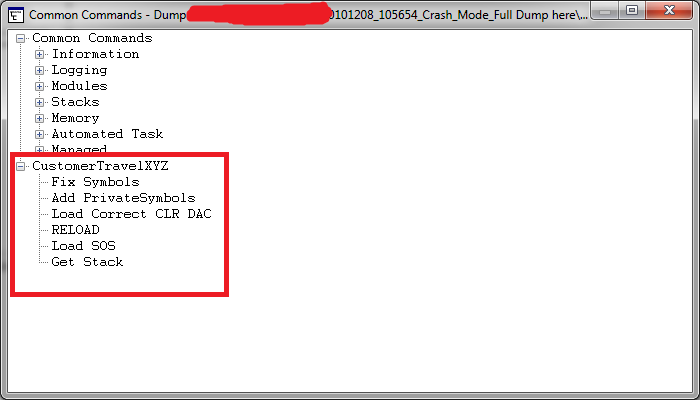
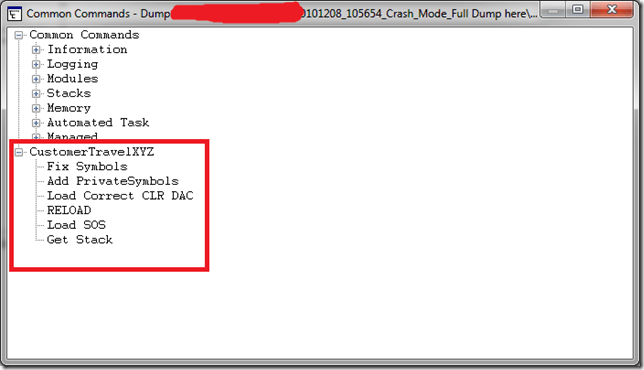
Now I get this window popup to execute my command to initialise the debugging environment:
image


I can now double click Fix Symbols all the way up to Get Stack. I hate typing this in all the time when debugging multiple DMP files! This generates these commands

0:030> .symfix
0:030> .sympath+ H:\Projects\Travel\Symbols
Symbol search path is: srv*;H:\Projects\Travel\Symbols
Expanded Symbol search path is: cache*;SRV*http://msdl.microsoft.com/download/symbols;h:\projects\travel\symbols
0:030> .cordll -lp H:\Projects\Travel\mscordacwks.dll
CLR DLL status: No load attempts
0:030> .reload
……………………………………………………….
……………………………………………………….
……………………………………………………….
………….
Loading unloaded module list
..
0:030> .loadby sos mscorwks

0:030> !clrstack

0:030> !clrstack
OS Thread Id: 0x1748 (30)
*** WARNING: Unable to verify checksum for mscorlib.ni.dll
*** WARNING: Unable to verify checksum for System.Web.ni.dll
Child-SP         RetAddr          Call Site
0000000004ce2500 000007fef8564cba System.Diagnostics.StackTrace.ToString(TraceFormat)
0000000004ce25e0 000007fef850396c System.Exception.get_StackTrace()
0000000004ce2620 000007ff001a69ad System.Exception.ToString()
0000000004ce2660 000007ff001a2153 Company.XYZ._EmptyErrorObject(System.Type, Company.XYZ.DBError)
0000000004ce26c0 000007fef92642e1 Company.XYZ._FirstWhere(System.Type, Company.XYZ.SqlStatement)
0000000004ce45e0 000007ff001a20be Company.XYZ.Broker.FindFirst(System.Type, Company.XYZ.SqlStatement)
0000000004ce47e0 000007ff0019fa63 Company.XYZ._FirstWhere(System.Type, Company.XYZ.SqlStatement)
0000000004ce4890 000007ff0019eec9 ConcordeLib.STSessionDataObjects.LoginMessage.Latest()
0000000004ce49a0 000007ff001a97af Company.XYZControllers.AccountController.LogOn(System.String)
0000000004ce4bd0 000007fef92642e1 Company.XYZControllers.AccountController.LogOn(Int32, System.String, System.String, Boolean, System.String)
0000000004ce6af0 000007ff001ad7cb Company.XYZ.Login(System.String, System.String, System.String)
0000000004ce6bd0 000007ff001ad717 Company.XYZ.Login(Int32, System.String, System.String, System.String, System.String)
0000000004ce6cd0 000007ff001a92e7 Company.XYZModels.StandardTicketProcessor.Login(Int32, System.String, System.String, System.String, System.String)
0000000004ce6d20 000007ff0019f517 Company.XYZControllers.AccountController.LogOn(Int32, System.String, System.String, Boolean, System.String)
0000000004ce6f50 000007ff001a97af Company.XYZControllers.AccountController.LogOn(System.String)
0000000004ce7180 000007fef92642e1 Company.XYZControllers.AccountController.LogOn(Int32, System.String, System.String, Boolean, System.String)
0000000004ce90a0 000007ff001ad7cb Company.XYZ.Login(System.String, System.String, System.String)
0000000004ce9180 000007ff001ad717 Company.XYZ.Login(Int32, System.String, System.String, System.String, System.String)
0000000004ce9280 000007ff001a92e7 Company.XYZModels.StandardTicketProcessor.Login(Int32, System.String, System.String, System.String, System.String)
0000000004ce92d0 000007ff0019f517 Company.XYZControllers.AccountController.LogOn(Int32, System.String, System.String, Boolean, System.String)
0000000004ce9500 000007ff001a97af Company.XYZControllers.AccountController.LogOn(System.String)
0000000004ce9730 000007fef92642e1 Company.XYZControllers.AccountController.LogOn(Int32, System.String, System.String, Boolean, System.String)
0000000004ceb650 000007ff001ad7cb Company.XYZ.Login(System.String, System.String, System.String)
0000000004ceb730 000007ff001ad717 Company.XYZ.Login(Int32, System.String, System.String, System.String, System.String)
System.String)
0000000004d2b1c0 000007ff001a92e7 Company.XYZModels.StandardTicketProcessor.Login(Int32, System.String, System.String, System.String, System.String)
0000000004d2b210 000007ff0019f517 Company.XYZControllers.AccountController.LogOn(Int32, System.String, System.String, Boolean, System.String)
0000000004d2b440 000007ff001a97af Company.XYZControllers.AccountController.LogOn(System.String)
0000000004d2b670 000007fef92642e1 Company.XYZControllers.AccountController.LogOn(Int32, System.String, System.String, Boolean, System.String)
0000000004d2d590 000007ff001ad7cb Company.XYZ.Login(System.String, System.String, System.String)
0000000004d2d670 000007ff001ad717 Company.XYZ.Login(Int32, System.String, System.String, System.String, System.String)
0000000004d2d770 000007ff001a92e7 Company.XYZModels.StandardTicketProcessor.Login(Int32, System.String, System.String, System.String, System.String)
0000000004d2d7c0 000007ff0019f517 Company.XYZControllers.AccountController.LogOn(Int32, System.String, System.String, Boolean, System.String)
0000000004d2d9f0 000007ff00241035 Company.XYZControllers.AccountController.LogOn(System.String)
0000000004d2dc20 000007ff0019e3bb DynamicClass.lambda_method(System.Runtime.CompilerServices.ExecutionScope, System.Web.Mvc.ControllerBase, System.Object[])
0000000004d2dc60 000007ff0019e27f System.Web.Mvc.ReflectedActionDescriptor.Execute(System.Web.Mvc.ControllerContext, System.Collections.Generic.IDictionary`2<System.String,System.Object>)
0000000004d2dcc0 000007ff0019e0c8 System.Web.Mvc.ControllerActionInvoker.InvokeActionMethod(System.Web.Mvc.ControllerContext, System.Web.Mvc.ActionDescriptor, System.Collections.Generic.IDictionary`2<System.String,System.Object>)
0000000004d2dd00 000007ff0019de55 System.Web.Mvc.ControllerActionInvoker+<>c__DisplayClassd.<InvokeActionMethodWithFilters>b__a()
0000000004d2dd60 000007ff0019dac8 System.Web.Mvc.ControllerActionInvoker.InvokeActionMethodFilter(System.Web.Mvc.IActionFilter, System.Web.Mvc.ActionExecutingContext, System.Func`1<System.Web.Mvc.ActionExecutedContext>)
0000000004d2ddf0 000007ff00196906 System.Web.Mvc.ControllerActionInvoker.InvokeActionMethodWithFilters(System.Web.Mvc.ControllerContext, System.Collections.Generic.IList`1<System.Web.Mvc.IActionFilter>, System.Web.Mvc.ActionDescriptor, System.Collections.Generic.IDictionary`2<System.String,System.Object>)
0000000004d2de50 000007ff00195db8 System.Web.Mvc.ControllerActionInvoker.InvokeAction(System.Web.Mvc.ControllerContext, System.String)
0000000004d2def0 000007ff001957e3 System.Web.Mvc.Controller.ExecuteCore()
0000000004d2df50 000007ff00195775 System.Web.Mvc.MvcHandler+<>c__DisplayClass8.<BeginProcessRequest>b__4()
0000000004d2df90 000007ff0019572f System.Web.Mvc.Async.AsyncResultWrapper+<>c__DisplayClass1.<MakeVoidDelegate>b__0()
0000000004d2dfd0 000007ff001955bd System.Web.Mvc.Async.AsyncResultWrapper+<>c__DisplayClass8`1[[System.Web.Mvc.Async.AsyncVoid, System.Web.Mvc]].<BeginSynchronous>b__7(System.IAsyncResult)
0000000004d2e000 000007ff00195417 System.Web.Mvc.Async.AsyncResultWrapper+WrappedAsyncResult`1[[System.Web.Mvc.Async.AsyncVoid, System.Web.Mvc]].End()
0000000004d2e040 000007fef29714c6 System.Web.Mvc.MvcHandler.EndProcessRequest(System.IAsyncResult)
0000000004d2e070 000007fef29356d7 System.Web.HttpApplication+CallHandlerExecutionStep.System.Web.HttpApplication.IExecutionStep.Execute()
0000000004d2e120 000007fef301dfa1 System.Web.HttpApplication.ExecuteStep(IExecutionStep, Boolean ByRef)
0000000004d2e1c0 000007fef300f1e2 System.Web.HttpApplication+PipelineStepManager.ResumeSteps(System.Exception)
0000000004d2e350 000007fef2ff1409 System.Web.HttpApplication.BeginProcessRequestNotification(System.Web.HttpContext, System.AsyncCallback)
0000000004d2e3a0 000007fef3117fb4 System.Web.HttpRuntime.ProcessRequestNotificationPrivate(System.Web.Hosting.IIS7WorkerRequest, System.Web.HttpContext)
0000000004d2e4c0 000007fef3117bcb System.Web.Hosting.PipelineRuntime.ProcessRequestNotificationHelper(IntPtr, IntPtr, IntPtr, Int32)
0000000004d2e630 000007fef3116c34 System.Web.Hosting.PipelineRuntime.ProcessRequestNotification(IntPtr, IntPtr, IntPtr, Int32)
0000000004d2e690 000007fef93cb07a DomainNeutralILStubClass.IL_STUB(Int64, Int64, Int64, Int32)
0000000004d2eec0 000007fef3118094 DomainNeutralILStubClass.IL_STUB(IntPtr, System.Web.RequestNotificationStatus ByRef)
0000000004d2efa0 000007fef3117bcb System.Web.Hosting.PipelineRuntime.ProcessRequestNotificationHelper(IntPtr, IntPtr, IntPtr, Int32)
0000000004d2f110 000007fef3116c34 System.Web.Hosting.PipelineRuntime.ProcessRequestNotification(IntPtr, IntPtr, IntPtr, Int32)
0000000004d2f170 000007fef93cb2cb DomainNeutralILStubClass.IL_STUB(Int64, Int64, Int64, Int32)


This is clearly a repetition of method calls on the stack, and is overflowing it. We can see a bug in the MVC Account Logon controller, so the developers will need to fix logon retries etc.

We can then issue a:

0:030> !clrstack -p
OS Thread Id: 0x1748 (30)
Child-SP         RetAddr          Call Site
0000000004ce2500 000007fef8564cba System.Diagnostics.StackTrace.ToString(TraceFormat)
    PARAMETERS:
        this = 0x00000001000fd088
        traceFormat = 0x000007ff00000000

0000000004ce25e0 000007fef850396c System.Exception.get_StackTrace()
    PARAMETERS:
        this = <no data>

0000000004ce2620 000007ff001a69ad System.Exception.ToString()
    PARAMETERS:
        this = <no data>

0000000004ce2660 000007ff001a2153Comapny.XYZ._EmptyErrorObject(System.Type, Comapny.XYZ.DBError)
    PARAMETERS:
        source = 0x00000000ffba39b0
        ex = 0x00000001000fc398

0000000004ce26c0 000007fef92642e1Comapny.XYZ._FirstWhere(System.Type, Comapny.XYZ.SqlStatement)
    PARAMETERS:
        source = <no data>
        stmt = <no data>

0000000004ce45e0 000007ff001a20be Comapny.XYZ.Broker.FindFirst(System.Type, Comapny.XYZ.SqlStatement)
    PARAMETERS:
        source = 0x00000000ffba39b0
        stmt = 0x00000001000ccef0

0000000004ce47e0 000007ff0019fa63Comapny.XYZ._FirstWhere(System.Type, Comapny.XYZ.SqlStatement)
    PARAMETERS:
        source = 0x00000000ffba39b0
        stmt = 0x00000001000ccef0

0000000004ce4890 000007ff0019eec9 Comapny.XYZ.LoginMessage.Latest()
0000000004ce49a0 000007ff001a97af Comapny.XYZ.Controllers.AccountController.LogOn(System.String)
    PARAMETERS:
        this = 0x00000000fff856a0
        returnUrl = 0x00000000fff86458

0000000004ce4bd0 000007fef92642e1 Comapny.XYZ.Controllers.AccountController.LogOn(Int32, System.String, System.String, Boolean, System.String)
    PARAMETERS:
        this = <no data>
        BLAHNo = <no data>
        uid = <no data>
        pwd = <no data>
        rememberMe = <no data>
        returnUrl = <no data>

0000000004ce6af0 000007ff001ad7cb Comapny.XYZ.Login(System.String, System.String, System.String)
    PARAMETERS:
        BLAHOrDebtorId = 0x0000000100098e90
        userId = 0x0000000100098cd0
        password =Omitted

0000000004ce6bd0 000007ff001ad717 Comapny.XYZ.TicketProcessor.Login(Int32, System.String, System.String, System.String, System.String)
    PARAMETERS:
        BLAHNo = 0x0000000000018c8c
        userName = 0x0000000100098cd0
        password = Omitted
        sessionId = 0x00000000ffbe00d8
        shopCode = 0x00000000ffbe0390


from here I can Dump Objects related to the username that caused the problem.

0:030> !do 0x0000000100098cd0
Name: System.String
MethodTable: 000007fef8657a80
EEClass: 000007fef825e530
Size: 40(0x28) bytes
(C:\Windows\assembly\GAC_64\mscorlib\2.0.0.0__b77a5c561934e089\mscorlib.dll)
String: RomikoDerbynewNaughty
Fields:
              MT    Field   Offset                 Type VT     Attr            Value Name
000007fef865ecf0  4000096        8         System.Int32  1 instance                8 m_arrayLength
000007fef865ecf0  4000097        c         System.Int32  1 instance                7 m_stringLength
000007fef86594c8  4000098       10          System.Char  1 instance               77 m_firstChar
000007fef8657a80  4000099       20        System.String  0   shared           static Empty
                                 >> Domain:Value  000000000133cc40:000000013fb00370 00000000030d2cc0:000000013fb00370 <<
000007fef8659378  400009a       28        System.Char[]  0   shared           static WhitespaceChars
                                 >> Domain:Value  000000000133cc40:000000013fb00ac0 00000000030d2cc0:00000000ffb03758 <<

I can see this user is always in the stackoverlfow, this method call with these parameters are repeated. Why???

Lets dump the exceptions

0:030> !pe
Exception object: 00000001000fc398
Exception type: Company.XYZ.DBAccessLayer.DBError
Message: Couldn’t find any results in LoginMessages for the statement
set transaction isolation level read uncommitted; select top 1 * from mytable where DateFrom <= @DateFrom and DateTo >= @DateTo and IsActive = @IsActive  order by Id desc
Parameters:
@DateFrom: 2002-12-08
@DateTo: 2002-12-08
@IsActive: True

InnerException: <none>
StackTrace (generated):
    SP               IP               Function
    0000000004CE45E0 000007FF001A2660 GentleCompany.XYZ!Company.XYZ.DBAccessLayer.Broker.FindFirst(System.Type, Company.XYZ.DBAccessLayer.SqlStatement)+0x3e0
    0000000004CE47E0 000007FF001A20BF GentleCompany.XYZ!Company.XYZ.DataAccessObject._FirstWhere(System.Type, Company.XYZ.DBAccessLayer.SqlStatement)+0x6f

StackTraceString: <none>
HResult: 80131500
There are nested exceptions on this thread. Run with -nested for details

This exception does not seem to be the real thing, has nothing to do with the user, lets get this exceptions nested exceptions.

Why, since the above SQL would not cause an IIS crash, it is just a SQLReader getting zero results and the code is not dealing with a null.


So moving into the nested exceptions. There were 100’s of them, so I kept it short here:

0:030> !pe -nested 00000001000fc398
Exception object: 00000001000fc398
Exception type: CompanyXYZLib.DBAccessLayer.DBError
Message: Couldn’t find any results in LoginMessages for the statement
set transaction isolation level read uncommitted; select top 1 * from mytable where DateFrom <= @DateFrom and DateTo >= @DateTo and IsActive = @IsActive  order by Id desc

Parameters:
@DateFrom: 2010-12-08
@DateTo: 2010-12-08
@IsActive: True

InnerException: <none>
StackTrace (generated):
    SP               IP               Function
    0000000004CE45E0 000007FF001A2660 CompanyXYZLib!CompanyXYZLib.DBAccessLayer.Broker.FindFirst(System.Type, CompanyXYZLib.DBAccessLayer.SqlStatement)+0x3e0
    0000000004CE47E0 000007FF001A20BF CompanyXYZLib!CompanyXYZLib.DataAccessObject._FirstWhere(System.Type, CompanyXYZLib.DBAccessLayer.SqlStatement)+0x6f

StackTraceString: <none>
HResult: 80131500

Nested exception ————————————————————-
Exception object: 00000001000cccb8
Exception type: CompanyXYZLib.AgentDataObjects.TicketsWebUser+LoginError

Message: Your BLAHNo is not currently active with Attribute2.

InnerException: <none>
StackTrace (generated):
    SP               IP               Function
    0000000004CE6AF0 000007FF001ADDDE CompanyXYZLib!CompanyXYZLib.AgentDataObjects.TicketsWebUser.Login(System.String, System.String, System.String)+0x2de
    0000000004CE6BD0 000007FF001AD7CC CompanyXYZ!CompanyXYZ.TicketProcessor.Login(Int32, System.String, System.String, System.String, System.String)+0x7c
    0000000004CE6CD0 000007FF001AD718 CompanyXYZ!CompanyXYZ.Models.StandardTicketProcessor.Login(Int32, System.String, System.String, System.String, System.String)+0x58
    0000000004CE6D20 000007FF001A92E8 CompanyXYZ!CompanyXYZ.Controllers.AccountController.LogOn(Int32, System.String, System.String, Boolean, System.String)+0x238

StackTraceString: <none>
HResult: 80131500

Nested exception ————————————————————-
Exception object: 00000001000977d0
Exception type: CompanyXYZLib.AgentDataObjects.TicketsWebUser+LoginError
Message: Your BLAHNo is not currently active with Attribute2.
InnerException: <none>
StackTrace (generated):
    SP               IP               Function
    0000000004CE90A0 000007FF001ADDDE CompanyXYZLib!CompanyXYZLib.AgentDataObjects.TicketsWebUser.Login(System.String, System.String, System.String)+0x2de
    0000000004CE9180 000007FF001AD7CC CompanyXYZ!CompanyXYZ.TicketProcessor.Login(Int32, System.String, System.String, System.String, System.String)+0x7c
    0000000004CE9280 000007FF001AD718 CompanyXYZ!CompanyXYZ.Models.StandardTicketProcessor.Login(Int32, System.String, System.String, System.String, System.String)+0x58
    0000000004CE92D0 000007FF001A92E8 CompanyXYZ!CompanyXYZ.Controllers.AccountController.LogOn(Int32, System.String, System.String, Boolean, System.String)+0x238

StackTraceString: <none>
HResult: 80131500

Perfect, we found the problem Smile BLAH attributes are causing issues when not active with BLAH2 and user RomikODebrynewNaughty has this unique condition which caused the software code to infinitely retry his login! So we isolated the problem in the logon business rules and fixed the infinite loop and the web server was back to normal Smile


The BLAHNo  from the !clrstack –p and then the !do on the parameter confirms this e.g.

0000000004ce6bd0 000007ff001ad717 Comapny.XYZ.TicketProcessor.Login(Int32, System.String, System.String, System.String, System.String)
    PARAMETERS:
        BLAHNo = 0x0000000000018c8c
        userName = 0x0000000100098cd0
        password = Omitted
        sessionId = 0x00000000ffbe00d8
        shopCode = 0x00000000ffbe0390


Hoe you find this useful. I omitted allot of the output as there were about 130 of the same method call patterns on the stack.

I am loving this sort of debugging and will be playing around with SOSEX soon and see what we can talk about Smile

CRM Performance Toolkit Check List

Hi,

I had the please working with Chanpreet Saluja this week with some Microsoft CRM testing, here are some of my notes in regards to setting up the CRM Performance Toolkit.

  • Ensure the VSTestHost.exe.xml has the following setting:

 <appSettings><add key=”urlkey” value=”crm://myserver:5555/”/></appSettings>

  • Note port number is your CRM web site 🙂

Also, ensure this registry key exists:

Windows Registry Editor Version 5.00

[HKEY_LOCAL_MACHINE\SOFTWARE\Microsoft\MSCRM]
“ConfigSku”=”OnPremise”
“CRM_Perf_Toolkit_ConfigDir”=”C:\\CRM 4.0 Toolkit\\ConfigFiles\\”
“configdb”=”Application Name=CRM_Perf_BenchMark;Server=myserver;Initial Catalog=MSCRM_CONFIG;Integrated Security=sspi”

  • The users created for test accounts in CRM must EXIST in the active directory PRIOR to running  RunPopulation.cmd in the binaries folder.
  • When you run RunPopulation.cmd, ensure you use a Domain Admin Account, that has access to CRM and AD etc. Access to the SQL Express Entity Manager Database is also important.

Here is a sample RunPopulation.cmd, this sample creates 1000 users in CRM and using a custom config file (unitTest_Custom.xml) for customized entities in CRM:

SET WEBSERVER=myserver:5555
SET ORGANIZATION=myorgnameNOSPACES
SET DOMAIN=mydomain
SET USERNAME=romikoderbynew
SET PASSWORD=password1
SET CRMUSERBASE=crmtestuser
SET CRMUSERSTART=1
SET CRMUSERCOUNT=1000
REM ImportCustomization\ImportCustomization.exe ImportCustomization\Account_Customized_10Attributes_form.xml /webserver:%WEBSERVER% /orgname:%ORGANIZATION% /domainname:%DOMAIN% /username:%USERNAME% /password:%PASSWORD% /authentication:AD
REM ImportCustomization\ImportCustomization.exe ImportCustomization\Contact_Customized_10Attributes_form.xml /webserver:%WEBSERVER% /orgname:%ORGANIZATION% /domainname:%DOMAIN% /username:%USERNAME% /password:%PASSWORD% /authentication:AD
REM ImportCustomization\ImportCustomization.exe ImportCustomization\Task_Customized_10Attributes_form.xml /webserver:%WEBSERVER% /orgname:%ORGANIZATION% /domainname:%DOMAIN% /username:%USERNAME% /password:%PASSWORD% /authentication:AD

DbPopulator\UserConfigGen.exe /domain:%DOMAIN% /webserver:%WEBSERVER% /userbase:%USERNAME% /password:%PASSWORD% /threadcount:1 /crmuserbase:%CRMUSERBASE% /crmuserstart:%CRMUSERSTART% /crmusercount:%CRMUSERCOUNT% /orgname:%ORGANIZATION%

DbPopulator\dbPopulator.exe UserPopulate.xml
DbPopulator\dbPopulator.exe c:\unitTest_Custom.xml
REM DbPopulator\dbPopulator.exe DbPopulator\ProductSuite.xml
REM DbPopulator\dbPopulator.exe DbPopulator\NestedSFAEntitiesWithState_Custom.xml
REM DbPopulator\dbPopulator.exe DbPopulator\ReportsData.xml

So, if you have any custom Tables you want to add to the database to represent your custom CRM entities, you will need to create an XML file, loads of samples are available at:

C:\CRM 4.0 Toolkit\CRM4_Perf_Toolkit\dbPopulator\Sample_Xmls

Once you have the XML in place, you will also need to update the EntityManager.cs file to add custom entries at these line numbers:

Line 49: public static class EntityNames
Line 430: public static string GetEntityIDName(string Type)
Line 494: private void TruncateTables()
Line 706 :private void LoadFromSQL() –

you need to create a corresponding custom method, use existing ones as examples! Note the difference between user and organization owned entities! Also use the Customize Entities feature in CRM to find attribute names e.g. Name, Title etc

Line 915: Create a BuildEntityFromSQL for the custom entity (note user or organization owned)

here is a sample method I created for the method call section at line number 706.

         /// <summary>
        /// Reads all defined Communications
        /// </summary>
        private void ReadCommunications()
        {           
            string[] Props = { EntityIDNames.Organization, EntityIDNames.Communications, “rel_title” };
            string EntityName = EntityNames.Communications;
            string where = ” where deletionstatecode = 0 and statecode = 0 “;
            Trace.WriteLine(“Read ” + ReadEntityFromTable(EntityName, Props, where) + ” rel_communication”);          
        }

 note that some entities will not use statecode! so ensure the where clause you use matches the table definition in the EntityManager and MSCRM_CONFIG database!

Also, update the EMDB_Setup.sql script to create the custom tables in EntityManager.

The EntityManager database is the gateway for all testing, it is used to manage GUID’S when it needs to create/delete/update leads in test scenarios, as it servers as the lookup database 🙂

Once you got it all in place, you can run the EMDBLoader to load data from MSCRM_CONFIG to ENTITYManager, so make sure you FIRST dbpopulate and then afterwards check the error logs and then run EMDBLoader 🙂 EMDBLoader will call the entitymanager singleton instance and load the data for you.

If you run DBPopulator and then later want to update Entitymanager, just increment the count for this setting in the: C:\CRM 4.0 Toolkit\ConfigFiles\ConfigSettings.xml

 <reloadentitymanager value=”17″/>

From the above you can see I reloaded it 17 times already 🙂

I hope this helps you all with your endeavours for using the CRM ToolKit.

Fiddler is a great tool to use to use as a reference when creating custom tests. You should use the framework in the toolkit, however, it is VERY time consuming to write custom tests, so do not underestimate it, as you will need to create various helper methods in the utils.cs and urls.cs files! As custom grids will need to be made which requires intricate CRM form knowledge which you can build up from Fiddler logs.

If you want to TEST SIMULATNIOUS CRM User connection, you must also add the following to ALL _PREWEBTEST methods in the .cs files for web tests:

            user = EntityManager.Instance.GetNextUser();
            e.WebTest.UserName = user[“domainname”];
            e.WebTest.Password = user[“userpassword”];

  • Browser caching can be disabled in the Utils.cs file, set this.PreAuthenticate = true;

Cheers


WebTest Recording does not work in Visual Studio 2008 Test Suite

Hi,

If you have IE 8 and Windows 7/Server 2008, WebTest recording may not function in IE correctly. To solve this problem, delete the following keys in the registry.

HKEY_CURRENT_USER\Software\Microsoft\Windows\CurrentVersion\Explorer\Discardable\PostSetup\Component Categories\{00021493-0000-0000-C000-000000000046}

HKEY_CURRENT_USER\Software\Microsoft\Windows\CurrentVersion\Explorer\Discardable\PostSetup\Component Categories\{00021494-0000-0000-C000-000000000046}