
Ladies and gentlemen, tech voyagers, and cloud explorers, fasten your seatbelts as we take you on a whimsical journey through the Cloud Adoption Framework (CAF) Landing Zones and Levels.
The Cloud Castle and Its Many Quirks
Imagine the cloud as a majestic castle in the digital skies. To conquer this castle effectively, you need more than just a map; you need a well-organized treasure hunt! That’s where the CAF steps in – it’s like the guidebook to the cloud’s hidden treasures.
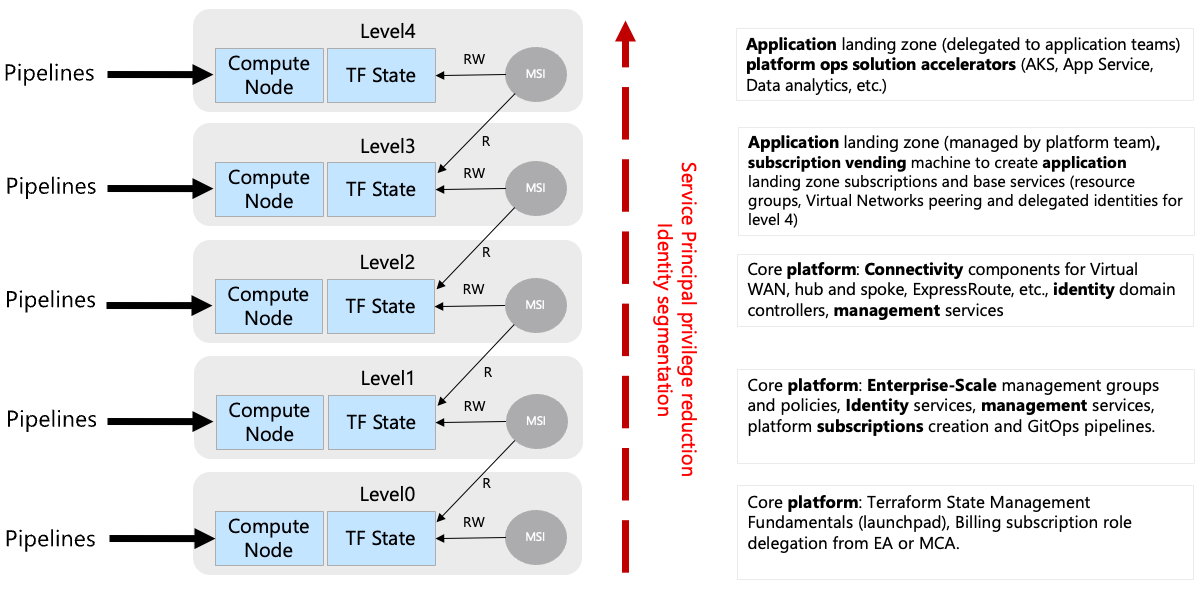
Level 0: Core Platform Automation
Welcome to the cloud’s backstage – the place where the real magic happens, but you rarely see it. Level 0 is like the control room of a rock concert; it’s essential but hidden behind the scenes. Here, you’ll find the launchpad with storage accounts, Key Vault, RBAC, and more. It’s where Terraform state files are managed, subscriptions are created, and credentials are rotated. It’s basically the cloud’s secret lair.
Level 1: Core Platform Governance
Up we go to the governance level – it’s like the castle’s council chamber. Here, you’ll find Azure management groups and policies, the rule-makers of the kingdom. They’re like the architects of the castle, designing its layout and enforcing the laws. You’ll also meet the GitOps services creating pipelines and summoning Virtual Networks and compute nodes for DevOps self-hosted agents. It’s where the cloud’s rule-makers and enforcers gather.
Level 2: Core Platform Connectivity
This level is like the kingdom’s bustling market square. Here, you deal with virtual networking components, from classic Virtual Network-based Hubs to Azure Virtual WANs and ExpressRoute connections. It’s like managing the kingdom’s complex highway system. There are also additional identity and management subscription services to keep things running smoothly. It’s the kingdom’s backstage crew, making sure everything runs smoothly.
Level 3: Application Landing Zones (Vending Machine)
Level 3 is where applications come to life – it’s the cloud’s vending machine. It’s where application teams get their subscriptions for different environments – Development, Test, UAT, DR, you name it. This level is like the cloud’s automated snack bar. It also handles privileged infrastructure services, supporting the application platform. Think of it as the royal kitchen, providing ingredients for the culinary masters in Level 4.
Level 4: Applications Landing Zone
Welcome to the cloud’s gourmet restaurant! Here, you’ll find the application configurations delegated to application teams. It’s where Azure Kubernetes Services Cluster, API Management services, and other delicious offerings are prepared. This level is like the cloud’s Michelin-star restaurant, where each team creates their own cloud delicacies.
The following pictures illustrates the split between level 3 and 4:

How It All Operates
In this grand castle, deployments are like a well-choreographed ballet. There are pipelines for each level, each with its own unique role:
Level 0 and 1 are the castle’s gatekeepers, ensuring the foundation is solid and the rules are clear.
Level 2 springs into action when new regional hubs or connectivity needs arise – they’re like the kingdom’s travel agents.
Level 3 steps in when a new service needs to be served up – they’re the cloud’s maître d’.
Level 4, the gourmet kitchen, is always bustling with activity as application teams whip up their cloud creations.
Azure Subscription Vending Machine

The Cloud Comedy: Bringing It All Together
In this cloud comedy, we’ve explored the whimsical world of CAF Landing Zones and Levels. It’s like a magical castle with different floors, each with its own quirks and responsibilities. As you journey through the cloud, remember that while it may seem complex, it’s also an adventure filled with opportunities for innovation and transformation.
So, whether you’re the cloud wizard behind the scenes or the master chef creating cloud delicacies, embrace the cloud with a twinkle in your eye. You’ll find that conquering the cloud castle can be an enchanting and delightful experience!
TIPS:
Use Azure Container Instances to spin up Azure DevOps Agents when deploying subscriptions and low-level resources instead of VMs and VM Scale Sets!
Use Managed Identity where you can and only use Service Principals if you cannot find a solution with Managed Identity
 Romiko Derbynew
You must be logged in to post a comment.