Hi,
I am currently learning how to use Ninject as a Inversion of Control and Dependency Injection tool.
I have created a very simple Console Application that is based on the tutorials at github. As I learn all the cool features of Ninject, I will then update my blog e.g. When I start learning about conventions and custom providers etc
My first Class File has custom attributes that I can use to apply contextual/conditional binding:
——————————CustomNinjectAttributes.cs————————–
using  System;

namespace NinjectTutorial
{
    public class RangeAttribute : Attribute{}

    public class ThrowingAttribute : Attribute { }

    public class MeleeBladeAttribute : Attribute { }
}
—————————— END CustomNinjectAttributes.cs————————–
We will use the above vocabulary on selected properties of Player types in the game (e.g. Warrior, Ninja, Samurai)
Ok, so the next part is to define all the weapons available. Then , we will define the player types and then use Ninject to detect the players weapon based on the attributes.
Ok, so the weapons are:
—————————————–Weapons.cs——————————————–
using System;

namespace NinjectTutorial
{

    public interface IWeapon
    {
        void Hit(string target);
    }

    public class Sword : IWeapon
    {
        public void Hit(string target)
        {
            System.Console.WriteLine("Chopped {0} clean in half", target);

        }
    }

    public class Bow : IWeapon
    {
        public void Hit(string target)
        {
            System.Console.WriteLine("Arrow hit target in the Bulls eye!", target);

        }
    }

    public class Shuriken : IWeapon
    {
        public void Hit(string target)
        {
            Console.WriteLine("Pierced {0}'s armor", target);
        }
    }
}
—————————————–END Weapons.cs——————————————–
Now that we have the weapons defined, lets then use Property injection in combination with contextual binding based on decorating properties with custom attributes that we defined above!
—————————————–MarksMan.cs——————————————–
using System;
using Ninject;

namespace NinjectTutorial
{
    public class MarksMan
    {
        [Inject, Range]
        public IWeapon Weapon
        {
            get;
            set;
        }

        public void Attack(string target)
        {
            Weapon.Hit(target);
        }
    }
}
—————————————–END MarksMan.cs——————————————–
—————————————–Ninja.cs——————————————–
using System;
using Ninject;

namespace NinjectTutorial
{
    public class Ninja
    {
        [Inject, Throwing]
        public IWeapon Weapon
        {
            get;
            set;
        }

        public void Attack(string target)
        {
            Weapon.Hit(target);
        }
    }
}
—————————————–END Ninja.cs——————————————–
—————————————–Samurai.cs——————————————–
using System;
using Ninject;

namespace NinjectTutorial
{
    public class Samurai
    {
        [Inject, MeleeBladeAttribute]
        public IWeapon Weapon
        {
            get;
            set;
        }

        public void Attack(string target)
        {
            Weapon.Hit(target);
        }
    }
}
—————————————–END Samurai.cs——————————————–
Steps to notice
- We use the Inject attribute in combination with the custom attribute
- This means when we define bindings we can now have conditions based on custom attribute names which are strongly types
- You do not need custom attributes you could use strings, but then you lose type safety.
Excellent, now the last part of the setup is to create a custom Ninject module. Note that when you create a module, it will not be called directly, but Ninject will detect and load it for you, when you ask it to.
ok, so lets create a module that does all the binding stuff for us, so we can keep our game code clean!
—————————————– AllFighterModule .cs——————————————–
using System;
using Ninject;
using Ninject.Modules;
namespace NinjectTutorial
{
public class AllFighterModule : NinjectModule
{
public override void Load()
{
Bind<IWeapon>().To<Sword>().WhenTargetHas<MeleeBladeAttribute>();
Bind<IWeapon>().To<Bow>().WhenTargetHas<RangeAttribute>();
Bind<IWeapon>().To<Shuriken>().WhenTargetHas<ThrowingAttribute>();
Bind<Samurai>().ToSelf();
}
}
}
—————————————–END AllFighterModule .cs——————————————–
As we can see when use the WHEN keyword to detect the decorated custom attributes and then bind the appropriate concrete class.
Now to run the game, lets check out the console application
———————————————Program.cs———————————————-
using System;
using Ninject;
namespace NinjectTutorial
{
class Program
{
public static void Main()
{
IKernel kernel = new StandardKernel();
kernel.Load(AppDomain.CurrentDomain.GetAssemblies()); //Go Load Ninject Modules
var samurai = kernel.Get<Samurai>();
var marksMan = kernel.Get<MarksMan>();
var ninja = kernel.Get<Ninja>();
samurai.Attack("The Boss Mob!");
marksMan.Attack("The Eagle!");
ninja.Attack("The Robber!");
System.Console.ReadKey();
}
}
}
———————————————End Program.cs———————————————-
Notice here, that we load the kernel and we also tell the kernel to find the modules! So
kernel.Load(AppDomain.CurrentDomain.GetAssemblies()); //Go Load Ninject Modules
will go and automatically load the AllFighterModule and get the bindings, this is done because the AllFigterModule extends the class : NinjectModule
The output of our cool little game is:
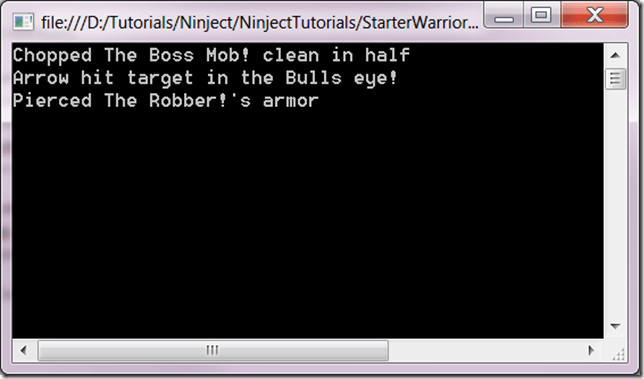
So our little warriors are working hard to keeping the peace with Ninject technology 🙂
I hope this helps you getting started with Ninject.

 Romiko Derbynew