Hi Guys,
Introduction
We will cover:
- Overview to configure multiple build projects on TeamCity
- Configure one of the build projects to deploy to the Azure Cloud
- Automated deployments to the Azure Cloud for Web and Worker Roles
- Leverage the msbuild target templates to automate generation of azure package files
- Alternative solution of generating the azure package files
- Using configuration transformations to manage settings e.g. UAT, Dev, Production
A colleague of mine Tatham Oddie and I are currently use TeamCity to automatically deploy our Azure/MVC3/Neo4j based project to the Azure cloud. Lets see how this can be done with relative ease and is fully automated. The focus here will be based on Powershell scripts which are using the Cerebrata Command scriplets, which can be found here: http://www.cerebrata.com/Products/AzureManagementCmdlets/Default.aspx
The PowerShell script included here will automatically undeploy and redploy you azure service and will even wait until all the services are in the ready state.
I will leave you to checking those commandlets out, and they worth every penny spent.
Now lets check how we get the deployment working.
The basic idea is that you have a continuous integration build configured on the Build Server in TeamCity, then what you do is configure the CI build to generate artifacts, which are basically the output from the build that can be used by another build project e.g. You can take the artifacts for the CI build and then run Functional Tests or Integration tests builds that run totally separate from the CI build. The idea here is, your functional and integration will NEVER interfere with the CI build and the Unit tests. Thus keeping CI builds fast and efficient.
Prerequisites on Build Server
- TeamCity Professional Version 6.5.1
- Cloud Subscription Certificate with Private key is imported into the User Certificate Store for the Team City service account
- Cerebrata CMDLETS
TeamCity -Continuous Integration Build Project
Ok, so, lets do a quick check at my CI build that spits out the Azure Packages.

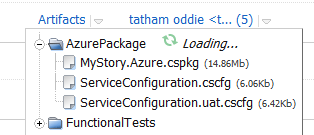
As we can see above, the CI build creates an Artifact called AzurePackage.
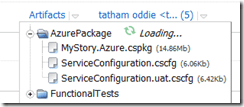
The way we generate these artifacts is very easy. In the settings for the CI Build Project we setup the artifacts path.

e.g. MyProjectMyProject.Azurebin%BuildConfiguration%Publish => AzurePackage
So, we will look at the build steps to configure.

As we can see below, we just say where the MSBuild is run from and then where the unit tests dll’s are.

Cool, now we need to setup the artifacts and configuration.
We just mention we want a release build.

Ok, now we need to tell our Azure Deployment project to have a dependency on the CI project we configured above.
Team City – UAT Deployment Build Project
So lets now go check out the UAT Deployment project.

This project will have dependencies on the CI build and then we will configure all the build parameters so it can connect to your Azure Storage and Service for automatic deployments. Once we done here, we will have a look at the powershell script that we use to automatically deploy to the cloud, the script supports un-deploying existing deployment slots before deploying a new one with retry attempts.
Ok, lets check the following for the UAT deployment project.


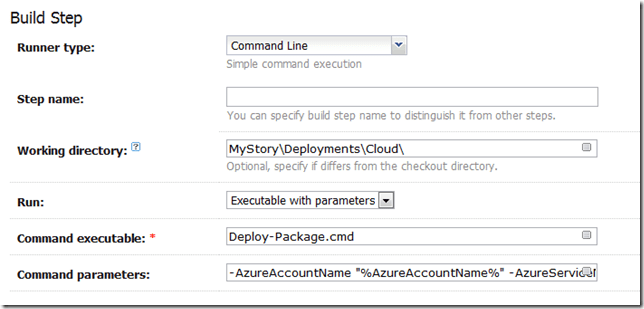
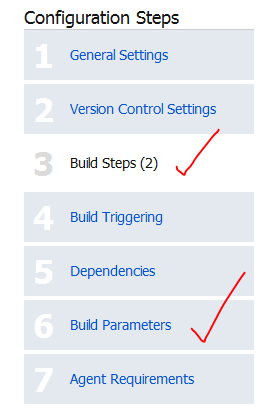
The above screenshot is the command that executes the powershell script, the parameters (%whatever%) will resolve from Build parameters in Step 6 of the screen shot above.
Here is the command for copy/paste friendless. Of course if you using some other Database then you do not need the Neo4j stuff.
| -AzureAccountName “%AzureAccountName%” -AzureServiceName “%AzureServiceName%” -AzureDeploymentSlot “%AzureDeploymentSlot%” -AzureAccountKey “%AzureAccountKey%” -AzureSubscriptionId “%AzureSubscriptionId%” -AzureCertificateThumbprint “%AzureCertificateThumbprint%” -PackageSource “%AzurePackageDependencyPath%MyProject.Azure.cspkg” -ConfigSource “%AzurePackageDependencyPath%%ConfigFileName%” -DeploymentName “%build.number%-%build.vcs.number%” -Neo4jBlobName “%Neo4jBlobName%” -Neo4jZippedBinaryFileHttpSource “%Neo4jZippedBinaryFileHttpSource%” |
This is the input for a deploy-package.cmd file, which is in our source repository.
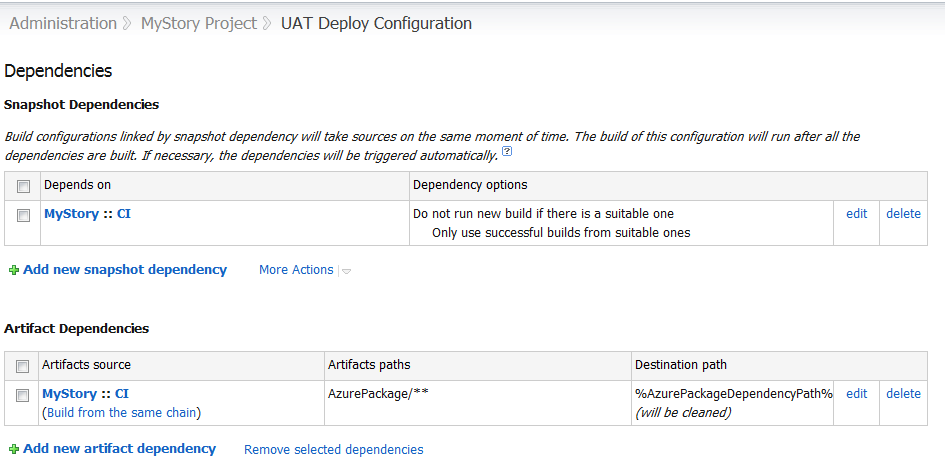
Now, we also need to tell the Deployment project to use the Artifact from our CI Project. So we setup an Artifact Dependencies as show below in the dependencies section. Also, notice how we use a wildcard, so get all files from AzurePackage (AzurePackage/**). This will be the cspackage files.

Notice above, that I have a SnapShot Dependency, this is forcing the UAT deployment to USE the SAME source code that the CI build project is using.
So, the parameters are as follows.

PowerShell Deployment Scripts
The Deployment scripts consist of three files and remember I assumed you installed the Cerebrata Management Command Scriptlets.
Ok, so lets look at the Deploy-Package.cmd file, I would like to pay my gratitude to Jason Stangroome(http://blog.codeassassin.com) for this,
Jason wrote: “This tiny proxy script just writes a temporary PowerShell script containing all the arguments you’re trying to pass to let PowerShell interpret them and avoid getting them messed up by the Win32 native command line parser.”
@echo off
setlocal
set tempscript=%temp%\%~n0.%random%.ps1
echo $ErrorActionPreference="Stop" >"%tempscript%"
echo ^& "%~dpn0.ps1" %* >>"%tempscript%"
powershell.exe -command "& \"%tempscript%\""
set errlvl=%ERRORLEVEL%
del "%tempscript%"
exit /b %errlvl%
Ok, and now here is the PowerShell code, Deployment-Package.ps1. I will leave you to read what it does. In Summary.
It demonstrates.
- Un-Deploying a service deployment slot
- Deploying a service deployment slot
- Using the certificate store to retrieve the certificate for service connections via a cert thumbprint – users cert store under the service account that TeamCity runs on.
- Uploading Blobs
- Downloading Blobs
- Waiting until the new deployment is in a ready state
#requires -version 2.0
param (
	[parameter(Mandatory=$true)] [string]$AzureAccountName,
	[parameter(Mandatory=$true)] [string]$AzureServiceName,
	[parameter(Mandatory=$true)] [string]$AzureDeploymentSlot,
	[parameter(Mandatory=$true)] [string]$AzureAccountKey,
	[parameter(Mandatory=$true)] [string]$AzureSubscriptionId,
	[parameter(Mandatory=$true)] [string]$AzureCertificateThumbprint,
	[parameter(Mandatory=$true)] [string]$PackageSource,
	[parameter(Mandatory=$true)] [string]$ConfigSource,
	[parameter(Mandatory=$true)] [string]$DeploymentName,
	[parameter(Mandatory=$true)] [string]$Neo4jZippedBinaryFileHttpSource,
	[parameter(Mandatory=$true)] [string]$Neo4jBlobName
)

$ErrorActionPreference = "Stop"

if ((Get-PSSnapin -Registered -Name AzureManagementCmdletsSnapIn -ErrorAction SilentlyContinue) -eq $null)
{
	throw "AzureManagementCmdletsSnapIn missing. Install them from Https://www.cerebrata.com/Products/AzureManagementCmdlets/Download.aspx"
}

Add-PSSnapin AzureManagementCmdletsSnapIn -ErrorAction SilentlyContinue

function AddBlobContainerIfNotExists ($blobContainerName)
{
	Write-Verbose "Finding blob container $blobContainerName"
	$containers = Get-BlobContainer -AccountName $AzureAccountName -AccountKey $AzureAccountKey
	$deploymentsContainer = $containers | Where-Object { $_.BlobContainerName -eq $blobContainerName }

	if ($deploymentsContainer -eq $null)
	{
		Write-Verbose  "Container $blobContainerName doesn't exist, creating it"
		New-BlobContainer $blobContainerName -AccountName $AzureAccountName -AccountKey $AzureAccountKey
	}
	else
	{
		Write-Verbose  "Found blob container $blobContainerName"
	}
}

function UploadBlobIfNotExists{param ([string]$container, [string]$blobName, [string]$fileSource)

	Write-Verbose "Finding blob $container\$blobName"
	$blob = Get-Blob -BlobContainerName $container -BlobPrefix $blobName -AccountName $AzureAccountName -AccountKey $AzureAccountKey

	if ($blob -eq $null)
	{
		Write-Verbose "Uploading blob $blobName to $container/$blobName"
		Import-File -File $fileSource -BlobName $blobName -BlobContainerName $container -AccountName $AzureAccountName -AccountKey $AzureAccountKey
	}
	else
	{
		Write-Verbose "Found blob $container\$blobName"
	}
}

function CheckIfDeploymentIsDeleted
{
	$triesElapsed = 0
	$maximumRetries = 10
	$waitInterval = [System.TimeSpan]::FromSeconds(30)
	Do
	{
		$triesElapsed+=1
		[System.Threading.Thread]::Sleep($waitInterval)
		Write-Verbose "Checking if deployment is deleted, current retry is $triesElapsed/$maximumRetries"
		$deploymentInstance = Get-Deployment `
			-ServiceName $AzureServiceName `
			-Slot $AzureDeploymentSlot `
			-SubscriptionId $AzureSubscriptionId `
			-Certificate $certificate `
			-ErrorAction SilentlyContinue

		if($deploymentInstance -eq $null)
		{
			Write-Verbose "Deployment is now deleted"
			break
		}

		if($triesElapsed -ge $maximumRetries)
		{
			throw "Checking if deployment deleted has been running longer than 5 minutes, it seems the delployment is not deleting, giving up this step."
		}
	}
	While($triesElapsed -le $maximumRetries)
}

function WaitUntilAllRoleInstancesAreReady
{
	$triesElapsed = 0
	$maximumRetries = 60
	$waitInterval = [System.TimeSpan]::FromSeconds(60)
	Do
	{
		$triesElapsed+=1
		[System.Threading.Thread]::Sleep($waitInterval)
		Write-Verbose "Checking if all role instances are ready, current retry is $triesElapsed/$maximumRetries"
		$roleInstances = Get-RoleInstanceStatus `
			-ServiceName $AzureServiceName `
			-Slot $AzureDeploymentSlot `
			-SubscriptionId $AzureSubscriptionId `
			-Certificate $certificate `
			-ErrorAction SilentlyContinue
		$roleInstancesThatAreNotReady = $roleInstances | Where-Object { $_.InstanceStatus -ne "Ready" }

		if ($roleInstances -ne $null -and
			$roleInstancesThatAreNotReady -eq $null)
		{
			Write-Verbose "All role instances are now ready"
			break
		}

		if ($triesElapsed -ge $maximumRetries)
		{
			throw "Checking if all roles instances are ready for more than one hour, giving up..."
		}
	}
	While($triesElapsed -le $maximumRetries)
}

function DownloadNeo4jBinaryZipFileAndUploadToBlobStorageIfNotExists{param ([string]$blobContainerName, [string]$blobName, [string]$HttpSourceFile)
	Write-Verbose "Finding blob $blobContainerName\$blobName"
	$blobs = Get-Blob -BlobContainerName $blobContainerName -ListAll -AccountName $AzureAccountName -AccountKey $AzureAccountKey
	$blob = $blobs | findstr $blobName

	if ($blob -eq $null)
	{
	    Write-Verbose "Neo4j binary does not exist in blob storage. "
	    Write-Verbose "Downloading file $HttpSourceFile..."
		$temporaryneo4jFile = [System.IO.Path]::GetTempFileName()
		$WebClient = New-Object -TypeName System.Net.WebClient
		$WebClient.DownloadFile($HttpSourceFile, $temporaryneo4jFile)
		UploadBlobIfNotExists $blobContainerName $blobName $temporaryneo4jFile
	}
}

Write-Verbose "Retrieving management certificate"
$certificate = Get-ChildItem -Path "cert:\CurrentUser\My\$AzureCertificateThumbprint" -ErrorAction SilentlyContinue
if ($certificate -eq $null)
{
	throw "Couldn't find the Azure management certificate in the store"
}
if (-not $certificate.HasPrivateKey)
{
	throw "The private key for the Azure management certificate is not available in the certificate store"
}

Write-Verbose "Deleting Deployment"
Remove-Deployment `
	-ServiceName $AzureServiceName `
	-Slot $AzureDeploymentSlot `
	-SubscriptionId $AzureSubscriptionId `
	-Certificate $certificate `
	-ErrorAction SilentlyContinue
Write-Verbose "Sent Delete Deployment Async, will check back later to see if it is deleted"

$deploymentsContainerName = "deployments"
$neo4jContainerName = "neo4j"

AddBlobContainerIfNotExists $deploymentsContainerName
AddBlobContainerIfNotExists $neo4jContainerName

$deploymentBlobName = "$DeploymentName.cspkg"

DownloadNeo4jBinaryZipFileAndUploadToBlobStorageIfNotExists $neo4jContainerName $Neo4jBlobName $Neo4jZippedBinaryFileHttpSource

Write-Verbose "Azure Service Information:"
Write-Verbose "Service Name: $AzureServiceName"
Write-Verbose "Slot: $AzureDeploymentSlot"
Write-Verbose "Package Location: $PackageSource"
Write-Verbose "Config File Location: $ConfigSource"
Write-Verbose "Label: $DeploymentName"
Write-Verbose "DeploymentName: $DeploymentName"
Write-Verbose "SubscriptionId: $AzureSubscriptionId"
Write-Verbose "Certificate: $certificate"

CheckIfDeploymentIsDeleted

Write-Verbose "Starting Deployment"
New-Deployment `
	-ServiceName $AzureServiceName `
	-Slot $AzureDeploymentSlot `
	-PackageLocation $PackageSource `
	-ConfigFileLocation $ConfigSource `
	-Label $DeploymentName `
	-DeploymentName $DeploymentName `
	-SubscriptionId $AzureSubscriptionId `
	-Certificate $certificate

WaitUntilAllRoleInstancesAreReady

Write-Verbose "Completed Deployment"
Automating Cloud Package File without using CSPack and CSRun explicitly
We will need to edit the Cloud Project file so that Visual Studio can create the cloud package files , as it will then automatically run the cspackage for you which can be consumed by the artifacts and hence other build projects. This allows us to bake functionality into the MSBuild process to generate the package files without the need for explicitly using cspack.exe and csrun.exe. Resulting in less scripts, else you would need a separate PowerShell script just to package the cloud project files.
Below are the changes for the .ccproj file of the Cloud Project. Notice the condition is that we generate these package files ONLY if the build is outside of visual studio, so this is nice to keep it from not always creating the packages to keep our development experience build process short. So for the condition below to work, you will need to build the project from the command line using MSBuild.
Here is the config entries for the project file.
  <PropertyGroup>
    <CloudExtensionsDir Condition=" '$(CloudExtensionsDir)' == '' ">$(MSBuildExtensionsPath)\Microsoft\Cloud Service\1.0\Visual Studio 10.0\</CloudExtensionsDir>
  </PropertyGroup>
  <Import Project="$(CloudExtensionsDir)Microsoft.CloudService.targets" />
  <Import Project="$(MSBuildExtensionsPath)\Microsoft\VisualStudio\v10.0\Web\Microsoft.Web.Publishing.targets" />
  <Target Name="AzureDeploy" AfterTargets="Build" DependsOnTargets="CorePublish" Condition="'$(BuildingInsideVisualStudio)'!='True'">
  </Target>
e.g.
C:\Windows\Microsoft.NET\Framework64\v4.0.30319\MSBuild.exe MyProject.sln /p:Configuration=Release
Configuration Transformations
You can also leverage configuration transformations so that you can have configurations for each environment. This is discussed here:
http://blog.alexlambert.com/2010/05/using-visual-studio-configuration.html
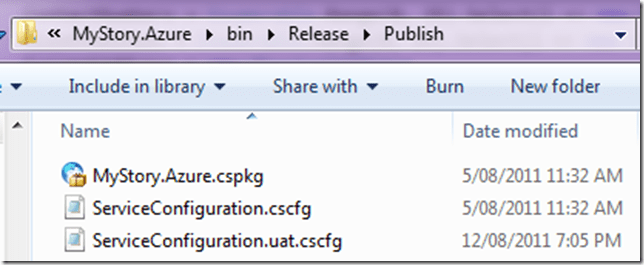
However, in a nutshell, you can have something like this in place, this means you can then have separate deployment config files, e.g.
ServiceConfiguration.cscfg
ServiceConfiguration.uat.cscfg
ServiceConfiguration.prod..cscfg
Just use the following config in the .ccproj file.
 <Target Name="ValidateServiceFiles"
          Inputs="@(EnvironmentConfiguration);@(EnvironmentConfiguration->'%(BaseConfiguration)')"
          Outputs="@(EnvironmentConfiguration->'%(Identity).transformed.cscfg')">
    <Message Text="ValidateServiceFiles: Transforming %(EnvironmentConfiguration.BaseConfiguration) to %(EnvironmentConfiguration.Identity).tmp via %(EnvironmentConfiguration.Identity)" />
    <TransformXml Source="%(EnvironmentConfiguration.BaseConfiguration)" Transform="%(EnvironmentConfiguration.Identity)"
     Destination="%(EnvironmentConfiguration.Identity).tmp" />

    <Message Text="ValidateServiceFiles: Transformation complete; starting validation" />
    <ValidateServiceFiles ServiceDefinitionFile="@(ServiceDefinition)" ServiceConfigurationFile="%(EnvironmentConfiguration.Identity).tmp" />

    <Message Text="ValidateServiceFiles: Validation complete; renaming temporary file" />
    <Move SourceFiles="%(EnvironmentConfiguration.Identity).tmp" DestinationFiles="%(EnvironmentConfiguration.Identity).transformed.cscfg" />
  </Target>
  <Target Name="MoveTransformedEnvironmentConfigurationXml" AfterTargets="AfterPackageComputeService"
          Inputs="@(EnvironmentConfiguration->'%(Identity).transformed.cscfg')"
          Outputs="@(EnvironmentConfiguration->'$(OutDir)Publish\%(filename).cscfg')">
    <Move SourceFiles="@(EnvironmentConfiguration->'%(Identity).transformed.cscfg')" DestinationFiles="@(EnvironmentConfiguration->'$(OutDir)Publish\%(filename).cscfg')" />
  </Target>
Here is a sample ServiceConfiguration.uat.config that will then leverage the transformations. Note the transformation for the web and worker roles sections. Our worker role is Neo4jServerHost and the Web is just called Web.
<?xml version="1.0"?>
<sc:ServiceConfiguration
    xmlns:sc="http://schemas.microsoft.com/ServiceHosting/2008/10/ServiceConfiguration"
    xmlns:xdt="http://schemas.microsoft.com/XML-Document-Transform">
  <sc:Role name="Neo4jServerHost" xdt:Locator="Match(name)">
    <sc:ConfigurationSettings>
      <sc:Setting xdt:Transform="Replace" xdt:Locator="Match(name)" name="Microsoft.WindowsAzure.Plugins.Diagnostics.ConnectionString" value="DefaultEndpointsProtocol=https;AccountName=myprojectname;AccountKey=myaccountkey"/>
      <sc:Setting xdt:Transform="Replace" xdt:Locator="Match(name)" name="Storage connection string" value="DefaultEndpointsProtocol=https;AccountName=myprojectname;AccountKey=myaccountkey"/>
      <sc:Setting xdt:Transform="Replace" xdt:Locator="Match(name)" name="Drive connection string" value="DefaultEndpointsProtocol=http;AccountName=myprojectname;AccountKey=myaccountkey"/>
      <sc:Setting xdt:Transform="Replace" xdt:Locator="Match(name)" name="Neo4j DBDrive override Path" value=""/>
      <sc:Setting xdt:Transform="Replace" xdt:Locator="Match(name)" name="UniqueIdSynchronizationStoreConnectionString" value="DefaultEndpointsProtocol=https;AccountName=myprojectname;AccountKey=myaccountkey"/>
    </sc:ConfigurationSettings>
  </sc:Role>
  <sc:Role name="Web" xdt:Locator="Match(name)">
    <sc:ConfigurationSettings>
      <sc:Setting xdt:Transform="Replace" xdt:Locator="Match(name)" name="Microsoft.WindowsAzure.Plugins.Diagnostics.ConnectionString" value="DefaultEndpointsProtocol=https;AccountName=myprojectname;AccountKey=myaccountkey"/>
      <sc:Setting xdt:Transform="Replace" xdt:Locator="Match(name)" name="UniqueIdSynchronizationStoreConnectionString" value="DefaultEndpointsProtocol=https;AccountName=myprojectname;AccountKey=myaccountkey"/>
    </sc:ConfigurationSettings>
  </sc:Role>
</sc:ServiceConfiguration>
Manually executing the script for testing
Prerequisites:
- You will need to install the Cerebrata Azure Management CMDLETS from: https://www.cerebrata.com/Products/AzureManagementCmdlets/Download.aspx
- If you are running 64 bit version, you will need to follow the readme file instructions contained with the AzureManagementCmdlets, as it requires manual copying of files. If you followed the default install, this readme will be in C:\Program Files\Cerebrata\Azure Management Cmdlets\readme.pdf
- You will need to install the Certificate and Private Key (Which must be marked as exportable) to your User Certificate Store. This file will have an extension of .pfx. Use the Certificate Management Snap-In, for User Account Store. The certificate should be installed in the personal folder.
- Once the certificate is installed, you should note the certificate thumbprint, as this is used as one of the parameters when executing the PowerShell script. Ensure you remove all the spaces from the thumbprint when using it in the script!
1) First up, you’ll need to make your own ”MyProject.Azure.cspkg” file. To do this, run this:
C:\Windows\Microsoft.NET\Framework64\v4.0.30319\MSBuild.exe MyProject.sln /p:Configuration=Release
(Adjust paths as required.)
You’ll now find a package waiting for you at ”C:\Code\MyProject\MyProject\MyProject.Azure\bin\Release\Publish\MyProject.Azure.cspkg”.
2) Make sure you have the required management certificate installed on your machine (including the private key).
3) Now you’re ready to run the deployment script.
It requires quite a lot of parameters. The easiest way to find them is just to copy them from the last output log on TeamCity.
You will need to manually execute is Deploy-Package.ps1.
The Deploy-Package.ps1 file has input parameters that need to be supplied. Below is the list of parameters and description.
Note: These values can change in the future, so ensure you do not rely on this example below.
AzureAccountName: The Windows Azure Account Name e.g. MyProjectUAT
AzureServiceName: The Windows Azure Service Name e.g. MyProjectUAT
AzureDeploymentSlot: Production or Staging e.g. Production
AzureAccountKey: The Azure Account Key: e.g. youraccountkey==
AzureSubscriptionId:*The Azure Subscription Id e.g. yourazuresubscriptionId
AzureCertificateThumbprint: The certificate thumbprint you note down when importing the pfx file e.g. YourCertificateThumbprintWithNoWhiteSpaces
PackageSource: Location of the .cspkg file e.g. C:\Code\MyProject\MyProject.Azure\bin\Release\Publish\MyProject.Azure.cspkg
ConfigSource: Location of the Azure configuration files .cscfg e.g. C:\Code\MyProject\MyProject\MyProject.Azure\bin\Release\Publish\ServiceConfiguration.uat.cscfg
DeploymentName: This can be a friendly name of the deployment e.g. local-uat-deploy-test
Neo4jBlobName: The name of the blob file containing the Neo4j binaries in zip format e.g. neo4j-community-1.4.M04-windows.zip
Neo4jZippedBinaryFileHttpSource: The http location of the Neo4j zipped binary files e.g. https://mydownloads.com/mydownloads/neo4j-community-1.4.M04-windows.zip?dl=1
-Verbose: You can use an additional parameter to get Verbose output which is useful when developing and testing the script, just append -Verbose to the end of the command.
Below is an example executed on my machine, this will be different on your machine, so use it as a guideline only:
<code title=Sample Deployment Execution>
.\Deploy-Package.ps1 -AzureAccountName MyProjectUAT `
-AzureServiceName MyProjectUAT `
-AzureDeploymentSlot Production `
-AzureAccountKey youraccountkey== `
-AzureSubscriptionId yoursubscriptionid `
-AzureCertificateThumbprint yourcertificatethumbprint `
-PackageSource “c:\Code\MyProject\MyProject\MyProject.Azure\bin\Release\Publish\MyProject.Azure.cspkg” `
-ConfigSource “c:\Code\MyProject\MyProject\MyProject.Azure\bin\Release\Publish\ServiceConfiguration.uat.cscfg” `
-DeploymentName local-uat-deploy-test -Neo4jBlobName neo4j-community-1.4.1-windows.zip `
-Neo4jZippedBinaryFileHttpSource https://mydownloads.com/mydownloads/neo4j-community-1.4.1-windows.zip?dl=1 -Verbose
</code>
Note: When running the PowerShell command and the 64bit version of the scripts, ensure you running the PowerShell version that you fixed in the readme file from Cerebrata, do not rely on the default shortcut links in the start menu!
Summary
Well, I hope this will help you automating Azure Deployments to the cloud, this a great way to keep UAT happy with Agile deployments to meet the goals of every sprint.
If you do not like the way we generate the package files above, you can choose to use CSRun and CSPack explicitly, I have prepared this script already, below is the code for you to use.
#requires -version 2.0
param (
	[parameter(Mandatory=$false)] [string]$ArtifactDownloadLocation
)

$ErrorActionPreference = "Stop"

$installPath= Join-Path $ArtifactDownloadLocation "..\AzurePackage"
$azureToolsPackageSDKPath="c:\Program Files\Windows Azure SDK\v1.4\bin\cspack.exe"
$azureToolsDeploySDKPath="c:\Program Files\Windows Azure SDK\v1.4\bin\csrun.exe"

$csDefinitionFile="..\..\Neo4j.Azure.Server\ServiceDefinition.csdef"
$csConfigurationFile="..\..\Neo4j.Azure.Server\ServiceConfiguration.cscfg"

$webRolePropertiesFile = ".\WebRoleProperties.txt"
$workerRolePropertiesFile=".\WorkerRoleProperties.txt"

$csOutputPackage="$installPath\Neo4j.Azure.Server.csx"
$serviceConfigurationFile = "$installPath\ServiceConfiguration.cscfg"

$webRoleName="Web"
$webRoleBinaryFolder="..\..\Web"

$workerRoleName="Neo4jServerHost"
$workerRoleBinaryFolder="..\..\Neo4jServerHost\bin\Debug"
$workerRoleEntryPointDLL="Neo4j.Azure.Server.dll"

function StartAzure{
	"Starting Azure development fabric"
	& $azureToolsDeploySDKPath /devFabric:start
	& $azureToolsDeploySDKPath /devStore:start
}

function StopAzure{
	"Shutting down development fabric"
	& $azureToolsDeploySDKPath /devFabric:shutdown
	& $azureToolsDeploySDKPath /devStore:shutdown
}

#Example: cspack Neo4j.Azure.Server\ServiceDefinition.csdef /out:.\Neo4j.Azure.Server.csx /role:$webRoleName;$webRoleName /sites:$webRoleName;$webRoleName;.\$webRoleName /role:Neo4jServerHost;Neo4jServerHost\bin\Debug;Neo4j.Azure.Server.dll /copyOnly /rolePropertiesFile:$webRoleName;WebRoleProperties.txt /rolePropertiesFile:$workerRoleName;WorkerRoleProperties.txt
function PackageAzure()
{
	"Packaging the azure Web and Worker role."
	& $azureToolsPackageSDKPath $csDefinitionFile /out:$csOutputPackage /role:$webRoleName";"$webRoleBinaryFolder /sites:$webRoleName";"$webRoleName";"$webRoleBinaryFolder /role:$workerRoleName";"$workerRoleBinaryFolder";"$workerRoleEntryPointDLL /copyOnly /rolePropertiesFile:$webRoleName";"$webRolePropertiesFile /rolePropertiesFile:$workerRoleName";"$workerRolePropertiesFile
	if (-not $?)
	{
		throw "The packaging process returned an error code."
	}
}

function CopyServiceConfigurationFile()
{
	"Copying service configuration file."
	copy $csConfigurationFile $serviceConfigurationFile
}

#Example: csrun /run:.\Neo4j.Azure.Server.csx;.\Neo4j.Azure.Server\ServiceConfiguration.cscfg /launchbrowser
function DeployAzure{param ([string] $azureCsxPath, [string] $azureConfigPath)
	"Deploying the package"
    & $azureToolsDeploySDKPath $csOutputPackage $serviceConfigurationFile
	if (-not $?)
	{
		throw "The deployment process returned an error code."
	}
}

Write-Host "Beginning deploy and configuration at" (Get-Date)

PackageAzure
StopAzure
StartAzure
CopyServiceConfigurationFile
DeployAzure '$csOutputPackage' '$serviceConfigurationFile'

# Give it 60s to boot up neo4j
[System.Threading.Thread]::Sleep(60000)

# Hit the homepage to make sure it's warmed up
(New-Object System.Net.WebClient).DownloadString("http://localhost:8080") | Out-Null

Write-Host "Completed deploy and configuration at" (Get-Date)
note, if using .Net 4.0 which I am sure you all are, you will need to provide the text files for web role and worker role with these entries.
WorkerRoleProperties.txt
TargetFrameWorkVersion=v4.0
EntryPoint=Neo4j.Azure.Server.dll
WebRoleProperties.txt
TargetFrameWorkVersion=v4.0
Thanks to Tatham Oddie for contributing and coming up with such great ideas for our builds.
Cheers
Romiko







 Romiko Derbynew