Category: .Net Development

NServiceBus – Some Benefits

Hi,

I am not sure why, but in many organisation, there is allot of unnecessary complexity when looking at source code. From Programmers using try/catch blocks all over the show to unnecessary synchronous service calls with multiple threads, causing deadlocks on SQL Server.

I would like to give a simple example, consider this code

static ProcessOrder()
{
    const int workerCount = 4;
    WorkQueue = new ConcurrentQueue();
    Workers = new List();

    for (var index = 0; index; workerCount; index++)
    {
        Worker = new BackgroundWorker();
        Workers.Add(Worker);
        Worker.DoWork += Worker_DoWork;
        Worker.RunWorkerAsync();
    }
}

The above code is extremely dangerous. You have no control over the load it will cause to backend calls, especially when it is calling Stored Procs etc. Secondly, it is not durable.

The above code, can easily be replaced by a NServiceBus Saga or handler, in the above, a Saga is appropriate, as this message is a Root Aggregate, we have an order to process. Sagas will provide an environment to preserve state and all the threading and correlation is all handled for you.

partial void HandleImplementation(ProcessOrder message)
{
    Logger.Info("ProcessOrder received, Saga Instance: {0} for OrderId: {1}", Data.Id, Data.OrderId);
    RunOnlyOncePerInstance(message);         
    AlwaysRunForEveryMessage(message); //counts and extracts new order items.

    if (Data.OrderCount == 1)
    {
        SendSaveOrder(message);
        return;
    }

    if (Data.InitialDelayPassed) //Expired workflow
        SendUpdateOrderItem();
}

From the above, you can see state is preserved for each unique OrderId. This Saga processes multiple order items for an OrderId. Which can be submitted at any time during the day. We do not have to worry about multiple threads, correlation is dealt with automatically, well we set the correlation id to the OrderId, so order items coming in can be matched to the correct Saga instance.

We can now get rid of the unreliable issues with in memory worker threads, and uncontrolled pounding of the database.

By using a MSMQ infrastructure and leveraging NServiceBus, these sort of issues, you find in code, can be easily mitigated.
Install NServiceBus as a service with Powershell

Hi,

I have just completed a script that can be used to install a service bus host as a windows service. It is nice to use, when delegating the installs to the support team, this is always done via NServiceBus.Host.exe.

It can always be tricky parsing arguments in PowerShell. The trick is to use the Start-Process command, and isolate the arguments into it’s own variable.

Here is the two scripts.

Download the script

The one will install the license and the other installs your endpoints as a windows service. All you now need to do, is just type in the password.

It relies on a directory structure, where.

Root\powershellscripts.ps1
Root\ServiceNameA\Debug or Root\ServiceNameA\Release
Root\ServiceNameB\Debug or Root\ServiceNameB\Release

I hope this makes installing all your endpoints easy.

Download the script

Now, remember, if you install Subscriber endpoints before publishers, you will get a race condition, so with this script, add the endpoints in the array argument in the correct dependent order. First install all the publisher endpoints first, then the subscriber endpoints.

Romiko

C# Binary Search Tree

Hi Folks,

I thought I would post source code for a Binary Search Tree Algorithm that I recently worked on.

https://github.com/Romiko/Dev2

In a future post, I will post source code for a Balanced Binary Search Tree (Red Black Tree RBTree).

Remember with an unbalanced Binary Search Tree, if you insert data in order, it will actually resemble a linked list and not a binary tree, hence why it is important to use a Balanced Binary Search Tree.

Of course, you can use built in .NET framework types like SortedSet and SortedDictionary, but for those of you that want to write your own implementation, then this can be a good starting point.

Remember, the rules for a Binary Search Tree, which will also return data in a sorted order, using your IComparer implementation.

I also wrote a method to delete nodes from a Binary Search Tree, which will treats leaf nodes, nodes with one child and nodes with two children differently.

There is allot of articles out there on BST’s, but it is important, that if you want to understand them, that you must understand the rules governing the Insertion, Deletion and Retrieval algorithms.

You can find the source code, at my repository here:
https://github.com/Romiko/Dev2

You will notice that there is also numerous unit tests for the solution as well.

You will notice that the way I delete nodes, uses a Random dice, so not to Degenerate the Binary Tree, if it was balanced, this would not be necessary.

One more thing, I have avoided recursive functions, why? Well, with large binary trees, if you use recursive functions, the stack is going to run out of memory, so avoid them all together.

Here is some code snippets of important algorithms, if you have any questions, or want to contribute to the code, you are welcome to do so.


public void Add(TKey key, TValue value)
        {
            var newNode = new BinaryTreeNode { KeyValue = new KeyValuePair(key, value) };

            if (Root == null)
                Root = newNode;
            else
            {
                var current = Root;
                while (true)
                {
                    var compareResult = Comparer.Compare(key, current.KeyValue.Key);
                    if (compareResult == 0)
                        throw new ArgumentException("Duplicate key found.");

                    if (compareResult  0)
                        if (current.Right != null)
                            current = current.Right;
                        else
                        {
                            current.Right = newNode;
                            newNode.Parent = current;
                            break;
                        }
                }
            }
        }

private void Delete(BinaryTreeNode node)
        {
            var nodeType = GetNodeType(node);

            if (nodeType == NodeType.LeafeNode)
            {
                DeleteLeafNode(node);
                return;
            }
            if (nodeType == NodeType.HasOneChild)
            {
                DeleteNodeWithOneChild(node);
                return;
            }
            DeleteNodeWithTwoChildren(node);
        }

        private void DeleteNodeWithTwoChildren(BinaryTreeNode node)
        {
            // Use random delete method, to avoid degenerate tree structure.
            var replaceInOrderType = RollDiceForSuccessorOrPredecessor();

            if (replaceInOrderType == InOrderNode.Successor)
                UseSuccessor(node);
            else
                UsePredecessor(node);
        }

        private static void DeleteNodeWithOneChild(BinaryTreeNode node)
        {
            var theChild = node.Left ?? node.Right;
            theChild.Parent = node.Parent;
            switch (NodeLinkedToParentAs(node))
            {
                case NodeLinkToParentAs.Right:
                    node.Parent.Right = theChild;
                    break;
                case NodeLinkToParentAs.Left:
                    node.Parent.Left = theChild;
                    break;
                case NodeLinkToParentAs.Root:
                    node.Parent = null;
                    break;
            }
        }

        private static void DeleteLeafNode(BinaryTreeNode node)
        {
            if (NodeLinkedToParentAs(node) == NodeLinkToParentAs.Right)
                node.Parent.Right = null;
            else
                node.Parent.Left = null;
        }

        private void UsePredecessor(BinaryTreeNode node)
        {
            var replaceWith = ReadLastRightNode(node.Left);
            node.KeyValue = replaceWith.KeyValue;
            Delete(replaceWith);
        }

        private void UseSuccessor(BinaryTreeNode node)
        {
            var replaceWith = ReadLastLeftNode(node.Right);
            node.KeyValue = replaceWith.KeyValue;
            Delete(replaceWith);
        }

        private InOrderNode RollDiceForSuccessorOrPredecessor()
        {
            if (ForceDeleteType.HasValue)
                return ForceDeleteType.Value;

            var random = new Random();
            var choice = random.Next(0, 2);
            return choice == 0 ? InOrderNode.Predecessor : InOrderNode.Successor;
        }

https://github.com/Romiko/Dev2

Windows Azure Cloud Drive–Dealing with large VHD’s and Blob Snapshot Restores

I ran into a scenario where I needed to transfer data from an Azure Cloud Drive VHD that was 250GB in Size from Production to Preproduction. So this means that I want to transfer the VHD from one azure account to another.

The thing with VHD’s and Cloud Drive, is that it is a Page Blob, and the VHD has to be a fixed size, so even though I might have 200MB of data in a 250GB VHD, you would need to download 250GB worth of data.

The Solution?

Remove desktop into the Azure Virtual Machine, Mount the VHD Manually, copy the data, zip it up and send it through other means, so in essence, I only send or download the data that is USED in the VHD i.e. 200MB and not 250GB.

This utility can use the concept of a blobsnapshot VHD backup to restore, and what it will do it mount it. This is ideal when you using blob snapshots as a backup mechanism and you need a way to restore the blob snapshot VHD data, as fast as possible to another Azure Account.

Below is the code for the helper and you can download the source code for the project here:

NOTE: This application must be run in a Windows Azure Virtual Machine, it will NOT WORK on a development machine/emulator.

hg clone ssh://hg@bitbucket.org/romiko/mountclouddrive
hg clone https://romiko@bitbucket.org/romiko/mountclouddrive

using System;
using Microsoft.WindowsAzure;
using Microsoft.WindowsAzure.StorageClient;
using MountCloudDrive.Properties;

namespace MountCloudDrive
{
    public class CloudDriveHotAssistant
    {
        private string restoreVHDName;
        private readonly StorageCredentialsAccountAndKey storageCredentials;
        private readonly CloudStorageAccount cloudStorageAccount;
        private CloudBlobClient blobClient;

        public CloudDriveHotAssistant(string accountName, string accountKey)
        {
            restoreVHDName = Settings.Default.DefaultRestoreDestination;
            storageCredentials = new StorageCredentialsAccountAndKey(accountName, accountKey);
            cloudStorageAccount = new CloudStorageAccount(storageCredentials, false);
            blobClient = new CloudBlobClient(cloudStorageAccount.BlobEndpoint, storageCredentials);
        }

        public CloudPageBlob GetBlobToRestore(string blobContainer, string blobFileName)
        {
            DateTime snapShotTime;
            var converted = DateTime.TryParse(Settings.Default.BlobSnapShotTime, out snapShotTime);

            CloudPageBlob pageBlob;

            if (converted)
                pageBlob = blobClient.GetPageBlobReference(string.Format(@"{0}\{1}", blobContainer, blobFileName), snapShotTime);
            else
                pageBlob = blobClient.GetPageBlobReference(string.Format(@"{0}\{1}", blobContainer, blobFileName));

            try
            {
                pageBlob.FetchAttributes();
            }
            catch (Exception ex)
            {
                Console.WriteLine("\r\nBlob Does Not Exist!");
                Console.WriteLine(ex);
                return null;
            }
            return pageBlob;
        }

        public void UnMountCurrentDrives()
        {
            foreach (var driveName in CloudDrive.GetMountedDrives())
            {
                var drive = new CloudDrive(driveName.Value, storageCredentials);
                Console.WriteLine(string.Format("\r\nUnmounting {0}", driveName.Key));
                Console.WriteLine("\r\nAre you sure Y/N");
                var key = Console.ReadKey();
                var decision = key.Key == ConsoleKey.Y;

                if (!decision)
                    continue;

                try
                {
                    drive.Unmount();
                }
                catch (Exception ex)
                {
                    Console.WriteLine(string.Format("\r\nUnmounting {0} FAILED.\r\n {1}", driveName.Key, ex));
                }
            }
        }

        public CloudPageBlob GetBlobReferenceToRestoreTo(string blobContainer)
        {
            return blobClient.GetPageBlobReference(string.Format(@"{0}\{1}", blobContainer, restoreVHDName));
        }

        public void MountCloudDrive(CloudPageBlob pageBlobSource, CloudPageBlob pageBlobDestination, string blobContainer)
        {
            pageBlobDestination.CopyFromBlob(pageBlobSource);
            Console.WriteLine(string.Format("\r\nAttempting to mount {0}", pageBlobDestination.Uri.AbsoluteUri));
            var myDrive = cloudStorageAccount.CreateCloudDrive(pageBlobDestination.Uri.AbsoluteUri);
            var drivePath = myDrive.Mount(0, DriveMountOptions.None);
            Console.WriteLine(string.Format("\r\nVHD mounted at {0}", drivePath));
        }
    }
}

Automate #WindowsAzure snapshot restores

Hi,
This is the last series in blog posts regarding the automation of backups, purging and restoring azure blobs.

Below is a PowerShell script that can take a file containing the contents of snapshot urls, it also supports the log file output from the backup restore script and just pasting that output in the event you want to restore a complete backup set.

Remember, when using the backup script, ALWAYS save the output of the script to use as a reference so that you have the URL’s of the snapshots you want to restore.

e.g. Sample restore.txt file.
[05:01:08]: [Publishing internal artifacts] Sending build.start.properties.gz file
[05:01:05]: Step 1/2: Command Line (14s)
[05:01:05]: [Step 1/2] in directory: C:\TeamCity\buildAgent\work\d9375448b88c1b75\Maintenance
[05:01:08]: [Step 1/2] Starting snapshot uniqueids
[05:01:08]: [Step 1/2] Found blob container uniqueids
[05:01:09]: [Step 1/2] https://uatmystory.blob.core.windows.net/uniqueids/agencies?snapshot=2012-04-22
[05:01:09]: [Step 1/2] T19:01:10.6488549Z
[05:01:09]: [Step 1/2] https://uatmystory.blob.core.windows.net/uniqueids/agency1-centres?snapshot=201
[05:01:09]: [Step 1/2] 2-04-22T19:01:10.8818083Z
[05:01:09]: [Step 1/2] https://uatmystory.blob.core.windows.net/uniqueids/agency1-clients?snapshot=201
[05:01:09]: [Step 1/2] 2-04-22T19:01:11.0257795Z
[05:01:09]: [Step 1/2] https://uatmystory.blob.core.windows.net/uniqueids/agency1-referrals?snapshot=2
[05:01:09]: [Step 1/2] 012-04-22T19:01:11.1717503Z

So the script will parse any restore file and just find URI’s in it, and then restore them.

#requires -version 2.0
param (
	[parameter(Mandatory=$true)] [string]$AzureAccountName,
	[parameter(Mandatory=$true)] [string]$AzureAccountKey,
	[parameter(Mandatory=$true)] [string]$FileContainingSnapshotAddresses
)

$ErrorActionPreference = "Stop"

if ((Get-PSSnapin -Registered -Name AzureManagementCmdletsSnapIn -ErrorAction SilentlyContinue) -eq $null)
{
	throw "AzureManagementCmdletsSnapIn missing. Install them from Https://www.cerebrata.com/Products/AzureManagementCmdlets/Download.aspx"
}

Add-PSSnapin AzureManagementCmdletsSnapIn -ErrorAction SilentlyContinue
Add-Type -Path 'C:\Program Files\Windows Azure SDK\v1.6\ref\Microsoft.WindowsAzure.StorageClient.dll'

$cred = New-Object Microsoft.WindowsAzure.StorageCredentialsAccountAndKey($AzureAccountName,$AzureAccountKey)
$client = New-Object Microsoft.WindowsAzure.StorageClient
.CloudBlobClient("https://$AzureAccountName.blob.core.windows.net",$cred)

function RestoreSnapshot
{
	param ( $snapShotUri)
	Write-Host "Parsing snapshot restore for $SnapShotUri"

	$regex = new-object System.Text.RegularExpressions.Regex("http://.*?/(devstoreaccount1/)?(?<containerName>.*?)/.*")
	$match = $regex.Match($snapShotUri)
	$container = $match.Groups["containerName"].Value
	$parsedUri = $match
	
	if($match.Value -eq "")
	{
		return
	}
		
	if ($container -eq $null)
	{
		Write-Host  "Container $blobContainerName doesn't exist, skipping snapshot restore"
	}
	else
	{
		Write-Host  "Restoring $snapShotUri" 
		Copy-Blob -BlobUrl $parsedUri -AccountName $AzureAccountName -AccountKey $AzureAccountKey -TargetBlobContainerName $container
		Write-Host  "Restore snapshot complete for $parsedUri"
	}
}

$fileContent = Get-Content $FileContainingSnapshotAddresses

foreach($uri in $fileContent)
{
	RestoreSnapshot $uri
}


Cloning Disks and Partitions

I have been using CloneZilla to manage all my disk and partition backups, I find it very user friendly and support all my disks (USB, ESATA). I recommend TUXBOOT for making Clonezilla bootable USB drive and to keep it with you whenever you need to clone a disk, then just boot off the stick.

http://clonezilla.org/liveusb.php

Windows 7 bootable USB stick

On the subject, sometimes you need to get an OS on beforehand for Windows, I like using this tool to make a bootable windows 7 USB stick.

http://images2.store.microsoft.com/prod/clustera/framework/w7udt/1.0/en-us/Windows7-USB-DVD-tool.exe

Automate #Azure Blob Snapshot purging/deletes with @Cerebrata

The pricing model for snapshots can get rather complicated, so we need a way to automate the purging of snapshots.
Read how snapshots can accrue additional costs

Lets minimize these costs! We use this script to backup and manage snapshot retention for all our Neo4j Databases hosted in the Azure Cloud.

So a solution I have is that:
We have a retention period in days for all snapshots e.g. 30 days
We have a retention period for the last day of the month backups e.g. 180 days

Rules:
1. The purging will always ensure that there is always at least ONE snapshot, so it will never delete a backup if it is the only backup for a base blob.

2. The purging will delete snapshots greater than the retention period, respecting rule 1

3. The purging will delete snapshots greater than the last day month retention period, respecting rule 1

You can then schedule this script to run after the Backup Script in TeamCity or some other build server scheduler.

param(
	[parameter(Mandatory=$true)] [string]$AzureAccountName,
	[parameter(Mandatory=$true)] [string]$AzureAccountKey,
	[parameter(Mandatory=$true)] [array]$BlobContainers, #Blob Containers to backup
	[parameter(Mandatory=$true)] [int]$BackupRetentionDays, #Days to keep snapshot backups
	[parameter(Mandatory=$true)] [int]$BackupLastDayOfMonthRetentionDays # Days to keep last day of month backups
)


if( $BackupRetentionDays -ge $BackupLastDayOfMonthRetentionDays )
{
	$message = "Argument Exception: BackupRentionDays cannot be greater than or equal to BackupLastDayOfMonthRetentionDays"
	throw $message
}

Add-Type -Path 'C:\Program Files\Windows Azure SDK\v1.6\ref\Microsoft.WindowsAzure.StorageClient.dll'

$cred = New-Object Microsoft.WindowsAzure.StorageCredentialsAccountAndKey($AzureAccountName,$AzureAccountKey)
$client = New-Object Microsoft.WindowsAzure.StorageClient
.CloudBlobClient("https://$AzureAccountName.blob.core.windows.net",$cred)

function PurgeSnapshots ($blobContainer)
{
	$container = $client.GetContainerReference($blobContainer)
	$options = New-Object  Microsoft.WindowsAzure.StorageClient.BlobRequestOptions
	$options.UseFlatBlobListing = $true
	$options.BlobListingDetails = [Microsoft.WindowsAzure.StorageClient.BlobListingDetails]::Snapshots

	$blobs = $container.ListBlobs($options)
	$baseBlobWithMoreThanOneSnapshot = $container.ListBlobs($options)| Group-Object Name | Where-Object {$_.Count -gt 1} | Select Name

	#Filter out blobs with more than one snapshot and only get SnapShots.
	$blobs = $blobs | Where-Object {$baseBlobWithMoreThanOneSnapshot  -match $_.Name -and $_.SnapshotTime -ne $null} | Sort-Object SnapshotTime -Descending

	foreach ($baseBlob in $baseBlobWithMoreThanOneSnapshot )
	{
		 $count = 0
		 foreach ( $blob in $blobs | Where-Object {$_.Name -eq $baseBlob.Name } )
		    {
				$count +=1
				$ageOfSnapshot = [System.DateTime]::UtcNow - $blob.SnapshotTime
				$blobAddress = $blob.Uri.AbsoluteUri + "?snapshot=" + $blob.SnapshotTime.ToString("yyyy-MM-ddTHH:mm:ss.fffffffZ")

				#Fail safe double check to ensure we only deleting a snapshot.
				if($blob.SnapShotTime -ne $null)
				{
					#Never delete the latest snapshot, so we always have at least one backup irrespective of retention period.
					if($ageOfSnapshot.Days -gt $BackupRetentionDays -and $count -eq 1)
					{
						Write-Host "Skipped Purging Latest Snapshot"  $blobAddress
						continue
					}

					if($ageOfSnapshot.Days -gt $BackupRetentionDays -and $count -gt 1 )
					{
					    #Do not backup last day of month backups
						if($blob.SnapshotTime.Month -eq $blob.SnapshotTime.AddDays(1).Month)
						{
							Write-Host "Purging Snapshot "  $blobAddress
							$blob.Delete()
							continue
						}
						#Purge last day of month backups based on monthly retention.
						elseif($blob.SnapshotTime.Month -ne $blob.SnapshotTime.AddDays(1).Month)
						{
							if($ageOfSnapshot.Days -gt $BackupLastDayOfMonthRetentionDays)
							{
							Write-Host "Purging Last Day of Month Snapshot "  $blobAddress
							$blob.Delete()
							continue
							}
						}
						else
						{
							Write-Host "Skipped Purging Last Day Of Month Snapshot"  $blobAddress
							continue
						}
					}
					
					if($count % 5 -eq 0)
					{
						Write-Host "Processing..."
					}
				}
				else
				{
					Write-Host "Skipped Purging "  $blobAddress
				}
		    }
	}
}

foreach ($container in $BlobContainers)
{
	Write-Host "Purging snapshots in " $container
	PurgeSnapshots $container
}

Automate #Azure Blob Snapshot backups with @Cerebrata

Hi,

Leveraging the cerebrata cmdlets for Azure, we can easily backup our blob containers via snapshot, this will prove useful for Page Blobs that are Random Access i.e. VHD’s on Cloud Drive

Here is how Purging Snapshots works

#requires -version 2.0
param (
	[parameter(Mandatory=$true)] [string]$AzureAccountName,
	[parameter(Mandatory=$true)] [string]$AzureAccountKey,
	[parameter(Mandatory=$true)] [array]$BlobContainers
)

$ErrorActionPreference = "Stop"

if ((Get-PSSnapin -Registered -Name AzureManagementCmdletsSnapIn -ErrorAction SilentlyContinue) -eq $null)
{
	throw "AzureManagementCmdletsSnapIn missing. Install them from Https://www.cerebrata.com/Products/AzureManagementCmdlets/Download.aspx"
}

Add-PSSnapin AzureManagementCmdletsSnapIn -ErrorAction SilentlyContinue

function SnapShotBlobContainer 
{
	param ( $containers, $blobContainerName )
	Write-Host "Starting snapshot $blobContainerName"

	$container = $containers | Where-Object { $_.BlobContainerName -eq $blobContainerName }

	if ($container -eq $null)
	{
		Write-Host  "Container $blobContainerName doesn't exist, skipping snapshot"
	}
	else
	{
        Write-Host  "Found blob container $blobContainerName"
Checkpoint-BlobContainer -Name $container.BlobContainerName -SaveSnapshotInformation -AccountName $AzureAccountName -AccountKey $AzureAccountKey
	Write-Host  "Snapshot complete for $blobContainerName"
	}
}

$containers = Get-BlobContainer -AccountName $AzureAccountName -AccountKey $AzureAccountKey
foreach($container in $BlobContainers)
{
	SnapShotBlobContainer $containers $container
}

Then just call the script with the params. remember an array of items is parsed in like this:

-BlobContainers:@(‘container1’, ‘contaner2’) -AzureAccountName romikoTown -AzureAccountKey blahblahblahblahblehblooblowblab==

Neo4jClient Cypher ResultSet Support

Sometimes when doing Cypher queries the result is only one column and not multiple columns, therefore it makes sense to have a method in the fluent API to let this be known, so we do not have to map the column to an object type.

So fluent support to deserialize common result sets where cypher returns a result with only 1 column with the help of Tatham Oddie is completed.

So in the Neo4jClient you can do this, when the result from Cypher is one column via REST:

var result = agencySource
                        .StartCypher("a1")
                        .AddStartPoint("a2", agency.Reference)
                        .Match("p = allShortestPaths( a1-[*..20]-a2 )")
                        .Return<PathsResult>("p")
                        .ResultSet;

So, if you need cypher results with only one column then use .ResultSet instead of .Results, thus no need for expression tree column matches to assist the deserializer with multiple column names.

Here is a sample rest response with 1 column result that is suited perfectly for ResultSet.

{
  "data" : [ [ {
    "start" : "http://localhost:20001/db/data/node/215",
    "nodes" : [ "http://localhost:20001/db/data/node/215", "http://localhost:20001/db/data/node/0", "http://localhost:20001/db/data/node/219" ],
    "length" : 2,
    "relationships" : [ "http://localhost:20001/db/data/relationship/247", "http://localhost:20001/db/data/relationship/257" ],
    "end" : "http://localhost:20001/db/data/node/219"
  } ], [ {
    "start" : "http://localhost:20001/db/data/node/215",
    "nodes" : [ "http://localhost:20001/db/data/node/215", "http://localhost:20001/db/data/node/1", "http://localhost:20001/db/data/node/219" ],
    "length" : 2,
    "relationships" : [ "http://localhost:20001/db/data/relationship/248", "http://localhost:20001/db/data/relationship/258" ],
    "end" : "http://localhost:20001/db/data/node/219"
  } ] ],
  "columns" : [ "p" ]
}

If you wondering what the hell is agencySource, it is just node references, that I got using gremlin, which can spin off cypher queries, cool is it not?

var agencies = graphClient
                .RootNode
                .Out<Agency>(Hosts.TypeKey)
                .ToList();

This just enumerate through the list of nodes to run your cypher queries off the node directly! Have these imports declarations:

using Neo4jClient.ApiModels.Cypher;
using Neo4jClient.Gremlin;
using Neo4jClient.Cypher;

Summary

Use .ResultSet for single column result sets and use .Results when dealing with multiple column results.

Working with time zones in ASP.NET MVC

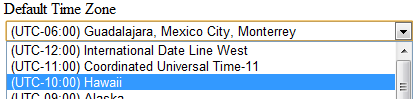
You would like a dropdown list of time zones that a user can select from and perhaps use it for a user profile or multi tenant profile.

image

Our second objective is that we do not want to manage this reference data, it should come from the system.

So what we going do is.

  • DisplayFor template to deal with data types of TimeZoneInfo, so that whenever a model or viewmodel contains a property of type TimeZoneInfo, we can then use the Html.DisplayFor helper method.
  • Custom Model Binder that will take the TimeZone value (TZID) in the drop down list and create an instance of a new TimeZoneInfo object that can be bound to the model property

Remember, the value stored in the drop down list is just the TimeZoneID:

image

See above, the value is the TZID. So we need to somehow convert this to a TimeZoneInfo object, there is the following static method which we can use.

http://msdn.microsoft.com/en-us/library/system.timezoneinfo.findsystemtimezonebyid.aspx

Excellento, lets geek it up.

Display Template

@model TimeZoneInfo

@{
    var timeZoneList = TimeZoneInfo
        .GetSystemTimeZones()
        .Select(t => new SelectListItem
        {
            Text = t.DisplayName,
            Value = t.Id,
            Selected = Model != null && t.Id == Model.Id
        });
}
@Html.DropDownListFor(model => model, timeZoneList)
@Html.ValidationMessageFor(model => model)

Model Binder and Model Binder Provider

 
using System;
using System.Web.Mvc;

namespace MyStory.Web.ModelBinders
{
    public class TimeZoneInfoModelBinder : IModelBinder
    {
        public object BindModel(ControllerContext controllerContext, ModelBindingContext bindingContext)
        {
            var valueProviderResult = bindingContext.ValueProvider.GetValue(bindingContext.ModelName);
            bindingContext.ModelState.SetModelValue(bindingContext.ModelName, valueProviderResult);

            if (valueProviderResult == null) return null;

            var attemptedValue = valueProviderResult.AttemptedValue;

            return ParseTimeZoneInfo(attemptedValue);
        }

        public static TimeZoneInfo ParseTimeZoneInfo(string attemptedValue)
        {
            return TimeZoneInfo.FindSystemTimeZoneById(attemptedValue);
        }

        public class TimeZoneModelBinderProvider : IModelBinderProvider
        {
            public IModelBinder GetBinder(Type modelType)
            {
                return modelType == typeof(TimeZoneInfo)
                    ? DependencyResolver.Current.GetService<TimeZoneInfoModelBinder>()
                    : null;
            }
        }
    }
}

Register Model Binder

Here I am using Autofac to automatically register all concrete types that implement IModelBinder in my assembly or IModelBinderProvider, via dependency injection in the global.asax.cs

  builder
                .RegisterAssemblyTypes(typeof(MvcApplication).Assembly)
                .Where(t => typeof(IModelBinder).IsAssignableFrom(t))
                .AsSelf()
                .InstancePerLifetimeScope();

            builder
                .RegisterAssemblyTypes(typeof(MvcApplication).Assembly)
                .Where(t => typeof(IModelBinderProvider).IsAssignableFrom(t))
                .As<IModelBinderProvider>();

Sample Model

  
    public class MyModel
    {
        [Required]
        [StringLength(100)]
        public string Name { get; set; }

        [Required]
        [Display(Name = "Default Time Zone" )]
        public TimeZoneInfo DefaultTimeZone { get; set; }
    }   

Now whatever view need to use this model just needs to call the DisplayFor helper.

  
@Html.LabelFor(model => model.DefaultTimeZone)  
<div>  @Html.DisplayFor(m => m.DefaultTimeZone, "TimeZones")  
</div>