Tag: Microservices

Embracing Microservices Architecture with the TOGAF® Framework

Embracing Microservices Architecture with the TOGAF® Framework

Introduction to Microservices Architecture (MSA) in the TOGAF® Framework

In the ever-evolving digital landscape, the TOGAF® Standard, developed by The Open Group, offers a comprehensive approach for managing and governing Microservices Architecture (MSA) within an enterprise. This guide is dedicated to understanding MSA within the context of the TOGAF® framework, providing insights into the creation and management of MSA and its alignment with business and IT cultures​​.

What is Microservices Architecture (MSA)?

MSA is a style of architecture where systems or applications are composed of independent and self-contained services. Unlike a product framework or platform, MSA is a strategy for building large, distributed systems. Each microservice in MSA is developed, deployed, and operated independently, focusing on a single business function and is self-contained, encapsulating all necessary IT resources. The key characteristics of MSA include service independence, single responsibility, and self-containment​​.

The Role of MSA in Enterprise Architecture

MSA plays a crucial role in simplifying business operations and enhancing interoperability within the business. This architecture style is especially beneficial in dynamic market environments where companies seek to manage complexity and enhance agility. The adoption of MSA leads to better system availability and scalability, two crucial drivers in modern business environments​​.

Aligning MSA with TOGAF® Standards

The TOGAF® Standard, with its comprehensive view of enterprise architecture, is well-suited to support MSA. It encompasses all business activities, capabilities, information, technology, and governance of the enterprise. The Preliminary Phase of TOGAF® focuses on determining the architecture’s scope and principles, which are essential for MSA development. This phase addresses the skills, capabilities, and governance required for MSA and ensures alignment with the overall enterprise architecture​​.

Implementing MSA in an Enterprise

Enterprises adopting MSA should integrate it with their architecture principles, acknowledging the benefits of resilience, scalability, and reliability. Whether adapting a legacy system or launching a new development, the implications for the organization and architecture governance are pivotal. The decision to adopt MSA principles should be consistent with the enterprise’s overall architectural direction​​.

Practical Examples
TOGAF is independent on directing what tools to use. However I have found it very useful to couple Domain Driven Design with Event Storming in a Miro Board where you can get all stakeholders together and nut out the various domain, subdomains and events.

https://www.eventstorming.com/

Event Storming – Business Process Example – source Lucidcharts

Within each domain, you can start working on ensuring data is independent as well, with patterns such as Strangler-Fig or IPC.

Extract a service from a monolith

After you identify the ideal service candidate, you must identify a way for both microservice and monolithic modules to coexist. One way to manage this coexistence is to introduce an inter-process communication (IPC) adapter, which can help the modules work together. Over time, the microservice takes on the load and eliminates the monolithic component. This incremental process reduces the risk of moving from the monolithic application to the new microservice because you can detect bugs or performance issues in a gradual fashion.

The following diagram shows how to implement the IPC approach:
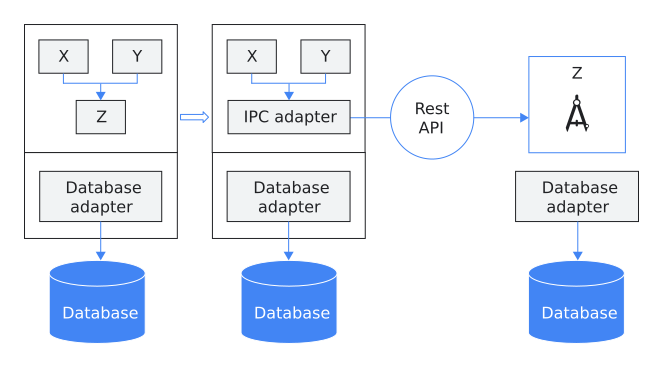
An IPC approach is implemented to help modules work together.

Figure 2. An IPC adapter coordinates communication between the monolithic application and a microservices module.

In figure 2, module Z is the service candidate that you want to extract from the monolithic application. Modules X and Y are dependent upon module Z. Microservice modules X and Y use an IPC adapter in the monolithic application to communicate with module Z through a REST API.

The next document in this series, Interservice communication in a microservices setup, describes the Strangler Fig pattern and how to deconstruct a service from the monolith.

Learn more about these patterns here – https://cloud.google.com/architecture/microservices-architecture-refactoring-monoliths

Conclusion

When integrated with the TOGAF® framework, Microservices Architecture (MSA) provides a strong and adaptable method for handling intricate, distributed architectures. Implementing MSA enables businesses to boost their agility, scalability, and resilience, thereby increasing their capacity to adjust to shifting market trends.

During the vision phase, establish your fundamental principles.

Identify key business areas to concentrate on, such as E-Commerce or online services.

Utilize domain-driven design (code patterns) and event storming (practical approach) to delineate domains and subdomains, using this framework as a business reference model to establish the groundwork of your software architecture.

Develop migration strategies like IPC Adapters/Strangler Fig patterns for database decoupling.

In the Technology phase of the ADM, plan for container orchestration tools, for example, Kubernetes.

Subsequently, pass the project to Solution Architects to address the remaining non-functional requirements from observability to security during step F of the ADM. This enables them to define distinct work packages adhering to SMART principles.

TIP: When migrating databases sometimes the legacy will be the main data and the microservice DB will be the secondary until a full migration, do not underestimate tools like CDC to assist.

Change Data Capture (CDC) is an approach used by microservices for tracking changes made to the data in a database. It enables microservices to be notified of any modifications in the data so that they can be updated accordingly. This real-time mechanism saves a lot of time that would otherwise be spent on regular database scans. In this blog post, we will explore how CDC can be used with microservices and provide some practical use cases and examples.

Source: Rany ElHousieny, PhDᴬᴮᴰ

References

https://pubs.opengroup.org/togaf-standard/guides/microservices-architecture.html#:~:text=moving%20business%20environment.-,2%20Microservices%20Architecture%20Defined,for%20building%20large%20distributed%20systems.

https://www.lucidchart.com/blog/ddd-event-storming

https://waqasahmeddev.medium.com/how-to-migrate-to-microservices-with-the-strangler-pattern-64f6144ae4db

https://cloud.google.com/architecture/microservices-architecture-refactoring-monoliths

https://learn.microsoft.com/en-us/azure/architecture/patterns/strangler-fig

Automate the Deployment of Azure Kubernetes Services Cluster + Application Gateway Ingress Controller

This post will demonstrate how to deploy a AKS cluster using Advanced Networking. We will then deploy an Application Gateway Ingress Controller. Essentially this will install a dedicated ingress POD that fully manages the Application gateway.

This means all entries in the Application gateway are 100% managed by AKS. If you manually add an entry to the AG, it will be removed by AKS Ingress Controller.

Overview

Considerations

  • Decided to dedicate an entire /16 IP range to the AKS cluster for simplicity e.g. 10.69.0.0/16.
  • Leverage AKS with Advanced Networking (CNI).
  • CNI provided the use of Application Gateway with WAFv2.
  • SSL offloading is configured. The actual private key (PEM – Base64 encoded) is stored in the default namespace in AKS. Whenever you deploy a new application, just –export (Deprecated) the key to the new namespace. The AG Ingress Controller will automatically be configured with the SSL certificate.
  • We will apply RBAC rules so AKS can manage the application gateway and VMSS scaleset.
  • RBAC to access container registry.

By using an Application Gateway, we can leverage additional benefits such as Web Application Firewall (V2), OWASP 3.0 firewall detection/prevention rules. Microsoft have totally refactors the AG WAF2 technology stack. It is much faster to provision and can deal with much larger amounts of traffic now.

By combining Load Balancing with WAF, we get the best of both worlds. If you have heavy traffic, it might be good to first do a performance test before making a final decision on AG + AKS stack.

Environment Setup + Tools

We are using AKS VMSS preview feature. Azure Virtual Machine Scale Sets have been around for a long time, and are in fact used by Microsoft Service Fabric. It makes total sense that this auto-scaling architecture is leveraged by AKS.

Due to the preview status of Container Services and VMSS+AKS, we will choose Azure CLI.

You can use Ubuntu Windows Shell or a Linux Ubuntu Shell.

Run the following code to setup your bash environment.

#!/bin/bash
echo "Updating system..."
sudo apt-get update
sudo apt-get upgrade

echo "Installing AzureCLI"
curl -sL https://aka.ms/InstallAzureCLIDeb | sudo bash

echo "Installing helm for AKS Admin"
curl -LO https://git.io/get_helm.sh
chmod 700 get_helm.sh
./get_helm.sh
helm init --service-account tiller --history-max 200

Helm is a client side tool to provide configuration settings to AKS. Tiller is a server side setting that runs on AKS that applies configuration settings that are applied from a helm client.

Create a config folder with 2 files.

Replace THECERTIFICATECHAIN with the contents of your base64 encoded .cer certificate chain. The script will replace <THEPRIVATEKEY> when you paste your private key. Future namespace or apps, will be able to find this in the default namespace. Thus a 1 time operations

e.g. (kubectl get secret rangerrom-tls –namespace=default ….).

apiVersion: v1
kind: Secret
metadata:
  name: rangerrom-tls
type: kubernetes.io/tls
data:
  tls.crt: THECERTIFICATECHAIN
  tls.key: THEPRIVATEKEY

rangerrom-tls.yml

apiVersion: v1
kind: ServiceAccount
metadata:
  name: tiller
  namespace: kube-system
---
apiVersion: rbac.authorization.k8s.io/v1
kind: ClusterRoleBinding
metadata:
  name: tiller
roleRef:
  apiGroup: rbac.authorization.k8s.io
  kind: ClusterRole
  name: cluster-admin
subjects:
  - kind: ServiceAccount
    name: tiller
    namespace: kube-system

tiller-rbac.yml

Azure Prerequisites

Ensure you have
* VNET in a resounce group – ${env}-network-rg
* Subnet with a name ${env}-aks-cluster-subnet matching the IP rules

Install AKS into existing VNET

#!/bin/bash
aksversion='1.13.7'
while ! [[ "$env" =~ ^(sb|dv|ut|pd)$ ]] 
do
  echo "Please specifiy environment [sb, dv,ut,pd]?"
  read -r env
done 

case $env in

  dv)
    servicecidr="10.66.64.0/18"
    dnsserver="10.66.64.10"
    az account set --subscription 'RangerRom DEV'
    subscriptionid=$(az account show --subscription 'RangerRom DEV' --query id | sed  's/\"//g')
    ;;

  sb)
    servicecidr="10.69.64.0/18"
    dnsserver="10.69.64.10"
    az account set --subscription 'RangerRom SANDBOX'
    subscriptionid=$(az account show --subscription 'RangerRom SANDBOX' --query id | sed  's/\"//g')
    ;;

  ut)
    servicecidr="10.70.64.0/18"
    dnsserver="10.70.64.10"
    az account set --subscription 'RangerRom TEST'
    subscriptionid=$(az account show --subscription 'RangerRom TEST' --query id | sed  's/\"//g')
    ;;

  pd)
    servicecidr="10.68.64.0/18"
    dnsserver="10.68.64.10"
    az account set --subscription 'RangerRom PROD'
    subscriptionid=$(az account show --subscription 'RangerRom PROD' --query id | sed  's/\"//g')
    ;;  
  *)
    echo "environment not found"
    exit
    ;;
esac

env="rrau${env}"
location="australiaeast"

az group create --location $location --name "${env}-aks-rg"
sleep 5

az feature register -n VMSSPreview --namespace Microsoft.ContainerService
az provider register -n Microsoft.ContainerService

az aks create \
    --resource-group "${env}-aks-rg" \
    --name "${env}-aks-cluster" \
    --enable-vmss \
    --node-count 2 \
    --kubernetes-version $aksversion \
    --generate-ssh-keys \
    --network-plugin azure \
    --service-cidr $servicecidr \
    --dns-service-ip $dnsserver \
    --vnet-subnet-id "/subscriptions/${subscriptionid}/resourceGroups/${env}-network-rg/providers/Microsoft.Network/virtualNetworks/${env}-network/subnets/${env}-aks-cluster-subnet"


clusterprincipalid=$(az ad sp list --display-name ${env}-aks-cluster --query [0].objectId)
resourceGroupid=$(az group show --name ${env}-network-rg --query 'id')
echo "Configuring cluster to owner ${resourceGroupid}"
cmd="az role assignment create --role Contributor --assignee $clusterprincipalid --scope $resourceGroupid"
eval $cmd


echo "Configuring AKS Cluster with Tiller"
az aks get-credentials --resource-group "${env}-aks-rg" --name "${env}-aks-cluster" --overwrite-existing
kubectl apply -f ./config/tiller-rbac.yml
helm init --service-account tiller

while ! [[ ${#privatekey} -gt 2000 ]]
do
  echo "Please provide TLS Private Key - BASE64 Encoded PEM?"
  read -r privatekey
done

kubectl create namespace scpi-${env}
cat ./config/rangerrom-tls.yml  | sed "s/THEPRIVATEKEY/$privatekey/" > temptls.yml
kubectl apply -f temptls.yml -n default
#The Flag --export is going to be deprecated - Below is workaround.
kubectl get secret rangerrom-tls --namespace=default -o yaml | \
   sed '/^.*creationTimestamp:/d' |\
   sed '/^.*namespace:/d' |\
   sed '/^.*resourceVersion:/d' |\
   sed '/^.*selfLink:/d' |\
   sed '/^.*uid:/d' |\
   kubectl apply --namespace=scpi-${env} -f -

rm -f ./temptls.yml
privatekey=""

echo "Setup container registry permissions"
az acr create -n "${env}containerregistry" -g "${env}-common-rg" --sku Premium
containerid=$(az acr show -n ${env}containerregistry --query id)
principalidaks=$(az ad sp list --all --query "([?contains(to_string(displayName),'"${env}-aks-cluster"')].objectId)[0]")
cmd1="az role assignment create --role acrpull --assignee $principalidaks --scope $containerid"
eval $cmd1

echo "Setup container registry permissions - Centralised"
containerid=$(az acr show --subscription 'RangerRom PROD' -n rraupdcontainerregistry --query id)
cmd2="az role assignment create --role acrpull --assignee $principalidaks --scope $containerid"
eval $cmd2

Install and Configure AKS to control the Ingress

#!/bin/bash
while ! [[ "$env" =~ ^(sb|dv|ut|pd)$ ]] 
do
  echo "Ensure you have owner permissions on the subscription before you continue."
  echo "Please specifiy environment [sb, dv,ut,pd]?"
  read -r env
done 

case $env in

  dv)
    az account set --subscription 'RangerRom DEV'
    ;;

  sb)
    az account set --subscription 'RangerRom SANDBOX'
    ;;

  ut)
    az account set --subscription 'RangerRom TEST'
    ;;

  pd)
    az account set --subscription 'RangerRom PROD'
    ;;  
  *)
    echo "Invalid Environment"
    exit
    ;;
esac

env="rrau${env}"

ipAddressName="${env}-aks-application-gateway-ip"
resourcegroup="MC_${env}-aks-rg_${env}-aks-cluster_australiaeast"
gatewayname="${env}-aks-application-gateway"
location="australiaeast"
vnet="${env}-network"
subnet="${env}-aks-application-gateway-subnet"

az network public-ip create \
  --resource-group $resourcegroup \
  --name $ipAddressName \
  --allocation-method Static \
  --sku Standard

sleep 20

subnetid=$(az network vnet subnet show -g "${env}-network-rg" -n "${env}-aks-application-gateway-subnet" --vnet-name ${vnet} --query id)
cmd="az network application-gateway create --name $gatewayname \
                                      --resource-group $resourcegroup \
                                      --capacity 2  \
                                      --sku "WAF_v2" \
                                      --subnet $subnetid \
                                      --http-settings-cookie-based-affinity Disabled \
                                      --location $location \
                                      --frontend-port 80 \
                                      --public-ip-address $ipAddressName"
eval $cmd
az network application-gateway waf-config set -g $resourcegroup --gateway-name $gatewayname \
                            --enabled true --firewall-mode Detection --rule-set-version 3.0

#Setup AAD POD Identity to manage application gateway
az identity create -g $resourcegroup -n "${env}-aks-aad_pod_identity"
sleep 20

principalid=$(az identity show -g $resourcegroup -n "${env}-aks-aad_pod_identity" --query 'principalId')
appgatewayid=$(az network application-gateway show -g $resourcegroup -n $gatewayname --query 'id')

echo "Assign Role so AKS can manage the Application Gateway"

echo "Configuring Create Role for identity - $principalid - for gateway"
cmd="az role assignment create --role Contributor --assignee $principalid --scope $appgatewayid"
eval $cmd

resourceGroupid=$(az group show --name $resourcegroup --query 'id')

echo "Configuring Read Role for identity - $principalid - for gateway resourcegroup"
cmd="az role assignment create --role Reader --assignee $principalid --scope $resourceGroupid"
eval $cmd

az identity show -g $resourcegroup -n "${env}-aks-aad_pod_identity"
echo "Please use the azure identity details above to configure AKS via Help for the AG Ingress Controller"
echo "Careful with copy and paste. Hidden characters can affect the values!"


echo "Ingress Controller for Azure Application Gateway"
az aks get-credentials --resource-group "${env}-aks-rg" --name "${env}-aks-cluster"
kubectl create -f https://raw.githubusercontent.com/Azure/aad-pod-identity/master/deploy/infra/deployment-rbac.yaml
helm repo add application-gateway-kubernetes-ingress https://appgwingress.blob.core.windows.net/ingress-azure-helm-package/
helm repo update

subscriptionid=$(az account show --query id | sed  's/\"//g')
appGatewayResourceId=$(az network application-gateway show -g $resourcegroup -n $gatewayname --query resourceGroup  | sed  's/\"//g')
identityClientid=$(az identity show -g $resourcegroup -n "${env}-aks-aad_pod_identity" --query clientId  | sed  's/\"//g')
aksfqdn=$(az aks show --resource-group "${env}-aks-rg" --name "${env}-aks-cluster" --query fqdn  | sed  's/\"//g')

cmd="helm upgrade ingress-azure application-gateway-kubernetes-ingress/ingress-azure \
     --install \
     --namespace default \
     --debug \
     --set appgw.name=$gatewayname \
     --set appgw.resourceGroup=$appGatewayResourceId \
     --set appgw.subscriptionId=$subscriptionid \
     --set appgw.shared=false \
     --set armAuth.type=aadPodIdentity \
     --set armAuth.identityResourceID=/subscriptions/$subscriptionid/resourcegroups/$appGatewayResourceId/providers/Microsoft.ManagedIdentity/userAssignedIdentities/$env-aks-aad_pod_identity \
     --set armAuth.identityClientID=$identityClientid \
     --set rbac.enabled=true \
     --set verbosityLevel=3 \
     --set aksClusterConfiguration.apiServerAddress=$aksfqdn"
eval $cmd
kubectl get pods


Conclusion

This post should provide a guide post to setup your infrastructure as code. By leveraging a rock solid naming convention, you can leverage fully automated scripts to deploy your environments. The above scripts for AKS and AG are also idempotent, so they can be run on a scheduled basis e.g. Azure Devops.