We started running into some timeout issues when loading tens of thousands of nodes with full text indexes into Neo4j. We decided to have a look at it from a default install and then tune all the way up to acceptable levels. Currently when loading nodes via the Rest API it would fail at around the 4000 node mark. Below are the recordings of what we needed to do to get the import of nodes running successfully.
Note: This pertains to consuming Neo4j via the REST API only! We are leveraging the Neo4jClient, which can be found on NuGet: http://nuget.org/List/Packages/Neo4jClient
Of course if you using native java, then bypassing the rest api and using the intrinsic batch api will be MUCH faster!
We first ran calls via rest without batching, and then later introduced batching.
In Short:
Optimise Threads from your client to be below 80 as Neo4j Server allocated 80 threads to the JVM, so no point in sending rest calls on more than 80 threads. (This is for a machine with 8 cores (Neo4j allocated 10 threads per core)).
So if you neo4j server is a dual core (10 * 2) = 20 threads. Quad Core = 40 Threads.
Use the Rest batching API.
If using Gremlin, use parameterised queries.
Use Circuit Breaker pattern to implement retry logic if calls fail (Optional)
Steps to setup profiling
Ensure the following entries are in the neo4j-wrapper.conf file:
# Initial Java Heap Size (in MB)
wrapper.java.initmemory=<Your Value>
# Maximum Java Heap Size (in MB)
wrapper.java.maxmemory=<Your Value>
#Enable JVM Garbage Collection Logging
wrapper.java.additional.3=-Xloggc:data/log/neo4j-gc.log
Download the following tool to get a graphical view of GC and Heap statistics.
http://www.tagtraum.com/gcviewer.html
Scenario
- Loading 30000 Client Nodes into Graph, With one relationship and +- 5 Full Text Index entries.
- +- 12 Active HTTP Connections to the Neo4JServer
- Neo4j is running on the Windows Azure Cloud Storage Emulator as a worker role.
- Java 1.6
Machine Specification
Lenovo W701 laptop, 5400 Rpm Drive for Database, SSD for Boot/System, 18GB Memory, Intel LGA 1156 I7 820QM (Clarksfield)
Default Heap Size
# Initial Java Heap Size (in MB)
wrapper.java.initmemory=3
# Maximum Java Heap Size (in MB)
wrapper.java.maxmemory=64

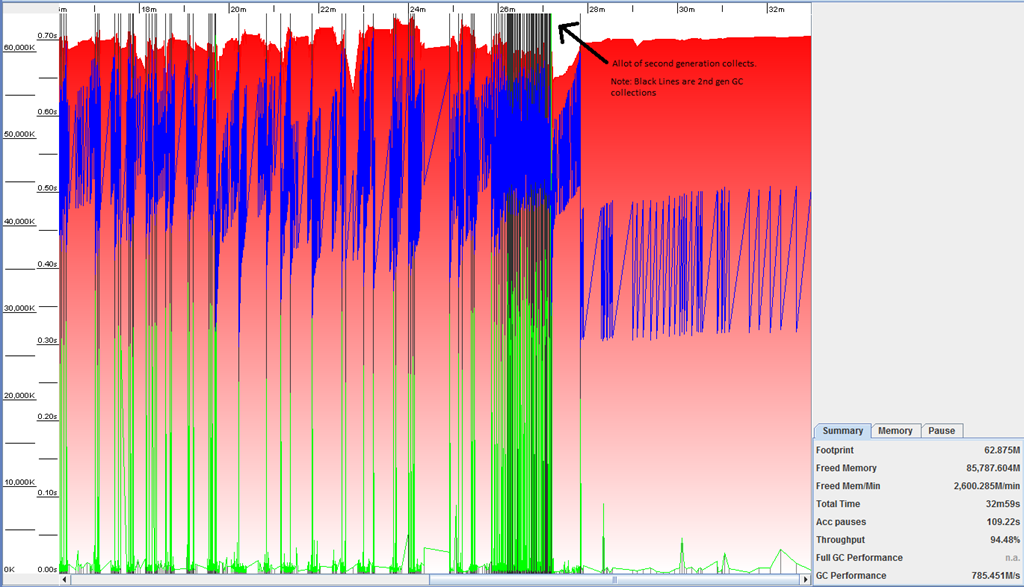
- Note the arrow shows allot of second generation GC collects (Black Lines), just after this occurred the import failed on roughly 4500 node entries and then we started getting timeouts from the Neo4j Server.
- Java.exe was roughly consuming between 150MB to 200MB of memory.
- GC Performance at 785M/S
Custom Heap Size (Windows)
# Initial Java Heap Size (in MB)
wrapper.java.initmemory=1024
# Maximum Java Heap Size (in MB)
wrapper.java.maxmemory=2048

- Java.exe was roughly consuming between 600MB to 750MB of memory.
- The heap size seemed to be reasonable location as there was plenty of available heap space to grow.
- Timeouts started to occur at around 3500 nodes.
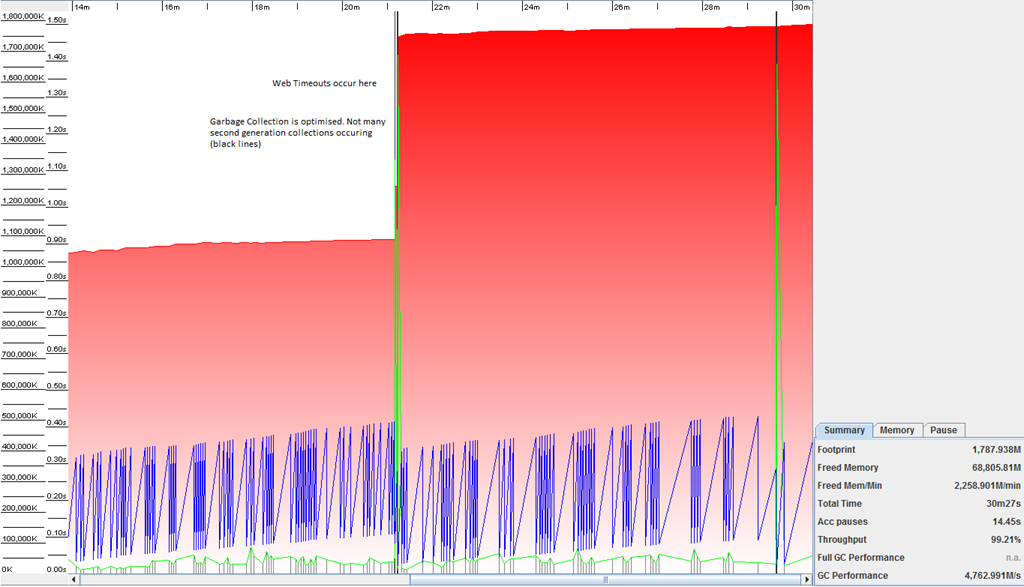
- Garbage Collection (Second Generation) is now optimized, not not many black lines
- The Heap Size shot up in size near point of timeouts
- The Blue line is working nicely, this is the used heap, which is remaining consistent at around the 450MB mark.
- GC performance at 4762 M/s


Another load run below, shows similar results but faster GC performance after the following changes to the system:
- JRE 1.7.0
- Windows Azure SDK 1.5
- Load data to new clean DB store.

- The GC performance is now at 12,974 M/s
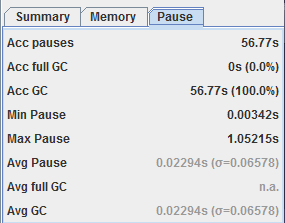
The custom heap size, definitely increased the productivity of the Garbage Collector, by having less second generation collections occurring, however, it has not solved the root cause of the problem, where web timeouts are occurring on the rest calls at around the 3500-4500 node mark.
The Rest API timed out at 3:11 local time.
[03:11:20] [Thread 27] Failed importing client
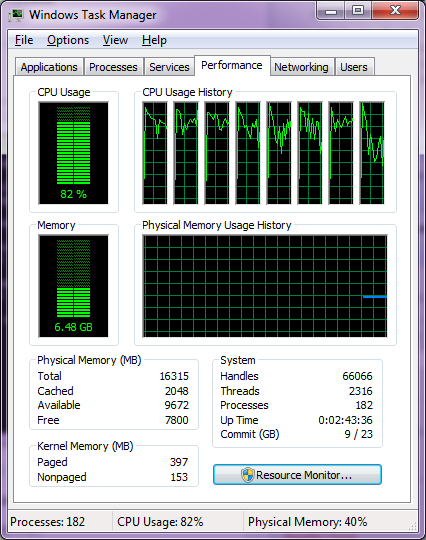
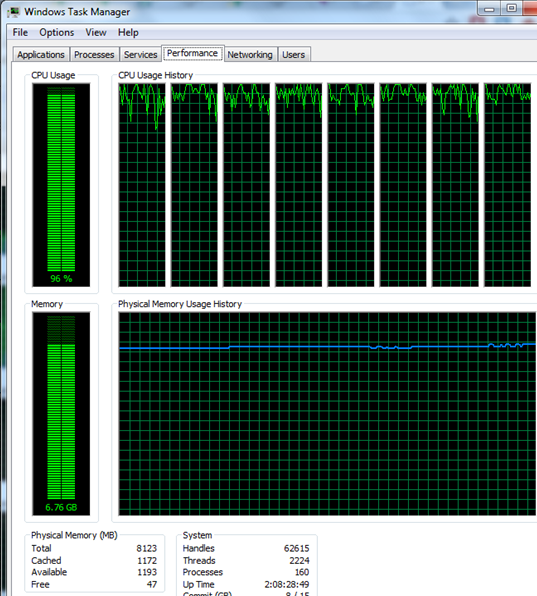
What is interesting is for the next 5 minutes, the server was utilisation all my 8 cores on the CPU, and I guess this was to flush or roll over the transaction logs, thus perhaps being the main cause for the rest API to become unresponsive. We can see evidence of this in the file system. As the datetime stamp is exactly 5 minutes after the 3:11 log entry when rest API stopped. Note size of file is in bytes. i.e. 3, 362,544 is +- 3MB.
Directory of C:\AzureTemp\neo4j-db
20/09/2011 03:16 PM 11 active_tx_log
20/09/2011 03:15 PM 3,362,544 nioneo_logical.log.
20/09/2011 03:16 PM 29,372 tm_tx_log.1
20/09/2011 03:16 PM 596 tm_tx_log.2
Directory of C:\AzureTemp\neo4j-db\index
20/09/2011 03:17 PM 1,499,357 lucene.log.1
Optimisation
JVM
The first thing I added was to ensure the JVM is running in Server Mode, 64 bit with a stack size of 2048k per thread (default is 1024k for 64 bit). I added the following to lines to the neo4j-wrapper.conf.
wrapper.java.additional.1=-d64
wrapper.java.additional.1=-server
wrapper.java.additional.1=-Xss2048k (We use multiple threads in the application.)
Using the JVM in server mode will optimise the code. JIT used in server mode gathers more information about the running code before optimizing, and thus does a far better job in optimizing the code
Neo4J Database Transaction Log Autorotation
The next part is to improve the write performance of the Neo4j database system. To do this, we can go two ways.
- Disable the transaction log autorotation
- Increase the size of the transaction log,
Read more about this here: http://wiki.neo4j.org/content/Performance_Guide (Write Performance Section)
Thus reducing the frequency of flushes from memory to the db disk subsystem, which will then reduce unresponsive Rest API responses.
Now, we a .Net client, so we will leverage the Rest API to execute a groovy script which will dynamically run the java code for us. However before we get all fancy with the Neo4jClient, lets first test this out, by bootstrapping the neo4j server and then using the embedded web server api to manually execute the java code in the performance guide to disable auto tx log rotation like this:
import org.neo4j.kernel.EmbeddedGraphDatabase.*
neo4j = g.getRawGraph()
txModule = neo4j.getConfig().getTxModule();
xaDsMgr = txModule.getXaDataSourceManager();
xaDs = xaDsMgr.getXaDataSource( "nioneodb" );
xaDs.setAutoRotate( false );
Here is a screenshot, of the commands executed via the console. I will be updating the NUGET package Neo4jClient to support disabling the TX logs shortly as well via rest api calls.
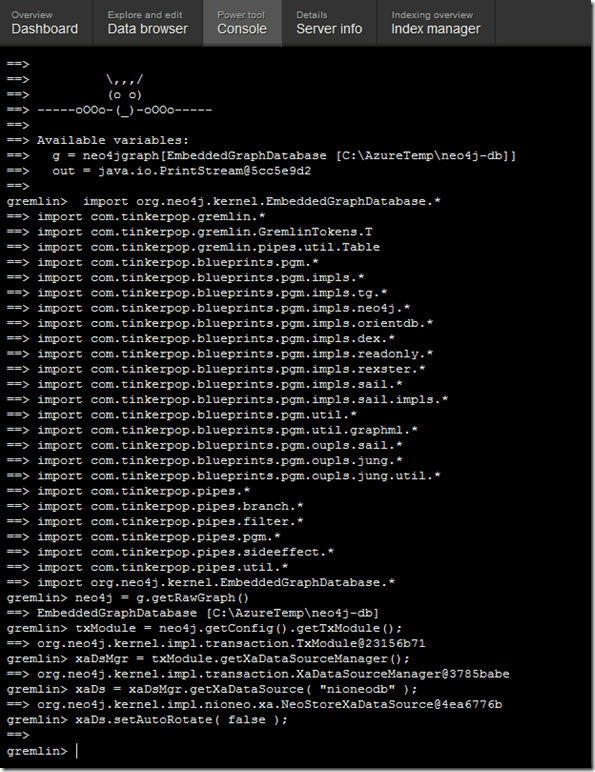
I now initiate an import of 35000 nodes witch also have full text lucene indexes. Below are screen shots at various stages
+- 400 Nodes imported

+- 1000 Nodes Imported
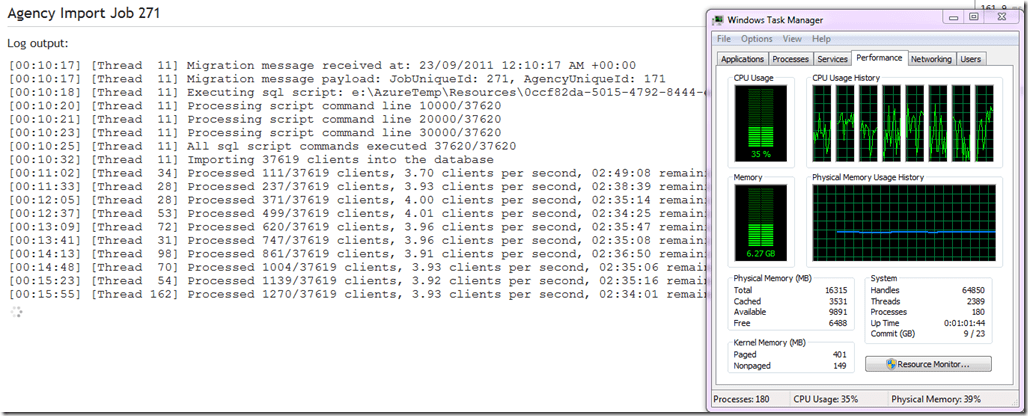

After running for +- 50 minutes, the system ran out of memory (dispite the machine having over 8gb of free memory!)

What is interesting is that Java is only using 706 memory.
So the conclusion here is that by turning of the TX Log rollers, it did not cause any performance or responsive increase on the rest API.
Lucene Index Rest Calls
We then disabled all Full text index creation calls when the nodes are created, to see the performance, and try isolated where the issue is coming from, is it Neo4j, Lucene or a combination of both.
By disabling the Lucene index calls, we got a faster response time. Roughly 4.5 nodes per second as apposed to 3.9 nodes per second.
However, the real test will be to see if the REST API becomes unresponsive, the JVM did indeed become unresponsive with the index calls turned off, this occurred at around 20000 node creations. A Node Creation is two rest calls for us, a gremlin query to check the node exists and then a POST.
Scenario – Un-Optimised Gremlin Code (not parameterised )
With Lucene Index Rest Calls Off and Heap Size 512->1024
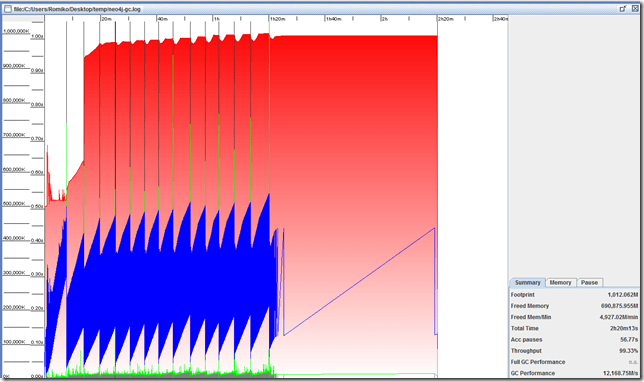
Attempt Load 37619 Nodes, each node with one relationship. Only +- 22000 Nodes made it. JAVA VM ran out of memory.
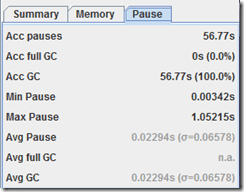
Below are the GC and Heap stats. Note the Java VM crashed here, it also ran out of memory. Which does not make sense, as the heap as plenty of space available. This is rather concerning as each Create Node operation is 2 rest requests, one a gremlin query to check node does not exist and then another POST to create the node. I would not expect this to have become unstable.

Scenario – Optimised Gremlin Code (parameterised)
We thought that perhaps using un-parameterised queries was the cause of the instability due to allot of JIT compilations occurring. So we decided to update the Neo4jClient to use parameterised gremlin queries for JIT optimisation. We also updated Neo4j to 1.5.M01, so a combination of both might improve the issues we experiencing.
With Lucene Index Rest Calls Off and Heap Size 512->1024
Neo4jClient NuGet package is now using PARAMTERISED queries to reduce JIT compilation.
Loaded 37619 Nodes, each node with one relationship.
Note: This uses neo4j-community-1.5.M01-windows and not 1.4..M04
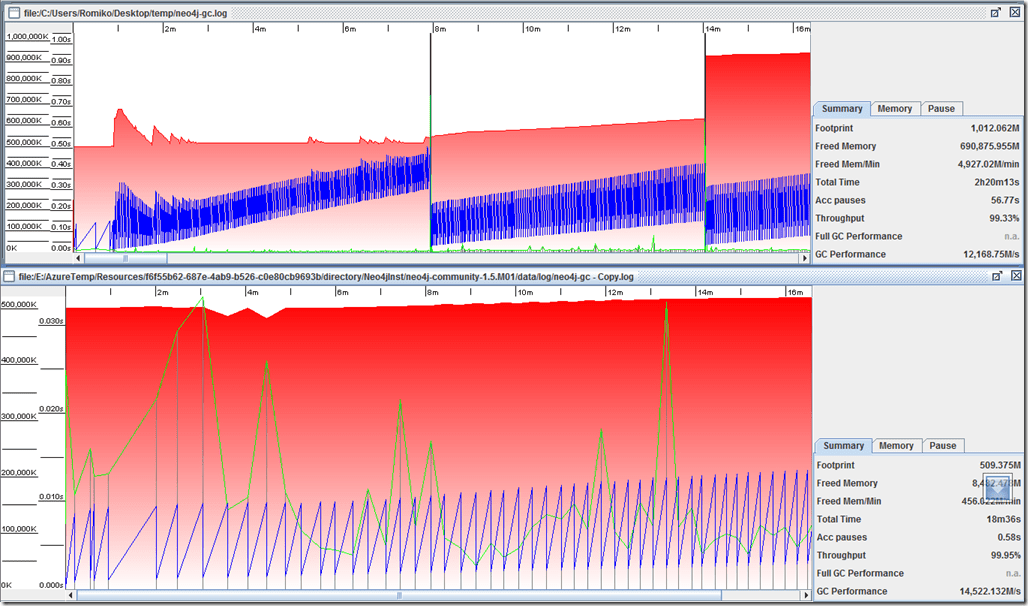
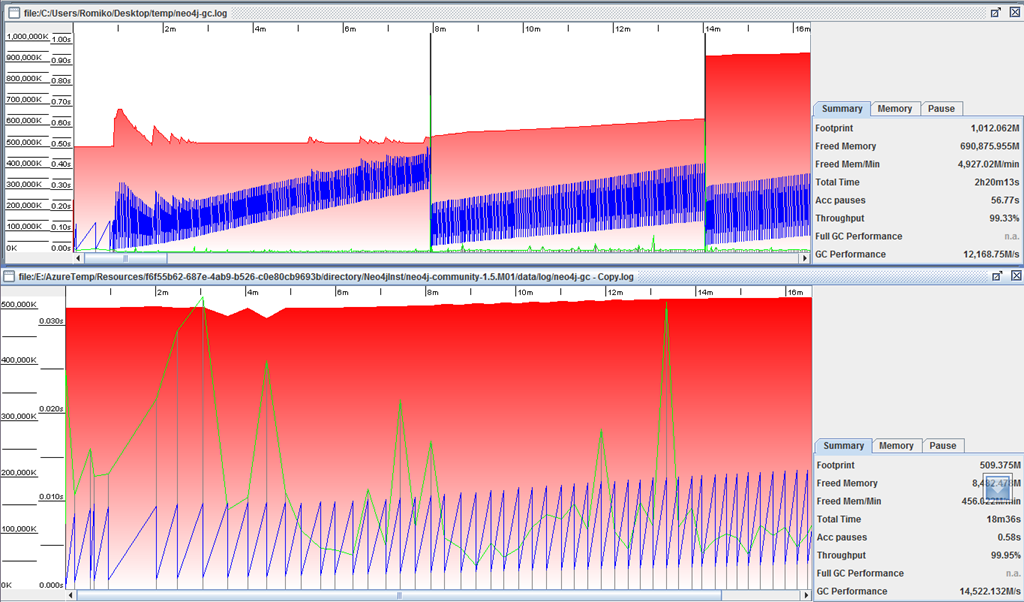
Below are the GC and Heap stats. Theoretically, the heap should be less used now, due to JIT compilation being reduced by passing in parameterised gremlin queries.
We noticed that with the parameterised queries, we got faster client loads, instead of 5 per second, it went to 6 per second.
We noticed immediately that the heap usage is allot less with parameterised queries. Notice this graph below, where the blue lines are allot less dense than all the previous graphs. The graph at the bottom in the image below is with the parameterised gremlin queries and Neo4j 1.5.M01.
At around 23000 nodes the Azure Worker Role on my local development machine failed with:
Unknown Hard Error. This is interesting as I did not get any JVM memory errors. This implies an issue in our Stress Test client, as we noticed over 27000 handles in our .Net client application. This raised a red flag for me on resource usage and possible thread management, lets get into this exciting part of the analysis…
Thread optimisation
We optimised the .Net client by ensuring no more than 70 thread call the rest API, I chose 70 threads as the Neo4j Server allocates 80 threads on the JVM, so we might as well be just below this value. This is absolutely amazing, by matching the number of simultaneous threads to call rest operations to the reserved threads neo4j has, we have a 5 times performance increase!!! We also noticed CPU utilisation is much more efficient now.

Now with the new thread optimised, we were able to do a full load into the system. With no errors.
MyStory Welcome, Temporary from MyStory Administration. Logout?
Agency Import Job 301
Log output:
[01:44:58] [Thread 10] Migration message received at: 26/09/2011 1:44:58 AM +00:00
[01:44:59] [Thread 10] Migration message payload: JobUniqueId: 301, AgencyUniqueId: 201
[01:44:59] [Thread 10] Executing sql script: e:\AzureTemp\Resources\4bb24cfd-0b35-4c91-83de-97f335159a49\temp\temp\RoleTemp\634526342992784034\output.sql
[01:45:01] [Thread 10] Processing script command line 10000/37620
[01:45:03] [Thread 10] Processing script command line 20000/37620
[01:45:05] [Thread 10] Processing script command line 30000/37620
[01:45:06] [Thread 10] All sql script commands executed 37620/37620
[01:45:13] [Thread 10] Importing 37619 clients into the database
[01:45:44] [Thread 12] Processed 169/37619 clients, 5.62 clients per second, 01:51:06 remaining
[01:46:16] [Thread 29] Processed 360/37619 clients, 5.80 clients per second, 01:47:02 remaining
[01:46:29] [Thread 69] Processed 1000/37619 clients, 13.30 clients per second, 00:45:52 remaining
[01:46:50] [Thread 28] Processed 2000/37619 clients, 20.78 clients per second, 00:28:34 remaining
[01:47:11] [Thread 30] Processed 3000/37619 clients, 25.47 clients per second, 00:22:39 remaining
[01:47:33] [Thread 32] Processed 4000/37619 clients, 28.71 clients per second, 00:19:31 remaining
[01:47:55] [Thread 76] Processed 5000/37619 clients, 30.95 clients per second, 00:17:33 remaining
[01:48:18] [Thread 87] Processed 6000/37619 clients, 32.52 clients per second, 00:16:12 remaining
[01:48:46] [Thread 13] Processed 7000/37619 clients, 32.95 clients per second, 00:15:29 remaining
[01:49:10] [Thread 70] Processed 8000/37619 clients, 33.84 clients per second, 00:14:35 remaining
[01:49:36] [Thread 54] Processed 9000/37619 clients, 34.25 clients per second, 00:13:55 remaining
[01:50:02] [Thread 64] Processed 10000/37619 clients, 34.69 clients per second, 00:13:16 remaining
[01:50:29] [Thread 50] Processed 11000/37619 clients, 34.85 clients per second, 00:12:43 remaining
[01:50:57] [Thread 82] Processed 12000/37619 clients, 34.97 clients per second, 00:12:12 remaining
[01:51:25] [Thread 27] Processed 13000/37619 clients, 35.02 clients per second, 00:11:42 remaining
[01:51:54] [Thread 10] Processed 14000/37619 clients, 34.99 clients per second, 00:11:15 remaining
[01:52:24] [Thread 76] Processed 15000/37619 clients, 34.89 clients per second, 00:10:48 remaining
[01:52:54] [Thread 68] Processed 15970/37619 clients, 34.70 clients per second, 00:10:23 remaining
[01:52:55] [Thread 17] Processed 16000/37619 clients, 34.69 clients per second, 00:10:23 remaining
[01:53:25] [Thread 59] Processed 16918/37619 clients, 34.43 clients per second, 00:10:01 remaining
[01:53:27] [Thread 46] Processed 17000/37619 clients, 34.42 clients per second, 00:09:59 remaining
[01:53:58] [Thread 58] Processed 17998/37619 clients, 34.33 clients per second, 00:09:31 remaining
[01:53:58] [Thread 34] Processed 18000/37619 clients, 34.32 clients per second, 00:09:31 remaining
[01:54:28] [Thread 21] Processed 18900/37619 clients, 34.07 clients per second, 00:09:09 remaining
[01:54:34] [Thread 13] Processed 19000/37619 clients, 33.90 clients per second, 00:09:09 remaining
[01:55:04] [Thread 35] Processed 19973/37619 clients, 33.81 clients per second, 00:08:41 remaining
[01:55:05] [Thread 86] Processed 20000/37619 clients, 33.80 clients per second, 00:08:41 remaining
[01:55:36] [Thread 93] Processed 20910/37619 clients, 33.61 clients per second, 00:08:17 remaining
[01:55:40] [Thread 42] Processed 21000/37619 clients, 33.54 clients per second, 00:08:15 remaining
[01:56:10] [Thread 31] Processed 21886/37619 clients, 33.35 clients per second, 00:07:51 remaining
[01:56:14] [Thread 81] Processed 22000/37619 clients, 33.32 clients per second, 00:07:48 remaining
[01:56:44] [Thread 17] Processed 22809/37619 clients, 33.02 clients per second, 00:07:28 remaining
[01:56:51] [Thread 77] Processed 23000/37619 clients, 32.96 clients per second, 00:07:23 remaining
[01:57:22] [Thread 42] Processed 23770/37619 clients, 32.63 clients per second, 00:07:04 remaining
[01:57:30] [Thread 71] Processed 24000/37619 clients, 32.57 clients per second, 00:06:58 remaining
[01:58:01] [Thread 44] Processed 24652/37619 clients, 32.13 clients per second, 00:06:43 remaining
[01:58:16] [Thread 42] Processed 25000/37619 clients, 31.94 clients per second, 00:06:35 remaining
[01:58:47] [Thread 9] Processed 25691/37619 clients, 31.60 clients per second, 00:06:17 remaining
[01:59:03] [Thread 84] Processed 26000/37619 clients, 31.33 clients per second, 00:06:10 remaining
[01:59:36] [Thread 91] Processed 26625/37619 clients, 30.88 clients per second, 00:05:56 remaining
[01:59:57] [Thread 74] Processed 27000/37619 clients, 30.57 clients per second, 00:05:47 remaining
[02:00:27] [Thread 79] Processed 27583/37619 clients, 30.20 clients per second, 00:05:32 remaining
[02:00:47] [Thread 82] Processed 28000/37619 clients, 30.01 clients per second, 00:05:20 remaining
[02:01:17] [Thread 64] Processed 28591/37619 clients, 29.67 clients per second, 00:05:04 remaining
[02:01:38] [Thread 17] Processed 29000/37619 clients, 29.46 clients per second, 00:04:52 remaining
[02:02:08] [Thread 24] Processed 29610/37619 clients, 29.18 clients per second, 00:04:34 remaining
[02:02:29] [Thread 58] Processed 30000/37619 clients, 28.98 clients per second, 00:04:22 remaining
[02:02:59] [Thread 69] Processed 30566/37619 clients, 28.68 clients per second, 00:04:05 remaining
[02:03:23] [Thread 89] Processed 31000/37619 clients, 28.46 clients per second, 00:03:52 remaining
[02:03:23] [Thread 88] Processed 31000/37619 clients, 28.46 clients per second, 00:03:52 remaining
[02:03:53] [Thread 30] Processed 31556/37619 clients, 28.18 clients per second, 00:03:35 remaining
[02:04:16] [Thread 61] Processed 32000/37619 clients, 28.00 clients per second, 00:03:20 remaining
[02:04:48] [Thread 66] Processed 32568/37619 clients, 27.73 clients per second, 00:03:02 remaining
[02:05:18] [Thread 20] Processed 33000/37619 clients, 27.41 clients per second, 00:02:48 remaining
[02:05:48] [Thread 13] Processed 33529/37619 clients, 27.16 clients per second, 00:02:30 remaining
[02:06:15] [Thread 56] Processed 34000/37619 clients, 26.95 clients per second, 00:02:14 remaining
[02:06:45] [Thread 92] Processed 34442/37619 clients, 26.66 clients per second, 00:01:59 remaining
[02:07:16] [Thread 95] Processed 34959/37619 clients, 26.44 clients per second, 00:01:40 remaining
[02:07:17] [Thread 91] Processed 35000/37619 clients, 26.44 clients per second, 00:01:39 remaining
[02:07:49] [Thread 95] Processed 35369/37619 clients, 26.09 clients per second, 00:01:26 remaining
[02:08:19] [Thread 41] Processed 35867/37619 clients, 25.88 clients per second, 00:01:07 remaining
[02:08:28] [Thread 66] Processed 36000/37619 clients, 25.81 clients per second, 00:01:02 remaining
[02:08:59] [Thread 45] Processed 36485/37619 clients, 25.60 clients per second, 00:00:44 remaining
[02:09:29] [Thread 78] Processed 36922/37619 clients, 25.37 clients per second, 00:00:27 remaining
[02:09:34] [Thread 81] Processed 37000/37619 clients, 25.34 clients per second, 00:00:24 remaining
[02:10:04] [Thread 12] Processed 37287/37619 clients, 25.01 clients per second, 00:00:13 remaining
[02:10:27] [Thread 10] All 37619 clients imported
Threads on .Net Client
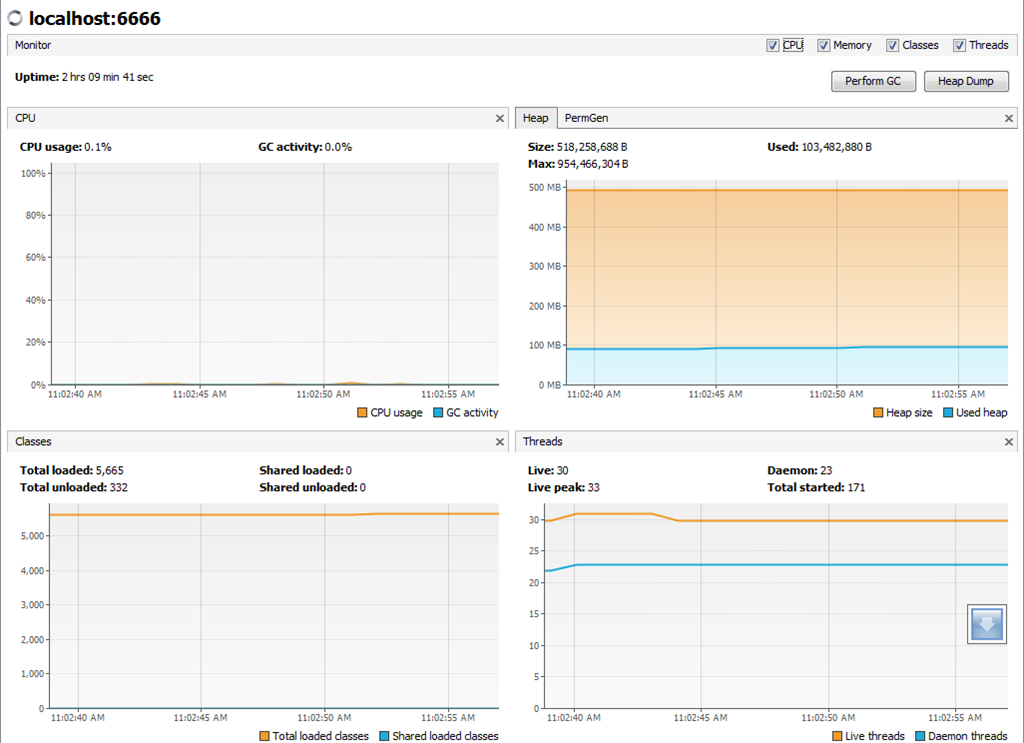
By configuring the .Net client to use a similar number of threads that Neo4j uses, we were able to achieve a 5 times performance boost.
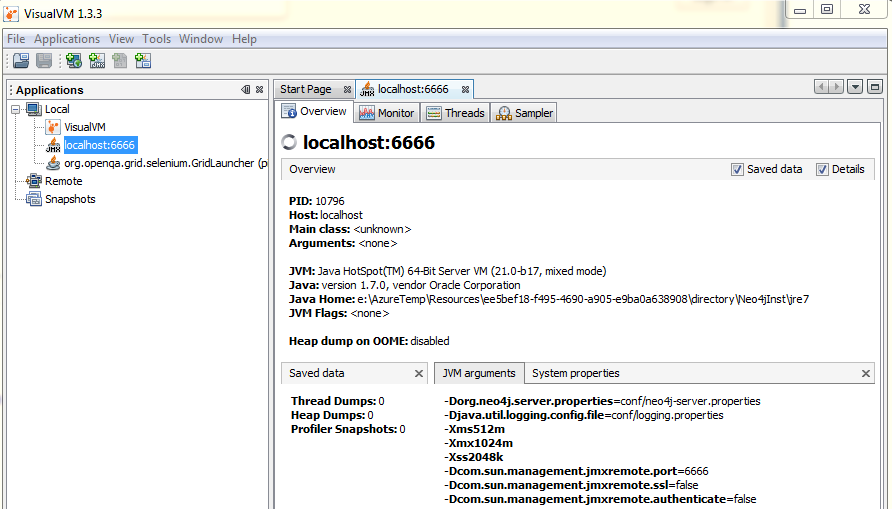
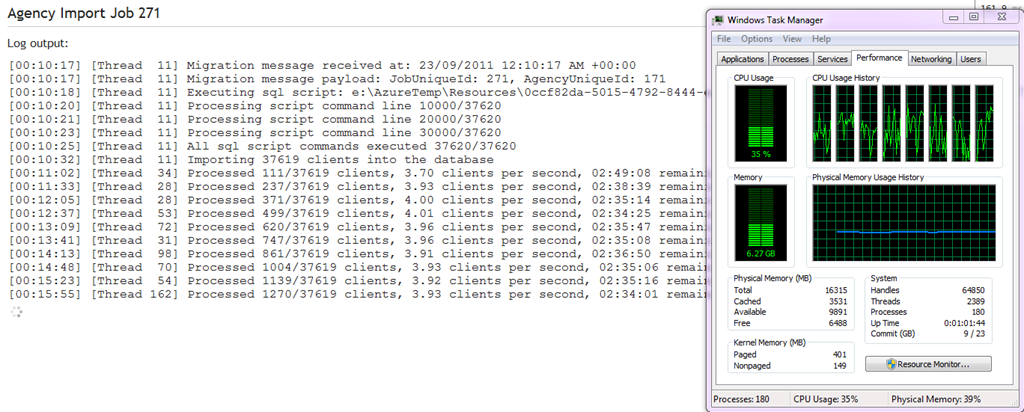
The processor utilization also became allot more efficient. Notice Neo4j has 80 threads, so we limit the rest calls to roughly this amount, I chose 70 threads.
So in .Net, we match the threads like so:
var processorCount = Environment.ProcessorCount;
var threadsToAllocate = (int)Math.Ceiling(processorCount*10 * 0.9);
var options = new ParallelOptions { MaxDegreeOfParallelism = threadsToAllocate };
Parallel.ForEach(clients, options, client =>{…

Note: My machine has 8 cores, Neo4j allocated 10 threads per core, therefore your code should detect how many cores there are and then allocate the threads of 10 threads per core!!
e,g if you run it on a dual core, Neo4j will only have 20 threads.
Batching Rest Requests
Once we fixed the threading issue, by matching the threads on the consumer to Neo4j, we then decided to test batching rest requests.
We implemented batching in the Neo4jClient NuGet package, this will reduce the amount of REST calls to the server for each node it needs to create, so if a node needed two relationships, instead of doing 3 rest calls, we do one rest call.
Test Run (Without Indexes)
The batching did not introduce any significant performance improvement when it only batched on average two rest calls. However, we will do another test run with indexing rest calls as perhaps you only notice this for a certain amount of rest calls batched together.
Average Bach Size (Node creation + Relationship creation) = 2 rest requests
[02:37:04] [Thread 34] Processed 17000/37619 clients, 34.51 clients per second, 00:09:57 remaining
Test Run (With Indexes)
We now included the indexes in the batch request. We noticed that sometimes web calls would timeout, but since we use the CIRCUIT BREAKER pattern, the service level always stayed above 80% and never tripped.
[04:52:38] [Thread 9] Importing 37592 clients into the database
[04:53:09] [Thread 46] Processed 169/37592 clients, 5.55 clients per second, 01:52:19 remaining
[04:53:40] [Thread 62] Processed 422/37592 clients, 6.76 clients per second, 01:31:35 remaining
[04:53:55] [Thread 49] Processed 1000/37592 clients, 13.03 clients per second, 00:46:48 remaining
[04:53:55] [Thread 54] Processed 1000/37592 clients, 13.03 clients per second, 00:46:48 remaining
[04:54:19] [Thread 10] Processed 2000/37592 clients, 19.89 clients per second, 00:29:49 remaining
[04:54:19] [Thread 50] Processed 2000/37592 clients, 19.88 clients per second, 00:29:49 remaining
[04:54:43] [Thread 32] Processed 3000/37592 clients, 23.96 clients per second, 00:24:03 remaining
[04:54:43] [Thread 11] Processed 3000/37592 clients, 23.96 clients per second, 00:24:03 remaining
[04:55:09] [Thread 64] Processed 4000/37592 clients, 26.51 clients per second, 00:21:07 remaining
[04:55:09] [Thread 23] Processed 4000/37592 clients, 26.50 clients per second, 00:21:07 remaining
[04:55:36] [Thread 70] Processed 5000/37592 clients, 28.13 clients per second, 00:19:18 remaining
[04:55:36] [Thread 57] Processed 5000/37592 clients, 28.13 clients per second, 00:19:18 remaining
[04:56:02] [Thread 25] Processed 6000/37592 clients, 29.41 clients per second, 00:17:54 remaining
[04:56:02] [Thread 85] Processed 6000/37592 clients, 29.41 clients per second, 00:17:54 remaining
[04:56:30] [Thread 102] Processed 7000/37592 clients, 30.13 clients per second, 00:16:55 remaining
[04:56:30] [Thread 51] Processed 7000/37592 clients, 30.13 clients per second, 00:16:55 remaining
[04:57:01] [Thread 102] Processed 7995/37592 clients, 30.46 clients per second, 00:16:11 remaining
[04:57:01] [Thread 96] Processed 8000/37592 clients, 30.45 clients per second, 00:16:11 remaining
[04:57:01] [Thread 70] Processed 8000/37592 clients, 30.45 clients per second, 00:16:11 remaining
[04:57:31] [Thread 65] Processed 8988/37592 clients, 30.68 clients per second, 00:15:32 remaining
[04:57:31] [Thread 84] Processed 9000/37592 clients, 30.68 clients per second, 00:15:31 remaining
[04:57:32] [Thread 46] Processed 9000/37592 clients, 30.68 clients per second, 00:15:31 remaining
[04:58:02] [Thread 109] Processed 10000/37592 clients, 30.89 clients per second, 00:14:53 remaining
[04:58:32] [Thread 12] Processed 10950/37592 clients, 30.93 clients per second, 00:14:21 remaining
[04:58:34] [Thread 11] Processed 11000/37592 clients, 30.94 clients per second, 00:14:19 remaining
[04:58:34] [Thread 16] Processed 11000/37592 clients, 30.94 clients per second, 00:14:19 remaining
[04:58:39] [Thread 91] Error occured importing client EAW2000203-Child4128. Started this attempt at 26/09/2011 4:58:37 AM +00:00. Started the very first attempt to import this client at 26/09/2011 4:58:37 AM +00:00.
[04:58:39] [Thread 91] Circuit breaker now reports the service level as 80.
[04:58:39] [Thread 101] Circuit breaker now reports the service level as 100.
[04:58:42] [Thread 69] Error occured importing client EAW2000002-Child3994. Started this attempt at 26/09/2011 4:58:40 AM +00:00. Started the very first attempt to import this client at 26/09/2011 4:58:40 AM +00:00.
[04:58:42] [Thread 69] Circuit breaker now reports the service level as 80.
[04:58:42] [Thread 24] Circuit breaker now reports the service level as 100.
[04:59:04] [Thread 25] Processed 11963/37592 clients, 31.01 clients per second, 00:13:46 remaining
[04:59:05] [Thread 89] Processed 12000/37592 clients, 31.02 clients per second, 00:13:45 remaining
[04:59:05] [Thread 21] Processed 12000/37592 clients, 31.02 clients per second, 00:13:45 remaining
[04:59:13] [Thread 22] Error occured importing client EAW3000118. Started this attempt at 26/09/2011 4:59:11 AM +00:00. Started the very first attempt to import this client at 26/09/2011 4:59:11 AM +00:00.
[04:59:13] [Thread 22] Circuit breaker now reports the service level as 80.
[04:59:13] [Thread 58] Circuit breaker now reports the service level as 100.
[04:59:28] [Thread 99] Error occured importing client EAW3000105-Child4273. Started this attempt at 26/09/2011 4:59:26 AM +00:00. Started the very first attempt to import this client at 26/09/2011 4:59:26 AM +00:00.
[04:59:28] [Thread 99] Circuit breaker now reports the service level as 80.
[04:59:28] [Thread 89] Circuit breaker now reports the service level as 100.
[04:59:35] [Thread 43] Processed 12956/37592 clients, 31.06 clients per second, 00:13:13 remaining
[04:59:37] [Thread 49] Processed 13000/37592 clients, 31.06 clients per second, 00:13:11 remaining
[04:59:37] [Thread 102] Processed 13000/37592 clients, 31.06 clients per second, 00:13:11 remaining
[05:00:07] [Thread 106] Processed 13966/37592 clients, 31.11 clients per second, 00:12:39 remaining
[05:00:08] [Thread 25] Processed 14000/37592 clients, 31.12 clients per second, 00:12:38 remaining
[05:00:08] [Thread 86] Processed 14000/37592 clients, 31.12 clients per second, 00:12:38 remaining
[05:00:38] [Thread 78] Processed 14926/37592 clients, 31.08 clients per second, 00:12:09 remaining
[05:00:41] [Thread 83] Processed 15000/37592 clients, 31.09 clients per second, 00:12:06 remaining
I wanted to also ensure indexing via Neo4j to Lucene did not affect the heap usage and frequency is a negative way,, that could possible cause the heap to grow, below is a image showing that the indexing is keeping the heap size and usage within normal range (blue lines)
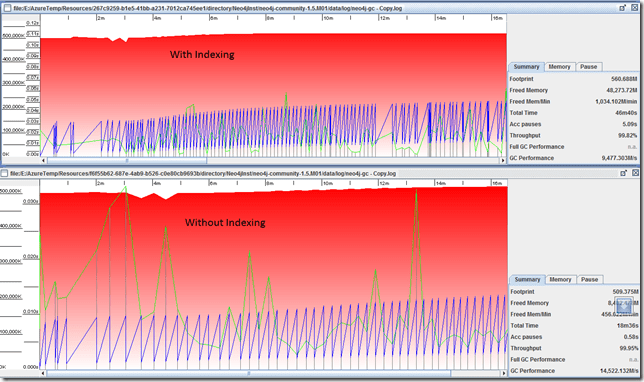
Also, CPU Utilisation was high with the indexing, proving efficient use of CPU.

Below is a graph of heap usage importing 37000 clients, with all the optimisation and tweaks. This run in around 30 minutes.
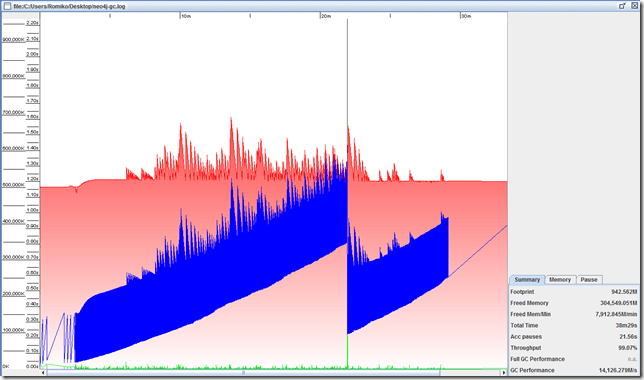
Desired throughput achieved 
Note, heap size did not need to grow beyond 512, as gremlin queries are parameterised.
Summary
Increasing Heap Size to 512m –> 1024m was sufficient to reduce GC collection.
Increasing Stack size from 1024 –> 2048k improves multiple thread operations.
Switching on GC logging is definitely a good way to get a view of how your heap is being used.
Disabling neo4j transaction roll over logging did not improve performance.
Disabling the Lucene index creations via the REST API solved the instability issues with the Rest API. optimising the threads on the client, and using parameterised queries removed the instability issue.
The REST API calls are causing the system to become unstable (Out Of memory errors). If the threads are optimised on the client with the use of parameterised gremlin queries, upgrade to Neo4j1.5.01M, incorporate batching, then Lucene indexing is also optimised.
CPU utilization is much more efficient after thread optimisation.
Parameterised queries and upgrading to Neo4j1.5.M01 increased performance and DRASTICALLY reduced the frequency of the heap size usage thus stabilising the heap usage.
*** By configuring the .Net client that sent REST calls on different threads to limit the thread count to 70 threads, we were able to improve performance 5 fold. This is the most significant improvement. 70 threads were chosen to match the similar number (80) that Neo4j reserves in the JVM. +- 35 nodes per second as compared with 5-6 nodes per second.
We now implemented batching in the Neo4Client NUGet package to further increase performance.
Batching improved performance.
Basically in our scenario, a node created between 4 to 8 index entries, this with the current release of Neo4j 1.4.1, means 4-8 rest calls. An issue has been logged to improve the rest calls to just one, where you can then parse in a dictionary of key/val pairs in the request body of the POST. The issue is located here:
https://github.com/neo4j/community/issues/25
A separate issue has been created to investigate why the REST API for indexes causes the system to become unstable.
https://github.com/neo4j/community/issues/28
In Short:
Optimise Threads from your client to be below 80 as Neo4j Server allocated 80 threads to the JVM, so no point in sending rest calls on more than 80 threads. (This is for a machine with 8 cores (Neo4j allocated 10 threads per core)).
So if you neo4j server is a dual core (10 * 2) = 20 threads. Quad Core = 40 Threads.
Use the Rest batching API.
If using Gremlin, use parameterised queries.
Use Circuit Breaker pattern to implement retry logic if calls fail (Optional)



















 Romiko Derbynew
You must be logged in to post a comment.