ASP.NET MVC Rendering Enum DropDownLists, Radio Buttons and ListBoxes

Hi Folks,

Sometimes you will want to display Enums for your lists. This can easily be done with some HTML extensions and then evaluating the member expression.

It is a two step process.

  1. Get the expression and and get the type
  2. If the Model has data, then compile the expression to get the value
  3. If the Model does not have data, then parse the expression and get the enum values via reflection

Here is some HTML Helper extensions that you can find useful. It also has support for place holders, where you can provide a hint or tip as the first element in the list for non HTML 5 support.

Remember this important rule.

  1. Your model for single select items from a DropDownList should NEVER be an IEnumerable, it should just be a string or int or enum etc, since it is only ONE value going in the form post.
  2. Use the ViewBag to store the entire list of items to CHOOSE from
  3. Use the model to STORE the single value item SELECTED
  4. For multiple selects, like ListBox, then you can have an IEnumerable in the model, since the user will select multiple values.

Allot of people get confused and assume that because they need a drop down list for a typed view, that it must be IEnumerable or IList or whatever sort of collection in the model, this is not true for single select items from lists.

By understanding the fundamentals of HTTP GET and HTTP POST, you will then realise that if only single item form a list needs to be selected that the form values is only going to be one item, and hence your model can represent how the HTTP FORM DATA coming over the wire looks like. Perhaps a blog post soon on HTML and MVC Model Bindings….

Note, that ordering of enum values is supported with Display attributes. Also, since you can have nullable enums, the EnumRadioButtonFor support none option, turn it off with explicit false.

@Html.EnumRadioButtonFor(m => m.Gender, false)
public enum Gender {
 [Display(Name="Male", Order=0)]
 Male,
 [Display(Name="Female", Order=1)]
 Female,
 [Display(Name="WhoTheHellKnows", Order=2)]
 Both
}

public class MyModel
{
 public string User {get; set;}
 public Gender Gender {get; set;}
 public IEnumerable {get; set;} //This is ok for multi select lists, like ListBox
}

Remember HTTP GET –>Controller–> ViewBag.Users(Populate from database in controller for non enums) –> @Html.DropDownListFor(m => m.User, ViewBag.Users)

For Enums
@Html.EnumDropDownListFor(m => m.Gender)

See above, the SINGULAR property in the model for m.User.

The ViewBag.Users has an IEnumerble of users.

Right, now here is your HTML extensions for ENUM lists

using System;
using System.Collections;
using System.Collections.Generic;
using System.ComponentModel.DataAnnotations;
using System.Linq;
using System.Linq.Expressions;
using System.Reflection;
using System.Text;
using System.Web;
using System.Web.Mvc;
using System.Web.Mvc.Html;

namespace Web
{
    public static class HtmlHelperExtensions
    {
        public static MvcHtmlString EnumDropDownList<TEnumType>(this HtmlHelper htmlHelper, string name, TEnumType value)
        {
            var selectItems = GetSelectItemsForEnum(typeof(TEnumType), value);
            return htmlHelper.DropDownList(name, selectItems);
        }

        public static MvcHtmlString EnumDropDownListPlaceholder<TEnumType>(this HtmlHelper htmlHelper, string name, TEnumType value, string placeholderName = null)
        {
            var selectItems = GetSelectItemsForEnum(typeof(TEnumType), value);

            AddPlaceHolderToSelectItems(placeholderName, selectItems);
            return htmlHelper.DropDownList(name, selectItems, new { @class = "placeholder" });
        }

        public static MvcHtmlString GenerateHiddenFieldsForIncomingModel<TModel, TProperty>(
        this HtmlHelper<TModel> htmlHelper,
        Expression<Func<TModel, TProperty>> expression,
        object model)
        {
            var sb = new StringBuilder();

            foreach (PropertyInfo info in model.GetType().GetProperties())
            {
                if (info.CanRead)
                {
                    var o = info.GetValue(model, null);

                    if (o is DateTimeOffset || o is DateTime)
                        sb.Append("<input type='hidden' name='" + info.Name + "' value='" + string.Format("{0:dd MMM yyyy}", o) + "'/>");
                    else if (!(o is IList))
                        sb.Append("<input type='hidden' name='" + info.Name + "' value='" + o + "'/>");
                }
            }
            return MvcHtmlString.Create(sb.ToString());
        }

        public static MvcHtmlString EnumRadioButtonFor<TModel, TProperty>(
        this HtmlHelper<TModel> htmlHelper,
        Expression<Func<TModel, TProperty>> expression,
        bool includeNoneOption = true,
        bool isDisabled = false,
        string cssClass = null
    ) where TModel : class
        {
            var memberExpression = expression.Body as MemberExpression;
            if (memberExpression == null)
                throw new InvalidOperationException("Expression must be a member expression");

            var name = ExpressionHelper.GetExpressionText(expression);
            var fullName = htmlHelper.ViewContext.ViewData.TemplateInfo.GetFullHtmlFieldName(name);
            ModelState currentValueInModelState;
            var couldGetValueFromModelState = htmlHelper.ViewData.ModelState.TryGetValue(fullName, out currentValueInModelState);
            object selectedValue = null;
            if (!couldGetValueFromModelState && htmlHelper.ViewData.Model != null)
            {
                selectedValue = expression.Compile()(htmlHelper.ViewData.Model);
            }

            var enumNames = GetSelectItemsForEnum(typeof(TProperty), selectedValue).Where(n => !string.IsNullOrEmpty(n.Value)).ToList();

            if (includeNoneOption)
            {
                if(!enumNames.Any(e => e.ToLowerInvariant() == "none"))
                    enumNames.Add("None");
            }

            var metaData = ModelMetadata.FromLambdaExpression(expression, htmlHelper.ViewData);
            var sb = new StringBuilder();
            sb.AppendFormat(
                "<ul class=\"radio-button-list{0}\">",
                string.IsNullOrEmpty(cssClass) ? string.Empty : " " + cssClass);
            foreach (var enumName in enumNames)
            {
                var id = string.Format(
                    "{0}_{1}_{2}",
                    htmlHelper.ViewData.TemplateInfo.HtmlFieldPrefix,
                    metaData.PropertyName,
                    enumName.Value
                    );

                if (id.StartsWith("-"))
                    id = id.Remove(0, 1);

                var value = enumName;
                if (includeNoneOption && enumName == "None")
                    value = string.Empty;

                sb.AppendFormat(
                    "<li>{2} <label for=\"{0}\">{1}</label></li>",
                    id,
                    HttpUtility.HtmlEncode(enumName),
                    isDisabled
                        ? htmlHelper.RadioButtonFor(expression, value, new {id, disabled = "disabled"}).ToHtmlString()
                        : htmlHelper.RadioButtonFor(expression, value, new {id}).ToHtmlString()
                    );
            }
            sb.Append("</ul>");
            return MvcHtmlString.Create(sb.ToString());
        }

        public static MvcHtmlString GuidanceNoteFor<TModel, TProperty>(
        this HtmlHelper<TModel> htmlHelper,
        Expression<Func<TModel, TProperty>> expression,
        string guidanceText)
        {
            var memberExpression = expression.Body as MemberExpression;
            if (memberExpression == null)
                throw new InvalidOperationException("Expression must be a member expression");

            //var metaData = ModelMetadata.FromLambdaExpression(expression, htmlHelper.ViewData);
            var sb = new StringBuilder();
            var name = ExpressionHelper.GetExpressionText(expression);
            var outterType = expression.Parameters[0].Type;
            var attributes = outterType.GetProperty(name).GetCustomAttributesData();
            var displayText = "";

            foreach(var attr in attributes)
            {
                if (attr.NamedArguments != null)
                foreach (var namedArg in attr.NamedArguments.Where(namedArg => namedArg.MemberInfo.Name == "Name"))
                {
                    displayText = (string)namedArg.TypedValue.Value;
                }
            }

            if (String.IsNullOrEmpty(guidanceText))
                guidanceText = displayText;

            sb.Append("<div class=\"guidance-img\"></div>");
            sb.Append("<div class=\"guidance-box\">");
            sb.Append("    <table class=\"infobox\" width=\"250\" cellspacing=\"0\" cellpadding=\"0\">");
            sb.Append("    <tbody>");
            sb.Append("        <tr>");
            sb.Append("            <td class=\"left\" width=\"14\" rowspan=\"3\">");
            sb.Append("                <div></div>");
            sb.Append("            </td>");
            sb.Append("            <td class=\"top\" colspan=\"2\"><div></div>");
            sb.Append("            </td>");
            sb.Append("        </tr>");
            sb.Append("        <tr>");
            sb.Append("            <td class=\"info\" width=\"356\">");
            sb.Append("                <a href=\"javascript: void(0);\">close<div></div></a>");
            sb.AppendFormat("                <p>{0}</p>", guidanceText);
            sb.Append("            </td>");
            sb.Append("            <td class=\"right\" width=\"3\"><div></div>");
            sb.Append("            </td>");
            sb.Append("        </tr>");
            sb.Append("        <tr>");
            sb.Append("            <td class=\"bottom\" colspan=\"2\"><div></div>");
            sb.Append("            </td>");
            sb.Append("        </tr>");
            sb.Append("    </tbody>");
            sb.Append("</table>");
            sb.Append("</div>");

            return MvcHtmlString.Create(sb.ToString());
        }

        public static MvcHtmlString EnumDropDownListFor<TModel, TProperty>(this HtmlHelper<TModel> htmlHelper, Expression<Func<TModel, TProperty>> expression, IDictionary<string, object> htmlAttributes = null) where TModel : class
        {
            var memberExpression = expression.Body as MemberExpression;
            if (memberExpression == null)
                throw new InvalidOperationException("Expression must be a member expression");

            var name = ExpressionHelper.GetExpressionText(expression);
            var fullName = htmlHelper.ViewContext.ViewData.TemplateInfo.GetFullHtmlFieldName(name);
            ModelState currentValueInModelState;
            var couldGetValueFromModelState = htmlHelper.ViewData.ModelState.TryGetValue(fullName, out currentValueInModelState);
            object selectedValue = null;
            if (!couldGetValueFromModelState &&
                htmlHelper.ViewData.Model != null)
            {
                selectedValue = expression.Compile()(htmlHelper.ViewData.Model);
            }

            var placeholderName = PlaceholderName(memberExpression);

            htmlAttributes = ApplyHtmlAttributes(htmlAttributes, placeholderName);

            var selectItems = GetSelectItemsForEnum(typeof(TProperty), selectedValue).ToList();
            AddPlaceHolderToSelectItems(placeholderName, selectItems);

            return htmlHelper.DropDownListFor(expression, selectItems, htmlAttributes);
        }

        public static MvcHtmlString PlaceholderDropDownListFor<TModel, TProperty>(this HtmlHelper<TModel> htmlHelper, Expression<Func<TModel, TProperty>> expression, IEnumerable<SelectListItem> selectList, string optionLabel, IDictionary<string, object> htmlAttributes = null)
            where TModel : class
        {
            var memberExpression = expression.Body as MemberExpression;
            if (memberExpression == null)
            throw new InvalidOperationException("Expression must be a member expression");

            IList<SelectListItem> list = selectList.ToList();
            var placeholderName = PlaceholderName(memberExpression);
            AddPlaceHolderToSelectItems(placeholderName, list);

            htmlAttributes = ApplyHtmlAttributes(htmlAttributes, placeholderName);

            return htmlHelper.DropDownListFor(expression, list, string.IsNullOrEmpty(optionLabel) ? null : optionLabel, htmlAttributes);
        }

        public static IList<SelectListItem> GetSelectItemsForEnum(Type enumType, object selectedValue)
        {
            var selectItems = new List<SelectListItem>();

            if (enumType.IsGenericType &&
                enumType.GetGenericTypeDefinition() == typeof(Nullable<>))
            {
                enumType = enumType.GetGenericArguments()[0];
                selectItems.Add(new SelectListItem { Value = string.Empty, Text = string.Empty });
            }

            var selectedValueName = selectedValue != null ? selectedValue.ToString() : null;
            var enumEntryNames = Enum.GetNames(enumType);
            var entries = enumEntryNames
                .Select(n => new
                {
                    Name = n,
                    DisplayAttribute = enumType
                        .GetField(n)
                        .GetCustomAttributes(typeof(DisplayAttribute), false)
                        .OfType<DisplayAttribute>()
                        .SingleOrDefault() ?? new DisplayAttribute()
                })
                .Select(e => new
                {
                    Value = e.Name,
                    DisplayName = e.DisplayAttribute.Name ?? e.Name,
                    Order = e.DisplayAttribute.GetOrder() ?? 50
                })
                .OrderBy(e => e.Order)
                .ThenBy(e => e.DisplayName)
                .Select(e => new SelectListItem
                {
                    Value = e.Value,
                    Text = e.DisplayName,
                    Selected = e.Value == selectedValueName
                });

            selectItems.AddRange(entries);

            return selectItems;
        }

        public static IEnumerable<string> GetNamesForEnum(Type enumType, object selectedValue)
        {
            if (enumType.IsGenericType &&
               enumType.GetGenericTypeDefinition() == typeof(Nullable<>))
            {
                enumType = enumType.GetGenericArguments()[0];
            }

            var enumEntryNames = Enum.GetNames(enumType);
            var entries = enumEntryNames
                .Select(n => new
                {
                    Name = n,
                    DisplayAttribute = enumType
                        .GetField(n)
                        .GetCustomAttributes(typeof(DisplayAttribute), false)
                        .OfType<DisplayAttribute>()
                        .SingleOrDefault() ?? new DisplayAttribute()
                })
                .Select(e => new
                {
                    Value = e.Name,
                    DisplayName = e.DisplayAttribute.Name ?? e.Name,
                    Order = e.DisplayAttribute.GetOrder() ?? 50
                })
                .OrderBy(e => e.Order)
                .ThenBy(e => e.DisplayName)
                .Select(e => e.Value);
            return entries;
        }

        static string PlaceholderName(MemberExpression memberExpression)
        {
            var placeholderName = memberExpression.Member
                .GetCustomAttributes(typeof(DisplayAttribute), true)
                .Cast<DisplayAttribute>()
                .Select(a => a.Prompt)
                .FirstOrDefault();
            return placeholderName;
        }

        static void AddPlaceHolderToSelectItems(string placeholderName, IList<SelectListItem> selectList)
        {
            if (!selectList.Where(i => i.Text == string.Empty).Any())
                selectList.Insert(0, new SelectListItem { Selected = false, Text = placeholderName, Value = string.Empty });

            if (!selectList.Any() || selectList[0].Text != string.Empty) return;

            selectList[0].Value = "";
            selectList[0].Text = placeholderName;
       }

        static IDictionary<string, object> ApplyHtmlAttributes(IDictionary<string, object> htmlAttributes, string placeholderName)
        {
            if (!string.IsNullOrEmpty(placeholderName))
            {
                if (htmlAttributes == null)
                {
                    htmlAttributes = new Dictionary<string, object>();
                }

                if(!htmlAttributes.ContainsKey("class"))
                    htmlAttributes.Add("class", "placeholder");
                else
                {
                    htmlAttributes["class"] += " placeholder";
                }
            }
            return htmlAttributes;
        }
    }
}

Gremlin vs Cypher Initial Thoughts @Neo4j

Hi,

The Neo4jClient now supports Cypher as a query language with Neo4j. However I noticed the following:

  • Simple graph traversals are much more efficient when using Gremlin
  • Queries in Gremlin are 30-50% faster for simple traversals
  • Cypher is ideal for complex traversals where back tracking is required
  • Cypher is our choice of query language for reporting
  • Gremlin is our choice of query language for simple traversals where projections are not required
  • Cypher has intrinsic table projection model, where Gremlins table projection model relies on AS steps which can be cumbersome when backtracking e.g. Back(), As() and _CopySplit, where cypher is just comma separated matches
  • Cypher is much better suited for outer joins than Gremlin, to achieve similar results in gremlin requires parallel querying with CopySplit, where as in Cypher using the Match clause with optional relationships
  • Gremlin is ideal when you need to retrieve very simple data structures
  • Table projection in gremlin can be very powerful, however outer joins can be very verbose

So in a nutshell, we like to use Cypher when we need tabular data back from Neo4j and is especially useful in outer joins.

Here are two queries that return the exact same data from Neo4j, one in Cypher and one in Gremlin.

Cypher Report Query

var resultSet = graphClient.RootNode
                .StartCypher("root")
                .Match(@"root-[:HOSTS]->(agency)
                       <-[:USER_BELONGS_TO]-(user)-[:USER_LINKED_TO_PROGRAM]
                       ->(program)
                       <-[:HAS_PROGRAM]-(centre),
                       (program)<-[:HAS_SUGGESTED_PROGRAM]-(referralDecisionsSection)
                       <-[:REFERRAL_HAS_DECISIONS_SECTION]-(referral)-[:CREATED_BY]
                       ->(createdByUser), (referral)-[:REFERRAL_HAS_WHO_SECTION]
                       ->(whoSection)-[:HAS_PARTICIPANT]->(participant)")
                .Where<Agency>(agency => agency.Key == userIdentifier.AgencyKey)
                .And()
                .Where<User>(user => user.Username == userIdentifier.Username)
                .And()
                .Where<Referral>(referral => referral.Completed == false)
                .Return((user, program, centre, createdByUser, referral, whoSection, participant) => 
                new ReferralByGroup
                {
                    UserFamilyName = createdByUser.As<User>().FamilyName,
                    UserGivenName = createdByUser.As<User>().GivenName,
                    Program = program.As<Program>().Name,
                    Centre = centre.As<Centre>().Name,
                    ReferralId = referral.As<Referral>().UniqueId,
                    ReferralDate = whoSection.As<ReferralWhoSection>().ReferralDate,
                    ParticipantName = participant.As<ReferralParticipant>().Name,
                    ParticipantDisplayOrder = participant.As<ReferralParticipant>().DisplayOrder,
                })
                .Results
                .ToArray();

Gremlin Report Query using Table Projections

            var resultSet = graphClient
                .RootNode
                .Out<Agency>(Hosts.TypeKey, a => a.Key == userIdentifier.AgencyKey)
                .In<User>(UserBelongsTo.TypeKey, u => u.Username == userIdentifier.Username)
                .Out<Program>(UserLinkedToProgram.TypeKey)
                .As("Program")
                .In<Centre>(HasProgram.TypeKey)
                .As("Centre")
                .BackV<Program>("Program")
                .In<ReferralDecisionsSection>(HasSuggestedProgram.TypeKey)
                .In<Referral>(ReferralHasDecisionsSection.TypeKey, r => r.Completed == false)
                .As("ReferralId")
                .Out<User>(CreatedBy.TypeKey)
                .As("UserGivenName")
                .As("UserFamilyName")
                .BackV<Referral>("ReferralId")
                .Out<ReferralWhoSection>(ReferralHasWhoSection.TypeKey)
                .As("ReferralDate")
                .Out<ReferralParticipant>(HasParticipant.TypeKey)
                .As("ParticipantDisplayOrder")
                .As("ParticipantName")
                .Table
                <ReferralByGroup, Program, Centre, Referral, User, User, ReferralWhoSection, ReferralParticipant,
                    ReferralParticipant>(
                        program => program.Name,
                        centre => centre.Name,
                        referral => referral.UniqueId,
                        user => user.FamilyName,
                        user => user.GivenName,
                        who => who.ReferralDate,
                        participant => participant.Name,
                        participant => participant.DisplayOrder
                )
                .ToArray();

Below is the converted parameterised script sent for cypher and gremlin respectively for those not familiar with the Neo4jClient.

Cypher

START root=node({p8})
MATCH root-[:HOSTS]->(agency)
                       <-[:USER_BELONGS_TO]-(user)-[:USER_LINKED_TO_PROGRAM]->(program)
                       <-[:HAS_PROGRAM]-(centre),
                       (program)<-[:HAS_SUGGESTED_PROGRAM]-(referralDecisionsSection)
                       <-[:REFERRAL_HAS_DECISIONS_SECTION]-(referral)-[:CREATED_BY]
                       ->(createdByUser), (referral)-[:REFERRAL_HAS_WHO_SECTION]
                       ->(whoSection)-[:HAS_PARTICIPANT]
                       ->(participant)
WHERE (agency.Key? = {p0}) AND (user.Username? = {p1}) AND (referral.Completed? = {p2})
RETURN createdByUser.FamilyName? AS UserFamilyName, createdByUser.GivenName? AS UserGivenName, program.Name? AS Program, centre.Name? AS Centre, referral.UniqueId? AS ReferralId, whoSection.ReferralDate? AS ReferralDate, participant.Name? AS ParticipantName, participant.DisplayOrder? AS ParticipantDisplayOrder

Gremlin

g.v(p0)
.out(p1).filter{ it[p2].equalsIgnoreCase(p3) }
.in(p4).filter{ it[p5].equalsIgnoreCase(p6) }
.out(p7).as(p8).in(p9).as(p10).back(p11)
.in(p12).in(p13).filter{ it[p14] == p15 }.as(p16)
.out(p17).as(p18).as(p19).back(p20)
.out(p21).as(p22).out(p23).as(p24).as(p25)
.table(new Table()){it[p26]}{it[p27]}{it[p28]}{it[p29]}{it[p30]}{it[p31]}{it[p32]}{it[p33]}
.cap

I have included below the non-paramerterised cypher and gremlin query respectively.

Cypher

START root=node(0)
MATCH root-[:HOSTS]->(agency)<-[:USER_BELONGS_TO]-(user)-[:USER_LINKED_TO_PROGRAM]
->(program)
<-[:HAS_PROGRAM]-(centre),(program)
<-[:HAS_SUGGESTED_PROGRAM]-(referralDecisionsSection)
<-[:REFERRAL_HAS_DECISIONS_SECTION]-(referral)-[:CREATED_BY]->(createdByUser), (referral)-[:REFERRAL_HAS_WHO_SECTION]
->(whoSection)-[:HAS_PARTICIPANT]
->(participant)   WHERE (agency.Key? = romikoagency) AND (user.Username? = romiko.derbynew) AND (referral.Completed? = false)   
RETURN createdByUser.FamilyName? AS UserFamilyName, createdByUser.GivenName? AS UserGivenName, program.Name? AS Program, centre.Name? AS Centre, referral.UniqueId? AS ReferralId, whoSection.ReferralDate? AS ReferralDate, participant.Name? AS ParticipantName, participant.DisplayOrder? AS ParticipantDisplayOrder

Gremlin

g.v('0').out('HOSTS').filter{ it['Key'].equalsIgnoreCase('romikoagency') }
.in('USER_BELONGS_TO').filter{ it['Username'].equalsIgnoreCase('romiko.derbynew') }
.out('USER_LINKED_TO_PROGRAM').as('Program')
.in('HAS_PROGRAM').as('Centre').back('Program')
.in('HAS_SUGGESTED_PROGRAM')
.in('REFERRAL_HAS_DECISIONS_SECTION').filter{ it['Completed'] == false }.as('ReferralId')
.out('CREATED_BY').as('UserGivenName').as('UserFamilyName').back('ReferralId')
.out('REFERRAL_HAS_WHO_SECTION').as('ReferralDate')
.out('HAS_PARTICIPANT').as('ParticipantDisplayOrder').as('ParticipantName')
.table(new Table()){it['Name']}{it['Name']}{it['UniqueId']}{it['FamilyName']}{it['GivenName']}{it['ReferralDate']}{it['Name']}{it['DisplayOrder']}.cap

#Neo4j Neo4jClient Cypher support added

Cypher support has now been added to the Neo4jClient

The Neo4jClient also has a built in custom Cypher REST result deserializer, so you do not need to worry about all the serialization/deserialization logic, courtesy to Tatham Oddie.

Below are some sample queries to get you going.

You can look at the Source Code for other code samples in the Test project.

Simple Query from API
            return graphClient.RootNode
                .StartCypher("root")
                .Match("root-[:BELONGS]->(user)")
                .Return<SimpleResultDto>("user")
                .Results
                .OrderBy(u => u.Username);
Simple Query
        [Test]
        public void WhereBooleanOperations()
        {
            // http://docs.neo4j.org/chunked/1.6/query-where.html#where-boolean-operations
            // START n=node(3, 1)
            // WHERE (n.age < 30 and n.name = "Tobias") or not(n.name = "Tobias")
            // RETURN n

            var client = Substitute.For<IGraphClient>();
            var query = new CypherFluentQuery(client)
                .Start("n", (NodeReference)3, (NodeReference)1)
                .Where<FooNode>(n => (n.Age < 30 && n.Name == "Tobias") || n.Name != "Tobias")
                .Return<object>("n")
                .Query;

            Assert.AreEqual("START n=node({p0}, {p1})\r\nWHERE (((n.Age < {p2}) AND (n.Name = {p3})) OR (n.Name != {p4}))\r\nRETURN n".Replace("'","\""), query.QueryText);
            Assert.AreEqual(3, query.QueryParameters["p0"]);
            Assert.AreEqual(1, query.QueryParameters["p1"]);
            Assert.AreEqual(30, query.QueryParameters["p2"]);
            Assert.AreEqual("Tobias", query.QueryParameters["p3"]);
            Assert.AreEqual("Tobias", query.QueryParameters["p4"]);
        }
Simple Query Column Aliases
 [Test]
        public void ReturnColumnAlias()
        {
            // http://docs.neo4j.org/chunked/1.6/query-return.html#return-column-alias
            // START a=node(1)
            // RETURN a.Age AS SomethingTotallyDifferent

            var client = Substitute.For<IGraphClient>();
            var query = new CypherFluentQuery(client)
                .Start("a", (NodeReference)1)
                .Return(a => new ReturnPropertyQueryResult
                {
                    SomethingTotallyDifferent = a.As<FooNode>().Age
                })
                .Query;

            Assert.AreEqual("START a=node({p0})\r\nRETURN a.Age AS SomethingTotallyDifferent", query.QueryText);
            Assert.AreEqual(1, query.QueryParameters["p0"]);
        }

Below is deserialization code, note this is Internal to the client and you would never explicitly call it directly, you would always use one of the Return overloads instead. I have put it here for those coders interested in deserialzing Cypher Rest results from Neo4j using expressions.

Deserialization Test Sample
        [Test]
        public void ShouldDeserializeTableStructureWithRelationships()
        {
            // Arrange
            const string queryText = @"
                START x = node({p0})
                MATCH x-[r]->n
                RETURN x AS Fooness, type(r) AS RelationshipType, n.Name? AS Name, n.UniqueId? AS UniqueId
                LIMIT 3";
            var query = new CypherQuery(
                queryText,
                new Dictionary<string, object>
                {
                    {"p0", 123}
                });

            var httpFactory = MockHttpFactory.Generate("http://foo/db/data", new Dictionary<RestRequest, HttpResponse>
            {
                {
                    new RestRequest
                    {
                        Resource = "/",
                        Method = Method.GET
                    },
                    new HttpResponse
                    {
                        StatusCode = HttpStatusCode.OK,
                        ContentType = "application/json",
                        Content =
                            @"{
                                'cypher' : 'http://foo/db/data/cypher',
                                'batch' : 'http://foo/db/data/batch',
                                'node' : 'http://foo/db/data/node',
                                'node_index' : 'http://foo/db/data/index/node',
                                'relationship_index' : 'http://foo/db/data/index/relationship',
                                'reference_node' : 'http://foo/db/data/node/0',
                                'extensions_info' : 'http://foo/db/data/ext',
                                'extensions' : {
                                'GremlinPlugin' : {
                                    'execute_script' : 'http://foo/db/data/ext/GremlinPlugin/graphdb/execute_script'
                                }
                                }
                            }".Replace('\'', '"')
                    }
                },
                {
                    new RestRequest
                    {
                        Resource = "/cypher",
                        Method = Method.POST,
                        RequestFormat = DataFormat.Json
                    }.AddBody(new CypherApiQuery(query)),
                    new HttpResponse
                    {
                        StatusCode = HttpStatusCode.OK,
                        ContentType = "application/json",
                        Content =
                            @"{
                                'data' : [ [ {
                                'start' : 'http://foo/db/data/node/0',
                                'data' : {
                                    'Bar' : 'bar',
                                    'Baz' : 'baz'
                                },
                                'property' : 'http://foo/db/data/relationship/0/properties/{key}',
                                'self' : 'http://foo/db/data/relationship/0',
                                'properties' : 'http://foo/db/data/relationship/0/properties',
                                'type' : 'HAS_REFERENCE_DATA',
                                'extensions' : {
                                },
                                'end' : 'http://foo/db/data/node/1'
                                }, 'HOSTS', 'foo', 44321 ], [ {
                                'start' : 'http://foo/db/data/node/1',
                                'data' : {
                                    'Bar' : 'bar',
                                    'Baz' : 'baz'
                                },
                                'property' : 'http://foo/db/data/relationship/1/properties/{key}',
                                'self' : 'http://foo/db/data/relationship/1',
                                'properties' : 'http://foo/db/data/relationship/1/properties',
                                'type' : 'HAS_REFERENCE_DATA',
                                'extensions' : {
                                },
                                'end' : 'http://foo/db/data/node/1'
                                }, 'LIKES', 'bar', 44311 ], [ {
                                'start' : 'http://foo/db/data/node/2',
                                'data' : {
                                    'Bar' : 'bar',
                                    'Baz' : 'baz'
                                },
                                'property' : 'http://foo/db/data/relationship/2/properties/{key}',
                                'self' : 'http://foo/db/data/relationship/2',
                                'properties' : 'http://foo/db/data/relationship/2/properties',
                                'type' : 'HAS_REFERENCE_DATA',
                                'extensions' : {
                                },
                                'end' : 'http://foo/db/data/node/1'
                                }, 'HOSTS', 'baz', 42586 ] ],
                                'columns' : [ 'Fooness', 'RelationshipType', 'Name', 'UniqueId' ]
                            }".Replace('\'', '"')
                    }
                }
            });
            var graphClient = new GraphClient(new Uri("http://foo/db/data"), httpFactory);
            graphClient.Connect();

            //Act
            var results = graphClient.ExecuteGetCypherResults<ResultWithRelationshipDto>(query);

            //Assert
            Assert.IsInstanceOf<IEnumerable<ResultWithRelationshipDto>>(results);

            var resultsArray = results.ToArray();
            Assert.AreEqual(3, resultsArray.Count());

            var firstResult = resultsArray[0];
            Assert.AreEqual(0, firstResult.Fooness.Reference.Id);
            Assert.AreEqual("bar", firstResult.Fooness.Data.Bar);
            Assert.AreEqual("baz", firstResult.Fooness.Data.Baz);
            Assert.AreEqual("HOSTS", firstResult.RelationshipType);
            Assert.AreEqual("foo", firstResult.Name);
            Assert.AreEqual(44321, firstResult.UniqueId);

            var secondResult = resultsArray[1];
            Assert.AreEqual(1, secondResult.Fooness.Reference.Id);
            Assert.AreEqual("bar", secondResult.Fooness.Data.Bar);
            Assert.AreEqual("baz", secondResult.Fooness.Data.Baz);
            Assert.AreEqual("LIKES", secondResult.RelationshipType);
            Assert.AreEqual("bar", secondResult.Name);
            Assert.AreEqual(44311, secondResult.UniqueId);

            var thirdResult = resultsArray[2];
            Assert.AreEqual(2, thirdResult.Fooness.Reference.Id);
            Assert.AreEqual("bar", thirdResult.Fooness.Data.Bar);
            Assert.AreEqual("baz", thirdResult.Fooness.Data.Baz);
            Assert.AreEqual("HOSTS", thirdResult.RelationshipType);
            Assert.AreEqual("baz", thirdResult.Name);
            Assert.AreEqual(42586, thirdResult.UniqueId);
        }
    }
Conclusion

The Neo4jClient now supports both Gremlin and Cypher query language in one logical graphClient, this should prove to be sufficient for all graph client query needs and CRUD operations, we now get the best of both worlds. You have intrinsic Neo4j CRUD + Gremlin + Cypher.

We find a balance where Gremlin is used for simple Graph Traversals and Cypher is used as our reporting tool.

#Neo4j Gremlin queries with CopySplit/table leveraging Neo4jClient

Hi,

I would like to share gremlin querying using the .Net Neo4jClient.

Consider the following graph

image

The object is to produce a table of results that shows

  • ReferralDate (ReferralDecisionSection Node)
  • ReferralId (Referral Node)
  • FamilyName (User Node)
  • GivenName (User Node)
    The trick is we want to get all referrals but we also what referrals that do not have a who section, so the ReferralDate will be NULL. We also want to get referrals that are indirectly linked to a program (via a decision) but we also want the ones that are not indirectly linked to a program
ReferralDate ReferralId FamilyName GivenName
13 Jan 2012 1 Derbynew Romiko
NULL 2 Derbynew Romiko

So, what we doing is essentially left/right joins on ReferralNode, ReferralDecisionNode and Program.

Lets see how we can do this in .Net Neo4jClient

 return graphClient
                .RootNode
                .CopySplitV<Referral>((
                    new IdentityPipe()
                        .Out(Hosts.TypeKey, a => a.Key == userIdentifier.AgencyKey)
                        .In(UserBelongsTo.TypeKey, u => u.Username == userIdentifier.Username)
                        .Out(UserLinkedToProgram.TypeKey, p => p.Name == "Foundation")
                        .In(HasSuggestedProgram.TypeKey)
                        .In(ReferralHasDecisionsSection.TypeKey, r => r.Completed == false)
                        .AggregateV("ReferralWithProgramFoundation"),
                    new IdentityPipe()
                        .Out(Hosts.TypeKey, a => a.Key == userIdentifier.AgencyKey)
                        .In(ReferralBelongsTo.TypeKey, r => r.Completed == false)
                )
                .FairMerge()
                .ExceptV("ReferralWithProgramFoundation")
                .GremlinDistinct()
                .Out(ReferralHasWhoSection.TypeKey)
                .As("ReferralDate")
                .In(ReferralHasWhoSection.TypeKey)
                .As("ReferralId")
                .Out(CreatedBy.TypeKey, u => u.Username == userIdentifier.Username)
                .As("UserGivenName")
                .As("UserFamilyName")
                .Table(
                    who => who.ReferralDate,
                    referral => referral.UniqueId,
                    user => user.FamilyName,
                    user => user.GivenName
                );

Notice the following

  • CopySplit uses a concept of an identity pipe as a continuation of the previous output
  • CopySplit will execute the two queries in parallel
  • We are getting all the referrals in the system and then we are getting all the referrals in the system that have a program “Foundation”
  • We then store the referrals that have a program (“Foundation”) in a aggregate (variable)
  • We merge the parallel query results together with a FaireMerge
  • We exclude referrals that in a a Program called “Foundation”  with an Except
  • We then deduplicate results with GremlinDistinct
  • We then use AS to mark areas we need for table projections

Note: Using the AS clause within a CopySplit pipe in conjunction with table projections will produce undesired results, I am not sure if Gremlin supports such operations, if you know, please contact me.

Visit Marko Rodriguez for in depth discussions on Gremlin.

Windows #Azure configuration transformations

Hi,

I needed to update the transformation today to support different csdef files for UAT/Test etc. I found myself forgetting the process, so i thought it would be a good idea to log the entries needed.

What I wanted was a way to disable New Relic in our performance environment, since we do not have a license key.

Since we use the Azure Tasks to run batch jobs before the worker role starts, it made sense that I create a TASK Environment variable that my batch script can check and see if it should install New relic, e.g.

if "%MYSTORYENV%" == "PERF" goto :EOF

So, in the above, my batch file startup.cmd will skip installing new relic if the environment variable is PERF. However we need to set this value in the csdef file.

So we go to the BASE servicedefinition.csdef file and have this entry for it.

<sd:Startup>
      <sd:Task commandLine="Startup.cmd" executionContext="elevated" taskType="background">
        <sd:Environment>
          <sd:Variable name="EMULATED">
            <sd:RoleInstanceValue xpath="/RoleEnvironment/Deployment/@emulated" />
          </sd:Variable>
          <sd:Variable name="MYSTORYENV" value="DEV" />
        </sd:Environment>
      </sd:Task>
    </sd:Startup>

Notice, that I have qualified all my csdef entries, this is important for transformations to occur (sd:)

Ok, the next step is that we create a transformation file

https://gist.github.com/1777060

Now, that we have this transform, we will need to edit the CSPROJ file. Please see below the parts added

Item Groups

<ItemGroup>
<ServiceDefinition Include="ServiceDefinition.csdef" />
<ServiceConfiguration Include="ServiceConfiguration.cscfg" />
</ItemGroup>
<ItemGroup>
<EnvironmentDefinition Include="ServiceDefinition.uat.csdef">
<BaseConfiguration>ServiceDefinition.csdef</BaseConfiguration>
</EnvironmentDefinition>
<EnvironmentDefinition Include="ServiceDefinition.perf.csdef">
<BaseConfiguration>ServiceDefinition.csdef</BaseConfiguration>
</EnvironmentDefinition>
<EnvironmentConfiguration Include="ServiceConfiguration.uat.cscfg">
<BaseConfiguration>ServiceConfiguration.cscfg</BaseConfiguration>
</EnvironmentConfiguration>
<EnvironmentConfiguration Include="ServiceConfiguration.perf.cscfg">
<BaseConfiguration>ServiceConfiguration.cscfg</BaseConfiguration>
</EnvironmentConfiguration>
<None Include="@(EnvironmentConfiguration)" />
<None Include="@(EnvironmentDefinition)" />
</ItemGroup>

Notice I have the include at the bottom, so I can see these in Visual Studio. I also have transformations for cscfg files, hence the reason why you see them here Smile

Targets Validation

<Target Name="ValidateServiceFiles"
		Inputs="@(EnvironmentConfiguration);@(EnvironmentConfiguration->'%(BaseConfiguration)');@(EnvironmentDefinition);@(EnvironmentDefinition->'%(BaseConfiguration)')"
		Outputs="@(EnvironmentConfiguration->'%(Identity).transformed.cscfg');@(EnvironmentDefinition->'%(Identity).transformed.csdef')">

	<Message Text="ValidateServiceFiles: Transforming %(EnvironmentConfiguration.BaseConfiguration) to %(EnvironmentConfiguration.Identity).tmp via %(EnvironmentConfiguration.Identity)" />
	<TransformXml Source="%(EnvironmentConfiguration.BaseConfiguration)" Transform="%(EnvironmentConfiguration.Identity)" Destination="%(EnvironmentConfiguration.Identity).tmp" />
	<Message Text="ValidateServiceFiles: Transformation complete; starting validation" />

	<Message Text="ValidateServiceFiles: Transforming %(EnvironmentDefinition.BaseConfiguration) to %(EnvironmentDefinition.Identity).tmp via %(EnvironmentDefinition.Identity)" />
	<TransformXml Source="%(EnvironmentDefinition.BaseConfiguration)" Transform="%(EnvironmentDefinition.Identity)" Destination="%(EnvironmentDefinition.Identity).tmp" />
	<Message Text="ValidateServiceFiles: Transformation complete; starting validation" />

	<ValidateServiceFiles ServiceDefinitionFile="@(ServiceDefinition)" ServiceConfigurationFile="%(EnvironmentConfiguration.Identity).tmp" />
	<ValidateServiceFiles ServiceDefinitionFile="%(EnvironmentDefinition.Identity).tmp" ServiceConfigurationFile="@(ServiceConfiguration)" />
	<Message Text="ValidateServiceFiles: Validation complete; renaming temporary file" />

	<Move SourceFiles="%(EnvironmentConfiguration.Identity).tmp" DestinationFiles="%(EnvironmentConfiguration.Identity).transformed.cscfg" />
	<Move SourceFiles="%(EnvironmentDefinition.Identity).tmp" DestinationFiles="%(EnvironmentDefinition.Identity).transformed.csdef" />
</Target>

Notice above I have them for BOTH CSCFG and CSDEF files!

Move transforms to the app.publish folder for azure packaging

<Target Name="MoveTransformedEnvironmentConfigurationXml" AfterTargets="AfterPackageComputeService" Inputs="@(EnvironmentConfiguration->'%(Identity).transformed.cscfg')" Outputs="@(EnvironmentConfiguration->'$(OutDir)app.publish\%(filename).cscfg')">
<Move SourceFiles="@(EnvironmentConfiguration->'%(Identity).transformed.cscfg')" DestinationFiles="@(EnvironmentConfiguration->'$(OutDir)app.publish\%(filename).cscfg')" />
<Move SourceFiles="@(EnvironmentDefinition->'%(Identity).transformed.csdef')" DestinationFiles="@(EnvironmentDefinition->'$(OutDir)app.publish\%(filename).csdef')" />
</Target>

Summary

So there you have it, you will now have csdef and cscfg files for different environments.

Windows #Azure–Pre Role Startup Tasks

Hi,

Imagine you need to boot up a web role in the cloud, but before the global.asax events kick in or even lower, before the WebRoleEntryPoint events kick in, you need to do some installations of prerequisite software.

The best way to go about doing this is to register a task in the ServiceDefinition.csdef file. Lets imagine we need to run a batch file that will do some sort of installation, say a monitoring service that is required to be installed BEFORE IIS starts our web application, so that it can get a hook point, say New Relic!

Below is a configuration example that will do this for you.

https://gist.github.com/1775222

You can also set elevation privileges, which are required if you are running PowerShell scripts etc.

<Task commandLine="Startup.cmd" executionContext="elevated" taskType="background">

You can read more about this here:

http://msdn.microsoft.com/en-us/library/windowsazure/hh124132.aspx

http://msdn.microsoft.com/en-us/library/windowsazure/gg456327.aspx

http://msdn.microsoft.com/en-us/library/windowsazure/gg432991.aspx

So, I hope you now have a cool way to bootstrap your prerequisite software before IIS kicks in.

Windows Azure–Diagnosing Role Start-ups

Hi Guys,

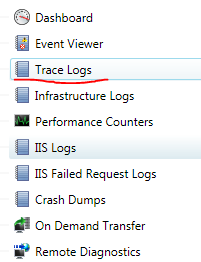
I want to walk through three issues you can have with Windows Azure Diagnostics and a Worker Role. I assume you want to access the Windows Azure Trace Logs, since you use the Trace command to write out exceptions and status messages in the onStart code.

e.g, Trace.WriteLine(“Starting my service.”)

Also you have the WAD trace listener on, which it is by default.

https://gist.github.com/1757147

Scenario – Role fails to start very early on

You might have a custom worker role that starts some sort of background service and perhaps it fails immediate due to some sort of configuration.

Symptoms

You notice the role keeps recycling and recovering.

On Demand Transfer or Schedule Transfer of Diagnostics logs do not work at all, so you cannot get any Trace Information whatsoever.

Solution

Put this method in your WorkerEntryPoint.cs file and call it at the beggining of OnStart() and in any Catch Exception block

https://gist.github.com/1757083

e.g Start

public override bool OnStart()
{
WaitForWindowsAzureDiagnosticsInfrastructureToCatchUp();
try
{


e.g Exception

catch (Exception ex)
           {
               TraceException(ex);
               Trace.Flush();
               WaitForWindowsAzureDiagnosticsInfrastructureToCatchUp();
               return true;
           }


Scenario – Role fails to start a bit later

You are able to diagnose the problem since On Demand Transfer/Scheduled Transfer works and you can then get to the trace logs to see error messages you have written to Trace. Recall that Windows Azure has a settings to automatically have a trace listener on to redirect trace to its WAD table.


Scenario – Role fails to start a bit later

Symptoms

You notice the role keeps recycling and recovering or event stars up but is unresponsive.

On Demand Transfer does not work – You try but it just does not complete or hangs

Below is screen shots of On Demand Transfers with the Cerebrata Diagnostics Manager.

image

image

Solution

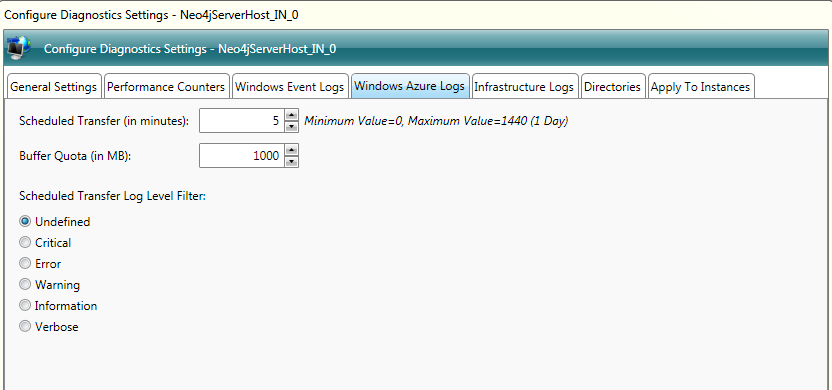
If you cannot do an On Demand Transfer of trace logs, perhaps it keeps recycling and recovering to fast for a On Demand Transfer to occur. Then what you do is temporarily configure a Scheduled Transfer of the Trace Logs

If using Cerebrata Diagnostics Manager

Click Remote Diagnostics in the Subscriptions under your Data Sources

image

image

Once you have configured Schedules transfer, this tool will basically UPLOAD a configuration file into your BLOB container: wad-control-container

Azure will automatically detect changes in this container and apply them to the Diagnostics Manager. Hence configuration of Windows Azure Diagnostics On The Fly

image

Now that we have scheduled transfer in place REBOOT the role that is causing the issue and then wait for it to try start up and fail, and then just go download the trace logs and it should be there.

image

Summary

So, ensure you have a silly sleep command in your work entry point OnStart and in areas where you catch exceptions in case your worker role crashes before Windows Azure Diagnostics!

Try On Demand Transfers if there is an issue, and if that does not work,  configure a scheduled transfer on the fly and then reboot the role to get the start up logs.

WARNING!

Scheduled Transfers will impact your billing of Storage Services, MAKE SURE you turn it OFF when you finished diagnosing the issue, else you will get BILLED for it.

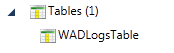
Notice in my screen shot I ALWAYS use a quota so I never over use diagnostics storage – and Windows Azure Trace Logs are stored in TABLE Storage:

image

Remember configuration of WAD is in Blob and the actual trace logs are in Tables.

image

Windows Azure, which affinity group or region is best for you?

A nice tool to use to see which Azure Affinity Group to use e.g. South America, North America or Asia is to download this tool and run checks from where your clients will be based.

http://research.microsoft.com/en-us/downloads/5c8189b9-53aa-4d6a-a086-013d927e15a7/default.aspx

Once you got it installed, add your storage accounts and then get started.

image

So above we will test from Sydney Australia to our UAT environment in America.

Lets click “run”

It will start executing the test, this is now a good time to plan a date, make a cup of coffee or write some JScript for your open source projects.

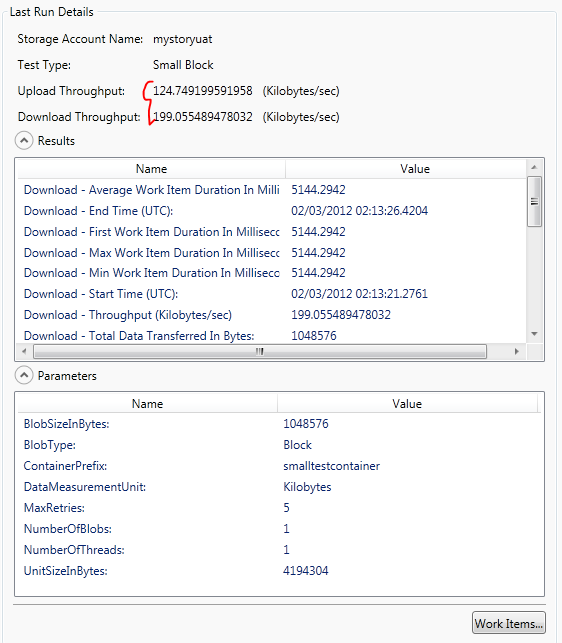
Results:

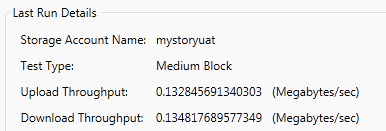
Sydney to North America

image

image


Sydney to South East Asia (Singapore)

image

image

Conclusion

For us, South East Asia was far more better (Web site, download is more important than upload), and the proof was in the pudding when we measures web site response times with MVC MiniProfiler.

However, this is not the ultimate conclusion, I bet these response times will vary depending on time of day, perhaps when Asia is awake and US is asleep, it could be the other way round, so test it at different times of day and pick the affinity or region that is best for you!

JavaScript setTimeout delay ignored on IPhone

I found the following to be ignored on an IPhone.

setTimeout(function () { ajaxget(notificationElement); }, 10000);

Below is the solution for the delay to be respected.

window.setTimeout(ajaxget, 10000, notificationElement, null);
Follow

Get every new post delivered to your Inbox.

Join 131 other followers