Author: Romiko Derbynew

Surfing the Recession Wave with Azure Spot Instances & Kubernetes

Surfing the Recession Wave with Azure Spot Instances & Kubernetes

Hey there, savvy tech enthusiasts and cloud aficionados! If you’re anything like us, you’ve probably been keeping an eye on the economic tides as companies navigate the choppy waters of a recession. In times like these, every penny counts, and the IT world is no exception. With companies tightening their belts and trimming their workforces, it’s more important than ever to find creative ways to save big without sacrificing performance. Well, hold onto your keyboards, because we’ve got a cloud solution that’s about to make your wallets smile: Azure Spot Instances!

Azure Spot Instances: Catching the Cost-saving Wave

Picture this: azure skies, azure waters, and Azure Spot Instances—your ticket to slashing cloud costs like a pro. What are Azure Spot Instances, you ask? Well, they’re like the rockstar bargain of the cloud world, offering significant savings by leveraging unutilized Azure capacity. It’s like snagging a front-row seat at a concert for a fraction of the price, but instead of music, you’re rocking those cost-cutting beats.

So, here’s the scoop: Azure Spot Instances are like the cool kids in the virtual playground. They’re virtual machine scale sets that thrive on filling up the unused capacity gaps in the Azure cloud. Think of them as the ultimate budget-friendly roommates who crash on your couch when they’re not partying elsewhere. But wait, there’s a catch (of the best kind): they’re perfect for workloads that can handle a bit of a hiccup. We’re talking batch processing jobs, testing environments, and compute-intensive tasks that don’t mind a little dance with interruption.

Don’t Just Save, Make it Rain Savings

Now, imagine this scenario: you’ve got your AKS (Azure Kubernetes Service) cluster humming along, and you’re hosting your Dev and UAT environments. The spotlight is on your Spot Instances—they’re not the main act (that’s for staging and production), but they steal the show when it comes to saving money. So, let’s break it down.

With Azure Spot Instances, you’re not just pinching pennies; you’re saving big bucks. These instances are the economy class of the cloud world, with no high availability guarantees. If Azure needs space, the not-so-glamorous eviction notice might come knocking. But, hey, for Dev and UAT environments that can handle the occasional hiccup, it’s like getting bumped to first class on a budget.

Setting Sail with Spot Instances

Now that we’ve got your attention, let’s dive into the fun part—getting started! First things first, you need an AKS cluster that’s already playing nice with multiple node pools. And guess what? Your Spot Instance pool can’t be the default—it’s the star of the show, but it’s gotta know its role.

az aks nodepool add \
    --resource-group myResourceGroup \
    --cluster-name myAKSCluster \
    --name spotnodepool \
    --priority Spot \
    --eviction-policy Delete \
    --spot-max-price -1 \
    --enable-cluster-autoscaler \
    --min-count 1 \
    --max-count 3 \
    --no-wait

Using the Azure CLI, you’ll unleash the magic with a few commands. It’s like casting a spell, but way more practical. Picture yourself conjuring cost savings from thin air—pretty magical, right? Just create a node pool with the priority set to “Spot,” and voilà! You’re on your way to cloud cost-cutting greatness.

The Caveats, but Cooler

Now, before you go all-in on Spot Instances, remember, they’re not for every situation. These instances are the fearless daredevils of the cloud, ready to tackle evictions and interruptions head-on. But, just like you wouldn’t invite a lion to a tea party, don’t schedule critical workloads on Spot Instances. Set up taints and tolerations to ensure your instances dance only with the tasks that love a bit of unpredictability.

You can also leverage affinity roles to schedule your pod of dolphins on spot nodes with affinity labels.

spec:
  containers:
  - name: spot-example
  tolerations:
  - key: "kubernetes.azure.com/scalesetpriority"
    operator: "Equal"
    value: "spot"
    effect: "NoSchedule"
  affinity:
    nodeAffinity:
      requiredDuringSchedulingIgnoredDuringExecution:
        nodeSelectorTerms:
        - matchExpressions:
          - key: "kubernetes.azure.com/scalesetpriority"
            operator: In
            values:
            - "spot"
   ...

The Grand Finale: Upgrade and Save More

Ready for the grand finale? Upgrading your Spot Instances is a breeze, and the best part is, AKS issues an eviction notice, not a complete storm-out. Plus, you can set a max price that works for you. Think of it like setting a budget for a shopping spree—except you’re not splurging on unnecessary costs.

So, there you have it, cloud trailblazers! Azure Spot Instances are the secret sauce to saving big during these recession times. With the right mindset, a sprinkle of taints, and a dash of tolerations, you’ll be riding the wave of cost-cutting success like a pro. Remember, it’s not just about saving money—it’s about making every cloud resource count. So go ahead, grab those Spot Instances by the horns and ride the cost-saving currents like the cloud-savvy superhero you were meant to be! 🚀🌩️

Customizing ChatGPT Output with OpenAI and VectorDB

Customizing ChatGPT Output with OpenAI and VectorDB

Introduction

In recent years, OpenAI has revolutionized the field of natural language processing with its advanced language models like ChatGPT. These models excel at generating human-like text and engaging in conversations. However, sometimes we may want to customize the output to align it with specific reference data or tailor it to specific domains. In this blog post, we will explore how to leverage OpenAI and a VectorDB to achieve this level of customization.

Understanding OpenAI and VectorDB: OpenAI is a renowned organization at the forefront of artificial intelligence research. They have developed language models capable of generating coherent and contextually relevant text based on given prompts. One such model is ChatGPT, which has been trained on vast amounts of diverse data to engage in interactive conversations.

VectorDB, on the other hand, is a powerful tool that enables the creation of indexes and retrieval mechanisms for documents based on semantic similarity. It leverages vector embeddings to calculate the similarity between documents and queries, facilitating efficient retrieval of relevant information.

Using OpenAI and VectorDB Together: To illustrate the use of OpenAI and VectorDB together, let’s dive into the provided sample code snippet:

import os
import sys

import openai
from langchain.chains import ConversationalRetrievalChain, RetrievalQA
from langchain.chat_models import ChatOpenAI
from langchain.document_loaders import DirectoryLoader, TextLoader
from langchain.embeddings import OpenAIEmbeddings
from langchain.indexes import VectorstoreIndexCreator
from langchain.indexes.vectorstore import VectorStoreIndexWrapper
from langchain.llms import OpenAI
from langchain.vectorstores import Chroma

import constants

os.environ["OPENAI_API_KEY"] = constants.APIKEY
# Enable to save to disk & reuse the model (for repeated queries on the same data)
PERSIST = False

query = None
if len(sys.argv) > 1:
  query = sys.argv[1]

if PERSIST and os.path.exists("persist"):
  print("Reusing index...\n")
  vectorstore = Chroma(persist_directory="persist", embedding_function=OpenAIEmbeddings())
  index = VectorStoreIndexWrapper(vectorstore=vectorstore)
else:
  #loader = TextLoader("data/data.txt") # Use this line if you only need data.txt
  loader = DirectoryLoader("data/")
  if PERSIST:
    index = VectorstoreIndexCreator(vectorstore_kwargs={"persist_directory":"persist"}).from_loaders([loader])
  else:
    index = VectorstoreIndexCreator().from_loaders([loader])

chain = ConversationalRetrievalChain.from_llm(
  llm=ChatOpenAI(model="gpt-3.5-turbo"),
  retriever=index.vectorstore.as_retriever(search_kwargs={"k": 1}),
)

chat_history = []
while True:
  if not query:
    query = input("Prompt: ")
  if query in ['quit', 'q', 'exit']:
    sys.exit()
  result = chain({"question": query, "chat_history": chat_history})
  print(result['answer'])

  chat_history.append((query, result['answer']))
  query = None
  1. Setting up the environment:
    • The code imports the necessary libraries and sets the OpenAI API key.
    • The PERSIST variable determines whether to save and reuse the model or not.
  2. Loading and indexing the data:
    • The code loads the reference data using a TextLoader or DirectoryLoader, depending on the requirements.
    • If PERSIST is set to True, the code creates or reuses a VectorstoreIndexWrapper for efficient retrieval.
  3. Creating a ConversationalRetrievalChain:
    • The chain is initialized with a ChatOpenAI language model and the VectorDB index for retrieval.
    • This chain combines the power of OpenAI’s language model with the semantic similarity-based retrieval capabilities of VectorDB.
  4. Customizing the output:
    • The code sets up a chat history to keep track of previous interactions.
    • It enters a loop where the user can input prompts or queries.
    • The input is processed using the ConversationalRetrievalChain, which generates an appropriate response based on the given question and chat history.
    • The response is then displayed to the user.

Lets starts the program and see what the output is:

Dangers

The dangers of apps and social media is evident here. Utilising their own data sources (VectorDBs), the output of OpenAI can be massaged to align with a particular political party and contribute to the polarising nature social media and targeted advertising has had on our culture. A lot of challenges lie ahead to protect our language and cultural identity and influences.

Opportunity

This will super charge personalisation in the online e-commerce space. I am talking about the 2007 iPhone moment here. With very little changes to E-Commerce architecture, you can have super intelligent chatbots that understand the context of a customer based on the browsing history and order history alone. It will super charge tools that usually require expensive subscriptions to Zendesk. Google Dialogue Flow will move into a new real & meaningful conversation on websites. It could remind me if I forgot to order an item I usually order, make recommendations on cool events happening on the weekend based on the products and browsing patterns I have, with very little data ingestion!

Conclusion

In this blog post, we explored how to leverage OpenAI and VectorDB to customize the output from ChatGPT. By combining the strengths of OpenAI’s language model with the semantic similarity-based retrieval of VectorDB, we can create more tailored and domain-specific responses. This allows us to align the output with specific reference data and achieve greater control over the generated text. The provided code snippet serves as a starting point for implementing this customization in your own projects. So, go ahead and experiment with OpenAI and VectorDB to unlock new possibilities in natural language processing.

Full source code can be downloaded from here:

https://github.com/Romiko/ai-sandbox/tree/master/open-ai

Tip: OpenAI subscription is NOT the same as OpenAI API subscriptions. To run this, you will need an API Key and a subscription if you have used your 3 month subscription quota.

You can set this all up and ensure you setup usage rates and limits.

https://platform.openai.com/account/billing/limits

VSCode Tips – Anaconda Environments
launch.json

{
// Use IntelliSense to learn about possible attributes.
// Hover to view descriptions of existing attributes.
// For more information, visit: https://go.microsoft.com/fwlink/?linkid=830387
“version”: “0.2.0”,
“configurations”: [
{
“name”: “Python: Current File”,
“type”: “python”,
“request”: “launch”,
“program”: “${file}”,
“console”: “integratedTerminal”,
“justMyCode”: true,
“cwd”: “${fileDirname}”,
}
]
}

Setup Anaconda Python Interpreter:

Ctrl + Shift + P
Typed Selected Interpreter and I chose my Anaconda Base environment for now. You can have many environments.

From here, you can debug in VSCode using Anaconda environments with ease.

Have Fun!

Using AI to detect anomalies in my gas bills

Hey,

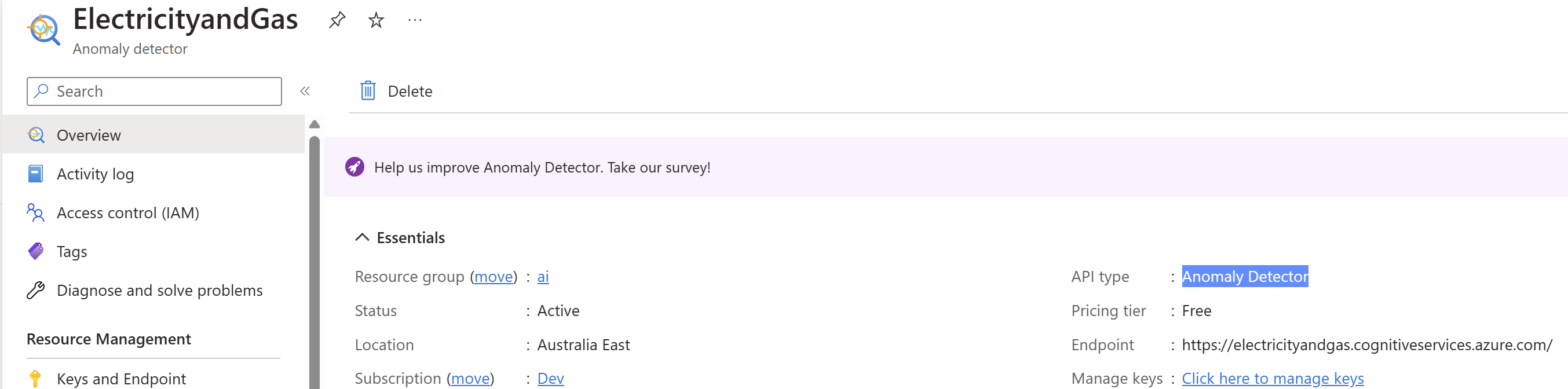
I sometimes get a crazy gas bill come through. So I decided to generate some raw data for my gas bill and feed it into the Azure Anomaly Detector API.

Prerequisites:

With our new found Azure service up and running, lets get down and dirty.

Then I massaged by gas bill data into this format, so we have nice timestamps (ISO 8601) and double-precision floating-point numbers.

2021-08-01T00:00:00Z,46.49
2021-09-01T00:00:00Z,78.33
2021-10-01T00:00:00Z,80.39
2021-11-01T00:00:00Z,40.63
2021-12-01T00:00:00Z,154.76
2022-01-01T00:00:00Z,39.60
2022-02-01T00:00:00Z,37.19
2022-03-01T00:00:00Z,78.72
2022-04-01T00:00:00Z,20.98
2022-05-01T00:00:00Z,23.02
2022-06-01T00:00:00Z,107.82
2022-07-01T00:00:00Z,60.60
2022-08-01T00:00:00Z,54.96
2022-09-01T00:00:00Z,86.11
2022-10-01T00:00:00Z,81.61
2022-11-01T00:00:00Z,42.35
2022-12-01T00:00:00Z,55.36
2023-01-01T00:00:00Z,47.92
2023-02-01T00:00:00Z,48.05
2023-03-01T00:00:00Z,119.25
2023-04-01T00:00:00Z,61.10
2023-05-01T00:00:00Z,23.64
2023-06-01T00:00:00Z,151.32
2023-07-01T00:00:00Z,92.94

Finally, I created a jupyter notebook and fed the data into it, calling the api

from azure.ai.anomalydetector import AnomalyDetectorClient
from azure.ai.anomalydetector.models import *
from azure.core.credentials import AzureKeyCredential
import pandas as pd
import os

API_KEY = os.environ['ANOMALY_DETECTOR_API_KEY']
ENDPOINT = os.environ['ANOMALY_DETECTOR_ENDPOINT']
DATA_PATH = "d:\\ai\\energy-data.csv"

client = AnomalyDetectorClient(ENDPOINT, AzureKeyCredential(API_KEY))

series = []
data_file = pd.read_csv(DATA_PATH, header=None, encoding='utf-8', date_parser=[0])
for index, row in data_file.iterrows():
    series.append(TimeSeriesPoint(timestamp=row[0], value=row[1]))

request = UnivariateDetectionOptions(series=series, granularity=TimeGranularity.DAILY)

change_point_response = client.detect_univariate_change_point(request)
anomaly_response = client.detect_univariate_entire_series(request)

for i in range(len(data_file.values)):
    if (change_point_response.is_change_point[i]):
        print("Change point detected at index: "+ str(i))
    elif (anomaly_response.is_anomaly[i]):
        print("Anomaly detected at index:      "+ str(i))

It was great to see the AI system pickup the culprits!

  • A massive party in December 2001
  • A stove left on for a few days in June 2023 or maybe the gas company starting to charge us higher rates than they should?

Happy code with AI, it is super fun once you get creative with it!

🙂

Kubernetes – Menu Command line – Common Tasks

Please find one of my favourite menu driven scripts that I use with developers if they keen to use the command line vs tools like Rancher to get to know Kubernetes e.g. Scaling Services, View Nginx Log files for suspicious activity etc

#!/bin/bash

# Function to display menu
display_menu() {
    clear
    echo "=== Kubernetes Administrator Menu ==="
    echo "1. Get Pods"
    echo "2. Get Services"
    echo "3. Describe Pod"
    echo "4. Describe Service"
    echo "5. View Log Files"
    echo "6. View High-Count Ingress HTTP Requests"
    echo "7. Scale Up Deployment"
    echo "8. Scale Down Deployment"
    echo "9. Exit"
    echo
    read -p "Enter your choice: " choice
    echo
}

# Function to get pods
get_pods() {
    kubectl get pods
    echo
    read -p "Press enter to continue..."
}

# Function to get services
get_services() {
    kubectl get services
    echo
    read -p "Press enter to continue..."
}

# Function to describe a pod
describe_pod() {
    read -p "Enter the pod name: " pod_name
    kubectl describe pod $pod_name
    echo
    read -p "Press enter to continue..."
}

# Function to describe a service
describe_service() {
    read -p "Enter the service name: " service_name
    kubectl describe service $service_name
    echo
    read -p "Press enter to continue..."
}

# Function to view log files
view_logs() {
    read -p "Enter the pod name: " pod_name
    read -p "Enter the container name (press enter for all containers): " container_name

    if [ -z "$container_name" ]; then
        kubectl logs $pod_name
    else
        kubectl logs $pod_name -c $container_name
    fi

    echo
    read -p "Press enter to continue..."
}

# Function to view high-count ingress HTTP requests
view_high_count_requests() {
    read -p "Enter the log file name: " log_file
    read -p "Enter the high count threshold: " threshold

    awk -v threshold=$threshold '/ingress/ { count[$NF]++ } END { for (ip in count) { if (count[ip] > threshold) print count[ip], ip } }' $log_file

    echo
    read -p "Press enter to continue..."
}

# Function to scale up a deployment
scale_up_deployment() {
    read -p "Enter the deployment name: " deployment_name
    read -p "Enter the number of replicas to scale up: " replicas

    kubectl scale deployment $deployment_name --replicas=+$replicas
    echo "Deployment scaled up successfully!"
    echo
    read -p "Press enter to continue..."
}

# Function to scale down a deployment
scale_down_deployment() {
    read -p "Enter the deployment name: " deployment_name
    read -p "Enter the number of replicas to scale down: " replicas

    kubectl scale deployment $deployment_name --replicas=-$replicas
    echo "Deployment scaled down successfully!"
    echo
    read -p "Press enter to continue..."
}

# Main script
while true; do
    display_menu

    case $choice in
        1) get_pods;;
        2) get_services;;
        3) describe_pod;;
        4) describe_service;;
        5) view_logs;;
        6) view_high_count_requests;;
        7) scale_up_deployment;;
        8) scale_down_deployment;;
        9) exit;;
        *) echo "Invalid choice. Please try again.";;
    esac
done

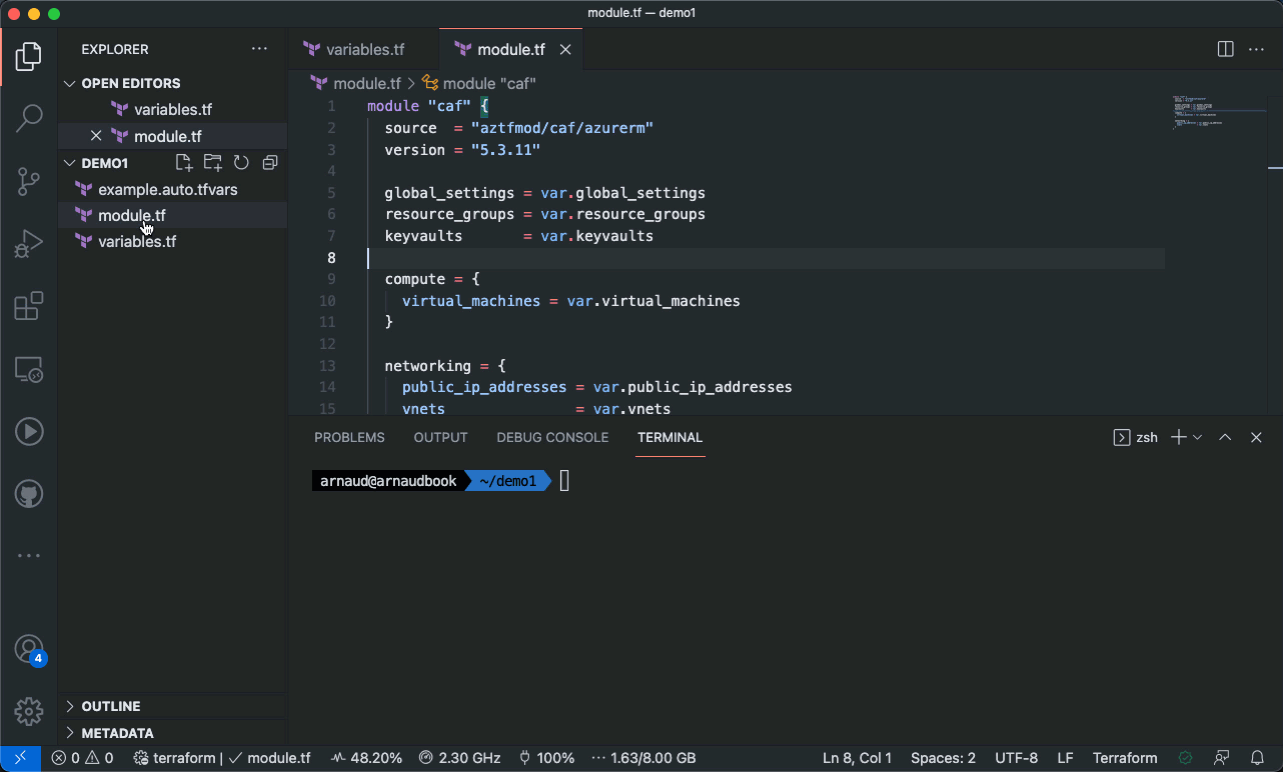
Unleashing the Power of Azure CAF Super Module: Exploring the CAF Enterprise Module and its Advantages and Disadvantages

Introduction

As organizations increasingly adopt cloud computing, they require a robust framework to guide their cloud journey effectively. Microsoft Azure offers the Cloud Adoption Framework (CAF), a proven methodology to accelerate cloud adoption and provide organizations with a structured approach. Building upon the CAF, Microsoft has introduced the Azure CAF Super Module, enhancing the framework’s capabilities. In this blog post, we will delve into the CAF Super Module, with a particular focus on the CAF Enterprise Module, and discuss the advantages and disadvantages of leveraging this powerful tool.

Understanding the Azure CAF Super Module

“We want to promote “infrastructure-as-data” in favor of ad-hoc “infrastructure-as-code”, in order to make composition more accessible and rely on a strong community to write code.”

The Azure CAF Super Module is an extension of the Cloud Adoption Framework, tailored specifically for Azure. It serves as a comprehensive guide to help organizations develop their cloud strategy, plan migrations, establish governance controls, and optimize their cloud environments. By adopting the Super Module, organizations can align their cloud initiatives with Azure best practices, ensuring a secure, scalable, and efficient cloud adoption journey.

The CAF Enterprise Module

At the core of the Azure CAF Super Module lies the CAF Enterprise Module, a key component designed to provide organizations with a standardized approach to building and operating their cloud environments. The CAF Enterprise Module encompasses several crucial elements, including governance, operations, and security, enabling organizations to effectively manage and maintain their Azure deployments.

  1. Governance: The CAF Enterprise Module offers a set of governance principles, guidelines, and best practices that facilitate the implementation of effective governance controls. It helps organizations define roles and responsibilities, establish policies, and ensure compliance and security in their Azure environments. The module assists in creating a well-structured governance framework, enabling organizations to balance control and agility.
  2. Operations: With the CAF Enterprise Module, organizations can implement standardized operational practices for managing their Azure environments. It provides guidance on monitoring, management, and incident response, helping organizations ensure the reliability, availability, and performance of their cloud resources. The module also assists in automating operational tasks, optimizing costs, and maintaining service continuity.
  3. Security: Security is a critical aspect of any cloud deployment, and the CAF Enterprise Module emphasizes this by offering comprehensive security guidance. It provides organizations with a structured approach to defining security policies, implementing security controls, and managing identity and access. The module also focuses on threat protection, data protection, and compliance, enabling organizations to build secure and compliant Azure environments.

Advantages of the CAF Super Module

  1. Standardization: The Azure CAF Super Module promotes standardization by providing a well-defined framework for cloud adoption. It ensures that organizations follow best practices and establish consistent processes and policies, resulting in improved efficiency and reduced complexity.
  2. Accelerated adoption: The CAF Super Module accelerates cloud adoption by offering a clear roadmap and guidance. It helps organizations avoid common pitfalls and make informed decisions throughout their cloud journey, ultimately saving time and effort.
  3. Enhanced governance: The CAF Enterprise Module enhances governance capabilities by providing a structured approach to establish and enforce governance controls. It ensures compliance, mitigates risks, and promotes accountability, giving organizations greater control over their Azure environments.
  4. Improved security and compliance: With the CAF Super Module, organizations can strengthen their security posture and achieve compliance objectives. The module offers comprehensive security guidance, enabling organizations to implement robust security controls and protect their data and resources effectively.

Disadvantages of the CAF Super Module

  1. Complexity: While the CAF Super Module offers a comprehensive framework, its implementation can be complex for organizations with limited cloud expertise. Organizations may need to invest in training and additional resources to fully leverage the capabilities of the Super Module.
  2. Customization challenges: The CAF Super Module provides a standardized
  3. approach, which may not align perfectly with every organization’s unique requirements. Adapting the Super Module to specific needs may involve additional customization efforts and careful consideration of individual business objectives.
  4. Remediation of legacy assets is not really accounted for and probably requires a seprate git repo for retro fixing due to legacy resources not having a naming convention to begin with

Conclusion

The Azure CAF Super Module, with its powerful CAF Enterprise Module, provides organizations with a robust framework for accelerating their cloud adoption journey on the Azure platform. By leveraging the CAF Super Module, organizations can benefit from standardized practices, enhanced governance, improved security, and accelerated cloud adoption. However, it is essential to acknowledge the potential complexities and customization challenges that organizations may encounter while implementing the Super Module. Overall, the Azure CAF Super Module offers a valuable toolset for organizations seeking to maximize the benefits of Azure and achieve successful cloud transformations.

Sources:

https://aztfmod.github.io/documentation/docs/module/module-intro/

https://github.com/aztfmod/terraform-azurerm-caf

Securing Kubernetes with Calico Cloud

In the ever-evolving world of technology, securing Kubernetes clusters has become a paramount concern for organizations. With the rise of cloud-native applications and microservices architectures, the need for a robust security solution has become more crucial than ever. This is where Calico Cloud from Tigera shines as an exceptional tool to enhance the security posture of a Kubernetes cluster.

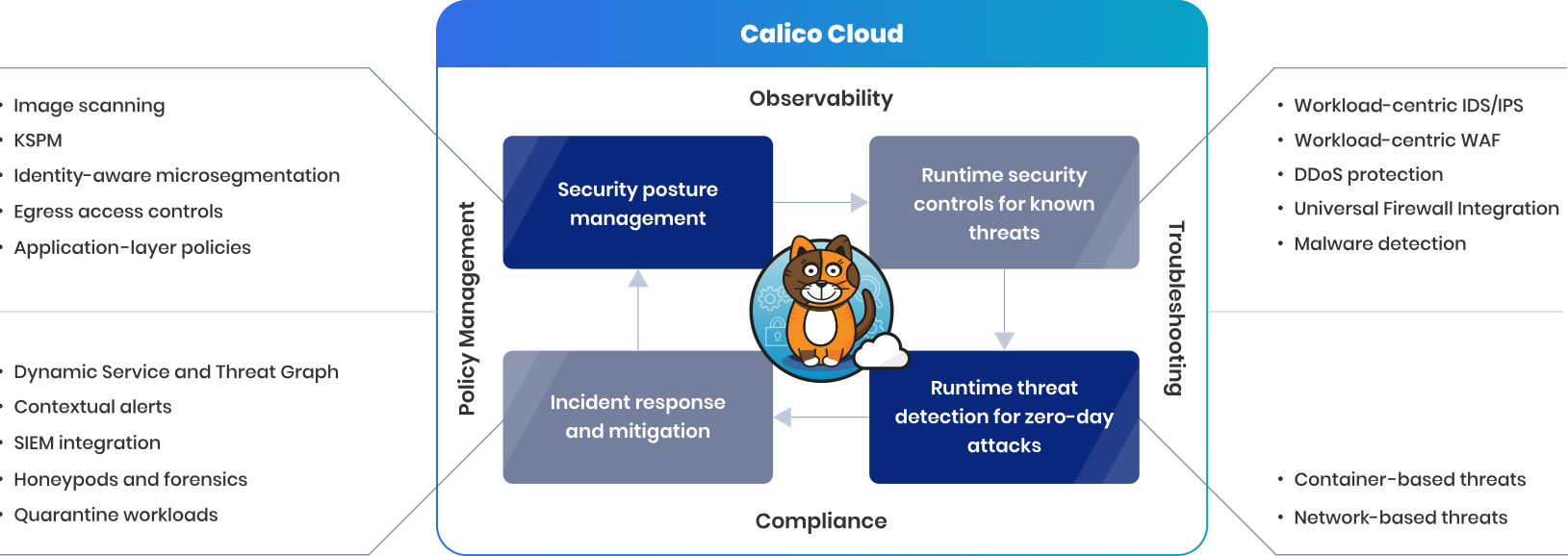
Calico Cloud offers a comprehensive set of features and capabilities specifically designed to address the unique security challenges of Kubernetes environments. By leveraging its advanced networking and security capabilities, Calico Cloud empowers organizations to protect their clusters against various threats, enforce granular security policies, and gain deep visibility into their network traffic.

Course vs. Fine-Grain Policies:

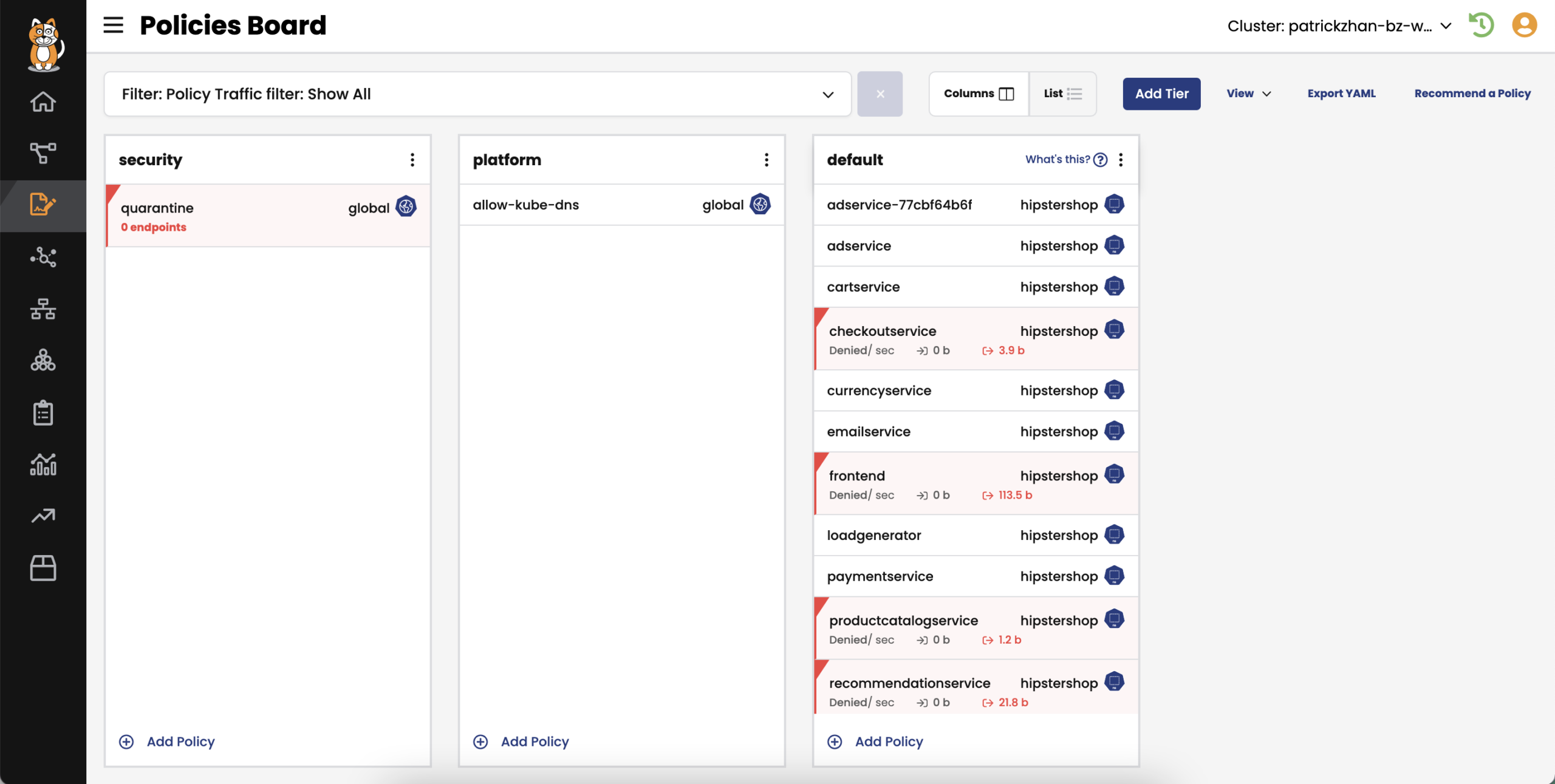
One of the key aspects that make Calico Cloud an excellent choice for improving the security posture of a Kubernetes cluster is its ability to enforce both course and fine-grain security policies. These policies act as guardrails to ensure that only authorized traffic flows within the cluster, mitigating the risks of unauthorized access, data breaches, and lateral movement by malicious actors.

Course-grain policies enable administrators to define high-level security rules that apply to entire namespaces or the entire cluster. These policies help establish a strong foundation for security by setting broad guidelines such as allowing or denying traffic between namespaces, restricting external access to certain services, or implementing network segmentation. Course-grain policies are easy to define and manage, making them suitable for organizations looking for initial security controls.

On the other hand, fine-grain policies offer a more granular level of control over network traffic within the Kubernetes cluster. These policies allow administrators to define rules based on specific labels, namespaces, IP addresses, or other metadata associated with pods and services. With fine-grain policies, organizations can precisely control which pods can communicate with each other, what protocols and ports are allowed, and even enforce encryption requirements. Fine-grain policies provide a high level of flexibility and customization, enabling organizations to tailor their security controls according to their specific requirements.

By offering both course and fine-grain policies, Calico Cloud allows organizations to strike a balance between simplicity and flexibility in securing their Kubernetes clusters. It provides a unified platform to manage and enforce these policies, simplifying the overall security management process.

Zero-trust Workload Security

Implement zero-trust workload access controls for traffic to and from individual pods to external endpoints on a per-pod basis to protect your Kubernetes cluster. Author DNS policies that implement fine-grained access controls between a workload and the external services it needs to connect to, like Amazon RDS, ElasticCache, and more.

Limit the blast radius when a security breach results in an APT (advanced persistent threat) with identity-aware microsegmentation for both container and VM workloads. Use a single policy framework and Kubernetes declarative model to set controls at the host, container/VM, and application levels.

Extend the use of existing firewalls and SIEMs to your Kubernetes environment with out-of-the-box firewall and SIEM integrations.

KEY FEATURES INCLUDE

  • Zero-trust workload access controls
  • Identity-aware microsegmentation for workloads
  • Firewall and SIEM integration
  • Envoy-based application-level protection

Conclusion:

In conclusion, Calico Cloud from Tigera is an outstanding tool for enhancing the security posture of Kubernetes clusters. Its advanced networking and security capabilities, coupled with the ability to enforce course and fine-grain policies, make it a comprehensive solution to protect against threats and enforce robust security controls. With Calico Cloud, organizations can achieve a higher level of confidence in the security of their Kubernetes deployments, ensuring the integrity, confidentiality, and availability of their applications and data.

Calico Cloud has proven instrumental in protecting our kubernetes cluster infrastructure at scale. Allowing us to control both North-South and East-West traffic.

Most secure way to access Azure Cloud

What if I told you that you could access your Azure Cloud Resources and tick the following boxes:

  • More secure than a VPN
  • More secure than a Bastion Host and Jumpbox
  • No need for patching and SOC2 compliance reports

If your cloud environment is serverless, why settle for less when it comes to remote access?

As soon as you introduce a jump box, you are required to patch the damn thing and this eats into the Opex budget in a big way.

So what is the solution?

What if you had a docker image with all the tools you need for support that you can spin up into an Azure Container Instance and access on demand, with the filesystem running off Azure Blob Storage?

Well, this is possible, and the good news is that you do not need to build it yourself. Microsoft already offers it.

Welcome to Azure Cloud Shell with VNET Integration!

Cloud Shell with VNET integration leveraging subnet delegation for ACI

The only limitation is that the Storage Account only supports Primary Regions, however Microsoft notified me today that Australia East is now supported.

Microsoft is currently working on more secondary region support, just something to be aware of from a security/data sovereignty perspective.

So the experience is like this.

  1. Log into the Azure Portal
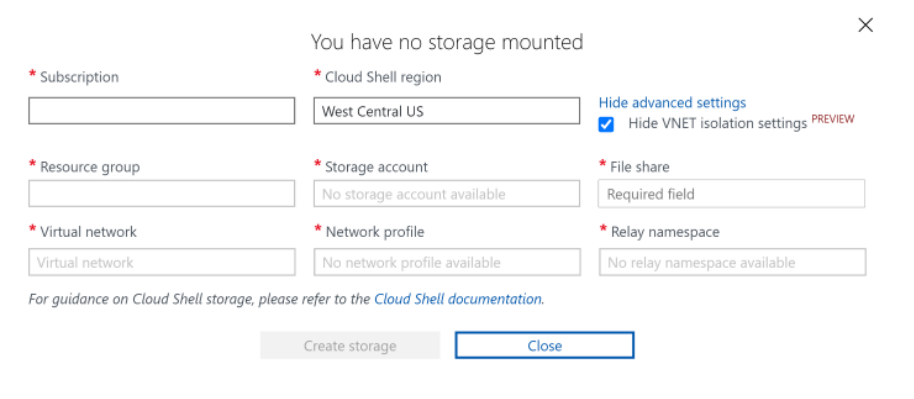
  2. Choose Cloud Shell with advanced options – Select VNET Integration and select the subnet / storage account that we will terraform
  3. Boom – You are in the Azure network and Cloud Shell will have all your common support tools that your require.

Terraform

We will need:

  • Dedicated subnet for CloudShell ACI instances to spin up in.

"csh" = "10.1.12.0/26"

  • Dedicated support subnet for storage account

"sup" = "10.1.13.0/26"

  • A dedicate subnet for the Azure Relay
relay_subnet = "10.1.14.0/26"

# Container instance built in OID for permissions / delegation
# Manually grant in Azure AD
container_instance_oid = "4c1b7058-e8ea-4854-abd2-bbb0abb6cd24"
  • Storage Account for OS filesystem – network rules for Cloudshell
# See https://github.com/Azure/azure-quickstart-templates/blob/master/demos/cloud-shell-vnet-storage/azuredeploy.json
resource "azurerm_storage_account" "cloud_shell" {
  name                         = "st${var.client}${var.env}${var.location_shortname}sup"
  resource_group_name          = azurerm_resource_group.rg.name
  location                     = azurerm_resource_group.rg.location
  allow_blob_public_access     = false
  account_tier                 = "Standard"
  access_tier                  = "Cool"
  account_replication_type     = "LRS"
  tags                         = local.tags
  enable_https_traffic_only    = true
  network_rules {
    bypass                     = ["None"]
    default_action             = "Deny"
    ip_rules                   = [ "101.112.8.233" ]
    virtual_network_subnet_ids = [
      azurerm_subnet.cloud_shell_subnet.id,
      azurerm_subnet.subnet["sup"].id
      ]
  }
}

resource "azurerm_storage_share" "cloud_shell" {
  name                 = "cshsupport"
  storage_account_name = azurerm_storage_account.cloud_shell.name
  quota                = 50
}
  • Then a Cloudshell Subnet leveraging subnet delegation so ACI can control network devices
resource "azurerm_subnet" "cloud_shell_subnet" {
  name                 = "snet-${local.resource_id}-${var.client}-csh"
  resource_group_name  = azurerm_resource_group.rg.name
  virtual_network_name = azurerm_virtual_network.network.name
  address_prefixes     = [var.cloud_shell_subnet]

  delegation {
    name = "delegation"

    service_delegation {
      name    = "Microsoft.ContainerInstance/containerGroups"
    }
  }
  service_endpoints = [
    "Microsoft.Storage"
  ]
}
  • Azure Relay Subnet and setup
resource "azurerm_subnet" "relay_subnet" {
  name                                            = "snet-${local.resource_id}-${var.client}-rel"
  resource_group_name                             = azurerm_resource_group.rg.name
  virtual_network_name                            = azurerm_virtual_network.network.name
  address_prefixes                                = [var.relay_subnet]
  enforce_private_link_endpoint_network_policies  = true
  enforce_private_link_service_network_policies   = false
}

resource "azurerm_relay_namespace" "relay_namespace" {
  name                = "rel-${local.resource_id}-${var.client}-csh"
  location            = azurerm_resource_group.rg.location
  resource_group_name = azurerm_resource_group.rg.name
  sku_name = "Standard"
  tags = local.tags
}

resource "azurerm_network_profile" "cloud_shell_containers" {
  name                = "netpr-${local.resource_id}-${var.client}-csh"
  location            = azurerm_resource_group.rg.location
  resource_group_name = azurerm_resource_group.rg.name
  tags = local.tags
  container_network_interface {
    name = "eth-${azurerm_subnet.cloud_shell_subnet.name}"

    ip_configuration {
      name      = "ipconfig-${azurerm_subnet.cloud_shell_subnet.name}"
      subnet_id = azurerm_subnet.cloud_shell_subnet.id
    }
  }
}

resource "azurerm_private_endpoint" "relay_csh" {
  name                = "prve-${local.resource_id}-${var.client}-csh"
  location            = azurerm_resource_group.rg.location
  resource_group_name = azurerm_resource_group.rg.name
  tags                = local.tags

  subnet_id           = azurerm_subnet.relay_subnet.id
  private_service_connection {
    name                           = "prvsc-${local.resource_id}-${var.client}-csh"
    private_connection_resource_id = azurerm_relay_namespace.relay_namespace.id
    subresource_names              = ["namespace"]
    is_manual_connection           = false
  }
}

resource "azurerm_private_dns_zone" "private_dns_relay" {
  name                = "privatelink.servicebus.windows.net"
  resource_group_name = azurerm_resource_group.rg.name
  tags                = local.tags
}

resource "azurerm_private_dns_a_record" "relay_dns_a_record" {
  name                = "csh"
  zone_name           = azurerm_private_dns_zone.private_dns_relay.name
  resource_group_name = azurerm_resource_group.rg.name
  ttl                 = 3600
  records             = [azurerm_private_endpoint.relay_csh.private_service_connection[0].private_ip_address]
}

resource "azurerm_private_dns_zone_virtual_network_link" "relay_vnet_link" {
  name                  = "dnsvl-${local.resource_id}-${var.client}-csh"
  resource_group_name   = azurerm_resource_group.rg.name
  private_dns_zone_name = azurerm_private_dns_zone.private_dns_relay.name
  virtual_network_id    = azurerm_virtual_network.network.id
  registration_enabled  = false
}

Now connect to CloudShell

So the above should get you on the right track for the most secure and painless free maintenance Remote Access solution for Azure Cloud!

Goodbye VPN!
Goodbye Bastion Host!
Goodbye Jumpboxes!

CloudShell Vnet

Source: https://docs.microsoft.com/en-us/azure/cloud-shell/private-vnet

Adobe Experience Manager – Setup Azure Devops CICD

Overview

CI/CD Git Flow

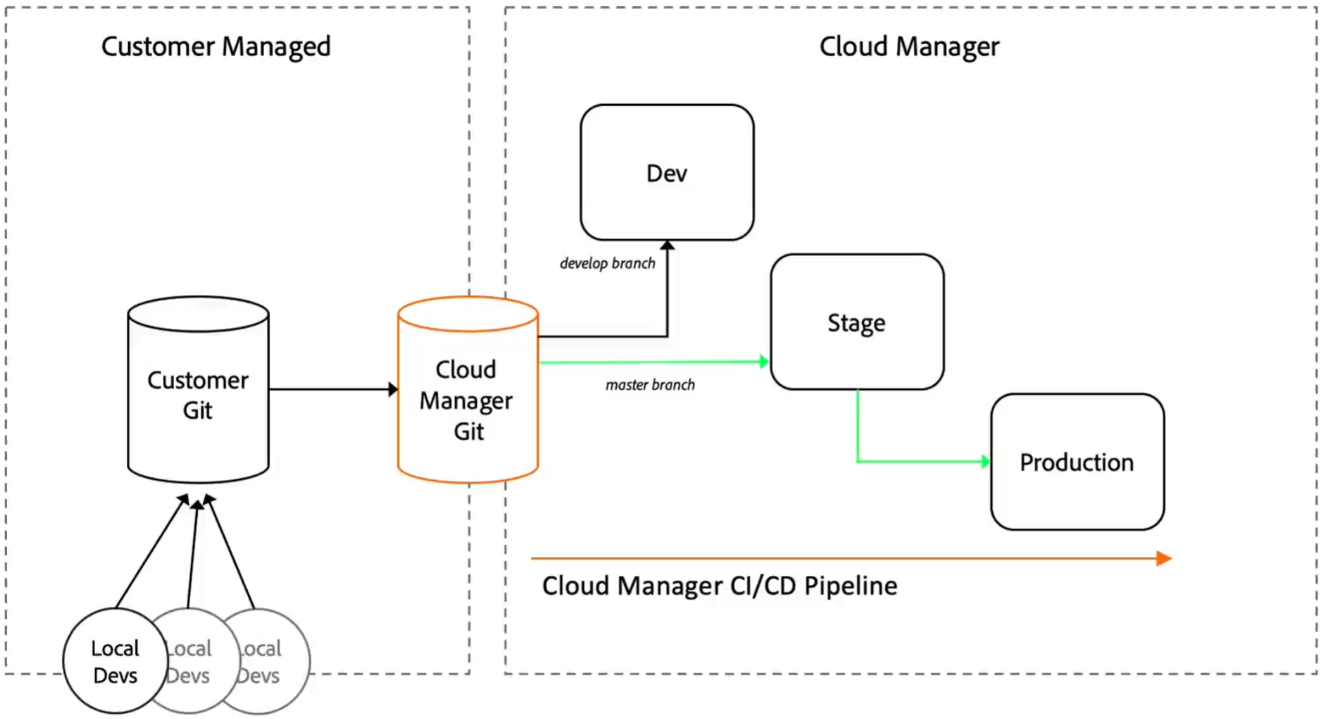
Above we can see that we would like our developers to push to their own git repo (Customer Git = Azure Devops).

From here we can then Sync Azure git with AEM Cloud Manager Git.

Below is a sample build pipeline you can use in Azure Devops.

azure-pipline.yml

trigger:
  batch: true
  branches:
    include:
    - master

variables:
- name: remote_git
  value: rangerrom/africa-p46502-uk11112

stages:
- stage: AEM_Cloud_Manager
  jobs:
  - job: Push_To_Cloudmanager
    timeoutInMinutes: 10
    condition: succeeded()
    workspace:
      clean: all
    steps:
    #steps: [ script | bash | pwsh | powershell | checkout | task | templateReference ]
    
    - task: AzureKeyVault@1
      displayName: pull secrets
      inputs:
        azureSubscription: PROD
        KeyVaultName: mykeyvault
        SecretsFilter: aem_dm_cm_credentials
    - checkout: self
      clean: true
    - bash: echo "##vso[task.setvariable variable=git_ref]https://$(aem_dm_cm_credentials)@git.cloudmanager.adobe.com/$(remote_git)/"
      displayName: Set remote adobe git URL 
    - bash: git remote add adobe $(git_ref)
      displayName: Add git remote to Adobe CloudManager
    - bash: cat .git/config
      displayName: Show git config
    - bash: git checkout $(Build.SourceBranchName)
      displayName: Checkout $(Build.SourceBranchName) branch
    - bash: git push -f -v adobe $(Build.SourceBranchName)
      displayName: Push changes from $(Build.SourceBranchName) branch to Adobe CloudManager

That is pretty much the minimum required to sync the two git repos. Happy AEMing and building your CMS solution.

Kali Linux – Steam and Rocksmith 2014

I enjoy playing my bass guitar with Rocksmith. However I do not use Windows at all and wanted it to work with Kali Linux 2021.2, a Debian 10 Distro.

This is how I got it to work with my audio and Nvidia GeForce RTX 2070

Install crossover bin file

wget https://media.codeweavers.com/pub/crossover/cxlinux/demo/install-crossover-21.0.0.bin

chmod 755 install-crossover-21.0.0.bin

./install-crossover-21.0.0.bin

Activate critical 32 bit libraries so that 32 bit games run on 64 bit linux

sudo dpkg –add-architecture i386

sudo apt install nvidia-driver-libs:i386

In Crossover install steam

In Steam install rocksmith and Rocksmith 2014

Run cxdiag – works

Run cxdiag64 – works

Manual Fixes for 32 bit libraries so audio can work perfectly and other things like odbc etc

./cxfix missinglibgsm

./cxfix  missinglibasound

./cxfix missinglibpcap

./cxfix missinglibosmesa8

./cxfix missinglibopencl 

./cxfix missinglibodbc

./cxfix missinglibcapi20

./cxfix missinggstreamer1libav

Manual fix

apt-get install gstreamer1.0-plugins-bad:i386

Change audio to alsa

Winetricks – wget https://raw.githubusercontent.com/Winetricks/winetricks/master/src/winetricks

chmod +x winetricks

./winetricks

set audio to alsa

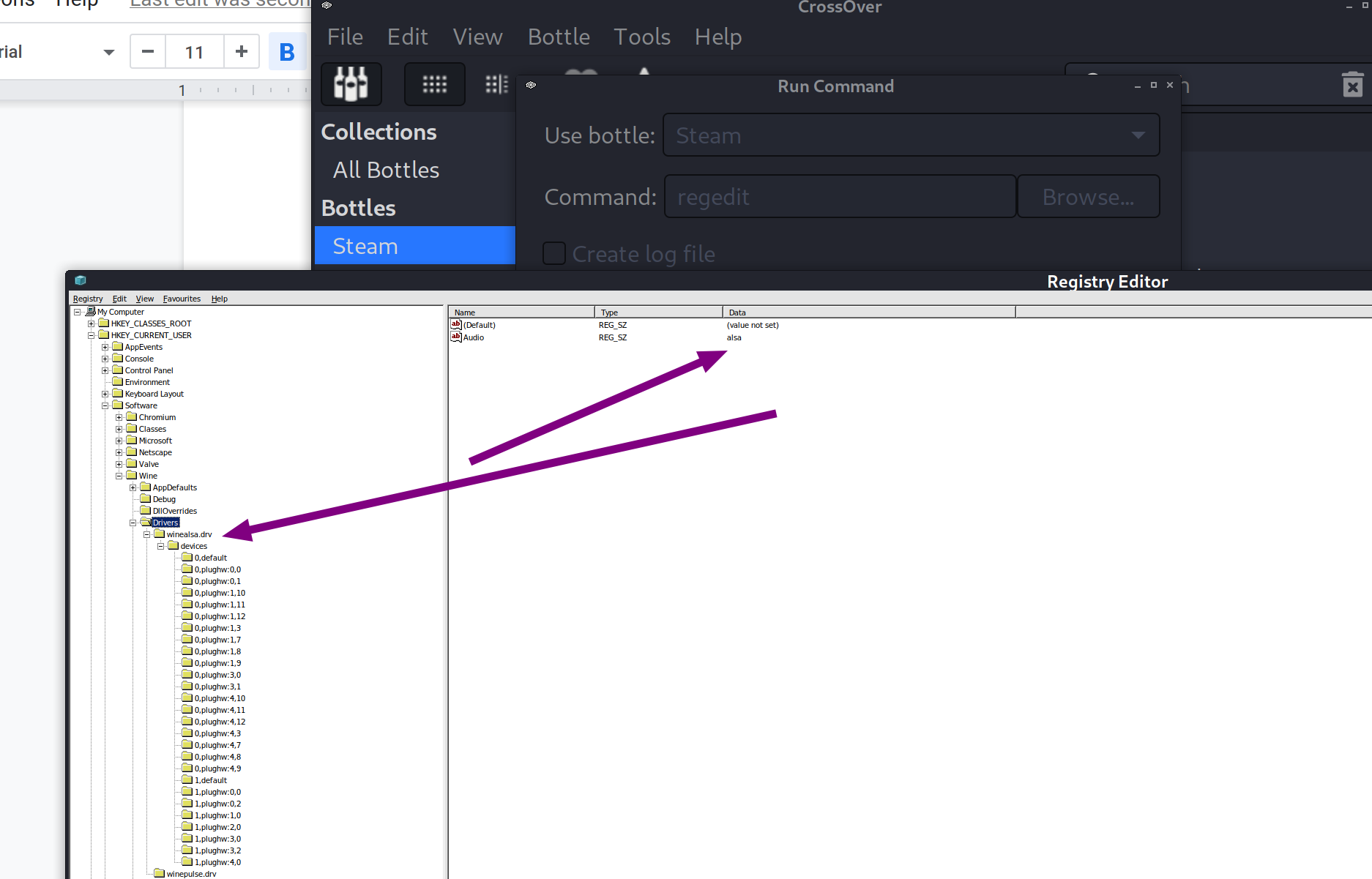
Run crossover regedit

Export CU/software/wine/drivers

Run bottle command regedit

Import registry file to bottle

Change driver to alsa

Rocksmith Config

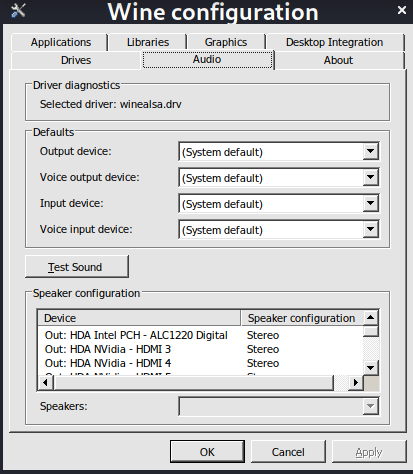
Now configure your steam bottle to use alsa audio drivers for Rocksmith to work.

~/cxoffice/bin/wine –bottle “Steam” winecfg

Configure Rocksmith INI

Win32UltraLowLatencyMode=0

Enjoy playing your guitar on linux with rocksmith!

Adobe Experience Manager – Remote SPA vs Headless

Adobe Experience Manager – Remote SPA vs Headless

It is important to consider the implications regarding the workflow content authors will use when publishing content to a website via

  • Headless
  • Remote SPA

Headless

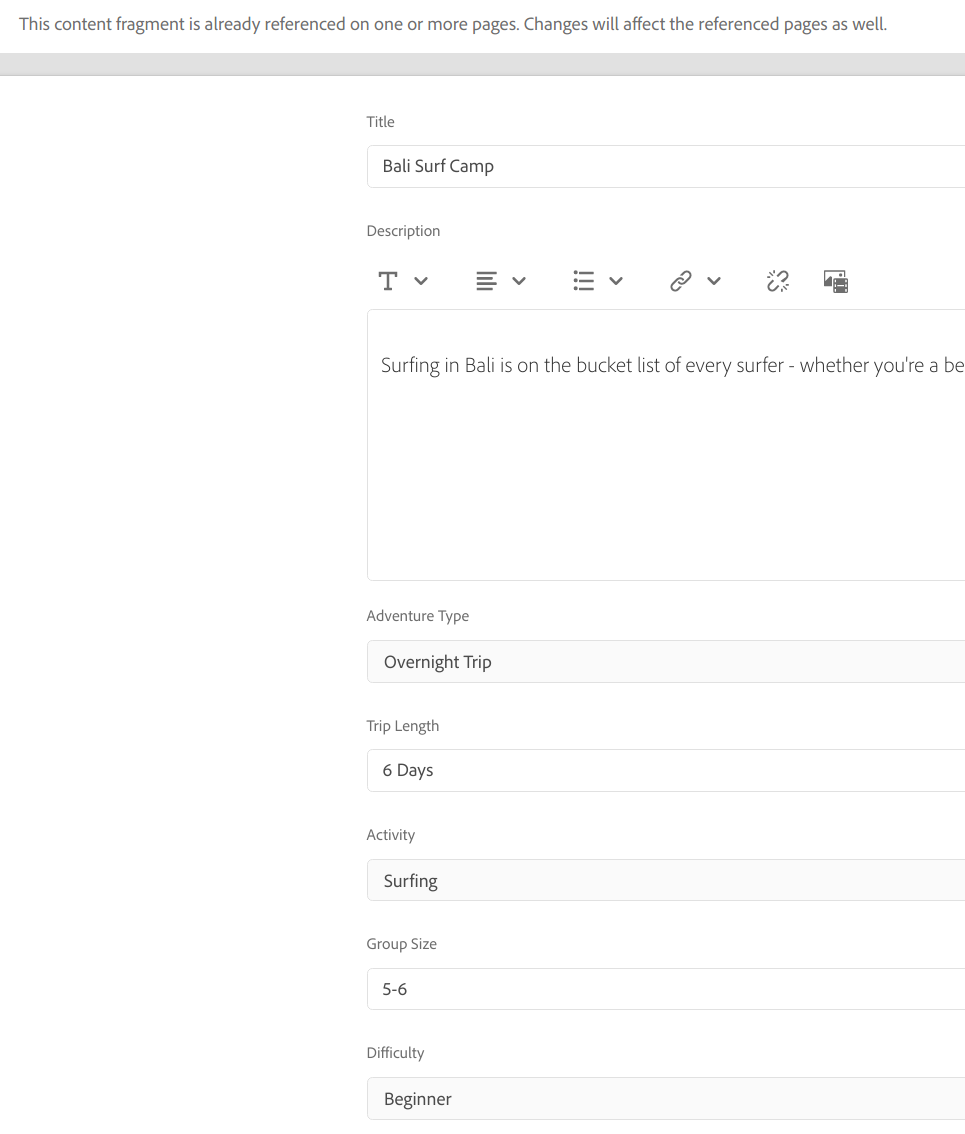
API driven solution.

  • Author does not require a WYSIWYG experience when editing and updating a particular component
  • Re-usable, presentation-agnostic content, composed of structured data elements (text, dates, references, etc.
  • Implemented as a DAM asset
  • Used via the GraphQL Assets APIs for 3rd party consumption e.g. Trader

Content fragments drive the data model. Usually managed via AEM assets.

Remote SPA

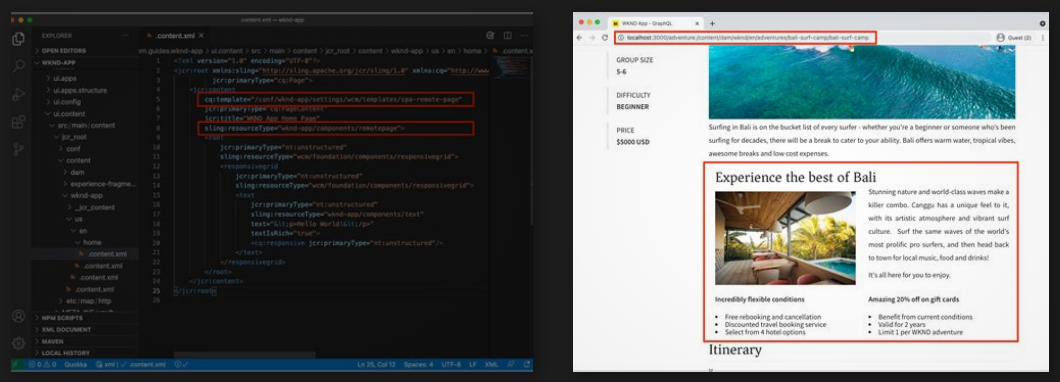
A totally seperate website based on Angular/React/NextJS. Your site does not have to be a “true” remote spa, as long as it is leveraging the modern javascript based frameworks.

IFRAME in AEM author instance enables the wysiwyg expereince.

Usually managed via AEM Sites

Developer activates areas of a website for content authors to use AEM components

This is the high level architecture to allow AEM to integrate with an existing angular site.

A great tutorial to work through regarding remote spa is https://experienceleague.adobe.com/docs/experience-manager-learn/getting-started-with-aem-headless/spa-editor/remote-spa/quick-setup.html?lang=en

Remote SPA Iframe Model

1. SPA Editor loads.
2. SPA is loaded in a separated frame.
3. SPA requests JSON content and renders components client-side.
4. SPA Editor detects rendered components and generates overlays.
5. Author clicks overlay, displaying the component’s edit toolbar.
6. SPA Editor persists edits with a POST request to the server.
7. SPA Editor requests updated JSON to the SPA Editor, which is sent to the SPA with a DOM Event.
8. SPA re-renders the concerned component, updating its DOM.

Advantages

The content author will not experience any difference when editing or creating content.

Enables in context editing of content & configuring components.

Enables in context layout management of components.

Provides the content authors with same user experience both in author and publish mode.

It supports React and Angular framework which are widely used to create SPAs.

Much improved seamless user experience.

Improved application performance, as all content is retrieved once in a single page load with additional resources loaded asynchronously as needed based on user interaction with in the page.

Clear separation of front end and back end development which reduces the integration dependency on each other.

Gives the front-end developers the flexibility to use their choice of JavaScript frameworks and build tools to create highly interactive applications.

By being faster, fluid, and more like a native application, a SPA becomes a very attractive experience not only for the visitor of the webpage, but also for marketers and developers due to the nature of how SPAs work.