Author: Romiko Derbynew

Short Film, Roger”

It has been two weeks since we filmed “Roger”. This has been a truly inspiring experience and the professionalism demonstrated by everyone at The Central Coast Screen Co-op, check their website Central Coast Screen Co-Op

It was the first time I have done a film and found it challenging especially when playing the lead role. The first day went really well and I was impressed by the commitment and professional of the entire crew.

The first day of filming was at the house where Roger’s mother lived, Roger is picking up his childhood pet Parrot and exchanging some banter with his girlfriend Mandy. We also then shot the end of the film which involved driving a car and swerving off the side of the road. I was damn nervous not to swerve to much and slam the breaks to late and then plough into 20 crew members! So thanks guys for trusting me not to mow you all down!

The second day was all done within the car in front of a green screen. It was very exciting and a new experience as you really had to visualise and use your imagination whilst being cooped up inside a garage with 30 crew members trying their best to get the best shots. This I found the most challenging aspect for acting, here we had to create our own external stimuli.

The start of day 2 was a tad slow, until about lunch time when everything started to flow more nicely, however it was a challenge to keep emotions at bay, especially when you want to perform at your best and you know you can do better.

I have definitely learnt allot from the experience and had an amazing time with everyone from the crew. It felt like I had gone an a holiday and had a short term affair with someone special.

Here are some pictures from the day, and would like to thank all those involved on such a great weekend together.


Keep your eyes posted here and hopefully in coming months “Roger” will be ready to watch!

Of course, always good to have the crew list at the end Smile

Writer and Concept

John Blackhawk

Writer

Al Brooks

Producer

Robert Doyle

Director

Graeme Mitchell

DoP/Camera Op

Brendan Palmer

1st Assitant Director

Mark Ferris

1st Assistant Camera

Max Gersbach

2st Assistant Camera

Kate Cornish

Sound Recordist

Peter Henskens

Boom Operator

Terry Wunsch

Gaffer/Grip

Daniel Grey

Prod Designer

Ty Batterham

Standby Props

Daniel Mitchell

Make‐up

Samantha Thompson

Script Supervisor

Liesl Bamback

Data Wrangler

Katey Freyburg

Unit Manager

Nathan Dalton

Bird Wrangler

Kylie Cooke

Stills Photographer

Stefan Sroczynsk

Production Assistant

Christopher Kaye

Production Assistant

John Blackhawk

Production Assistant

Al Brooks

Catering Assistant

Ryan Montgomery

Catering Assistant

Kellie

Roger

Romiko Derbynew

Mandy

Cathy Burnside

Polly (V/O)

Cathy Burnside

Samantha (V/O)

Meg Macintosh

Patricia (V/O)

Gianna Pattison

Blue One (V/O)

John Blackhawk

Blue Three (V/O)

Al Brooks

Editor

Katey Freyburg

Assistant Editor

Christopher Kaye

Assistant Editor

Mark Ferris

CGI Effects Artist

Alex Burgess

Composer

Jenny Harkin

Creativity

The sight of all these people in uniforms does not prime creativity

(Kahneman, D. (2011). Thinking Fast and Slow, Allen Lane 2011 -  Noble Prize 2002 Economic Sciences).

Let’s rethink our culture so that our society can express themselves in a constructive manner and live a more fulfilling life during work hours. To promote conformity and to stifle expression is one of the intrinsic causes of our societies rebellious sub cultures.

So what do suites, ties and school uniforms do for us?  Another social “Etiquette” that hides the true intention of an individual, What are your thoughts?

First Cross Country milestone–Paragliding

It was Friday afternoon and Jamal and I checked out the charts for the weather and the conditions were looking good! We headed off to Manilla Paragliding in NSW at 4am on Saturday. I have been itching to fly after only being back at work for 3 days, all I can think of is to fly!

I took off form Mount Borah West and the wind was strong, whilst soaring the ridge I got parked and felt very uncomfortable, used a little speed bar to get out ahead and then did some figure of eights to gain height and turn and burn over the mountain to avoid rotor winds and turbulence on the lee side of the mountain.

Once I got over the mountain, it was all about looking at the ground for some trigger points where thermals would be released.

When I finally could see Barraba, it dawned on me that I have made my first real cross country flight and the feeling I had inside was fantastic, it is hard to describe, perhaps some form of euphoria!

I met some awesome pilots and some crazy pilots whilst away on the Christmas season, and learnt as much as I can about the art of flying, there is so much to learn and I am looking forward to learning as much as I can.

Paragliding has opened up a new avenue where you can be at the mercy of natures wrath and meet amazing people who are just as crazy!

Here is the flight path and data, just like life, it has it’s up’s and downs! Sunday, was not as great, but still a lovely flight, the conditions were very thermic on Sunday and stable, bombed out in the north west and had a long walk back for 4 hours in 45 degree heat, lesson learned? Carry lots of water and have a back up plan if you need a pick up!

Barogram

image

Data

image

Map

image

Well, that’s it, if you would like to try out something new and exciting and challenge yourself mentally, then Paragliding is definitely worth a try!

Manilla Paragliding

I would highly recommend going to Manilla Paragliding, cool people and an awesome teacher. Check out http://www.flymanilla.com/

Into the sun

Cheers

Windows Azure Cloud Drive–Dealing with large VHD’s and Blob Snapshot Restores

I ran into a scenario where I needed to transfer data from an Azure Cloud Drive VHD that was 250GB in Size from Production to Preproduction. So this means that I want to transfer the VHD from one azure account to another.

The thing with VHD’s and Cloud Drive, is that it is a Page Blob, and the VHD has to be a fixed size, so even though I might have 200MB of data in a 250GB VHD, you would need to download 250GB worth of data.

The Solution?

Remove desktop into the Azure Virtual Machine, Mount the VHD Manually, copy the data, zip it up and send it through other means, so in essence, I only send or download the data that is USED in the VHD i.e. 200MB and not 250GB.

This utility can use the concept of a blobsnapshot VHD backup to restore, and what it will do it mount it. This is ideal when you using blob snapshots as a backup mechanism and you need a way to restore the blob snapshot VHD data, as fast as possible to another Azure Account.

Below is the code for the helper and you can download the source code for the project here:

NOTE: This application must be run in a Windows Azure Virtual Machine, it will NOT WORK on a development machine/emulator.

hg clone ssh://hg@bitbucket.org/romiko/mountclouddrive
hg clone https://romiko@bitbucket.org/romiko/mountclouddrive

using System;
using Microsoft.WindowsAzure;
using Microsoft.WindowsAzure.StorageClient;
using MountCloudDrive.Properties;

namespace MountCloudDrive
{
    public class CloudDriveHotAssistant
    {
        private string restoreVHDName;
        private readonly StorageCredentialsAccountAndKey storageCredentials;
        private readonly CloudStorageAccount cloudStorageAccount;
        private CloudBlobClient blobClient;

        public CloudDriveHotAssistant(string accountName, string accountKey)
        {
            restoreVHDName = Settings.Default.DefaultRestoreDestination;
            storageCredentials = new StorageCredentialsAccountAndKey(accountName, accountKey);
            cloudStorageAccount = new CloudStorageAccount(storageCredentials, false);
            blobClient = new CloudBlobClient(cloudStorageAccount.BlobEndpoint, storageCredentials);
        }

        public CloudPageBlob GetBlobToRestore(string blobContainer, string blobFileName)
        {
            DateTime snapShotTime;
            var converted = DateTime.TryParse(Settings.Default.BlobSnapShotTime, out snapShotTime);

            CloudPageBlob pageBlob;

            if (converted)
                pageBlob = blobClient.GetPageBlobReference(string.Format(@"{0}\{1}", blobContainer, blobFileName), snapShotTime);
            else
                pageBlob = blobClient.GetPageBlobReference(string.Format(@"{0}\{1}", blobContainer, blobFileName));

            try
            {
                pageBlob.FetchAttributes();
            }
            catch (Exception ex)
            {
                Console.WriteLine("\r\nBlob Does Not Exist!");
                Console.WriteLine(ex);
                return null;
            }
            return pageBlob;
        }

        public void UnMountCurrentDrives()
        {
            foreach (var driveName in CloudDrive.GetMountedDrives())
            {
                var drive = new CloudDrive(driveName.Value, storageCredentials);
                Console.WriteLine(string.Format("\r\nUnmounting {0}", driveName.Key));
                Console.WriteLine("\r\nAre you sure Y/N");
                var key = Console.ReadKey();
                var decision = key.Key == ConsoleKey.Y;

                if (!decision)
                    continue;

                try
                {
                    drive.Unmount();
                }
                catch (Exception ex)
                {
                    Console.WriteLine(string.Format("\r\nUnmounting {0} FAILED.\r\n {1}", driveName.Key, ex));
                }
            }
        }

        public CloudPageBlob GetBlobReferenceToRestoreTo(string blobContainer)
        {
            return blobClient.GetPageBlobReference(string.Format(@"{0}\{1}", blobContainer, restoreVHDName));
        }

        public void MountCloudDrive(CloudPageBlob pageBlobSource, CloudPageBlob pageBlobDestination, string blobContainer)
        {
            pageBlobDestination.CopyFromBlob(pageBlobSource);
            Console.WriteLine(string.Format("\r\nAttempting to mount {0}", pageBlobDestination.Uri.AbsoluteUri));
            var myDrive = cloudStorageAccount.CreateCloudDrive(pageBlobDestination.Uri.AbsoluteUri);
            var drivePath = myDrive.Mount(0, DriveMountOptions.None);
            Console.WriteLine(string.Format("\r\nVHD mounted at {0}", drivePath));
        }
    }
}

Automate #WindowsAzure snapshot restores

Hi,
This is the last series in blog posts regarding the automation of backups, purging and restoring azure blobs.

Below is a PowerShell script that can take a file containing the contents of snapshot urls, it also supports the log file output from the backup restore script and just pasting that output in the event you want to restore a complete backup set.

Remember, when using the backup script, ALWAYS save the output of the script to use as a reference so that you have the URL’s of the snapshots you want to restore.

e.g. Sample restore.txt file.
[05:01:08]: [Publishing internal artifacts] Sending build.start.properties.gz file
[05:01:05]: Step 1/2: Command Line (14s)
[05:01:05]: [Step 1/2] in directory: C:\TeamCity\buildAgent\work\d9375448b88c1b75\Maintenance
[05:01:08]: [Step 1/2] Starting snapshot uniqueids
[05:01:08]: [Step 1/2] Found blob container uniqueids
[05:01:09]: [Step 1/2] https://uatmystory.blob.core.windows.net/uniqueids/agencies?snapshot=2012-04-22
[05:01:09]: [Step 1/2] T19:01:10.6488549Z
[05:01:09]: [Step 1/2] https://uatmystory.blob.core.windows.net/uniqueids/agency1-centres?snapshot=201
[05:01:09]: [Step 1/2] 2-04-22T19:01:10.8818083Z
[05:01:09]: [Step 1/2] https://uatmystory.blob.core.windows.net/uniqueids/agency1-clients?snapshot=201
[05:01:09]: [Step 1/2] 2-04-22T19:01:11.0257795Z
[05:01:09]: [Step 1/2] https://uatmystory.blob.core.windows.net/uniqueids/agency1-referrals?snapshot=2
[05:01:09]: [Step 1/2] 012-04-22T19:01:11.1717503Z

So the script will parse any restore file and just find URI’s in it, and then restore them.

#requires -version 2.0
param (
	[parameter(Mandatory=$true)] [string]$AzureAccountName,
	[parameter(Mandatory=$true)] [string]$AzureAccountKey,
	[parameter(Mandatory=$true)] [string]$FileContainingSnapshotAddresses
)

$ErrorActionPreference = "Stop"

if ((Get-PSSnapin -Registered -Name AzureManagementCmdletsSnapIn -ErrorAction SilentlyContinue) -eq $null)
{
	throw "AzureManagementCmdletsSnapIn missing. Install them from Https://www.cerebrata.com/Products/AzureManagementCmdlets/Download.aspx"
}

Add-PSSnapin AzureManagementCmdletsSnapIn -ErrorAction SilentlyContinue
Add-Type -Path 'C:\Program Files\Windows Azure SDK\v1.6\ref\Microsoft.WindowsAzure.StorageClient.dll'

$cred = New-Object Microsoft.WindowsAzure.StorageCredentialsAccountAndKey($AzureAccountName,$AzureAccountKey)
$client = New-Object Microsoft.WindowsAzure.StorageClient
.CloudBlobClient("https://$AzureAccountName.blob.core.windows.net",$cred)

function RestoreSnapshot
{
	param ( $snapShotUri)
	Write-Host "Parsing snapshot restore for $SnapShotUri"

	$regex = new-object System.Text.RegularExpressions.Regex("http://.*?/(devstoreaccount1/)?(?<containerName>.*?)/.*")
	$match = $regex.Match($snapShotUri)
	$container = $match.Groups["containerName"].Value
	$parsedUri = $match
	
	if($match.Value -eq "")
	{
		return
	}
		
	if ($container -eq $null)
	{
		Write-Host  "Container $blobContainerName doesn't exist, skipping snapshot restore"
	}
	else
	{
		Write-Host  "Restoring $snapShotUri" 
		Copy-Blob -BlobUrl $parsedUri -AccountName $AzureAccountName -AccountKey $AzureAccountKey -TargetBlobContainerName $container
		Write-Host  "Restore snapshot complete for $parsedUri"
	}
}

$fileContent = Get-Content $FileContainingSnapshotAddresses

foreach($uri in $fileContent)
{
	RestoreSnapshot $uri
}


Cloning Disks and Partitions

I have been using CloneZilla to manage all my disk and partition backups, I find it very user friendly and support all my disks (USB, ESATA). I recommend TUXBOOT for making Clonezilla bootable USB drive and to keep it with you whenever you need to clone a disk, then just boot off the stick.

http://clonezilla.org/liveusb.php

Windows 7 bootable USB stick

On the subject, sometimes you need to get an OS on beforehand for Windows, I like using this tool to make a bootable windows 7 USB stick.

http://images2.store.microsoft.com/prod/clustera/framework/w7udt/1.0/en-us/Windows7-USB-DVD-tool.exe

Automate #Azure Blob Snapshot purging/deletes with @Cerebrata

The pricing model for snapshots can get rather complicated, so we need a way to automate the purging of snapshots.
Read how snapshots can accrue additional costs

Lets minimize these costs! We use this script to backup and manage snapshot retention for all our Neo4j Databases hosted in the Azure Cloud.

So a solution I have is that:
We have a retention period in days for all snapshots e.g. 30 days
We have a retention period for the last day of the month backups e.g. 180 days

Rules:
1. The purging will always ensure that there is always at least ONE snapshot, so it will never delete a backup if it is the only backup for a base blob.

2. The purging will delete snapshots greater than the retention period, respecting rule 1

3. The purging will delete snapshots greater than the last day month retention period, respecting rule 1

You can then schedule this script to run after the Backup Script in TeamCity or some other build server scheduler.

param(
	[parameter(Mandatory=$true)] [string]$AzureAccountName,
	[parameter(Mandatory=$true)] [string]$AzureAccountKey,
	[parameter(Mandatory=$true)] [array]$BlobContainers, #Blob Containers to backup
	[parameter(Mandatory=$true)] [int]$BackupRetentionDays, #Days to keep snapshot backups
	[parameter(Mandatory=$true)] [int]$BackupLastDayOfMonthRetentionDays # Days to keep last day of month backups
)


if( $BackupRetentionDays -ge $BackupLastDayOfMonthRetentionDays )
{
	$message = "Argument Exception: BackupRentionDays cannot be greater than or equal to BackupLastDayOfMonthRetentionDays"
	throw $message
}

Add-Type -Path 'C:\Program Files\Windows Azure SDK\v1.6\ref\Microsoft.WindowsAzure.StorageClient.dll'

$cred = New-Object Microsoft.WindowsAzure.StorageCredentialsAccountAndKey($AzureAccountName,$AzureAccountKey)
$client = New-Object Microsoft.WindowsAzure.StorageClient
.CloudBlobClient("https://$AzureAccountName.blob.core.windows.net",$cred)

function PurgeSnapshots ($blobContainer)
{
	$container = $client.GetContainerReference($blobContainer)
	$options = New-Object  Microsoft.WindowsAzure.StorageClient.BlobRequestOptions
	$options.UseFlatBlobListing = $true
	$options.BlobListingDetails = [Microsoft.WindowsAzure.StorageClient.BlobListingDetails]::Snapshots

	$blobs = $container.ListBlobs($options)
	$baseBlobWithMoreThanOneSnapshot = $container.ListBlobs($options)| Group-Object Name | Where-Object {$_.Count -gt 1} | Select Name

	#Filter out blobs with more than one snapshot and only get SnapShots.
	$blobs = $blobs | Where-Object {$baseBlobWithMoreThanOneSnapshot  -match $_.Name -and $_.SnapshotTime -ne $null} | Sort-Object SnapshotTime -Descending

	foreach ($baseBlob in $baseBlobWithMoreThanOneSnapshot )
	{
		 $count = 0
		 foreach ( $blob in $blobs | Where-Object {$_.Name -eq $baseBlob.Name } )
		    {
				$count +=1
				$ageOfSnapshot = [System.DateTime]::UtcNow - $blob.SnapshotTime
				$blobAddress = $blob.Uri.AbsoluteUri + "?snapshot=" + $blob.SnapshotTime.ToString("yyyy-MM-ddTHH:mm:ss.fffffffZ")

				#Fail safe double check to ensure we only deleting a snapshot.
				if($blob.SnapShotTime -ne $null)
				{
					#Never delete the latest snapshot, so we always have at least one backup irrespective of retention period.
					if($ageOfSnapshot.Days -gt $BackupRetentionDays -and $count -eq 1)
					{
						Write-Host "Skipped Purging Latest Snapshot"  $blobAddress
						continue
					}

					if($ageOfSnapshot.Days -gt $BackupRetentionDays -and $count -gt 1 )
					{
					    #Do not backup last day of month backups
						if($blob.SnapshotTime.Month -eq $blob.SnapshotTime.AddDays(1).Month)
						{
							Write-Host "Purging Snapshot "  $blobAddress
							$blob.Delete()
							continue
						}
						#Purge last day of month backups based on monthly retention.
						elseif($blob.SnapshotTime.Month -ne $blob.SnapshotTime.AddDays(1).Month)
						{
							if($ageOfSnapshot.Days -gt $BackupLastDayOfMonthRetentionDays)
							{
							Write-Host "Purging Last Day of Month Snapshot "  $blobAddress
							$blob.Delete()
							continue
							}
						}
						else
						{
							Write-Host "Skipped Purging Last Day Of Month Snapshot"  $blobAddress
							continue
						}
					}
					
					if($count % 5 -eq 0)
					{
						Write-Host "Processing..."
					}
				}
				else
				{
					Write-Host "Skipped Purging "  $blobAddress
				}
		    }
	}
}

foreach ($container in $BlobContainers)
{
	Write-Host "Purging snapshots in " $container
	PurgeSnapshots $container
}

Automate #Azure Blob Snapshot backups with @Cerebrata

Hi,

Leveraging the cerebrata cmdlets for Azure, we can easily backup our blob containers via snapshot, this will prove useful for Page Blobs that are Random Access i.e. VHD’s on Cloud Drive

Here is how Purging Snapshots works

#requires -version 2.0
param (
	[parameter(Mandatory=$true)] [string]$AzureAccountName,
	[parameter(Mandatory=$true)] [string]$AzureAccountKey,
	[parameter(Mandatory=$true)] [array]$BlobContainers
)

$ErrorActionPreference = "Stop"

if ((Get-PSSnapin -Registered -Name AzureManagementCmdletsSnapIn -ErrorAction SilentlyContinue) -eq $null)
{
	throw "AzureManagementCmdletsSnapIn missing. Install them from Https://www.cerebrata.com/Products/AzureManagementCmdlets/Download.aspx"
}

Add-PSSnapin AzureManagementCmdletsSnapIn -ErrorAction SilentlyContinue

function SnapShotBlobContainer 
{
	param ( $containers, $blobContainerName )
	Write-Host "Starting snapshot $blobContainerName"

	$container = $containers | Where-Object { $_.BlobContainerName -eq $blobContainerName }

	if ($container -eq $null)
	{
		Write-Host  "Container $blobContainerName doesn't exist, skipping snapshot"
	}
	else
	{
        Write-Host  "Found blob container $blobContainerName"
Checkpoint-BlobContainer -Name $container.BlobContainerName -SaveSnapshotInformation -AccountName $AzureAccountName -AccountKey $AzureAccountKey
	Write-Host  "Snapshot complete for $blobContainerName"
	}
}

$containers = Get-BlobContainer -AccountName $AzureAccountName -AccountKey $AzureAccountKey
foreach($container in $BlobContainers)
{
	SnapShotBlobContainer $containers $container
}

Then just call the script with the params. remember an array of items is parsed in like this:

-BlobContainers:@(‘container1’, ‘contaner2’) -AzureAccountName romikoTown -AzureAccountKey blahblahblahblahblehblooblowblab==

Neo4jClient Cypher ResultSet Support

Sometimes when doing Cypher queries the result is only one column and not multiple columns, therefore it makes sense to have a method in the fluent API to let this be known, so we do not have to map the column to an object type.

So fluent support to deserialize common result sets where cypher returns a result with only 1 column with the help of Tatham Oddie is completed.

So in the Neo4jClient you can do this, when the result from Cypher is one column via REST:

var result = agencySource
                        .StartCypher("a1")
                        .AddStartPoint("a2", agency.Reference)
                        .Match("p = allShortestPaths( a1-[*..20]-a2 )")
                        .Return<PathsResult>("p")
                        .ResultSet;

So, if you need cypher results with only one column then use .ResultSet instead of .Results, thus no need for expression tree column matches to assist the deserializer with multiple column names.

Here is a sample rest response with 1 column result that is suited perfectly for ResultSet.

{
  "data" : [ [ {
    "start" : "http://localhost:20001/db/data/node/215",
    "nodes" : [ "http://localhost:20001/db/data/node/215", "http://localhost:20001/db/data/node/0", "http://localhost:20001/db/data/node/219" ],
    "length" : 2,
    "relationships" : [ "http://localhost:20001/db/data/relationship/247", "http://localhost:20001/db/data/relationship/257" ],
    "end" : "http://localhost:20001/db/data/node/219"
  } ], [ {
    "start" : "http://localhost:20001/db/data/node/215",
    "nodes" : [ "http://localhost:20001/db/data/node/215", "http://localhost:20001/db/data/node/1", "http://localhost:20001/db/data/node/219" ],
    "length" : 2,
    "relationships" : [ "http://localhost:20001/db/data/relationship/248", "http://localhost:20001/db/data/relationship/258" ],
    "end" : "http://localhost:20001/db/data/node/219"
  } ] ],
  "columns" : [ "p" ]
}

If you wondering what the hell is agencySource, it is just node references, that I got using gremlin, which can spin off cypher queries, cool is it not?

var agencies = graphClient
                .RootNode
                .Out<Agency>(Hosts.TypeKey)
                .ToList();

This just enumerate through the list of nodes to run your cypher queries off the node directly! Have these imports declarations:

using Neo4jClient.ApiModels.Cypher;
using Neo4jClient.Gremlin;
using Neo4jClient.Cypher;

Summary

Use .ResultSet for single column result sets and use .Results when dealing with multiple column results.

Working with time zones in ASP.NET MVC

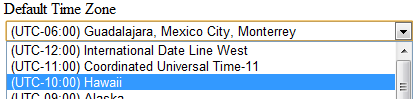
You would like a dropdown list of time zones that a user can select from and perhaps use it for a user profile or multi tenant profile.

image

Our second objective is that we do not want to manage this reference data, it should come from the system.

So what we going do is.

  • DisplayFor template to deal with data types of TimeZoneInfo, so that whenever a model or viewmodel contains a property of type TimeZoneInfo, we can then use the Html.DisplayFor helper method.
  • Custom Model Binder that will take the TimeZone value (TZID) in the drop down list and create an instance of a new TimeZoneInfo object that can be bound to the model property

Remember, the value stored in the drop down list is just the TimeZoneID:

image

See above, the value is the TZID. So we need to somehow convert this to a TimeZoneInfo object, there is the following static method which we can use.

http://msdn.microsoft.com/en-us/library/system.timezoneinfo.findsystemtimezonebyid.aspx

Excellento, lets geek it up.

Display Template

@model TimeZoneInfo

@{
    var timeZoneList = TimeZoneInfo
        .GetSystemTimeZones()
        .Select(t => new SelectListItem
        {
            Text = t.DisplayName,
            Value = t.Id,
            Selected = Model != null && t.Id == Model.Id
        });
}
@Html.DropDownListFor(model => model, timeZoneList)
@Html.ValidationMessageFor(model => model)

Model Binder and Model Binder Provider

 
using System;
using System.Web.Mvc;

namespace MyStory.Web.ModelBinders
{
    public class TimeZoneInfoModelBinder : IModelBinder
    {
        public object BindModel(ControllerContext controllerContext, ModelBindingContext bindingContext)
        {
            var valueProviderResult = bindingContext.ValueProvider.GetValue(bindingContext.ModelName);
            bindingContext.ModelState.SetModelValue(bindingContext.ModelName, valueProviderResult);

            if (valueProviderResult == null) return null;

            var attemptedValue = valueProviderResult.AttemptedValue;

            return ParseTimeZoneInfo(attemptedValue);
        }

        public static TimeZoneInfo ParseTimeZoneInfo(string attemptedValue)
        {
            return TimeZoneInfo.FindSystemTimeZoneById(attemptedValue);
        }

        public class TimeZoneModelBinderProvider : IModelBinderProvider
        {
            public IModelBinder GetBinder(Type modelType)
            {
                return modelType == typeof(TimeZoneInfo)
                    ? DependencyResolver.Current.GetService<TimeZoneInfoModelBinder>()
                    : null;
            }
        }
    }
}

Register Model Binder

Here I am using Autofac to automatically register all concrete types that implement IModelBinder in my assembly or IModelBinderProvider, via dependency injection in the global.asax.cs

  builder
                .RegisterAssemblyTypes(typeof(MvcApplication).Assembly)
                .Where(t => typeof(IModelBinder).IsAssignableFrom(t))
                .AsSelf()
                .InstancePerLifetimeScope();

            builder
                .RegisterAssemblyTypes(typeof(MvcApplication).Assembly)
                .Where(t => typeof(IModelBinderProvider).IsAssignableFrom(t))
                .As<IModelBinderProvider>();

Sample Model

  
    public class MyModel
    {
        [Required]
        [StringLength(100)]
        public string Name { get; set; }

        [Required]
        [Display(Name = "Default Time Zone" )]
        public TimeZoneInfo DefaultTimeZone { get; set; }
    }   

Now whatever view need to use this model just needs to call the DisplayFor helper.

  
@Html.LabelFor(model => model.DefaultTimeZone)  
<div>  @Html.DisplayFor(m => m.DefaultTimeZone, "TimeZones")  
</div>