Category: .Net Development

Heroku Neo4j, App Harbor MVC4, Neo4jClient & Ruby Proxy

Overview

We going to outlay the process to deploy a 4 layers architecture using the above technologies.

architecture

Prerequisites

Sinatra and Rest-Client

Sinatra and the Rest-Client libraries are used in the Ruby Gem to proxy all Http requests to Neo4j.

Install Process

Install the Heroku client, run this from the heroku\Ruby\bin folder e.g. D:\Program Files (x86)\Heroku\ruby\bin

gem install heroku

We then need to use the Cedar stack (http://devcenter.heroku.com/articles/cedar) which supports ruby in Heroku,  so run:

heroku create –stack cedar

(Ensure git.exe is in your environment variables)

image

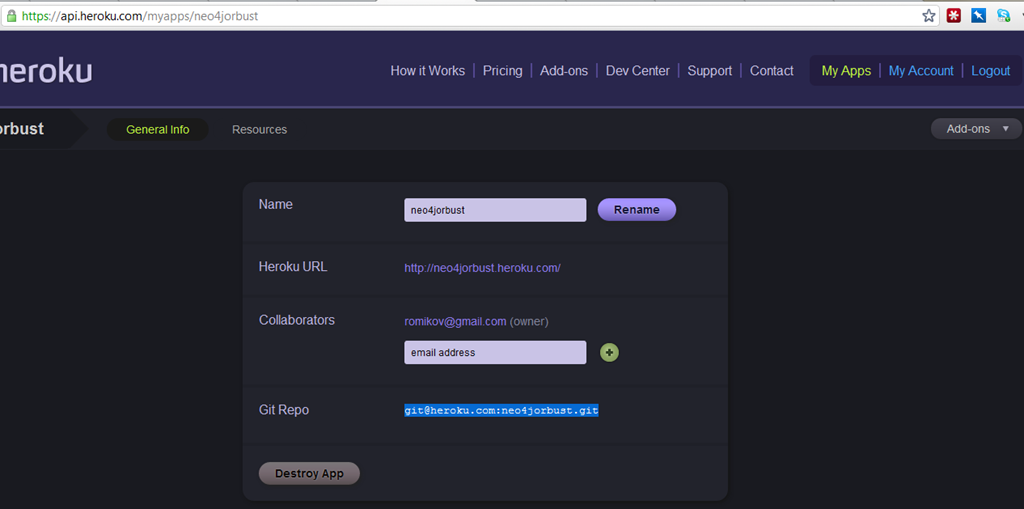
Once this is completed we then deploy our code to our Heroku git repository. You can see your git heroku repository in the app details for the app you created in Heroku:

image

We will use a public key that we created when first setting up Heroku, check blog post

https://romikoderbynew.com/2012/01/25/getting-started-with-heroku-toolbelt-on-windows-2/

if you changed your public key, then add it to Heroku

heroku keys:add

Ok, now we push the Gem files to our Heroku git repository. Your repsotory will be different to mine!

git push git@heroku.com:neo4jorbust.git master

image

Lets check the state of the application

E:\Projects\RubyRestProxy>heroku ps –app neo4jorbust
Process State Command
——- ———– ————————————
web.1 idle for 9h thin -p $PORT -e $RACK_ENV -R $HER..

Test HttpClient –> Ruby –> Neo4j Communication

Nice, now we got this GEM file, which is our Ruby http proxy code for gremlin queries. Lets test this baby out with fiddler and run  gremlin query to the web app, which will then call neo4j!

Lets browse the Ruby Application on the Heroku server, so we can find out what URL we need to use to send Gremlin queries to Neo4j.

image

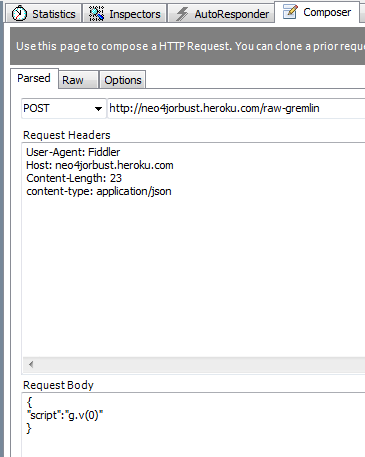
Beautiful, all we need to do now is send an HTTP POST to the added, you can use curl, but here is fiddler.

image

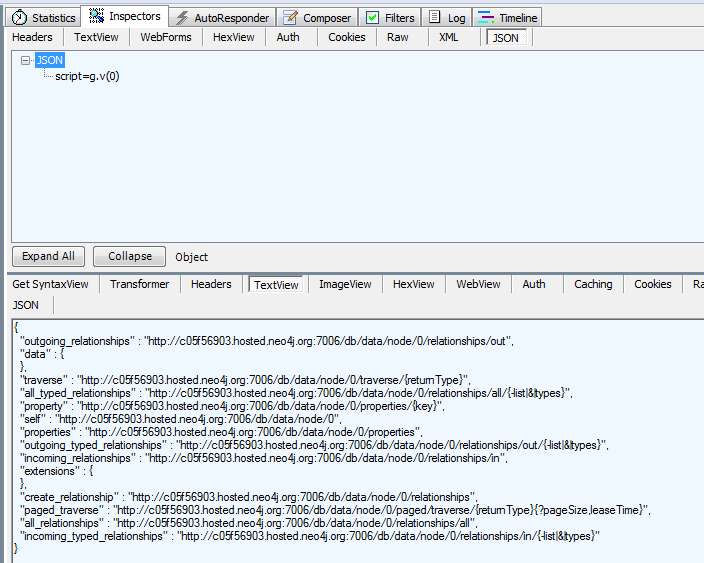
And the result, music to our eyes

image

ASP.NET MVC 4 APP with Neo4jClient

This application is hosted at

http://frictionfree.org

Source Code:

https://bitbucket.org/romiko/frictionfree/src

Now we going to fire up a .Net application that will use the Neo4jClient Rest Api to communicate with neo4j in Heroku. You can find out more about Neo4jClient here http://hg.readify.net/neo4jclient/wiki/Home

Clone the git repository to get the source code for our sample Neo4jClient .Net application. This is a MVC4 application and runs on the .Net Framework 4 runtime, so please ensure you have this installed on your windows machine.

About frictionfree.org

The application is used to find other people with similar interests to you and the opportunity to get their details and contact them to perhaps share your love of flying, surfing or whatever it is you like to do!

Bitbucket and AppHarbor integration

If you have your own ASP.NET application, you can store it in bitbucket and then configure bitbucket to auto deploy to AppHarbor when pushing back the repostory.

In the admin settings for your repository just add your appharbor token.

image

Neo4jClient gremlin Query syntax

Check the source code of the MVC application in the Logic library to see how to run queries to Neo4j. Here is sample code to get administrators of the system

private void CreateAdminAccountIfNoneExist() { var anyAdmins = graphClient .RootNode .In(Administers.TypeKey) .Any(); if (!anyAdmins) { provisionNewUserService.CreateAdmin(); } } 

FrictionFree.org supporting the .NET Neo4j community

I am proud to announce the first release of http://frictionfree.org, this website is to serve the Neo4j community in the .NET space. You can learn all about how the Neo4jClient can be used with .NET. The current site demonstrates the fluent Gremlin API.

I encourage developers to contribute to the source if you interested Smile

Romiko

Getting Started with Heroku ToolBelt/Neo4j on Windows

Hi Guys,

To get started with Heroku, you need a public key. If you do not have one in the

C:\Users\<YourUsername>\.ssh folder, then you get this error

D:/Program Files (x86)/Heroku/lib/heroku/auth.rb:195:in `read’: No such file or
directory – C:/Users/Romiko/.ssh/id_rsa.pub (Errno::ENOENT)
from D:/Program Files (x86)/Heroku/lib/heroku/auth.rb:195:in `associate_key’

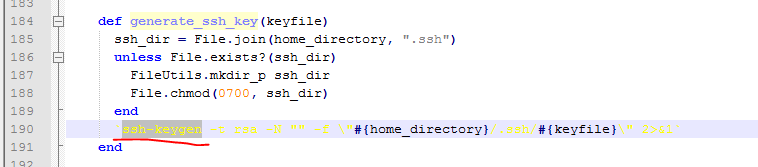
looking at the source code, line 195 is ssh key generation. So what we need to do is use a utility like GitBash to do this for us:

image

Instructions

TO get up and running with the Heroku Toolbelt on windows ensure you read:

http://devcenter.heroku.com/articles/quickstart

Once you have read that and installed Heroku toolbelt

http://assets.heroku.com/heroku-toolbelt/heroku-toolbelt.exe

then install Git (Or use the Git bash if already installed)

http://msysgit.googlecode.com/files/Git-1.7.8-preview20111206.exe

Now, what you do is follow all the instructions here, you might as well ensure you have a GitHub account, its nice to put your code in a repository if developing:

http://help.github.com/win-set-up-git/

You should then have these files (you might not have known hosts), if you did not connect into git

image

The Heroku batch file will look for the id_rsa.pub file and use it to connect to the cloud servers.

Once this is done, you can then go back to the heroku.cmd execution and login

D:\Program Files (x86)\Heroku>heroku login
Enter your Heroku credentials.
Email: ROMxxx@xxx.COM
Password:
Found existing public key: C:/Users/Romiko/.ssh/id_rsa.pub
Uploading ssh public key C:/Users/Romiko/.ssh/id_rsa.pub

That is it, so hope this gets you started on Heroku Smile

Neo4j

Once you ran the above command, then create an application

Create Heroku Applicaton in the Cloud

D:\Program Files (x86)\Heroku>heroku apps:create Neo4jOrBust
Creating neo4jorbust… done, stack is bamboo-mri-1.9.2
http://neo4jorbust.heroku.com/ | git@heroku.com:neo4jorbust.git

Notice the appname is lowercase always!

Install Neo4j Addon

For this to work, you must verify the account and you will need a credit card, it will NOT be billed. Don’t sue me if it does!

Then for Neo4j, just install the addon like so

D:\Program Files (x86)\Heroku>heroku addons:add neo4j –app neo4jorbust
—–> Adding neo4j to neo4jorbust… failed
!    Please verify your account to install this add-on
!    For more information, see http://devcenter.heroku.com/categories/billing
!    Confirm now at https://heroku.com/confirm

Go verify your account and then come back and run the command again

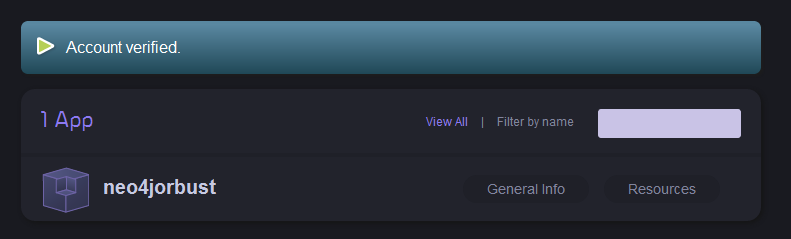
https://api.heroku.com/myapps

image

D:\Program Files (x86)\Heroku>heroku addons:add neo4j –app neo4jorbust
—–> Adding neo4j to neo4jorbust… done, (free)

image

Thats it!

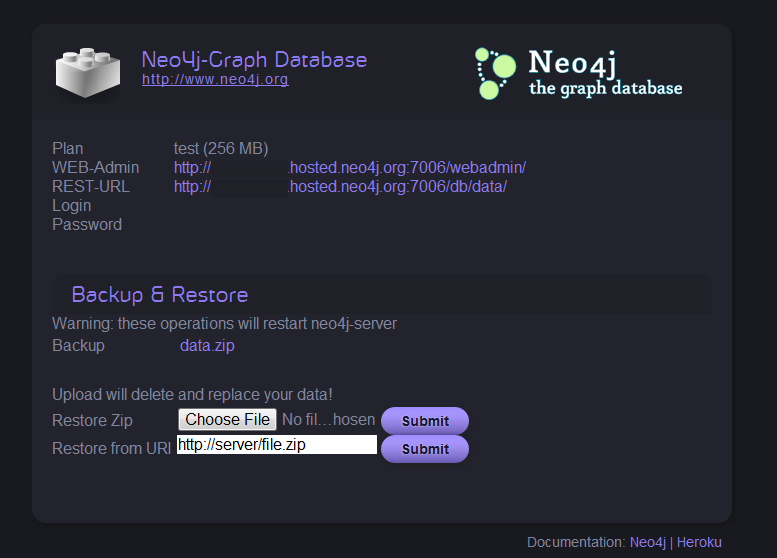
You can then go check your addons on the web site at heroku under resources. Click databases and scroll to bottom.

image

Notice neo4jTest and it is free Smile Lets enable it

image

Notice, the urls for the webadmin site and rest url, you all set to work with Neo4j now Smile

Thats it, have fun!

Getting Started with Heroku ToolBelt on Windows

Hi Guys,

To get started with Heroku, you need a public key. If you do not have one in the

C:\Users\<YourUsername>\.ssh folder, then you get this error

D:/Program Files (x86)/Heroku/lib/heroku/auth.rb:195:in `read’: No such file or
directory – C:/Users/Romiko/.ssh/id_rsa.pub (Errno::ENOENT)
        from D:/Program Files (x86)/Heroku/lib/heroku/auth.rb:195:in `associate_key’

looking at the source code, line 195 is ssh key generation. So what we need to do is use a utility like GitBash to do this for us:

image

Instructions

TO get up and running with the Heroku Toolbelt on windows ensure you read:

http://devcenter.heroku.com/articles/quickstart

Once you have read that and installed Heroku toolbelt

http://assets.heroku.com/heroku-toolbelt/heroku-toolbelt.exe

then install Git (Or use the Git bash if already installed)

http://msysgit.googlecode.com/files/Git-1.7.8-preview20111206.exe

Now, what you do is follow all the instructions here, you might as well ensure you have a GitHub account, its nice to put your code in a repository if developing:

http://help.github.com/win-set-up-git/

You should then have these files (you might not have known hosts), if you did not connect into git

image

The Heroku batch file will look for the id_rsa.pub file and use it to connect to the cloud servers.

Once this is done, you can then go back to the heroku.cmd execution and login

D:\Program Files (x86)\Heroku>heroku login
Enter your Heroku credentials.
Email: ROMIKOV@GMAIL.COM
Password:
Found existing public key: C:/Users/Romiko/.ssh/id_rsa.pub
Uploading ssh public key C:/Users/Romiko/.ssh/id_rsa.pub

That is it, so hope this gets you started on Heroku Smile

Slow HttpWebRequest.GetResponse()

In the development of the Neo4jClient, we noticed that all DB queries to Neo4j were taking roughly 150ms longer than on my local development machine. after using Fiddler and ApacheBench, it was clear the performance issue was inside the .Net Code.

What we use in Neo4jClient (http://hg.readify.net/neo4jclient/wiki/Home) is the RestSharp open source library. Fiddler proved to be very unreliable to produce consistent results due to it caching and reuse of connections, even when disabling them, also, when requests went via fiddler, the response time was quick, so queries taking over 150ms without fiddler were taking 10-15ms within fiddler.

Profiling

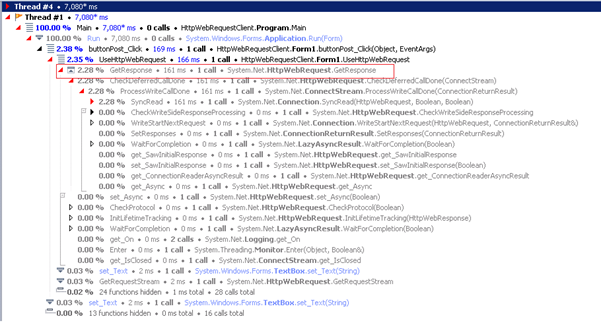
The solution was to build a custom .Net tool to send Http POSTS, and using the JetBrains DotTrace utility, we were able to see an issue where, if we FIRST bypassed RestSharp and just used HttpWebRequest, the response time was quick, as soon as we used RestSharp it went slow, and even after using it, going back to HttpWebeRequest was then slow.

Somewhere, a Static Class was causing an issue that RestSharp uses.

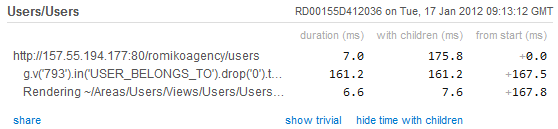
image

Notice the 150ms overhead in the above screenshot

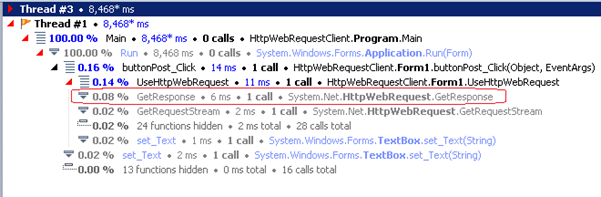
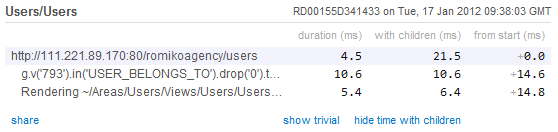
Here is a profile where restsharp is bypassed

image

In the above profile, the http response time is fast.

ServicePointManager

RestSharp sets the ServicePointManager, which is a static class, and what we found was that this algorithm was causing 150ms delays in our Neo4j DB calls.

ServicePointManager.UseNagleAlgorithm

I noticed in wire shark the difference between a fast stream and a slow one, it affected the number of packets which pointed to either

ServicePointManager.Expect100Continue

or

ServicePointManager.UseNagleAlgorithm

we found changing Expect100Continue not to cause any changes, however setting UseNagleAlgorithm to false, solved the issue, and now all DB calls to Neo4j are 150ms quicker!


(HttpWebRequest) – SLOW – After a RestSharp call (Poisoned system)

FAST TCP STREAM (HTTPWebRequest)

This is due to UseNagleAlgorithm being off

POST /db/data/ext/GremlinPlugin/graphdb/execute_script HTTP/1.1

Content-Type: application/json

Host: 10.25.234.67:20001

Content-Length: 65

{"script":"g.v(793).in(‘USER_BELONGS_TO’).drop(0).take(100)._()"}HTTP/1.1 200 OK

Content-Length: 5316

Content-Encoding: UTF-8

Content-Type: application/json

Access-Control-Allow-Origin: *

Server: Jetty(6.1.25)

POST /db/data/ext/GremlinPlugin/graphdb/execute_script HTTP/1.1

Content-Type: application/json

Host: 10.25.234.67:20001

Content-Length: 65

Expect: 100-continue

HTTP/1.1 100 Continue

{"script":"g.v(793).in(‘USER_BELONGS_TO’).drop(0).take(100)._()"}HTTP/1.1 200 OK

Content-Length: 5316

Content-Encoding: UTF-8

Content-Type: application/json

Access-Control-Allow-Origin: *

Server: Jetty(6.1.25)

Before Optimisation in Azure

image

After Optimisation in Azure

image

Conclusion

If you doing allot of small HTTP POSTS, it might be a good idea to turn off the Nagle Algorithm.

http://www.winsocketdotnetworkprogramming.com/xmlwebservicesaspnetworkprogramming11e.html

When using the Neo4j REST API(http://docs.neo4j.org/chunked/snapshot/rest-api.html), be aware of the response times, and if you notice response times greater than 150ms for all DB calls, then perhaps you have the same issue with the ServicePointManager confguration.

Nagle Algorithm

The Nagle algorithm increases network efficiency by decreasing the number of packets sent across the network. It accomplishes this by instituting a delay on the client of up to 200 milliseconds when small amounts of data are written to the network. The delay is a wait period for additional data that might be written. New data is added to the same packet. The practice of compiling data is not always ideal for Web services, however, because a POST request often contains a small amount of data in the HTTP headers without the body (because of 100 Continue, as described earlier). The Nagle algorithm can be turned off for Web services calls via the System.Net.ServicePointManager.UseNagleAlgorithm property. Yet disabling the Nagle algorithm might not provide the best performance either, you’ll need to experiment with disabling the algorithm to fine- tune your application. Whether you should disable the algorithm in this case depends on several factors, including the size of the Web services call, the latency of the network, and whether HTTP authentication is involved.

Neo4j application performance profiling management with New Relic

Hi,

We currently need a way to have performance profiling management solution in place for Neo4j running in Windows Azure cloud. The benefits of course is on going data analysis and performance statistics, not to mention assisting in debugging issues with performance. The best part of it all, is the agent that collects the data just runs as part of the JVM and the data is automatically uploaded to the website where you can view it online.

New Relic Account

The first thing you will need to do is create a new relic account at:

http://newrelic.com/

Once, this is done, you can then download the java agent which will contain two files:

newrelic.jar

newrelic.yml

The yml file contains the license key and the application name to display on the new relic performance dashboard website. When you use New Relic it has a trial option, so it is easy to test out.

Infrastructure

What we do is store these zip files in blob storage and when the worker role is bootstrapping, it will then download the zip file, and then automatically edit the neo4j config files before starting up neo4j.

image

Neo4j configuration

It is extremely simple to configure the relic agent to run and profile neo4j, all you need to do is edit the neo4j-wrapper.conf file and add this line of code.

wrapper.java.additional.2=-javaagent:..\newrelic.jar

We use a relative path, as we store the newrelic jar relative to the neo4j binaries, so all you need to do is store the newrelic.jar file in a location where neo4j can access it from when starting up.

Dashboard

Once this has been deployed to the cloud, we then have performance statistic automatically made available to use via the neo4j JVM on the New Relic web site!

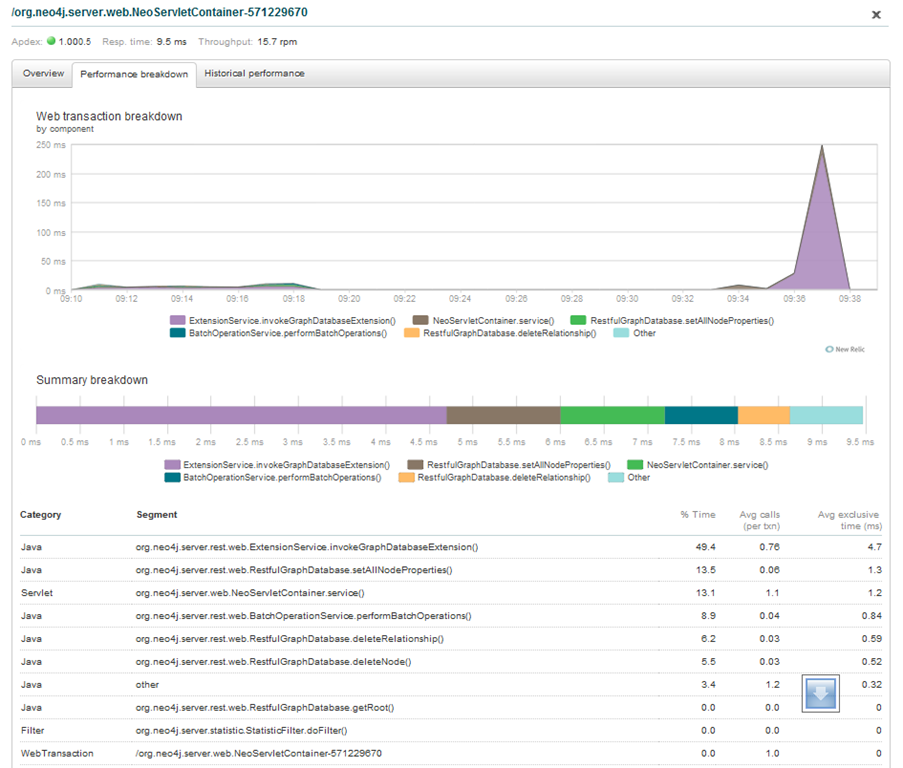
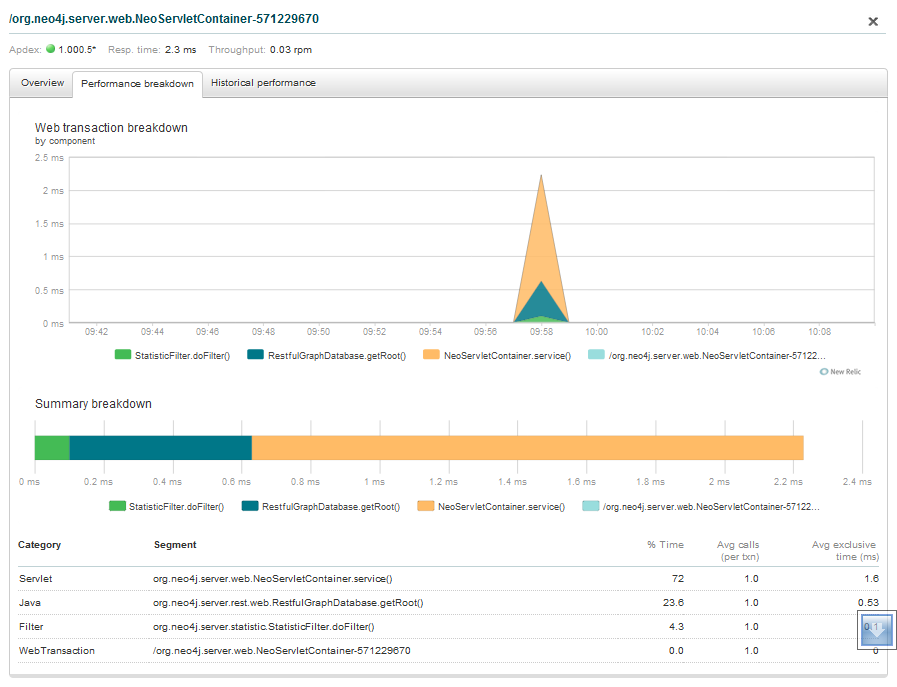
image

From here, you can actually click a segment on the graph and drill into the method level calls that occurred in the JVM.

image

Notice that you can get details about the timing of method invocation timings.

image

Comparing environments

What is really cool, is comparing response times between environments, so you can see how fast UAT/Prod/Dev are compared to one another

image

Conclusion

It is a relatively easy task to get application performance statistics for neo4j running in or out of the cloud and New Relic seems to be a really useful tool with minimal overhead to get up and running, so I would highly recommend using the combination together. This coupled with VisualJM should provide enough performance data and profiling when collecting performance data and compiling reports.

Neo4j, JMX and VisualVM

It might be necessary to use JMX to profile neo4j, which we are currently doing to address performance issues with Neo4j in combination with Windows Azure.

The first thing you will need to configure is additional switches in the neo4j-wrapper.conf file, here are mine:

wrapper.java.additional.1=-d64
wrapper.java.additional.1=-server
wrapper.java.additional.1=-Xss2048k
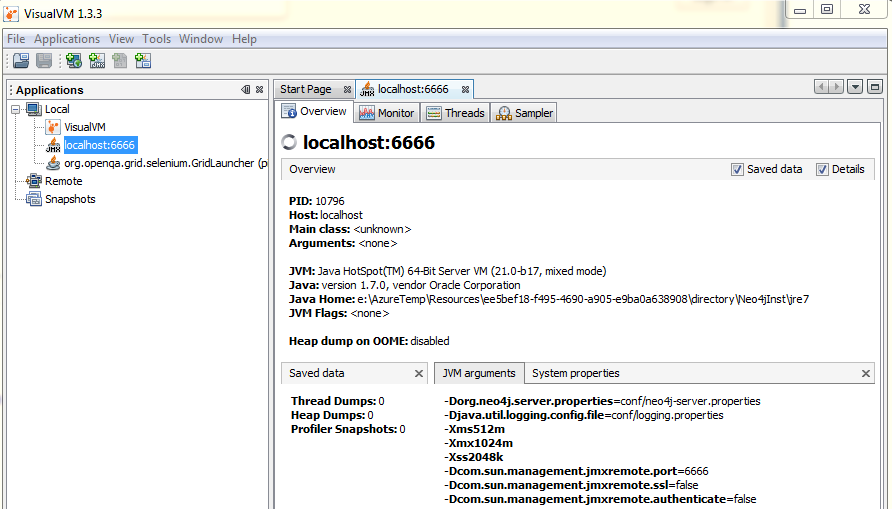
wrapper.java.additional.2=-Dcom.sun.management.jmxremote.port=6666
wrapper.java.additional.2=-Dcom.sun.management.jmxremote.ssl=false
wrapper.java.additional.2=-Dcom.sun.management.jmxremote.authenticate=false

Notice, that I am using a port number here, and this will allow remote JMX profiling, the reason for this is that in azure, the neo4j instance runs in a different user context than the remote desktop user, so we need a way to attach to the process, with VisualVM, we can do this via remote JMX.

Just add the neo4j JMX listener as a remote host. Then, if using the azure cloud:

  • Remote desktop into the worker role hosting Neo4j
  • Install the JDK
  • Install VisualVM
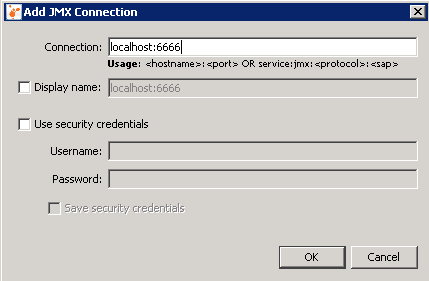
  • Configure the JMX Connectionas outlined below
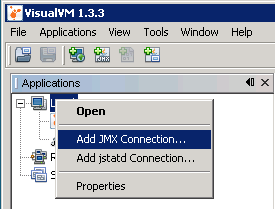
    Right click Local and click Add JMX Connection:

image

image

image

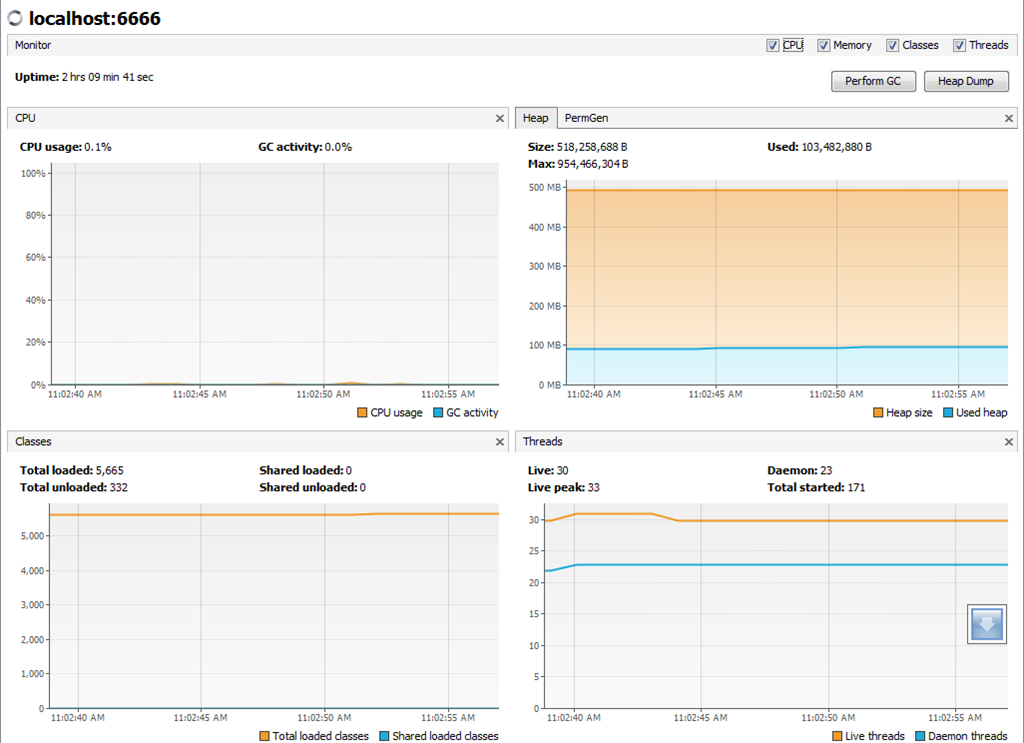
From here we can now do profiling of the Neo4j application.

image

Romiko

Windows Azure SDK 1.6–CSX folder output breaking change..again..

Background

Automated deployments with SDK 1.6 have been broken with TeamCity.

Location of CSX folder in build output changed.

Location of CSRUN.exe moved to emulator folder.

Details

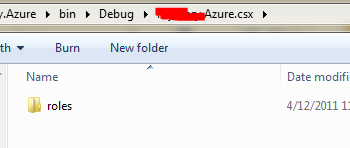
Before, when using the MSBUILD targets, the csx folder that is needed by CSRUN.exe for automated deployments has been changed, what is worse, is the old csx folder location is not cleaned up and is partially there, so to the untrained eye you think it is still there!

Also note, you will need to change the path of csrun.exe as this has been moved.

Old Location

CloudProject\bin\%BuildConfiguration%\CloudProject.csx

New Location

CloudProject\csx\%BuildConfiguration%

Why does the old location with impartial files still exist? Not sure…Because this was my new error when I tried to deploy.

The compute emulator had a error: Can’t locate service descriptions

image

Now the new location with all files

image

TeamCity Artefacts fix

Notice the new relative path to the project is \csx\release and not bin\release\MyProject.csx.

image

Summary

This is not the first time, that we get breaking changes. In 1.5 allot of the MSBuild target names changed, they were fine the way they were, sometimes I just do not understand certain changes that did not really need to be made.

So, can anyone explain why the folder before in bin\MyprojectName.csx was changed to a directory level up from bin and called only csx, it just seems to be changes that we really can do without, or is their some grand planned scheme that will make this change so exciting in the future…who knows?

Lucene Full Text Indexing with Neo4j

Hi Guys,

I spent some time working on full text search for Neo4j. The basic goals were as follows.

    • Control the pointers of the index
    • Full Text Search
    • All operations are done via Rest
    • Can create an index when creating a node
    • Can update and index
    • Can check if an index exists
    • When bootstrapping Neo4j in the cloud run Index checks
    • Query Index using full text search lucene query language.
Download:
This is based on Neo4jClient:
Source Code at:

Introduction

So with the above objectives, I decided to go with Manual Indexing. The main reason here is that I can put an index pointing to node A based on values in node B.

Imagine the following.

You have Node A with a list:

Surname, FirstName and MiddleName. However Node A also has a relationship to Node B which has other names, perhaps Display Names, Avatar Names and AKA’s.

So with manual indexing, you can have all the above entries for names in Node A and Node B point to Node A only.

So, in a Rest call to the Neo4j server, it would look something like this in Fiddler.

image

Notice the following:

Url: http://localhost:7474/db/data/index/node/{IndexName}/{Key}/{Value}

So, if we were adding 3 names for the SAME client from 2 different nodes. You would have the same IndexName and Key then with different values in the Url. The node pointer (In the request body) will then be the address to the Node.

Neo4jClient Nuget Package

I have updated the Neo4jClient which is on Nuget, to now support:

  • Creating Exact or FullText Indexes on it’s own, so that it just exists
  • Creating Exact or FullTest indexes when creating a node, the node reference will automatically be calculated.
  • Updating an Index
  • Deleting entries from an index.
    Class diagram for the indexing solution in Neo4jClient.

image

RestSharp

The Neo4jClient package uses RestSharp, thus making all the index call operations a trivial task for us, so lets have a look at some of the code inside the client to see how to consume manual index api from .Net, and then in the next section well look how we consume this code from another application.

 public Dictionary<string, IndexMetaData> GetIndexes(IndexFor indexFor)
        {
            CheckRoot();

            string indexResource;
            switch (indexFor)
            {
                case IndexFor.Node:
                    indexResource = RootApiResponse.NodeIndex;
                    break;
                case IndexFor.Relationship:
                    indexResource = RootApiResponse.RelationshipIndex;
                    break;
                default:
                    throw new NotSupportedException(string.Format("GetIndexes does not support indexfor {0}", indexFor));
            }

            var request = new RestRequest(indexResource, Method.GET)
            {
                RequestFormat = DataFormat.Json,
                JsonSerializer = new CustomJsonSerializer { NullHandling = JsonSerializerNullValueHandling }
            };

            var response =  client.Execute<Dictionary<string, IndexMetaData>>(request);

            if (response.StatusCode != HttpStatusCode.OK)
                throw new NotSupportedException(string.Format(
                    "Received an unexpected HTTP status when executing the request.\r\n\r\n\r\nThe response status was: {0} {1}",
                    (int)response.StatusCode,
                    response.StatusDescription));

            return response.Data;
        }

        public bool CheckIndexExists(string indexName, IndexFor indexFor)
        {
            CheckRoot();

            string indexResource;
            switch (indexFor)
            {
                case IndexFor.Node:
                    indexResource = RootApiResponse.NodeIndex;
                    break;
                case IndexFor.Relationship:
                    indexResource = RootApiResponse.RelationshipIndex;
                    break;
                default:
                    throw new NotSupportedException(string.Format("IndexExists does not support indexfor {0}", indexFor));
            }

            var request = new RestRequest(string.Format("{0}/{1}",indexResource, indexName), Method.GET)
            {
                RequestFormat = DataFormat.Json,
                JsonSerializer = new CustomJsonSerializer { NullHandling = JsonSerializerNullValueHandling }
            };

            var response = client.Execute<Dictionary<string, IndexMetaData>>(request);

            return response.StatusCode == HttpStatusCode.OK;
        }

        void CheckRoot()
        {
            if (RootApiResponse == null)
                throw new InvalidOperationException(
                    "The graph client is not connected to the server. Call the Connect method first.");
        }

        public void CreateIndex(string indexName, IndexConfiguration config, IndexFor indexFor)
        {
            CheckRoot();

            string nodeResource;
            switch (indexFor)
            {
                case IndexFor.Node:
                    nodeResource = RootApiResponse.NodeIndex;
                    break;
                case IndexFor.Relationship:
                    nodeResource = RootApiResponse.RelationshipIndex;
                    break;
                default:
                    throw new NotSupportedException(string.Format("CreateIndex does not support indexfor {0}", indexFor));
            }

            var createIndexApiRequest = new
                {
                    name = indexName.ToLower(),
                    config
                };

            var request = new RestRequest(nodeResource, Method.POST)
                {
                    RequestFormat = DataFormat.Json,
                    JsonSerializer = new CustomJsonSerializer {NullHandling = JsonSerializerNullValueHandling}
                };
            request.AddBody(createIndexApiRequest);

            var response = client.Execute(request);

            if (response.StatusCode != HttpStatusCode.Created)
                throw new NotSupportedException(string.Format(
                    "Received an unexpected HTTP status when executing the request..\r\n\r\nThe index name was: {0}\r\n\r\nThe response status was: {1} {2}",
                    indexName,
                    (int) response.StatusCode,
                    response.StatusDescription));
        }

        public void ReIndex(NodeReference node, IEnumerable<IndexEntry> indexEntries)
        {
            CheckRoot();

            var nodeAddress = string.Join("/", new[] {RootApiResponse.Node, node.Id.ToString()});

            var updates = indexEntries
                .SelectMany(
                    i => i.KeyValues,
                    (i, kv) => new {IndexName = i.Name, kv.Key, kv.Value});

            foreach (var update in updates)
            {
                if (update.Value == null)
                    break;

                string indexValue;
                if(update.Value is DateTimeOffset)
                {
                    indexValue = ((DateTimeOffset) update.Value).UtcTicks.ToString();
                }
                else if (update.Value is DateTime)
                {
                    indexValue = ((DateTime)update.Value).Ticks.ToString();
                }
                else
                {
                    indexValue = update.Value.ToString();
                }

                AddNodeToIndex(update.IndexName, update.Key, indexValue, nodeAddress);
            }
        }

        public void DeleteIndex(string indexName, IndexFor indexFor)
        {
            CheckRoot();

            string indexResource;
            switch (indexFor)
            {
                case IndexFor.Node:
                    indexResource = RootApiResponse.NodeIndex;
                    break;
                case IndexFor.Relationship:
                    indexResource = RootApiResponse.RelationshipIndex;
                    break;
                default:
                    throw new NotSupportedException(string.Format("DeleteIndex does not support indexfor {0}", indexFor));
            }

            var request = new RestRequest(string.Format("{0}/{1}", indexResource, indexName), Method.DELETE)
            {
                RequestFormat = DataFormat.Json,
                JsonSerializer = new CustomJsonSerializer { NullHandling = JsonSerializerNullValueHandling }
            };

            var response = client.Execute(request);

            if (response.StatusCode != HttpStatusCode.NoContent)
                throw new NotSupportedException(string.Format(
                    "Received an unexpected HTTP status when executing the request.\r\n\r\nThe index name was: {0}\r\n\r\nThe response status was: {1} {2}",
                    indexName,
                    (int)response.StatusCode,
                    response.StatusDescription));
        }

        void AddNodeToIndex(string indexName, string indexKey, string indexValue, string nodeAddress)
        {
            var nodeIndexAddress = string.Join("/", new[] { RootApiResponse.NodeIndex, indexName, indexKey, indexValue });
            var request = new RestRequest(nodeIndexAddress, Method.POST)
            {
                RequestFormat = DataFormat.Json,
                JsonSerializer = new CustomJsonSerializer { NullHandling = JsonSerializerNullValueHandling }
            };
            request.AddBody(string.Join("", client.BaseUrl, nodeAddress));

            var response = client.Execute(request);

            if (response.StatusCode != HttpStatusCode.Created)
                throw new NotSupportedException(string.Format(
                    "Received an unexpected HTTP status when executing the request.\r\n\r\nThe index name was: {0}\r\n\r\nThe response status was: {1} {2}",
                    indexName,
                    (int)response.StatusCode,
                    response.StatusDescription));
        }

        public IEnumerable<Node<TNode>> QueryIndex<TNode>(string indexName, IndexFor indexFor, string query)
        {
            CheckRoot();

            string indexResource;

            switch (indexFor)
            {
                case IndexFor.Node:
                    indexResource = RootApiResponse.NodeIndex;
                    break;
                case IndexFor.Relationship:
                    indexResource = RootApiResponse.RelationshipIndex;
                    break;
                default:
                    throw new NotSupportedException(string.Format("QueryIndex does not support indexfor {0}", indexFor));
            }

            var request = new RestRequest(indexResource + "/" + indexName, Method.GET)
                {
                    RequestFormat = DataFormat.Json,
                    JsonSerializer = new CustomJsonSerializer {NullHandling = JsonSerializerNullValueHandling}
                };

            request.AddParameter("query", query);

            var response = client.Execute<List<NodeApiResponse<TNode>>>(request);

            if (response.StatusCode != HttpStatusCode.OK)
                throw new NotSupportedException(string.Format(
                    "Received an unexpected HTTP status when executing the request.\r\n\r\nThe index name was: {0}\r\n\r\nThe response status was: {1} {2}",
                    indexName,
                    (int) response.StatusCode,
                    response.StatusDescription));

            return response.Data == null
           ? Enumerable.Empty<Node<TNode>>()
           : response.Data.Select(r => r.ToNode(this));
        }
		

Using the Neo4jClient from within an application

Create an Index and check if it exists

This is useful when bootstrapping Neo4j, to see if there are any indexes that SHOULD be there and are not, so that you can enumerate all the nodes for that index and add entries.

public void CreateIndexesForAgencyClients()
        {
            var agencies = graphClient
                .RootNode
                .Out<Agency>(Hosts.TypeKey)
                .ToList();

            foreach (var agency in agencies)
            {
                var indexName = IndexNames.Clients(agency.Data);
                var indexConfiguration = new IndexConfiguration
                    {
                        Provider = IndexProvider.lucene,
                        Type = IndexType.fulltext
                    };

                if (!graphClient.CheckIndexExists(indexName, IndexFor.Node))
                {
                    Trace.TraceInformation("CreateIndexIfNotExists {0} for Agency Key {0}", indexName, agency.Data.Key);
                    graphClient.CreateIndex(indexName, indexConfiguration, IndexFor.Node);
                    PopulateAgencyClientIndex(agency.Data);
                }
            }
        }

Create an Index Node Entry when creating a node

 var indexEntries = GetIndexEntries(agency.Data, client, clientViewModel.AlsoKnownAses);

var clientNodeReference = graphClient.Create(
                client,
                new[] {new ClientBelongsTo(agencyNode.Reference)}, indexEntries);

public IEnumerable<IndexEntry> GetIndexEntries(Agency agency, Client client, IEnumerable<AlsoKnownAs> alsoKnownAses)
        {
            var indexKeyValues = new List<KeyValuePair<string, object>>
            {
                new KeyValuePair<string, object>(AgencyClientIndexKeys.Gender.ToString(), client.Gender)
            };

            if (client.DateOfBirth.HasValue)
            {
                var dateOfBirthUtcTicks = client.DateOfBirth.Value.UtcTicks;
                indexKeyValues.Add(new KeyValuePair<string, object>(AgencyClientIndexKeys.DateOfBirth.ToString(), dateOfBirthUtcTicks));
            }

            var names = new List<string>
            {
                client.GivenName,
                client.FamilyName,
                client.PreferredName,
            };

            if (alsoKnownAses != null)
            {
                names.AddRange(alsoKnownAses.Where(a => !string.IsNullOrEmpty(a.Name)).Select(aka => aka.Name));
            }

            indexKeyValues.AddRange(names.Select(name => new KeyValuePair<string, object>(AgencyClientIndexKeys.Name.ToString(), name)));

            return new[]
            {
                new IndexEntry
                {
                    Name = IndexNames.Clients(agency),
                    KeyValues = indexKeyValues.Where(v => v.Value != null)
                }
            };
        }
		

Reindex a node

Notice there was a call to PopulateAgencyClientIndexin in the code, this is done in our bootstrap to ensure indexes are always there as expected, and if for some reason they are not, then they created and populated by using reindex feature.

void PopulateAgencyClientIndex(Agency agency)
        {
            var clients = graphClient
                .RootNode
                .Out<Agency>(Hosts.TypeKey, a => a.Key == agency.Key)
                .In<Client>(ClientBelongsTo.TypeKey);

            foreach (var client in clients)
            {
                var clientService = clientServiceCallback();
                var akas = client.Out<AlsoKnownAs>(IsAlsoKnownAs.TypeKey).Select(a => a.Data);
                var indexEntries = clientService.GetIndexEntries(agency, client.Data, akas);
                graphClient.ReIndex(client.Reference, indexEntries);
            }
        }
		

Querying a full text search index using Lucene

Below is sample code to query full text search. Basically your index entries for a person with

Name: Bob, Surname:Van de Builder, Aka1: Bobby, Aka2: Bobs, PrefferedName: Bob The Builder

The index entries will need to look like the

Key:Value
Name: Bob
Name:Van
Name:de
Name: Builder
Name: Bobby
Name: Bobs

Remember, Lucene has a white space analyser, so any names with spaces MUST become a new index entry, so what we do is split out names based on whitespaces and this becomes our collection of IndexEntries. The above is related to full text search context.

Note: If using EXACT Index match, then composite entries are needed for multiple words, since you no longer using lucene full text search capabilities. e.g.

Name: Bob The Builder

This is good to know, because things like postal code searches or Gender where exact matches are required do not need full text indexes.

Lets check out an example of querying an index.

        [Test]
        public void VerifyWhenANewClientIsCreateThatPartialNameCanBeFuzzySearchedInTheFullTextSearchIndex()
        {
            using (var agency = Data.NewTestAgency())
            using (var client = Data.NewTestClient(agency, c =>
            {
                c.Gender = Gender.Male;
                c.GivenName = "Joseph";
                c.MiddleNames = "Mark";
                c.FamilyName = "Kitson";
                c.PreferredName = "Joey";

                c.AlsoKnownAses = new List<AlsoKnownAs>
                    {
                       new AlsoKnownAs {Name = "J-Man"},
                       new AlsoKnownAs {Name = "J-Town"}
                    };
            }
                ))
            {
                var indexName = IndexNames.Clients(agency.Agency.Data);
                const string partialName = "+Name:Joe~+Name:Kitson~";
                var result = GraphClient.QueryIndex<Client>(indexName, IndexFor.Node, partialName);
                Assert.AreEqual(client.Client.Data.UniqueId, result.First().Data.UniqueId);
            }
        }
		

Dates

Notice that in some of the code, you may have noticed that when I store date entries in the index, I store them as Ticks, so this will be as long numbers, this is awesome, as it gives raw power to searching dates via longs Smile

 [Test]
        public void VerifyWhenANewClientIsCreateThatTheDateOfBirthCanBeRangeSearchedInTheFullTextSearchIndex()
        {
            // Arrange
            const long dateOfBirthTicks = 634493518171556320;
            using (var agency = Data.NewTestAgency())
            using (var client = Data.NewTestClient(agency, c =>
            {
                c.Gender = Gender.Male;
                c.GivenName = "Joseph";
                c.MiddleNames = "Mark";
                c.FamilyName = "Kitson";
                c.PreferredName = "Joey";
                c.DateOfBirth = new DateTimeOffset(dateOfBirthTicks, new TimeSpan());
                c.CurrentAge = null;
                c.AlsoKnownAses = new List<AlsoKnownAs>
                    {
                       new AlsoKnownAs {Name = "J-Man"},
                       new AlsoKnownAs {Name = "J-Town"}
                    };
            }
                ))
            {
                // Act
                var indexName = IndexNames.Clients(agency.Agency.Data);
                var partialName = string.Format("DateOfBirth:[{0} TO {1}]", dateOfBirthTicks - 5, dateOfBirthTicks + 5);
                var result = GraphClient.QueryIndex<Client>(indexName, IndexFor.Node, partialName);
                // Assert
                Assert.AreEqual(client.Client.Data.UniqueId, result.First().Data.UniqueId);
            }
        }
		

Summary

Well, I hope you found this post useful. Neo4jClientis on nuget, so have a bash using it and would love to know your feedback.

Download

NuGetPackage:
Source Code at:

Cheers

Automating Windows Azure Deployments leveraging TeamCity and PowerShell

Hi Guys,

Introduction

We will cover:

  • Overview to configure multiple build projects on TeamCity
  • Configure one of the build projects to deploy to the Azure Cloud
  • Automated deployments to the Azure Cloud for Web and Worker Roles
  • Leverage the msbuild target templates to automate generation of azure package files
  • Alternative solution of generating the azure package files
  • Using configuration transformations to manage settings e.g. UAT, Dev, Production

A colleague of mine Tatham Oddie and I are currently use TeamCity to automatically deploy our Azure/MVC3/Neo4j based project to the Azure cloud. Lets see how this can be done with relative ease and is fully automated. The focus here will be based on Powershell scripts which are using the Cerebrata Command scriplets, which can be found here: http://www.cerebrata.com/Products/AzureManagementCmdlets/Default.aspx

The PowerShell script included here will automatically undeploy and redploy you azure service and will even wait until all the services are in the ready state.

I will leave you to checking those commandlets out, and they worth every penny spent.

Now lets check how we get the deployment working.

The basic idea is that you have a continuous integration build configured on the Build Server in TeamCity, then what you do is configure the CI build to generate artifacts, which are basically the output from the build that can be used by another build project e.g. You can take the artifacts for the CI build and then run Functional Tests or Integration tests builds that run totally separate from the CI build. The idea here is, your functional and integration will NEVER interfere with the CI build and the Unit tests. Thus keeping CI builds fast and efficient.

Prerequisites on Build Server

  • TeamCity Professional Version 6.5.1
  • Cloud Subscription Certificate with Private key is imported into the User Certificate Store for the Team City service account
  • Cerebrata CMDLETS

TeamCity -Continuous Integration Build Project

Ok, so, lets do a quick check at my CI build that spits out the Azure Packages.

image

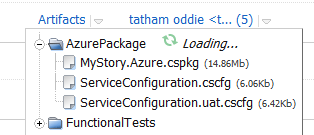
As we can see above, the CI build creates an Artifact called AzurePackage.
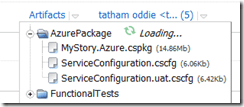
image

The way we generate these artifacts is very easy. In the settings for the CI Build Project we setup the artifacts path.

image

e.g. MyProjectMyProject.Azurebin%BuildConfiguration%Publish => AzurePackage

So, we will look at the build steps to configure.

image

As we can see below, we just say where the MSBuild is run from and then where the unit tests dll’s are.

image

Cool, now we need to setup the artifacts and configuration.

We just mention we want a release build.

image

Ok, now we need to tell our Azure Deployment project to have a dependency on the CI project we configured above.

Team City – UAT Deployment Build Project

So lets now go check out the UAT Deployment project.

image

This project will have dependencies on the CI build and then we will configure all the build parameters so it can connect to your Azure Storage and Service for automatic deployments. Once we done here, we will have a look at the powershell script that we use to automatically deploy to the cloud, the script supports un-deploying existing deployment slots before deploying a new one with retry attempts.

Ok, lets check the following for the UAT deployment project.

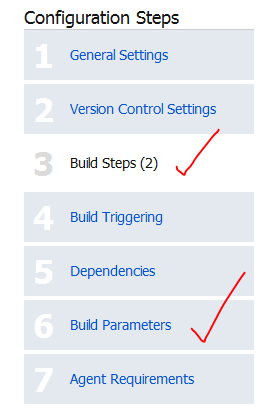
image

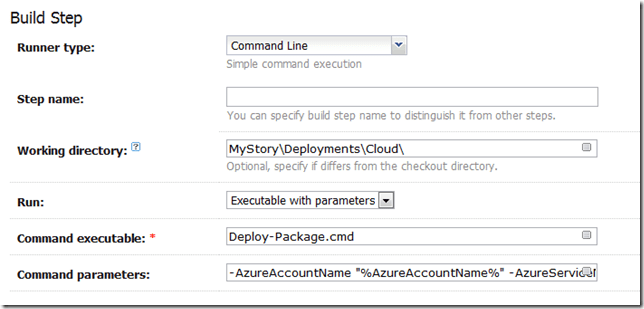
image

The above screenshot is the command that executes the powershell script, the parameters (%whatever%) will resolve from Build parameters in Step 6 of the screen shot above.

Here is the command for copy/paste friendless. Of course if you using some other Database then you do not need the Neo4j stuff.

-AzureAccountName “%AzureAccountName%” -AzureServiceName “%AzureServiceName%” -AzureDeploymentSlot “%AzureDeploymentSlot%” -AzureAccountKey “%AzureAccountKey%” -AzureSubscriptionId “%AzureSubscriptionId%” -AzureCertificateThumbprint “%AzureCertificateThumbprint%” -PackageSource “%AzurePackageDependencyPath%MyProject.Azure.cspkg” -ConfigSource “%AzurePackageDependencyPath%%ConfigFileName%” -DeploymentName “%build.number%-%build.vcs.number%” -Neo4jBlobName “%Neo4jBlobName%” -Neo4jZippedBinaryFileHttpSource “%Neo4jZippedBinaryFileHttpSource%”

This is the input for a deploy-package.cmd file, which is in our source repository.
image

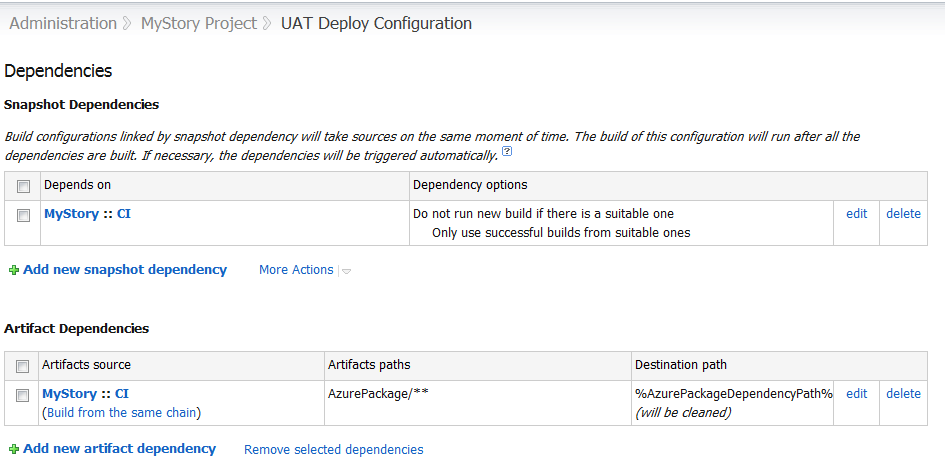
Now, we also need to tell the Deployment project to use the Artifact from our CI Project. So we setup an Artifact Dependencies as show below in the dependencies section. Also, notice how we use a wildcard, so get all files from AzurePackage (AzurePackage/**). This will be the cspackage files.

image

Notice above, that I have a SnapShot Dependency, this is forcing the UAT deployment to USE the SAME source code that the CI build project is using.

So, the parameters are as follows.

image

PowerShell Deployment Scripts

The Deployment scripts consist of three files and remember I assumed you installed the Cerebrata Management Command Scriptlets.

Ok, so lets look at the Deploy-Package.cmd file, I would like to pay my gratitude to Jason Stangroome(http://blog.codeassassin.com) for this,

Jason wrote: “This tiny proxy script just writes a temporary PowerShell script containing all the arguments you’re trying to pass to let PowerShell interpret them and avoid getting them messed up by the Win32 native command line parser.”

@echo off
setlocal
set tempscript=%temp%\%~n0.%random%.ps1
echo $ErrorActionPreference="Stop" >"%tempscript%"
echo ^& "%~dpn0.ps1" %* >>"%tempscript%"
powershell.exe -command "& \"%tempscript%\""
set errlvl=%ERRORLEVEL%
del "%tempscript%"
exit /b %errlvl%

Ok, and now here is the PowerShell code, Deployment-Package.ps1. I will leave you to read what it does. In Summary.

It demonstrates.

  • Un-Deploying a service deployment slot
  • Deploying a service deployment slot
  • Using the certificate store to retrieve the certificate for service connections via a cert thumbprint – users cert store under the service account that TeamCity runs on.
  • Uploading Blobs
  • Downloading Blobs
  • Waiting until the new deployment is in a ready state
#requires -version 2.0
param (
	[parameter(Mandatory=$true)] [string]$AzureAccountName,
	[parameter(Mandatory=$true)] [string]$AzureServiceName,
	[parameter(Mandatory=$true)] [string]$AzureDeploymentSlot,
	[parameter(Mandatory=$true)] [string]$AzureAccountKey,
	[parameter(Mandatory=$true)] [string]$AzureSubscriptionId,
	[parameter(Mandatory=$true)] [string]$AzureCertificateThumbprint,
	[parameter(Mandatory=$true)] [string]$PackageSource,
	[parameter(Mandatory=$true)] [string]$ConfigSource,
	[parameter(Mandatory=$true)] [string]$DeploymentName,
	[parameter(Mandatory=$true)] [string]$Neo4jZippedBinaryFileHttpSource,
	[parameter(Mandatory=$true)] [string]$Neo4jBlobName
)

$ErrorActionPreference = "Stop"

if ((Get-PSSnapin -Registered -Name AzureManagementCmdletsSnapIn -ErrorAction SilentlyContinue) -eq $null)
{
	throw "AzureManagementCmdletsSnapIn missing. Install them from Https://www.cerebrata.com/Products/AzureManagementCmdlets/Download.aspx"
}

Add-PSSnapin AzureManagementCmdletsSnapIn -ErrorAction SilentlyContinue

function AddBlobContainerIfNotExists ($blobContainerName)
{
	Write-Verbose "Finding blob container $blobContainerName"
	$containers = Get-BlobContainer -AccountName $AzureAccountName -AccountKey $AzureAccountKey
	$deploymentsContainer = $containers | Where-Object { $_.BlobContainerName -eq $blobContainerName }

	if ($deploymentsContainer -eq $null)
	{
		Write-Verbose  "Container $blobContainerName doesn't exist, creating it"
		New-BlobContainer $blobContainerName -AccountName $AzureAccountName -AccountKey $AzureAccountKey
	}
	else
	{
		Write-Verbose  "Found blob container $blobContainerName"
	}
}

function UploadBlobIfNotExists{param ([string]$container, [string]$blobName, [string]$fileSource)

	Write-Verbose "Finding blob $container\$blobName"
	$blob = Get-Blob -BlobContainerName $container -BlobPrefix $blobName -AccountName $AzureAccountName -AccountKey $AzureAccountKey

	if ($blob -eq $null)
	{
		Write-Verbose "Uploading blob $blobName to $container/$blobName"
		Import-File -File $fileSource -BlobName $blobName -BlobContainerName $container -AccountName $AzureAccountName -AccountKey $AzureAccountKey
	}
	else
	{
		Write-Verbose "Found blob $container\$blobName"
	}
}

function CheckIfDeploymentIsDeleted
{
	$triesElapsed = 0
	$maximumRetries = 10
	$waitInterval = [System.TimeSpan]::FromSeconds(30)
	Do
	{
		$triesElapsed+=1
		[System.Threading.Thread]::Sleep($waitInterval)
		Write-Verbose "Checking if deployment is deleted, current retry is $triesElapsed/$maximumRetries"
		$deploymentInstance = Get-Deployment `
			-ServiceName $AzureServiceName `
			-Slot $AzureDeploymentSlot `
			-SubscriptionId $AzureSubscriptionId `
			-Certificate $certificate `
			-ErrorAction SilentlyContinue

		if($deploymentInstance -eq $null)
		{
			Write-Verbose "Deployment is now deleted"
			break
		}

		if($triesElapsed -ge $maximumRetries)
		{
			throw "Checking if deployment deleted has been running longer than 5 minutes, it seems the delployment is not deleting, giving up this step."
		}
	}
	While($triesElapsed -le $maximumRetries)
}

function WaitUntilAllRoleInstancesAreReady
{
	$triesElapsed = 0
	$maximumRetries = 60
	$waitInterval = [System.TimeSpan]::FromSeconds(60)
	Do
	{
		$triesElapsed+=1
		[System.Threading.Thread]::Sleep($waitInterval)
		Write-Verbose "Checking if all role instances are ready, current retry is $triesElapsed/$maximumRetries"
		$roleInstances = Get-RoleInstanceStatus `
			-ServiceName $AzureServiceName `
			-Slot $AzureDeploymentSlot `
			-SubscriptionId $AzureSubscriptionId `
			-Certificate $certificate `
			-ErrorAction SilentlyContinue
		$roleInstancesThatAreNotReady = $roleInstances | Where-Object { $_.InstanceStatus -ne "Ready" }

		if ($roleInstances -ne $null -and
			$roleInstancesThatAreNotReady -eq $null)
		{
			Write-Verbose "All role instances are now ready"
			break
		}

		if ($triesElapsed -ge $maximumRetries)
		{
			throw "Checking if all roles instances are ready for more than one hour, giving up..."
		}
	}
	While($triesElapsed -le $maximumRetries)
}

function DownloadNeo4jBinaryZipFileAndUploadToBlobStorageIfNotExists{param ([string]$blobContainerName, [string]$blobName, [string]$HttpSourceFile)
	Write-Verbose "Finding blob $blobContainerName\$blobName"
	$blobs = Get-Blob -BlobContainerName $blobContainerName -ListAll -AccountName $AzureAccountName -AccountKey $AzureAccountKey
	$blob = $blobs | findstr $blobName

	if ($blob -eq $null)
	{
	    Write-Verbose "Neo4j binary does not exist in blob storage. "
	    Write-Verbose "Downloading file $HttpSourceFile..."
		$temporaryneo4jFile = [System.IO.Path]::GetTempFileName()
		$WebClient = New-Object -TypeName System.Net.WebClient
		$WebClient.DownloadFile($HttpSourceFile, $temporaryneo4jFile)
		UploadBlobIfNotExists $blobContainerName $blobName $temporaryneo4jFile
	}
}

Write-Verbose "Retrieving management certificate"
$certificate = Get-ChildItem -Path "cert:\CurrentUser\My\$AzureCertificateThumbprint" -ErrorAction SilentlyContinue
if ($certificate -eq $null)
{
	throw "Couldn't find the Azure management certificate in the store"
}
if (-not $certificate.HasPrivateKey)
{
	throw "The private key for the Azure management certificate is not available in the certificate store"
}

Write-Verbose "Deleting Deployment"
Remove-Deployment `
	-ServiceName $AzureServiceName `
	-Slot $AzureDeploymentSlot `
	-SubscriptionId $AzureSubscriptionId `
	-Certificate $certificate `
	-ErrorAction SilentlyContinue
Write-Verbose "Sent Delete Deployment Async, will check back later to see if it is deleted"

$deploymentsContainerName = "deployments"
$neo4jContainerName = "neo4j"

AddBlobContainerIfNotExists $deploymentsContainerName
AddBlobContainerIfNotExists $neo4jContainerName

$deploymentBlobName = "$DeploymentName.cspkg"

DownloadNeo4jBinaryZipFileAndUploadToBlobStorageIfNotExists $neo4jContainerName $Neo4jBlobName $Neo4jZippedBinaryFileHttpSource

Write-Verbose "Azure Service Information:"
Write-Verbose "Service Name: $AzureServiceName"
Write-Verbose "Slot: $AzureDeploymentSlot"
Write-Verbose "Package Location: $PackageSource"
Write-Verbose "Config File Location: $ConfigSource"
Write-Verbose "Label: $DeploymentName"
Write-Verbose "DeploymentName: $DeploymentName"
Write-Verbose "SubscriptionId: $AzureSubscriptionId"
Write-Verbose "Certificate: $certificate"

CheckIfDeploymentIsDeleted

Write-Verbose "Starting Deployment"
New-Deployment `
	-ServiceName $AzureServiceName `
	-Slot $AzureDeploymentSlot `
	-PackageLocation $PackageSource `
	-ConfigFileLocation $ConfigSource `
	-Label $DeploymentName `
	-DeploymentName $DeploymentName `
	-SubscriptionId $AzureSubscriptionId `
	-Certificate $certificate

WaitUntilAllRoleInstancesAreReady

Write-Verbose "Completed Deployment"

Automating Cloud Package File without using CSPack and CSRun explicitly

We will need to edit the Cloud Project file so that Visual Studio can create the cloud package files , as it will then automatically run the cspackage for you which can be consumed by the artifacts and hence other build projects. This allows us to bake functionality into the MSBuild process to generate the package files without the need for explicitly using cspack.exe and csrun.exe. Resulting in less scripts, else you would need a separate PowerShell script just to package the cloud project files.

Below are the changes for the .ccproj file of the Cloud Project. Notice the condition is that we generate these package files ONLY if the build is outside of visual studio, so this is nice to keep it from not always creating the packages to keep our development experience build process short. So for the condition below to work, you will need to build the project from the command line using MSBuild.

Here is the config entries for the project file.

  <PropertyGroup>
    <CloudExtensionsDir Condition=" '$(CloudExtensionsDir)' == '' ">$(MSBuildExtensionsPath)\Microsoft\Cloud Service\1.0\Visual Studio 10.0\</CloudExtensionsDir>
  </PropertyGroup>
  <Import Project="$(CloudExtensionsDir)Microsoft.CloudService.targets" />
  <Import Project="$(MSBuildExtensionsPath)\Microsoft\VisualStudio\v10.0\Web\Microsoft.Web.Publishing.targets" />
  <Target Name="AzureDeploy" AfterTargets="Build" DependsOnTargets="CorePublish" Condition="'$(BuildingInsideVisualStudio)'!='True'">
  </Target>

e.g.

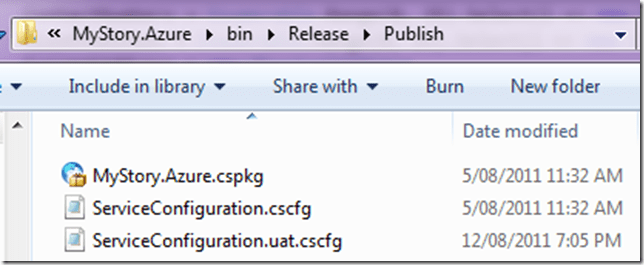
C:\Windows\Microsoft.NET\Framework64\v4.0.30319\MSBuild.exe MyProject.sln /p:Configuration=Release
image

Configuration Transformations

You can also leverage configuration transformations so that you can have configurations for each environment. This is discussed here:
http://blog.alexlambert.com/2010/05/using-visual-studio-configuration.html

However, in a nutshell, you can have something like this in place, this means you can then have separate deployment config files, e.g.

ServiceConfiguration.cscfg

ServiceConfiguration.uat.cscfg

ServiceConfiguration.prod..cscfg

Just use the following config in the .ccproj file.

 <Target Name="ValidateServiceFiles"
          Inputs="@(EnvironmentConfiguration);@(EnvironmentConfiguration->'%(BaseConfiguration)')"
          Outputs="@(EnvironmentConfiguration->'%(Identity).transformed.cscfg')">
    <Message Text="ValidateServiceFiles: Transforming %(EnvironmentConfiguration.BaseConfiguration) to %(EnvironmentConfiguration.Identity).tmp via %(EnvironmentConfiguration.Identity)" />
    <TransformXml Source="%(EnvironmentConfiguration.BaseConfiguration)" Transform="%(EnvironmentConfiguration.Identity)"
     Destination="%(EnvironmentConfiguration.Identity).tmp" />

    <Message Text="ValidateServiceFiles: Transformation complete; starting validation" />
    <ValidateServiceFiles ServiceDefinitionFile="@(ServiceDefinition)" ServiceConfigurationFile="%(EnvironmentConfiguration.Identity).tmp" />

    <Message Text="ValidateServiceFiles: Validation complete; renaming temporary file" />
    <Move SourceFiles="%(EnvironmentConfiguration.Identity).tmp" DestinationFiles="%(EnvironmentConfiguration.Identity).transformed.cscfg" />
  </Target>
  <Target Name="MoveTransformedEnvironmentConfigurationXml" AfterTargets="AfterPackageComputeService"
          Inputs="@(EnvironmentConfiguration->'%(Identity).transformed.cscfg')"
          Outputs="@(EnvironmentConfiguration->'$(OutDir)Publish\%(filename).cscfg')">
    <Move SourceFiles="@(EnvironmentConfiguration->'%(Identity).transformed.cscfg')" DestinationFiles="@(EnvironmentConfiguration->'$(OutDir)Publish\%(filename).cscfg')" />
  </Target>

Here is a sample ServiceConfiguration.uat.config that will then leverage the transformations. Note the transformation for the web and worker roles sections. Our worker role is Neo4jServerHost and the Web is just called Web.

<?xml version="1.0"?>
<sc:ServiceConfiguration
    xmlns:sc="http://schemas.microsoft.com/ServiceHosting/2008/10/ServiceConfiguration"
    xmlns:xdt="http://schemas.microsoft.com/XML-Document-Transform">
  <sc:Role name="Neo4jServerHost" xdt:Locator="Match(name)">
    <sc:ConfigurationSettings>
      <sc:Setting xdt:Transform="Replace" xdt:Locator="Match(name)" name="Microsoft.WindowsAzure.Plugins.Diagnostics.ConnectionString" value="DefaultEndpointsProtocol=https;AccountName=myprojectname;AccountKey=myaccountkey"/>
      <sc:Setting xdt:Transform="Replace" xdt:Locator="Match(name)" name="Storage connection string" value="DefaultEndpointsProtocol=https;AccountName=myprojectname;AccountKey=myaccountkey"/>
      <sc:Setting xdt:Transform="Replace" xdt:Locator="Match(name)" name="Drive connection string" value="DefaultEndpointsProtocol=http;AccountName=myprojectname;AccountKey=myaccountkey"/>
      <sc:Setting xdt:Transform="Replace" xdt:Locator="Match(name)" name="Neo4j DBDrive override Path" value=""/>
      <sc:Setting xdt:Transform="Replace" xdt:Locator="Match(name)" name="UniqueIdSynchronizationStoreConnectionString" value="DefaultEndpointsProtocol=https;AccountName=myprojectname;AccountKey=myaccountkey"/>
    </sc:ConfigurationSettings>
  </sc:Role>
  <sc:Role name="Web" xdt:Locator="Match(name)">
    <sc:ConfigurationSettings>
      <sc:Setting xdt:Transform="Replace" xdt:Locator="Match(name)" name="Microsoft.WindowsAzure.Plugins.Diagnostics.ConnectionString" value="DefaultEndpointsProtocol=https;AccountName=myprojectname;AccountKey=myaccountkey"/>
      <sc:Setting xdt:Transform="Replace" xdt:Locator="Match(name)" name="UniqueIdSynchronizationStoreConnectionString" value="DefaultEndpointsProtocol=https;AccountName=myprojectname;AccountKey=myaccountkey"/>
    </sc:ConfigurationSettings>
  </sc:Role>
</sc:ServiceConfiguration>

Manually executing the script for testing

Prerequisites:

  • You will need to install the Cerebrata Azure Management CMDLETS from: https://www.cerebrata.com/Products/AzureManagementCmdlets/Download.aspx
  • If you are running 64 bit version, you will need to follow the readme file instructions contained with the AzureManagementCmdlets, as it requires manual copying of files. If you followed the default install, this readme will be in C:\Program Files\Cerebrata\Azure Management Cmdlets\readme.pdf
  • You will need to install the Certificate and Private Key (Which must be marked as exportable) to your User Certificate Store. This file will have an extension of .pfx. Use the Certificate Management Snap-In, for User Account Store. The certificate should be installed in the personal folder.
  • Once the certificate is installed, you should note the certificate thumbprint, as this is used as one of the parameters when executing the PowerShell script. Ensure you remove all the spaces from the thumbprint when using it in the script!

1) First up, you’ll need to make your own ”MyProject.Azure.cspkg” file. To do this, run this:

C:\Windows\Microsoft.NET\Framework64\v4.0.30319\MSBuild.exe MyProject.sln /p:Configuration=Release

(Adjust paths as required.)

You’ll now find a package waiting for you at ”C:\Code\MyProject\MyProject\MyProject.Azure\bin\Release\Publish\MyProject.Azure.cspkg”.

2) Make sure you have the required management certificate installed on your machine (including the private key).

3) Now you’re ready to run the deployment script.

It requires quite a lot of parameters. The easiest way to find them is just to copy them from the last output log on TeamCity.

You will need to manually execute is Deploy-Package.ps1.

The Deploy-Package.ps1 file has input parameters that need to be supplied. Below is the list of parameters and description.

Note: These values can change in the future, so ensure you do not rely on this example below.

AzureAccountName: The Windows Azure Account Name e.g. MyProjectUAT

AzureServiceName: The Windows Azure Service Name e.g. MyProjectUAT

AzureDeploymentSlot: Production or Staging e.g. Production

AzureAccountKey: The Azure Account Key: e.g. youraccountkey==

AzureSubscriptionId:*The Azure Subscription Id e.g. yourazuresubscriptionId

AzureCertificateThumbprint: The certificate thumbprint you note down when importing the pfx file e.g. YourCertificateThumbprintWithNoWhiteSpaces

PackageSource: Location of the .cspkg file e.g. C:\Code\MyProject\MyProject.Azure\bin\Release\Publish\MyProject.Azure.cspkg

ConfigSource: Location of the Azure configuration files .cscfg e.g. C:\Code\MyProject\MyProject\MyProject.Azure\bin\Release\Publish\ServiceConfiguration.uat.cscfg

DeploymentName: This can be a friendly name of the deployment e.g. local-uat-deploy-test

Neo4jBlobName: The name of the blob file containing the Neo4j binaries in zip format e.g. neo4j-community-1.4.M04-windows.zip

Neo4jZippedBinaryFileHttpSource: The http location of the Neo4j zipped binary files e.g. https://mydownloads.com/mydownloads/neo4j-community-1.4.M04-windows.zip?dl=1

-Verbose: You can use an additional parameter to get Verbose output which is useful when developing and testing the script, just append -Verbose to the end of the command.

Below is an example executed on my machine, this will be different on your machine, so use it as a guideline only:

<code title=Sample Deployment Execution>

.\Deploy-Package.ps1 -AzureAccountName MyProjectUAT `

-AzureServiceName MyProjectUAT `

-AzureDeploymentSlot Production `

-AzureAccountKey youraccountkey== `

-AzureSubscriptionId yoursubscriptionid `

-AzureCertificateThumbprint yourcertificatethumbprint `

-PackageSource “c:\Code\MyProject\MyProject\MyProject.Azure\bin\Release\Publish\MyProject.Azure.cspkg” `

-ConfigSource “c:\Code\MyProject\MyProject\MyProject.Azure\bin\Release\Publish\ServiceConfiguration.uat.cscfg” `

-DeploymentName local-uat-deploy-test -Neo4jBlobName neo4j-community-1.4.1-windows.zip `

-Neo4jZippedBinaryFileHttpSource https://mydownloads.com/mydownloads/neo4j-community-1.4.1-windows.zip?dl=1 -Verbose

</code>

Note: When running the PowerShell command and the 64bit version of the scripts, ensure you running the PowerShell version that you fixed in the readme file from Cerebrata, do not rely on the default shortcut links in the start menu!

Summary

Well, I hope this will help you automating Azure Deployments to the cloud, this a great way to keep UAT happy with Agile deployments to meet the goals of every sprint.

If you do not like the way we generate the package files above, you can choose to use CSRun and CSPack explicitly, I have prepared this script already, below is the code for you to use.

#requires -version 2.0
param (
	[parameter(Mandatory=$false)] [string]$ArtifactDownloadLocation
)

$ErrorActionPreference = "Stop"

$installPath= Join-Path $ArtifactDownloadLocation "..\AzurePackage"
$azureToolsPackageSDKPath="c:\Program Files\Windows Azure SDK\v1.4\bin\cspack.exe"
$azureToolsDeploySDKPath="c:\Program Files\Windows Azure SDK\v1.4\bin\csrun.exe"

$csDefinitionFile="..\..\Neo4j.Azure.Server\ServiceDefinition.csdef"
$csConfigurationFile="..\..\Neo4j.Azure.Server\ServiceConfiguration.cscfg"

$webRolePropertiesFile = ".\WebRoleProperties.txt"
$workerRolePropertiesFile=".\WorkerRoleProperties.txt"

$csOutputPackage="$installPath\Neo4j.Azure.Server.csx"
$serviceConfigurationFile = "$installPath\ServiceConfiguration.cscfg"

$webRoleName="Web"
$webRoleBinaryFolder="..\..\Web"

$workerRoleName="Neo4jServerHost"
$workerRoleBinaryFolder="..\..\Neo4jServerHost\bin\Debug"
$workerRoleEntryPointDLL="Neo4j.Azure.Server.dll"

function StartAzure{
	"Starting Azure development fabric"
	& $azureToolsDeploySDKPath /devFabric:start
	& $azureToolsDeploySDKPath /devStore:start
}

function StopAzure{
	"Shutting down development fabric"
	& $azureToolsDeploySDKPath /devFabric:shutdown
	& $azureToolsDeploySDKPath /devStore:shutdown
}

#Example: cspack Neo4j.Azure.Server\ServiceDefinition.csdef /out:.\Neo4j.Azure.Server.csx /role:$webRoleName;$webRoleName /sites:$webRoleName;$webRoleName;.\$webRoleName /role:Neo4jServerHost;Neo4jServerHost\bin\Debug;Neo4j.Azure.Server.dll /copyOnly /rolePropertiesFile:$webRoleName;WebRoleProperties.txt /rolePropertiesFile:$workerRoleName;WorkerRoleProperties.txt
function PackageAzure()
{
	"Packaging the azure Web and Worker role."
	& $azureToolsPackageSDKPath $csDefinitionFile /out:$csOutputPackage /role:$webRoleName";"$webRoleBinaryFolder /sites:$webRoleName";"$webRoleName";"$webRoleBinaryFolder /role:$workerRoleName";"$workerRoleBinaryFolder";"$workerRoleEntryPointDLL /copyOnly /rolePropertiesFile:$webRoleName";"$webRolePropertiesFile /rolePropertiesFile:$workerRoleName";"$workerRolePropertiesFile
	if (-not $?)
	{
		throw "The packaging process returned an error code."
	}
}

function CopyServiceConfigurationFile()
{
	"Copying service configuration file."
	copy $csConfigurationFile $serviceConfigurationFile
}

#Example: csrun /run:.\Neo4j.Azure.Server.csx;.\Neo4j.Azure.Server\ServiceConfiguration.cscfg /launchbrowser
function DeployAzure{param ([string] $azureCsxPath, [string] $azureConfigPath)
	"Deploying the package"
    & $azureToolsDeploySDKPath $csOutputPackage $serviceConfigurationFile
	if (-not $?)
	{
		throw "The deployment process returned an error code."
	}
}

Write-Host "Beginning deploy and configuration at" (Get-Date)

PackageAzure
StopAzure
StartAzure
CopyServiceConfigurationFile
DeployAzure '$csOutputPackage' '$serviceConfigurationFile'

# Give it 60s to boot up neo4j
[System.Threading.Thread]::Sleep(60000)

# Hit the homepage to make sure it's warmed up
(New-Object System.Net.WebClient).DownloadString("http://localhost:8080") | Out-Null

Write-Host "Completed deploy and configuration at" (Get-Date)

note, if using .Net 4.0 which I am sure you all are, you will need to provide the text files for web role and worker role with these entries.

WorkerRoleProperties.txt
TargetFrameWorkVersion=v4.0
EntryPoint=Neo4j.Azure.Server.dll

WebRoleProperties.txt
TargetFrameWorkVersion=v4.0

Thanks to Tatham Oddie for contributing and coming up with such great ideas for our builds.
Cheers

Romiko