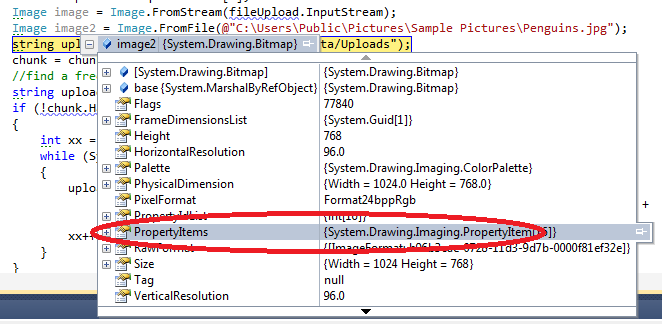
plupload property items will be lost if you use Resize in Script Code.

Hi,

There is a small bug in PLUpload, a tool I highly recommend to use to upload files to MVC 3. It works really well.

The place to download the tool is from:

http://www.plupload.com/

Now, ensure this is disabled or commented out, else you will LOSE all image properties, such as camera settings and GPS. So ensure        // resize: { width: 320, height: 240, quality: 90 } is not used!

<script type="text/javascript">
    // Convert divs to queue widgets when the DOM is ready
    $(function () {
        $("#uploader").plupload({
            // General settings
            runtimes: ‘flash,html5,browserplus,silverlight,gears,html4’,
            url: ‘home/upload’,
            max_file_size: ‘1000mb’,
            max_file_count: 20, // user can add no more then 20 files at a time
            chunk_size: ‘1mb’,
            unique_names: true,
            multiple_queues: true,

            // Resize images on clientside if we can
           // resize: { width: 320, height: 240, quality: 90 },

            // Rename files by clicking on their titles
            rename: true,

            // Sort files
            sortable: true,

            // Specify what files to browse for
            filters: [
            { title: "Image files", extensions: "jpg,gif,png" },
            { title: "Zip files", extensions: "zip,avi" }
        ],

            // Flash settings
            flash_swf_url: ‘/Scripts/plupload/plupload.flash.swf’,

            // Silverlight settings
            silverlight_xap_url: ‘/Scripts/plupload/plupload.silverlight.xap’
        });

        // Client side form validation
        $(‘form’).submit(function (e) {
            var uploader = $(‘#uploader’).plupload(‘getUploader’);

            // Validate number of uploaded files
            if (uploader.total.uploaded == 0) {
                // Files in queue upload them first
                if (uploader.files.length > 0) {
                    // When all files are uploaded submit form
                    uploader.bind(‘UploadProgress’, function () {
                        if (uploader.total.uploaded == uploader.files.length)
                            $(‘form’).submit();
                    });

                    uploader.start();
                } else
                    alert(‘You must at least upload one file.’);

                e.preventDefault();
            }
        });

    });
</script>


If it is not commented out, the property list of the image will only have two items.

image

UPDATE 24/02/2011: It does keep properties with Image Resize if HTML 5 is being used, FLASH and SILVERLIGHT does not work currently with it, so if in doubt, use HTML 5 first.

Azure Blob Storage Helper Class and Shared Access Policy

Hi,

I have create a simple helper class that can be used to Upload Blobs to a public and private container. It then also allows you to grant users Temporary access at the blob level for 2 days. This is nice when you want to provide a download link that will expire.

Below is the class

using System.IO;
using Microsoft.WindowsAzure;
using Microsoft.WindowsAzure.StorageClient;


namespace Common.Azure
{
    public interface IStorage
    {

        string ContainerThumbnails { get; }
        string ContainerPhotos { get; }

        CloudStorageAccount StorageAccountInfo { get; set; }
        CloudBlobClient BlobClient { get; set; }

        CloudBlob UploadBlob(string blobUri, Stream stream, string containerName, bool isPublic);
        string GetSharedAccessSignatureToDownloadBlob(string blobUri, string containerName, string userName);
    }
}


using System;
using System.Configuration;
using System.IO;
using Microsoft.WindowsAzure;
using Microsoft.WindowsAzure.ServiceRuntime;
using Microsoft.WindowsAzure.StorageClient;

namespace Common.Azure
{
    public class Storage : IStorage
    {
        public string ContainerThumbnails
        {
            get { return "photothumbnails"; }
        }
        public string ContainerPhotos
        {
            get { return "photos"; }
        }


        public CloudStorageAccount StorageAccountInfo { get; set; }
        public CloudBlobClient BlobClient { get; set; }

        public Storage()
        {

            CloudStorageAccount.SetConfigurationSettingPublisher((configName, configSetter) =>
            {
                if (RoleEnvironment.IsAvailable)
                    configSetter(RoleEnvironment.GetConfigurationSettingValue(configName));
                else
                    configSetter(ConfigurationManager.AppSettings[configName]);
            });

            StorageAccountInfo = CloudStorageAccount.FromConfigurationSetting("StorageConnectionString");
            BlobClient = StorageAccountInfo.CreateCloudBlobClient();
        }


        public CloudBlob UploadBlob(string blobUri, Stream stream, string containerName, bool isPublic)
        {
            var container = BlobClient.GetContainerReference(containerName);
            container.CreateIfNotExist();

            if (isPublic)
            {
                var permissions = new BlobContainerPermissions
                {
                    PublicAccess = BlobContainerPublicAccessType.Container
                };
                container.SetPermissions(permissions);
            }
            else
            {
                var permissions = new BlobContainerPermissions
                {
                    PublicAccess = BlobContainerPublicAccessType.Off
                };
                container.SetPermissions(permissions);
            }


            var blob = container.GetBlockBlobReference(blobUri);
            blob.UploadFromStream(stream);
            return blob;
        }

        public string GetSharedAccessSignatureToDownloadBlob(string blobUri, string containerName, string userName)
        {
            var container = BlobClient.GetContainerReference(containerName);
            container.CreateIfNotExist();
            var blob = container.GetBlockBlobReference(blobUri);


            var containeraccess= new SharedAccessPolicy();
            containeraccess.Permissions = SharedAccessPermissions.Read;

            var blobaccess = new SharedAccessPolicy
                                 {
                                     SharedAccessExpiryTime = DateTime.UtcNow.AddDays(2)
                                 };

            var perm = new BlobContainerPermissions
                           {
                               PublicAccess = BlobContainerPublicAccessType.Off
                           };
            perm.SharedAccessPolicies.Clear();
            perm.SharedAccessPolicies.Add(userName, containeraccess);

            container.SetPermissions(perm, new BlobRequestOptions());

            return blob.GetSharedAccessSignature(blobaccess, userName);
        }
    }
}

Now, in a MVC 3 controller, I can call the helper class when an order is submitted and removed from the shopping cart:

orderDetails.DownloadLink = storage.GetSharedAccessSignatureToDownloadBlob(photo.Photo_Url),
                                                                          "photos",
                                                                          cartItem.Username);


That’s all this is to it, then on the downloads link, you just render the shared access url

   //
        //Get: /Download/
        [HttpGet]
        public ActionResult Download(int photoId)
        {
            var userName = HttpContext.User.Identity.Name;
            OrderDetail order = _storeDb.OrderDetails.Include("Photo").Include("Order").First(x => x.PhotoId == photoId && x.Order.Username == userName);

            if (order == null)
                return View("InvalidPhoto");

            order.DownloadCount += 1;
            _storeDb.SaveChanges();

            string path = order.Photo.Photo_Url + order.DownloadLink;
            return base.Redirect(path);

        }

e.g.

http://myblobs.com/containername/blobname.jpg?se=2011-02-22T01%3A07%3A20Z&sr=b&si=romiko&sig=PsfUXcJtWRoWBvIiz%2FvHoUJnYF2D70%2B3CdlBbn9SiOM%3D

Using Autofac, MVC3, SQLMembershipProvider and Entity Framework in Windows Azure and SQL Azure

We will cover some configuration issues when deploying MVC3/Razor  Web Apps to the cloud

MVC Configuration

To get MVC 3/Razor working with Azure, follow these instructions:

MVC3 Assembly References

Once you have a SQL Azure instance running, you will need to connect to it from the SQL Management Studio, ensure you set the default database (it is on master, so ensure you change it to your database name, else it will not connect).

Configuration e.g. Database Connection Strings, SMTP settings etc

When we are developing on a local machine without the development fabric, e.g. F5 from the web project and not from the cloud project, the configuration information will be coming from the web.config or app.config (worker role).

So we need to ensure that ALL cloud configuration information for connection strings and other configuration values are stored at the PACKAGE level i.e. ServiceConfiguration.cscfg

However, when you add key/value pairs to the ServiceConfiguration.cscfg you will need to define them in the ServiceConfiguration.csdef file as well, but without the values.

So lets get this setup

——————————————————————Web,config———————————————————————–

  <connectionStrings>
    <add name="ApplicationServices" connectionString="Data Source=.;Initial Catalog=Readify.Romiko;Integrated Security=True;MultipleActiveResultSets=True" providerName="System.Data.SqlClient" />
    <add name="RomikoEntities" connectionString="metadata=res://*/Repository.Romiko.csdl|res://*/Repository.Romiko.ssdl|res://*/Repository.Romiko.msl;provider=System.Data.SqlClient;provider connection string=&quot;Data Source=.;Initial Catalog=Readify.Romiko;Integrated Security=True;MultipleActiveResultSets=True&quot;" providerName="System.Data.EntityClient" />
  </connectionStrings>

——————————————————————————————————————————————————–

As we can see above, we got the EF connection string and a SQLMembershipProvider connection string.

Excellent, now lets define these key/value pairs in the ServiceConfiguration.csdef

Now, I use these connections from both a worker and web role, so you need to define it in the respective sections:

——————————————————————ServiceConfiguration.csdef ————————————————-

<ServiceDefinition name="Readify.Romiko.Azure" xmlns="http://schemas.microsoft.com/ServiceHosting/2008/10/ServiceDefinition">
  <WebRole name="Readify.Romiko.Web">
    <Sites>
      <Site name="Web">
        <Bindings>
          <Binding name="Endpoint1" endpointName="Endpoint1" />
        </Bindings>
      </Site>
    </Sites>
    <Endpoints>
      <InputEndpoint name="Endpoint1" protocol="http" port="80" />
    </Endpoints>
    <Imports>
      <Import moduleName="Diagnostics" />
    </Imports>
    <ConfigurationSettings>
      <Setting name="RomikoEntities" />
      <Setting name="ApplicationServices" />
    </ConfigurationSettings>
  </WebRole>
  <WorkerRole name="Readify.Romiko.Worker">
    <Imports>
      <Import moduleName="Diagnostics" />
    </Imports>
    <ConfigurationSettings>
      <Setting name="RomikoEntities" />
      <Setting name="SMTPServer" />
      <Setting name="SMTPServerPort" />
      <Setting name="SMTPUser" />
      <Setting name="SMTPPassword" />
    </ConfigurationSettings>
  </WorkerRole>
</ServiceDefinition>

———————————————————————————————————————————————————

As you can see above, I only need the EF connection string in the worker role, as I do not use forms authentication there! Also notice, there is no values set, this will be done in the csfg file:

——————————————————————ServiceConfiguration.cscfg —————————————————–

<Role name="Readify.Romiko.Web">
   <Instances count="1" />
   <ConfigurationSettings>
     <Setting name="Microsoft.WindowsAzure.Plugins.Diagnostics.ConnectionString" value="UseDevelopmentStorage=true" />
     <Setting name="RomikoEntities" value="metadata=res://*/Repository.Romiko.csdl|res://*/Repository.Romiko.ssdl|res://*/Repository.Romiko.msl;provider=System.Data.SqlClient;provider connection string=&quot;Data Source=ifx2adecne.database.windows.net;Initial Catalog=Romiko;Persist Security Info=True;User ID=RomikoApp;Password=St0rmyCloud@pp1&quot;" />
     <Setting name="ApplicationServices" value="Data Source=ifx2adecne.database.windows.net;Initial Catalog=Romiko;Persist Security Info=True;User ID=RomikoApp;Password=St0rmyCloud@pp1" />
   </ConfigurationSettings>
 </Role>
 <Role name="Readify.Romiko.Worker">
   <Instances count="1" />
   <ConfigurationSettings>
     <Setting name="Microsoft.WindowsAzure.Plugins.Diagnostics.ConnectionString" value="UseDevelopmentStorage=true" />
     <Setting name="RomikoEntities" value="metadata=res://*/Repository.Romiko.csdl|res://*/Repository.Romiko.ssdl|res://*/Repository.Romiko.msl;provider=System.Data.SqlClient;provider connection string=&quot;Data Source=ifx2adecne.database.windows.net;Initial Catalog=Romiko;Persist Security Info=True;User ID=RomikoApp;Password=St0rmyCloud@pp1&quot;" />
     <Setting name="SMTPServer" value="smtp.mail.Romiko.com" />
     <Setting name="SMTPServerPort" value="25" />
     <Setting name="SMTPUser" value="Romiko@romiko.net" />
     <Setting name="SMTPPassword" value="derbynew" />
   </ConfigurationSettings>
 </Role>

———————————————————————————————————————————————————

Configuration Classes

Excellent, now we need a way to tell the runtime when to load data from the Azure configuration or the standard .NET configuration files.

All we do is create a helper class and interface, the interface will be used for IoC injection later with Autofac.

image


Now, the two concrete classes just fetch config info from seperate managers:

 public class ConfigurationManagerAzure : IConfigurationManager
    {
        public string GetDatabaseConnectionString()
        {

            return RoleEnvironment.GetConfigurationSettingValue("RomikoEntities");

        }

        public string AuthenticationProviderConnectionString()
        {

            return RoleEnvironment.GetConfigurationSettingValue("ApplicationServices");

        }


        public SmtpSettings GetSmtpSettings()
        {
            var smtpSettings = new SmtpSettings();

            smtpSettings.SmtpServer = RoleEnvironment.GetConfigurationSettingValue("SMTPServer");
            smtpSettings.SmtpServerPort = RoleEnvironment.GetConfigurationSettingValue("SMTPServerPort");
            smtpSettings.SmtpUser = RoleEnvironment.GetConfigurationSettingValue("SMTPUser");
            smtpSettings.SmtpPassword = RoleEnvironment.GetConfigurationSettingValue("SMTPPassword");

            return smtpSettings;
        }
    }


 public class ConfigurationManagerLocal : IConfigurationManager
    {
        public string GetDatabaseConnectionString()
        {

            return System.Configuration.ConfigurationManager.ConnectionStrings["RomikoEntities"].ToString();

        }

        public string AuthenticationProviderConnectionString()
        {

            return System.Configuration.ConfigurationManager.ConnectionStrings["ApplicationServices"].ToString();

        }


        public SmtpSettings GetSmtpSettings()
        {
            var smtpSettings = new SmtpSettings();

            smtpSettings.SmtpServer = System.Configuration.ConfigurationManager.AppSettings["SMTPServer"];
            smtpSettings.SmtpServerPort = System.Configuration.ConfigurationManager.AppSettings["SMTPServerPort"];
            smtpSettings.SmtpUser = System.Configuration.ConfigurationManager.AppSettings["SMTPUser"];
            smtpSettings.SmtpPassword = System.Configuration.ConfigurationManager.AppSettings["SMTPPassword"];


            return smtpSettings;
        }
    }

This is perfect, now what we can do is load the concrete class dynamically via AutoFac, so in the Global.asax.cs file we have something like this:

AutoFac (Web Role)

protected void Application_Start()
       {

           RegisterGlobalFilters(GlobalFilters.Filters);
           RegisterRoutes(RouteTable.Routes);


           var builder = new ContainerBuilder();
           builder.RegisterControllers(Assembly.GetExecutingAssembly());


           if (RoleEnvironment.IsAvailable)
               builder.RegisterType<ConfigurationManagerAzure>().AsImplementedInterfaces();
           else
               builder.RegisterType<ConfigurationManagerLocal>().AsImplementedInterfaces();

           builder.RegisterType<RomikoEntities>();
           builder.RegisterType<AccountMembershipService>().AsImplementedInterfaces();
           builder.RegisterType<Membership.AzureMembershipProvider>();
           builder.RegisterType<FormsAuthenticationService>().AsImplementedInterfaces();

           builder.Register(x => System.Web.Security.Membership.Provider).ExternallyOwned();

           Container = builder.Build();
           DependencyResolver.SetResolver(new AutofacDependencyResolver(Container));

       }

So, from the above we used the RoleEnvironment.isAvailable to detect if it is running on the cloud,, and then load the correct class types into the container.

Just ensure you controllers and helper classes have constructor’s for injecting the IConfiguration and Entities e.g.

Controller:

public HomeController(RomikoEntities entities)
        {
            this.entities = entities;
        }

Helper Class injection setup:

public class AlertManager
   {
       private readonly IConfigurationManager configurationManager;
       private readonly RomikoEntities entities;

       public PolicyAlertManager(
           IConfigurationManager configurationManager,
           RomikoEntities entities)
       {
           this.configurationManager = configurationManager;
           this.entities = entities;
       }


EF partial class extended

To get EF to use the connection string from the inject configuration concrete class we have this partial class:

public partial class RomikoEntities
    {
        public RomikoEntities(IConfigurationManager configurationManager)
            : this(configurationManager.GetDatabaseConnectionString())
        {

        }
    }

As we get can, EF has a default constructor that we can call to pass in the connection string.

AccountController and SQLMembershipProvider

Now, we need to make some modifications to the default account controller that comes with an MVC project, if you choose the template.

First of all, we will ensure Autofac registers a method call:

   builder.Register(x => System.Web.Security.Membership.Provider).ExternallyOwned();

This is used in the accountmodel class:

I modified the AccountController.cs to have the following constructor injection possible:

private  IFormsAuthenticationService formsService;
private  IMembershipService membershipService;

public AccountController(IMembershipService membershipService, IFormsAuthenticationService formsService)
{
    this.MembershipService = membershipService;
    this.FormsService = formsService;
}

public IMembershipService MembershipService
{
    get { return membershipService; }
    set { membershipService = value; }
}

public IFormsAuthenticationService FormsService
{
    get { return formsService; }
    set { formsService = value; }
}


Then we need to modify the AccountModel class to get the correct constructor parameters, since this is configured via the web.,config and it expects a paramterless constructor:

<membership>
  <providers>
    <clear />
    <add name="AspNetSqlMembershipProvider" type="Readify.Romiko.Web.Membership.AzureMembershipProvider" connectionStringName="ApplicationServices" enablePasswordRetrieval="false" enablePasswordReset="true" requiresQuestionAndAnswer="false" requiresUniqueEmail="false" maxInvalidPasswordAttempts="5" minRequiredPasswordLength="6" minRequiredNonalphanumericCharacters="0" passwordAttemptWindow="10" applicationName="/" />
  </providers>
</membership>

So, we have a custom MemberShipProvider that inherits from SqlMembershipProvider:

AzureMembershipProvider

using System.Collections.Specialized;
using System.Reflection;
using System.Web.Security;
using Autofac;
using Readify.Romiko.Common.Configuration;

namespace Readify.Romiko.Web.Membership
{
    public class AzureMembershipProvider : SqlMembershipProvider
    {
        private readonly IConfigurationManager configuration;

        public AzureMembershipProvider()
            :this((MvcApplication.Container.Resolve<IConfigurationManager>()))
        {
        }

        public AzureMembershipProvider(IConfigurationManager configuration)
            
        {
            this.configuration = configuration;
        }

        public override void Initialize(string name, NameValueCollection config)
        {
            base.Initialize(name, config);

            var connectionString = configuration.AuthenticationProviderConnectionString();
            var connectionStringField = typeof(SqlMembershipProvider).GetField("_sqlConnectionString", BindingFlags.Instance | BindingFlags.NonPublic);
            if (connectionStringField != null) connectionStringField.SetValue(this, connectionString);
        }
    }
}


Notice, above, we have kept the constructor parameter less, but then we use AutoFac to resolve the configuration:

Note MVCApplication is the class name of the Global.asax.cs file! Also we have a static reference to the Container.

Excellent, so now we can inject configuration, however, the AccountModel.cs file needs some pimping as well, remember this resolver:

builder.Register(x => System.Web.Security.Membership.Provider).ExternallyOwned();

Well, we need to implement this in the Account.Model, so it is available, again, we will resolve it like so:

In the AccountModel.cs there is a class called: AccountMembershipService, we will modify the constructor to do some resolving:

public class AccountMembershipService : IMembershipService
    {
        private readonly MembershipProvider _provider;

        public AccountMembershipService()
            : this(MvcApplication.Container.Resolve<MembershipProvider>())
        {
        }

        public AccountMembershipService(MembershipProvider provider)
        {
            _provider = provider ?? System.Web.Security.Membership.Provider;
        }
……..

So, as you can see we just use a parameter less constructor pattern and then within that constructor we resolve types and method/property calls.

So when Membership.Provider is called, the container will get the return value.

Autofac install with Nuget

In VS2010, we can go to View->Other Windows-> Package manager console, and install autofac into the various projects:

Note the default project, ensure you install to the respective projects:

image

Command to install is:

PM> install-package Autofac.Mvc3

You can read more about this here:

http://code.google.com/p/autofac/wiki/Mvc3Integration

SQL Azure Membership Role Database Setup

This is interesting, as you will need custom scripts that are azure friendly, e.g. SQL Azure does not use USE statements! Makes sense from a security perspective.

Updated ASP.net scripts for use with Microsoft SQL Azure

http://support.microsoft.com/kb/2006191/en-us


AutoFac and Worker Roles:

This is easy to setup, just put the logic in the OnStart Method of the WorkerRole.cs file.

  public override bool OnStart()
        {
            ServicePointManager.DefaultConnectionLimit = 12;

            //AutoFac Container
            var builder = new ContainerBuilder();

            if (RoleEnvironment.IsAvailable)
                builder.RegisterType<ConfigurationManagerAzure>().AsImplementedInterfaces();
            else
                builder.RegisterType<ConfigurationManagerLocal>().AsImplementedInterfaces();

            builder.RegisterType<AlertManager>();
            builder.RegisterType<RomikoCloudEntities>();

            container = builder.Build();

            return base.OnStart();
        }

As you can see the Alertmanager constructor has all the interfaces defined Smile

 public class AlertManager
    {
        private readonly IConfigurationManager configurationManager;
        private readonly RomikoCloudEntities entities;

        public PolicyAlertManager(
            IConfigurationManager configurationManager,
            RomikoCloudEntities entities)
        {
            this.configurationManager = configurationManager;
            this.entities = entities;
        }

So, I hope this gets you going with MVC3, Azure and all the bells and whistles that it comes with.

MVC3/Razor and Azure SDK 1.3

You can deploy MVC3 to Azure, endure you have all these in the reference and copy local set to true:

  • Microsoft.Web.Infrastructure
  • System.Web.Helpers
  • System.Web.Mvc
  • System.Web.Razor
  • System.Web.WebPages
  • System.Web.WebPages.Deployment
  • System.Web.WebPages.Razor

The best way to debug this after a deployment is to have the following in the web.config for debugging purposes:

<system.web>
  <customErrors mode="Off" />
  <compilation debug="true" targetFramework="4.0">


Obviously do not have this for production!

TFS and Windows Azure SDK 3.1 Development

Hi,

I am working on a project with Team Foundation Server which loves to make the web.config file read only. When this occurs and I try to run my MVC3 ASP.NET web role, I will get this error:

"The communication object, System.ServiceModel.Channels.ServiceChannel, cannot be used for communication because it is in the Faulted state."

It is not the best error in the world, however, the Development Fabric is deploying the application and needs write access to your web.config file, so endure this is not Read Only.

I never have this issue with BitBucket and Mecurial Smile

Honestly, I think this is a bug with the SDK 1.3, as I have this problem with other projects like Windows Phone 7 and Azure connectivity, what happens it it keeps playing with the machine key!

<machineKey decryption="AES" decryptionKey=blahblahblah

Generating and analysing Post Mortem memory dump files

Hi,

This week, a client of ours experienced their IIS Application pool crashing, and this occurred several times during the week. For months they could not figure out what was causing the problem.

We could not reproduce it either.

So the first step was to attach ADPLUS to the IIS process that was crashing, and then configure ADPlus to catch the specific exception we were having.

The only clue we had in the event log was this exception code, without any additional information, except that the Kernel.dll was involved.

Exception Code: 0xe053534f

Armed with our new found knowledge, I downloaded the debugging tools for windows and installed them on the server, I made sure I only selected the debugging tools in the common section and deselected everything else, due to it being a production server (64 bit version):

http://www.microsoft.com/whdc/devtools/debugging/install64bit.mspx

This will install tools to:

%systemdrive%\Program Files\Debugging Tools for Windows (x64)

I then configured ADPlus to catch this type of exception, this is crucial, else it would catch other exception types and the dumps generated will not be the ones we need, so a filter with a config file is used! Note I am using AdPlus verson that requires version 2 attribute in the header and the schema has changed since the previosu version.

——————————————ExceptionFilter.cfg———————————————

<ADPlus  Version="2">
     <Settings> 
      <RunMode>Crash</RunMode>
      <Option>NoDumpOnFirst</Option>
      <Sympath>c:\symbols\</Sympath>
      <OutputDir>F:\TEMP\Debug\Dump</OutputDir>
     </Settings> 
     <Exceptions>
       <!–
                av = AccessViolation
                ch = InvalidHandle
                ii = IllegalInstruction
                dz =  IntegerDivide
                c000008e = FloatingDivide
                iov = IntegerOverflow
                lsq = InvalidLockSequence
                sov = StackOverflowException
                eh = CPlusPlusEH
                * = UnknownException
                clr = NET_CLR
                bpe = CONTRL_C_OR_Debug_Break
                ld = DLL_Load
                ud = DLL_UnLoad
                epr = Process_Shut_Down
                sbo = Stack_buffer_overflow
                –>
         <NewException Code="0xe053534f" Name="Unknown_Exception "> 
         </NewException> 
    <Exception Code="0xe053534f">   
       <Actions1>FullDump;Log;EventLog</Actions1>
       <Actions2>MiniDump</Actions2>
       <ReturnAction1>gn</ReturnAction1>
    </Exception>
    <Exception Code="sov">   
       <Actions1>FullDump;Log;EventLog</Actions1>
       <Actions2>MiniDump</Actions2>
     <ReturnAction1>gn</ReturnAction1>
    </Exception>
    <Exception Code="*">   
       <Actions1>FullDump;Log;EventLog</Actions1>
       <Actions2>MiniDump</Actions2>
     <ReturnAction1>gn</ReturnAction1>
    </Exception>   
     </Exceptions> 
</ADPlus>

————————————————————————————————————————-

We then open a command prompt and then run the Adplus.exe command:

I also downloaded the symbol files for the NT system and the private symbol files (pdb) for the custom .net web application and put them in the c:\symbols folder

adplus.exe –pi 4567 –y c:\\symbols  /c ExceptionFilter.cfg

This was left to run and after 2 days, we got this dump file Smile

FULLDUMP_FirstChance_0xe053534f_Unknown_Exception_w3wp.exe__106c_2010-12-08_16-08-27-451_1608

and then this one

FULLDUMP_FirstChance_epr_Process_Shut_Down_w3wp.exe__106c_2010-12-08_16-08-38-169_1608

The one we want to check out is the first one, since it managed to find the 0xe053534f exception that I was concerned about, and I was sure this code is a stack overflow, but lets go find out!

Before I get started with WinDBG, I created this file template, since I copied the symbol files and private pdb files to my local laptop, I also needed the DAC for CLR (mscordacwks.dll) on my machine, which is the version from the server.

So here is my template file:

———————————cmdtree.txt————————————-

windbg ANSI Command Tree 1.0
title {"Common Commands"}
body
{"Common Commands"}
{"Information"}
  {"Time of dump"} {".time"}
  {"Process being debugged"} {"|"}
  {"Dump Location"} {"||"}
  {"Create server on port 9999"} {".server tcp:port=9999"}
  {"Show remote connections"} {".clients"}
  {"Process Environment Block"} {"!peb"}
{"Logging"}
  {"Open Log"} {".logopen /t /u /d"}
  {"Close Log"} {".logclose"}
{"Modules"}
  {"All Modules"} {"lm D sm"}
  {"Loaded Modules"} {"lmo D sm"}
  {"Loaded Modules (verbose)"} {"lmvo D sm"}
  {"Modules w/o symbols"} {"lme D sm"}
{"Stacks"}
  {"Set frame length to 2000"} {".kframes 2000"}
  {"Dump current stack w/ DML"} {"kpM 1000"}
  {"Dump stacks without private info"} {"knL 1000"}
  {"Dump stacks with all parameters"} {"kPn 1000"}
  {"Dump stacks (distance from last frame)"} {"kf 1000"}
  {"Dump stacks with Frame Pointer Omission"} {"kvn 1000"}
  {"Dump all stack"} {"~*kbn 1000"}
  {"Dump unique stacks"} {"!uniqstack -pn"}
  {"Thread environment block"} {"!teb"}
  {"Move to next frame"} {".f+"}
  {"Move to previous frame"} {".f-"}
{"Memory"}
  {"Dump heaps"} {"!heap -a"}
{"Automated Task"}
  {"!analyze"} {"!analyze -v"}
  {"Locks"} {"!ntsdexts.locks"}
  {"CPU time for User and Kernel Mode"} {"!runaway 7"}
{"Managed"}
  {"Load sos"} {".loadby sos mscorwks"}
  {"clrstack"} {"!clrstack"}
  {"Threads"} {"!threads"}
  {"Stack Objects"} {"!dso"}
  {"Exceptions"} {"!dae"}
{"CustomerTravelXYZ"}
{"Fix Symbols"} {".symfix"}
{"Add PrivateSymbols"} {".sympath+ H:\Projects\Travel\Symbols"}
{"Load Correct CLR DAC"} {".cordll -lp H:\Projects\Travel\mscordacwks.dll"}
{"RELOAD"} {".reload"}
{"Load SOS"} {".loadby sos mscorwks"}
{"Get Stack"} {"!clrstack"}

————————————————————————————-

Now we we open windbg and load the dump file, we can issue this command:

windbg> .cmdtree H:\Projects\Debug\cmdtree.txt

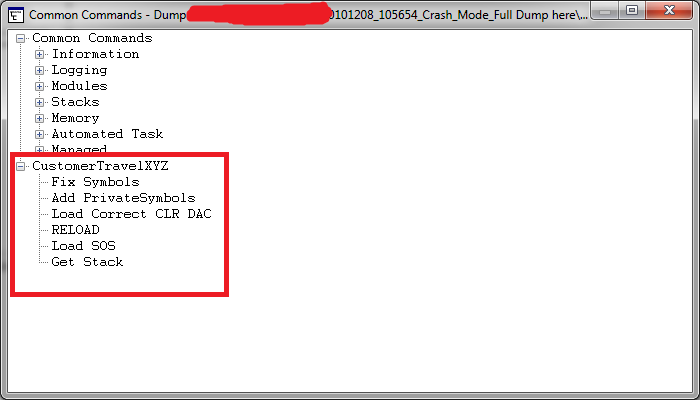
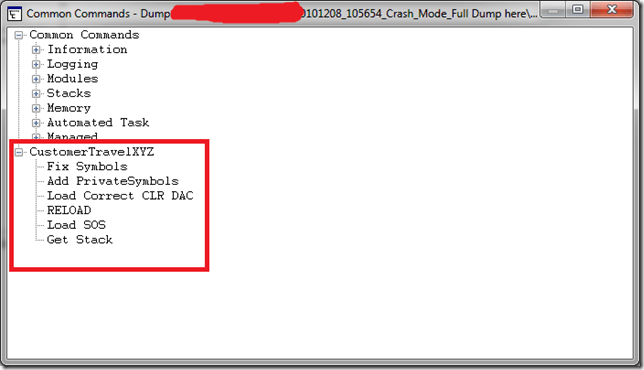
Now I get this window popup to execute my command to initialise the debugging environment:
image


I can now double click Fix Symbols all the way up to Get Stack. I hate typing this in all the time when debugging multiple DMP files! This generates these commands

0:030> .symfix
0:030> .sympath+ H:\Projects\Travel\Symbols
Symbol search path is: srv*;H:\Projects\Travel\Symbols
Expanded Symbol search path is: cache*;SRV*http://msdl.microsoft.com/download/symbols;h:\projects\travel\symbols
0:030> .cordll -lp H:\Projects\Travel\mscordacwks.dll
CLR DLL status: No load attempts
0:030> .reload
……………………………………………………….
……………………………………………………….
……………………………………………………….
………….
Loading unloaded module list
..
0:030> .loadby sos mscorwks

0:030> !clrstack

0:030> !clrstack
OS Thread Id: 0x1748 (30)
*** WARNING: Unable to verify checksum for mscorlib.ni.dll
*** WARNING: Unable to verify checksum for System.Web.ni.dll
Child-SP         RetAddr          Call Site
0000000004ce2500 000007fef8564cba System.Diagnostics.StackTrace.ToString(TraceFormat)
0000000004ce25e0 000007fef850396c System.Exception.get_StackTrace()
0000000004ce2620 000007ff001a69ad System.Exception.ToString()
0000000004ce2660 000007ff001a2153 Company.XYZ._EmptyErrorObject(System.Type, Company.XYZ.DBError)
0000000004ce26c0 000007fef92642e1 Company.XYZ._FirstWhere(System.Type, Company.XYZ.SqlStatement)
0000000004ce45e0 000007ff001a20be Company.XYZ.Broker.FindFirst(System.Type, Company.XYZ.SqlStatement)
0000000004ce47e0 000007ff0019fa63 Company.XYZ._FirstWhere(System.Type, Company.XYZ.SqlStatement)
0000000004ce4890 000007ff0019eec9 ConcordeLib.STSessionDataObjects.LoginMessage.Latest()
0000000004ce49a0 000007ff001a97af Company.XYZControllers.AccountController.LogOn(System.String)
0000000004ce4bd0 000007fef92642e1 Company.XYZControllers.AccountController.LogOn(Int32, System.String, System.String, Boolean, System.String)
0000000004ce6af0 000007ff001ad7cb Company.XYZ.Login(System.String, System.String, System.String)
0000000004ce6bd0 000007ff001ad717 Company.XYZ.Login(Int32, System.String, System.String, System.String, System.String)
0000000004ce6cd0 000007ff001a92e7 Company.XYZModels.StandardTicketProcessor.Login(Int32, System.String, System.String, System.String, System.String)
0000000004ce6d20 000007ff0019f517 Company.XYZControllers.AccountController.LogOn(Int32, System.String, System.String, Boolean, System.String)
0000000004ce6f50 000007ff001a97af Company.XYZControllers.AccountController.LogOn(System.String)
0000000004ce7180 000007fef92642e1 Company.XYZControllers.AccountController.LogOn(Int32, System.String, System.String, Boolean, System.String)
0000000004ce90a0 000007ff001ad7cb Company.XYZ.Login(System.String, System.String, System.String)
0000000004ce9180 000007ff001ad717 Company.XYZ.Login(Int32, System.String, System.String, System.String, System.String)
0000000004ce9280 000007ff001a92e7 Company.XYZModels.StandardTicketProcessor.Login(Int32, System.String, System.String, System.String, System.String)
0000000004ce92d0 000007ff0019f517 Company.XYZControllers.AccountController.LogOn(Int32, System.String, System.String, Boolean, System.String)
0000000004ce9500 000007ff001a97af Company.XYZControllers.AccountController.LogOn(System.String)
0000000004ce9730 000007fef92642e1 Company.XYZControllers.AccountController.LogOn(Int32, System.String, System.String, Boolean, System.String)
0000000004ceb650 000007ff001ad7cb Company.XYZ.Login(System.String, System.String, System.String)
0000000004ceb730 000007ff001ad717 Company.XYZ.Login(Int32, System.String, System.String, System.String, System.String)
System.String)
0000000004d2b1c0 000007ff001a92e7 Company.XYZModels.StandardTicketProcessor.Login(Int32, System.String, System.String, System.String, System.String)
0000000004d2b210 000007ff0019f517 Company.XYZControllers.AccountController.LogOn(Int32, System.String, System.String, Boolean, System.String)
0000000004d2b440 000007ff001a97af Company.XYZControllers.AccountController.LogOn(System.String)
0000000004d2b670 000007fef92642e1 Company.XYZControllers.AccountController.LogOn(Int32, System.String, System.String, Boolean, System.String)
0000000004d2d590 000007ff001ad7cb Company.XYZ.Login(System.String, System.String, System.String)
0000000004d2d670 000007ff001ad717 Company.XYZ.Login(Int32, System.String, System.String, System.String, System.String)
0000000004d2d770 000007ff001a92e7 Company.XYZModels.StandardTicketProcessor.Login(Int32, System.String, System.String, System.String, System.String)
0000000004d2d7c0 000007ff0019f517 Company.XYZControllers.AccountController.LogOn(Int32, System.String, System.String, Boolean, System.String)
0000000004d2d9f0 000007ff00241035 Company.XYZControllers.AccountController.LogOn(System.String)
0000000004d2dc20 000007ff0019e3bb DynamicClass.lambda_method(System.Runtime.CompilerServices.ExecutionScope, System.Web.Mvc.ControllerBase, System.Object[])
0000000004d2dc60 000007ff0019e27f System.Web.Mvc.ReflectedActionDescriptor.Execute(System.Web.Mvc.ControllerContext, System.Collections.Generic.IDictionary`2<System.String,System.Object>)
0000000004d2dcc0 000007ff0019e0c8 System.Web.Mvc.ControllerActionInvoker.InvokeActionMethod(System.Web.Mvc.ControllerContext, System.Web.Mvc.ActionDescriptor, System.Collections.Generic.IDictionary`2<System.String,System.Object>)
0000000004d2dd00 000007ff0019de55 System.Web.Mvc.ControllerActionInvoker+<>c__DisplayClassd.<InvokeActionMethodWithFilters>b__a()
0000000004d2dd60 000007ff0019dac8 System.Web.Mvc.ControllerActionInvoker.InvokeActionMethodFilter(System.Web.Mvc.IActionFilter, System.Web.Mvc.ActionExecutingContext, System.Func`1<System.Web.Mvc.ActionExecutedContext>)
0000000004d2ddf0 000007ff00196906 System.Web.Mvc.ControllerActionInvoker.InvokeActionMethodWithFilters(System.Web.Mvc.ControllerContext, System.Collections.Generic.IList`1<System.Web.Mvc.IActionFilter>, System.Web.Mvc.ActionDescriptor, System.Collections.Generic.IDictionary`2<System.String,System.Object>)
0000000004d2de50 000007ff00195db8 System.Web.Mvc.ControllerActionInvoker.InvokeAction(System.Web.Mvc.ControllerContext, System.String)
0000000004d2def0 000007ff001957e3 System.Web.Mvc.Controller.ExecuteCore()
0000000004d2df50 000007ff00195775 System.Web.Mvc.MvcHandler+<>c__DisplayClass8.<BeginProcessRequest>b__4()
0000000004d2df90 000007ff0019572f System.Web.Mvc.Async.AsyncResultWrapper+<>c__DisplayClass1.<MakeVoidDelegate>b__0()
0000000004d2dfd0 000007ff001955bd System.Web.Mvc.Async.AsyncResultWrapper+<>c__DisplayClass8`1[[System.Web.Mvc.Async.AsyncVoid, System.Web.Mvc]].<BeginSynchronous>b__7(System.IAsyncResult)
0000000004d2e000 000007ff00195417 System.Web.Mvc.Async.AsyncResultWrapper+WrappedAsyncResult`1[[System.Web.Mvc.Async.AsyncVoid, System.Web.Mvc]].End()
0000000004d2e040 000007fef29714c6 System.Web.Mvc.MvcHandler.EndProcessRequest(System.IAsyncResult)
0000000004d2e070 000007fef29356d7 System.Web.HttpApplication+CallHandlerExecutionStep.System.Web.HttpApplication.IExecutionStep.Execute()
0000000004d2e120 000007fef301dfa1 System.Web.HttpApplication.ExecuteStep(IExecutionStep, Boolean ByRef)
0000000004d2e1c0 000007fef300f1e2 System.Web.HttpApplication+PipelineStepManager.ResumeSteps(System.Exception)
0000000004d2e350 000007fef2ff1409 System.Web.HttpApplication.BeginProcessRequestNotification(System.Web.HttpContext, System.AsyncCallback)
0000000004d2e3a0 000007fef3117fb4 System.Web.HttpRuntime.ProcessRequestNotificationPrivate(System.Web.Hosting.IIS7WorkerRequest, System.Web.HttpContext)
0000000004d2e4c0 000007fef3117bcb System.Web.Hosting.PipelineRuntime.ProcessRequestNotificationHelper(IntPtr, IntPtr, IntPtr, Int32)
0000000004d2e630 000007fef3116c34 System.Web.Hosting.PipelineRuntime.ProcessRequestNotification(IntPtr, IntPtr, IntPtr, Int32)
0000000004d2e690 000007fef93cb07a DomainNeutralILStubClass.IL_STUB(Int64, Int64, Int64, Int32)
0000000004d2eec0 000007fef3118094 DomainNeutralILStubClass.IL_STUB(IntPtr, System.Web.RequestNotificationStatus ByRef)
0000000004d2efa0 000007fef3117bcb System.Web.Hosting.PipelineRuntime.ProcessRequestNotificationHelper(IntPtr, IntPtr, IntPtr, Int32)
0000000004d2f110 000007fef3116c34 System.Web.Hosting.PipelineRuntime.ProcessRequestNotification(IntPtr, IntPtr, IntPtr, Int32)
0000000004d2f170 000007fef93cb2cb DomainNeutralILStubClass.IL_STUB(Int64, Int64, Int64, Int32)


This is clearly a repetition of method calls on the stack, and is overflowing it. We can see a bug in the MVC Account Logon controller, so the developers will need to fix logon retries etc.

We can then issue a:

0:030> !clrstack -p
OS Thread Id: 0x1748 (30)
Child-SP         RetAddr          Call Site
0000000004ce2500 000007fef8564cba System.Diagnostics.StackTrace.ToString(TraceFormat)
    PARAMETERS:
        this = 0x00000001000fd088
        traceFormat = 0x000007ff00000000

0000000004ce25e0 000007fef850396c System.Exception.get_StackTrace()
    PARAMETERS:
        this = <no data>

0000000004ce2620 000007ff001a69ad System.Exception.ToString()
    PARAMETERS:
        this = <no data>

0000000004ce2660 000007ff001a2153Comapny.XYZ._EmptyErrorObject(System.Type, Comapny.XYZ.DBError)
    PARAMETERS:
        source = 0x00000000ffba39b0
        ex = 0x00000001000fc398

0000000004ce26c0 000007fef92642e1Comapny.XYZ._FirstWhere(System.Type, Comapny.XYZ.SqlStatement)
    PARAMETERS:
        source = <no data>
        stmt = <no data>

0000000004ce45e0 000007ff001a20be Comapny.XYZ.Broker.FindFirst(System.Type, Comapny.XYZ.SqlStatement)
    PARAMETERS:
        source = 0x00000000ffba39b0
        stmt = 0x00000001000ccef0

0000000004ce47e0 000007ff0019fa63Comapny.XYZ._FirstWhere(System.Type, Comapny.XYZ.SqlStatement)
    PARAMETERS:
        source = 0x00000000ffba39b0
        stmt = 0x00000001000ccef0

0000000004ce4890 000007ff0019eec9 Comapny.XYZ.LoginMessage.Latest()
0000000004ce49a0 000007ff001a97af Comapny.XYZ.Controllers.AccountController.LogOn(System.String)
    PARAMETERS:
        this = 0x00000000fff856a0
        returnUrl = 0x00000000fff86458

0000000004ce4bd0 000007fef92642e1 Comapny.XYZ.Controllers.AccountController.LogOn(Int32, System.String, System.String, Boolean, System.String)
    PARAMETERS:
        this = <no data>
        BLAHNo = <no data>
        uid = <no data>
        pwd = <no data>
        rememberMe = <no data>
        returnUrl = <no data>

0000000004ce6af0 000007ff001ad7cb Comapny.XYZ.Login(System.String, System.String, System.String)
    PARAMETERS:
        BLAHOrDebtorId = 0x0000000100098e90
        userId = 0x0000000100098cd0
        password =Omitted

0000000004ce6bd0 000007ff001ad717 Comapny.XYZ.TicketProcessor.Login(Int32, System.String, System.String, System.String, System.String)
    PARAMETERS:
        BLAHNo = 0x0000000000018c8c
        userName = 0x0000000100098cd0
        password = Omitted
        sessionId = 0x00000000ffbe00d8
        shopCode = 0x00000000ffbe0390


from here I can Dump Objects related to the username that caused the problem.

0:030> !do 0x0000000100098cd0
Name: System.String
MethodTable: 000007fef8657a80
EEClass: 000007fef825e530
Size: 40(0x28) bytes
(C:\Windows\assembly\GAC_64\mscorlib\2.0.0.0__b77a5c561934e089\mscorlib.dll)
String: RomikoDerbynewNaughty
Fields:
              MT    Field   Offset                 Type VT     Attr            Value Name
000007fef865ecf0  4000096        8         System.Int32  1 instance                8 m_arrayLength
000007fef865ecf0  4000097        c         System.Int32  1 instance                7 m_stringLength
000007fef86594c8  4000098       10          System.Char  1 instance               77 m_firstChar
000007fef8657a80  4000099       20        System.String  0   shared           static Empty
                                 >> Domain:Value  000000000133cc40:000000013fb00370 00000000030d2cc0:000000013fb00370 <<
000007fef8659378  400009a       28        System.Char[]  0   shared           static WhitespaceChars
                                 >> Domain:Value  000000000133cc40:000000013fb00ac0 00000000030d2cc0:00000000ffb03758 <<

I can see this user is always in the stackoverlfow, this method call with these parameters are repeated. Why???

Lets dump the exceptions

0:030> !pe
Exception object: 00000001000fc398
Exception type: Company.XYZ.DBAccessLayer.DBError
Message: Couldn’t find any results in LoginMessages for the statement
set transaction isolation level read uncommitted; select top 1 * from mytable where DateFrom <= @DateFrom and DateTo >= @DateTo and IsActive = @IsActive  order by Id desc
Parameters:
@DateFrom: 2002-12-08
@DateTo: 2002-12-08
@IsActive: True

InnerException: <none>
StackTrace (generated):
    SP               IP               Function
    0000000004CE45E0 000007FF001A2660 GentleCompany.XYZ!Company.XYZ.DBAccessLayer.Broker.FindFirst(System.Type, Company.XYZ.DBAccessLayer.SqlStatement)+0x3e0
    0000000004CE47E0 000007FF001A20BF GentleCompany.XYZ!Company.XYZ.DataAccessObject._FirstWhere(System.Type, Company.XYZ.DBAccessLayer.SqlStatement)+0x6f

StackTraceString: <none>
HResult: 80131500
There are nested exceptions on this thread. Run with -nested for details

This exception does not seem to be the real thing, has nothing to do with the user, lets get this exceptions nested exceptions.

Why, since the above SQL would not cause an IIS crash, it is just a SQLReader getting zero results and the code is not dealing with a null.


So moving into the nested exceptions. There were 100’s of them, so I kept it short here:

0:030> !pe -nested 00000001000fc398
Exception object: 00000001000fc398
Exception type: CompanyXYZLib.DBAccessLayer.DBError
Message: Couldn’t find any results in LoginMessages for the statement
set transaction isolation level read uncommitted; select top 1 * from mytable where DateFrom <= @DateFrom and DateTo >= @DateTo and IsActive = @IsActive  order by Id desc

Parameters:
@DateFrom: 2010-12-08
@DateTo: 2010-12-08
@IsActive: True

InnerException: <none>
StackTrace (generated):
    SP               IP               Function
    0000000004CE45E0 000007FF001A2660 CompanyXYZLib!CompanyXYZLib.DBAccessLayer.Broker.FindFirst(System.Type, CompanyXYZLib.DBAccessLayer.SqlStatement)+0x3e0
    0000000004CE47E0 000007FF001A20BF CompanyXYZLib!CompanyXYZLib.DataAccessObject._FirstWhere(System.Type, CompanyXYZLib.DBAccessLayer.SqlStatement)+0x6f

StackTraceString: <none>
HResult: 80131500

Nested exception ————————————————————-
Exception object: 00000001000cccb8
Exception type: CompanyXYZLib.AgentDataObjects.TicketsWebUser+LoginError

Message: Your BLAHNo is not currently active with Attribute2.

InnerException: <none>
StackTrace (generated):
    SP               IP               Function
    0000000004CE6AF0 000007FF001ADDDE CompanyXYZLib!CompanyXYZLib.AgentDataObjects.TicketsWebUser.Login(System.String, System.String, System.String)+0x2de
    0000000004CE6BD0 000007FF001AD7CC CompanyXYZ!CompanyXYZ.TicketProcessor.Login(Int32, System.String, System.String, System.String, System.String)+0x7c
    0000000004CE6CD0 000007FF001AD718 CompanyXYZ!CompanyXYZ.Models.StandardTicketProcessor.Login(Int32, System.String, System.String, System.String, System.String)+0x58
    0000000004CE6D20 000007FF001A92E8 CompanyXYZ!CompanyXYZ.Controllers.AccountController.LogOn(Int32, System.String, System.String, Boolean, System.String)+0x238

StackTraceString: <none>
HResult: 80131500

Nested exception ————————————————————-
Exception object: 00000001000977d0
Exception type: CompanyXYZLib.AgentDataObjects.TicketsWebUser+LoginError
Message: Your BLAHNo is not currently active with Attribute2.
InnerException: <none>
StackTrace (generated):
    SP               IP               Function
    0000000004CE90A0 000007FF001ADDDE CompanyXYZLib!CompanyXYZLib.AgentDataObjects.TicketsWebUser.Login(System.String, System.String, System.String)+0x2de
    0000000004CE9180 000007FF001AD7CC CompanyXYZ!CompanyXYZ.TicketProcessor.Login(Int32, System.String, System.String, System.String, System.String)+0x7c
    0000000004CE9280 000007FF001AD718 CompanyXYZ!CompanyXYZ.Models.StandardTicketProcessor.Login(Int32, System.String, System.String, System.String, System.String)+0x58
    0000000004CE92D0 000007FF001A92E8 CompanyXYZ!CompanyXYZ.Controllers.AccountController.LogOn(Int32, System.String, System.String, Boolean, System.String)+0x238

StackTraceString: <none>
HResult: 80131500

Perfect, we found the problem Smile BLAH attributes are causing issues when not active with BLAH2 and user RomikODebrynewNaughty has this unique condition which caused the software code to infinitely retry his login! So we isolated the problem in the logon business rules and fixed the infinite loop and the web server was back to normal Smile


The BLAHNo  from the !clrstack –p and then the !do on the parameter confirms this e.g.

0000000004ce6bd0 000007ff001ad717 Comapny.XYZ.TicketProcessor.Login(Int32, System.String, System.String, System.String, System.String)
    PARAMETERS:
        BLAHNo = 0x0000000000018c8c
        userName = 0x0000000100098cd0
        password = Omitted
        sessionId = 0x00000000ffbe00d8
        shopCode = 0x00000000ffbe0390


Hoe you find this useful. I omitted allot of the output as there were about 130 of the same method call patterns on the stack.

I am loving this sort of debugging and will be playing around with SOSEX soon and see what we can talk about Smile
CRM Performance Toolkit Check List

Hi,

I had the please working with Chanpreet Saluja this week with some Microsoft CRM testing, here are some of my notes in regards to setting up the CRM Performance Toolkit.

  • Ensure the VSTestHost.exe.xml has the following setting:

 <appSettings><add key=”urlkey” value=”crm://myserver:5555/”/></appSettings>

  • Note port number is your CRM web site 🙂

Also, ensure this registry key exists:

Windows Registry Editor Version 5.00

[HKEY_LOCAL_MACHINE\SOFTWARE\Microsoft\MSCRM]
“ConfigSku”=”OnPremise”
“CRM_Perf_Toolkit_ConfigDir”=”C:\\CRM 4.0 Toolkit\\ConfigFiles\\”
“configdb”=”Application Name=CRM_Perf_BenchMark;Server=myserver;Initial Catalog=MSCRM_CONFIG;Integrated Security=sspi”

  • The users created for test accounts in CRM must EXIST in the active directory PRIOR to running  RunPopulation.cmd in the binaries folder.
  • When you run RunPopulation.cmd, ensure you use a Domain Admin Account, that has access to CRM and AD etc. Access to the SQL Express Entity Manager Database is also important.

Here is a sample RunPopulation.cmd, this sample creates 1000 users in CRM and using a custom config file (unitTest_Custom.xml) for customized entities in CRM:

SET WEBSERVER=myserver:5555
SET ORGANIZATION=myorgnameNOSPACES
SET DOMAIN=mydomain
SET USERNAME=romikoderbynew
SET PASSWORD=password1
SET CRMUSERBASE=crmtestuser
SET CRMUSERSTART=1
SET CRMUSERCOUNT=1000
REM ImportCustomization\ImportCustomization.exe ImportCustomization\Account_Customized_10Attributes_form.xml /webserver:%WEBSERVER% /orgname:%ORGANIZATION% /domainname:%DOMAIN% /username:%USERNAME% /password:%PASSWORD% /authentication:AD
REM ImportCustomization\ImportCustomization.exe ImportCustomization\Contact_Customized_10Attributes_form.xml /webserver:%WEBSERVER% /orgname:%ORGANIZATION% /domainname:%DOMAIN% /username:%USERNAME% /password:%PASSWORD% /authentication:AD
REM ImportCustomization\ImportCustomization.exe ImportCustomization\Task_Customized_10Attributes_form.xml /webserver:%WEBSERVER% /orgname:%ORGANIZATION% /domainname:%DOMAIN% /username:%USERNAME% /password:%PASSWORD% /authentication:AD

DbPopulator\UserConfigGen.exe /domain:%DOMAIN% /webserver:%WEBSERVER% /userbase:%USERNAME% /password:%PASSWORD% /threadcount:1 /crmuserbase:%CRMUSERBASE% /crmuserstart:%CRMUSERSTART% /crmusercount:%CRMUSERCOUNT% /orgname:%ORGANIZATION%

DbPopulator\dbPopulator.exe UserPopulate.xml
DbPopulator\dbPopulator.exe c:\unitTest_Custom.xml
REM DbPopulator\dbPopulator.exe DbPopulator\ProductSuite.xml
REM DbPopulator\dbPopulator.exe DbPopulator\NestedSFAEntitiesWithState_Custom.xml
REM DbPopulator\dbPopulator.exe DbPopulator\ReportsData.xml

So, if you have any custom Tables you want to add to the database to represent your custom CRM entities, you will need to create an XML file, loads of samples are available at:

C:\CRM 4.0 Toolkit\CRM4_Perf_Toolkit\dbPopulator\Sample_Xmls

Once you have the XML in place, you will also need to update the EntityManager.cs file to add custom entries at these line numbers:

Line 49: public static class EntityNames
Line 430: public static string GetEntityIDName(string Type)
Line 494: private void TruncateTables()
Line 706 :private void LoadFromSQL() –

you need to create a corresponding custom method, use existing ones as examples! Note the difference between user and organization owned entities! Also use the Customize Entities feature in CRM to find attribute names e.g. Name, Title etc

Line 915: Create a BuildEntityFromSQL for the custom entity (note user or organization owned)

here is a sample method I created for the method call section at line number 706.

         /// <summary>
        /// Reads all defined Communications
        /// </summary>
        private void ReadCommunications()
        {           
            string[] Props = { EntityIDNames.Organization, EntityIDNames.Communications, “rel_title” };
            string EntityName = EntityNames.Communications;
            string where = ” where deletionstatecode = 0 and statecode = 0 “;
            Trace.WriteLine(“Read ” + ReadEntityFromTable(EntityName, Props, where) + ” rel_communication”);          
        }

 note that some entities will not use statecode! so ensure the where clause you use matches the table definition in the EntityManager and MSCRM_CONFIG database!

Also, update the EMDB_Setup.sql script to create the custom tables in EntityManager.

The EntityManager database is the gateway for all testing, it is used to manage GUID’S when it needs to create/delete/update leads in test scenarios, as it servers as the lookup database 🙂

Once you got it all in place, you can run the EMDBLoader to load data from MSCRM_CONFIG to ENTITYManager, so make sure you FIRST dbpopulate and then afterwards check the error logs and then run EMDBLoader 🙂 EMDBLoader will call the entitymanager singleton instance and load the data for you.

If you run DBPopulator and then later want to update Entitymanager, just increment the count for this setting in the: C:\CRM 4.0 Toolkit\ConfigFiles\ConfigSettings.xml

 <reloadentitymanager value=”17″/>

From the above you can see I reloaded it 17 times already 🙂

I hope this helps you all with your endeavours for using the CRM ToolKit.

Fiddler is a great tool to use to use as a reference when creating custom tests. You should use the framework in the toolkit, however, it is VERY time consuming to write custom tests, so do not underestimate it, as you will need to create various helper methods in the utils.cs and urls.cs files! As custom grids will need to be made which requires intricate CRM form knowledge which you can build up from Fiddler logs.

If you want to TEST SIMULATNIOUS CRM User connection, you must also add the following to ALL _PREWEBTEST methods in the .cs files for web tests:

            user = EntityManager.Instance.GetNextUser();
            e.WebTest.UserName = user[“domainname”];
            e.WebTest.Password = user[“userpassword”];

  • Browser caching can be disabled in the Utils.cs file, set this.PreAuthenticate = true;

Cheers


WebTest Recording does not work in Visual Studio 2008 Test Suite

Hi,

If you have IE 8 and Windows 7/Server 2008, WebTest recording may not function in IE correctly. To solve this problem, delete the following keys in the registry.

HKEY_CURRENT_USER\Software\Microsoft\Windows\CurrentVersion\Explorer\Discardable\PostSetup\Component Categories\{00021493-0000-0000-C000-000000000046}

HKEY_CURRENT_USER\Software\Microsoft\Windows\CurrentVersion\Explorer\Discardable\PostSetup\Component Categories\{00021494-0000-0000-C000-000000000046}

Dynamics CRM 4.0 Windows Server 2008/IIS 7.5 install problems

Hi,

Setup:

SQL 2008 r2

Windows Server 2008 r2

IIS 7.5

Ensure IIS Windows Authentication is installed.

Also ensure:

So, go to the web site (Microsoft Dynamics CRM) -> features view -> double-click on handler mappings -> double click on "StaticFile" -> make sure it reads:
StaticFileModule,DefaultDocumentModule


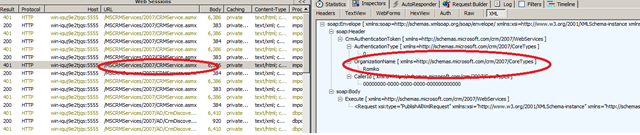
use Fiddler if you get issues. I was playing with DbPopulator and the RunPopulation command and had issues, Fiddler helped me solved them. Like connecting to my CRM website:

here is the RunPopulation.exe i used, notice portnumber for iis! I got errors with SOAP CALLS, since Organisaton was wrong, by using fiddler you can find these issue, when it calls: CRMService.asmx to upload data to CRM:


SET WEBSERVER=WIN-IQUJ9E2TJQS:5555
SET ORGANIZATION=Romiko
SET DOMAIN=Romiko.Derbynew.Com
SET USERNAME=romiko
SET PASSWORD=mypassword

SET CRMUSERBASE=Romiko
SET CRMUSERSTART=1
SET CRMUSERCOUNT=1

ImportCustomization\ImportCustomization.exe ImportCustomization\Account_Customized_10Attributes_form.xml /webserver:%WEBSERVER% /orgname:%ORGANIZATION% /domainname:%DOMAIN% /username:%USERNAME% /password:%PASSWORD% /authentication:AD
ImportCustomization\ImportCustomization.exe ImportCustomization\Contact_Customized_10Attributes_form.xml /webserver:%WEBSERVER% /orgname:%ORGANIZATION% /domainname:%DOMAIN% /username:%USERNAME% /password:%PASSWORD% /authentication:AD
ImportCustomization\ImportCustomization.exe ImportCustomization\Task_Customized_10Attributes_form.xml /webserver:%WEBSERVER% /orgname:%ORGANIZATION% /domainname:%DOMAIN% /username:%USERNAME% /password:%PASSWORD% /authentication:AD

DbPopulator\UserConfigGen.exe /domain:%DOMAIN% /webserver:%WEBSERVER% /userbase:%USERNAME% /password:%PASSWORD% /threadcount:1 /crmuserbase:%CRMUSERBASE% /crmuserstart:%CRMUSERSTART% /crmusercount:%CRMUSERCOUNT% /orgname:%ORGANIZATION%

DbPopulator\dbPopulator.exe UserPopulate.xml
DbPopulator\dbPopulator.exe DbPopulator\ProductSuite.xml
DbPopulator\dbPopulator.exe DbPopulator\NestedSFAEntitiesWithState_Custom.xml
DbPopulator\dbPopulator.exe DbPopulator\ReportsData.xml


image

Also ensure:

Microsoft Dynamics CRM 4.0

Microsoft Dynamics CRM 4.0 is compatible with Windows Server 2008 and Windows Server 2008 R2-based computers. The Microsoft Dynamics CRM 4.0 client for Microsoft Office Outlook is supported on Windows Server 2008 and Windows Server 2008 R2 when used with Terminal Services or with Citrix.
The following versions of Windows Server 2008 and Windows Server 2008 R2 are supported:

  • The 32-bit and 64-bit editions of the Windows Server 2008 Standard
  • The 32-bit and 64-bit editions of the Windows Server 2008 Enterprise
  • The 32-bit and 64-bit editions of the Windows Server 2008 Datacenter
  • The 32-bit and 64-bit editions of the Windows Server 2008 Web Server

Installing Microsoft Dynamics CRM 4.0 on Windows Server 2008
Note: Microsoft Dynamics CRM 4.0 is not currently supported in an IPv6 only environment.
Note: During the install of Microsoft Dynamics CRM 4.0 you must use Network Service as the Service Account or the installation will fail.
A server role describes the primary function of the server. In Windows Server 2008, administrators can dedicate an entire computer to one server role, or install multiple server roles on a single computer. In order to install Microsoft Dynamics CRM 4.0 on Windows Server 2008 the following Windows Server 2008 Server roles need to be installed.

  • Static Content role service (Included in the Web Server (IIS) role)
  • Dynamic Content Compression role service (Included in the Web Server (IIS) role)
  • Windows Authentication IIS role service (Included in the Web Server (IIS) role)
  • Compatibility Components role service (Included in the Web Server (IIS) role)
  • Indexing Service (Included in the File Services role)

To add the above roles before you install Microsoft Dynamics CRM 4.0 follow these steps:

  1. Click Start, click All Programs, click Administrative Tools, and then click Server Manager.
  2. Right-click Roles, and then click Add Roles.
  3. Click Next to get to the Server Role Screen.
  4. Mark the checkbox for the following roles, and then click Next.
    • Application Server
    • File Services
  5. Click Next to get to the Roles Services for the Application Server.
  6. Select the checkbox next to Web Server (IIS) Support. When the Add Roles Wizard box comes up, click Add Required Role Services, and then click Next.
  7. Click Next to get to the Web Server Role Services, keep the existing checkboxes that are marked and mark the checkbox next to IIS 6 Management Compatibility, and then click Next.
  8. Click Next to get to the File Services Role Services, mark the checkbox next to Indexing Service , and then click Next.
  9. Click Install

If you have already enabled the Application Server, File Services or Web Server (IIS). Then to enable certain Role Services follow these steps:

  1. Click Start, click All Programs, click Administrative Tools and click Server Manager.
  2. Expand Roles and right-click Application Server, File Services or Web Server (IIS) depending on the role you need and click Add Role Services.
  3. Complete the wizard to add the desired role services.

Back to the top

MORE INFORMATION

Back to the top

Issues that may occur when you use Windows Server 2008 with Microsoft Dynamics CRM 4.0

The following known issues may occur when you use Microsoft Dynamics CRM 4.0 with Windows Server 2008 if the above roles are not installed. . Any available workarounds are also described.
Issue 1: Error message when you try to open the Microsoft Dynamics CRM 4.0 Web application:

"Problems with this Web page might prevent it from being displayed properly or functioning properly" Line: 194 Char: 1 Error: Object expected code: 0 URL: http://localhost/

To work around this problem, enable the Static Content role service in the Web Server (IIS) role.
Issue 2: Error message when you install Microsoft Dynamics CRM 4.0:

"Action Microsoft.Crm.Setup.Server.EnableCompressionAction failed" System.Runtime.InteropServices.COMException (0x80005006): Exception from HRESULT: 0x80005006

To workaround this problem, enable the Dynamic Content Compression role service in the Web Server (IIS) role.
Issue 3: Error message when you try to open the Microsoft Dynamics CRM 4.0 Web application:

"HTTP Error 401.2 – Unauthorized"

To work around this problem, enable the Windows Authentication role service in the Web Server (IIS) role.
Issue 4: Error message when you try to install the Microsoft Dynamics CRM 4.0 server:

"Internet Information Services (IIS) 7 along with IIS 6 Compatibility Components must be installed on Windows Server 2008"

Microsoft Dynamics CRM 4.0 only supports IIS 6.0 Management Compatibility role service.
To work around this problem, you must install the IIS 6.0 Compatibility role service in the Web Server (IIS) role.
Issue 5: If you only enable IPv6, the following problems may occur in Microsoft Dynamics CRM 4.0. Consider the following scenario. You install Microsoft Dynamics CRM 4.0 Internet Facing Deployment (IFD) in an IPv6-only environment. You set the internalnetworkaddress registry key to an IPv6 address. You try to open the Microsoft Dynamics CRM 4.0 Web application. In this scenario, you receive the following error message:

An invalid IP address was specified.

Consider the following scenario. You try to install the Microsoft Dynamics CRM 4.0 server in an IPv6-only environment. Then, you configure the Setup process to create the Web site to be used as the Microsoft Dynamics CRM server. In this scenario, you receive the following error message:

Check WebServerValidator: Failure: An address incompatible with the requested protocol was used

To work around these problems, make sure IPv4 is enabled along with IPv6 and that you have Update Rollup 3 or higher installed.
Issue 6: Consider the following scenario: You try to install the Microsoft Dynamics CRM 4.0 Server with a Security Account running under a Domain User account on Windows Server 2008. The Microsoft Dynamics CRM 4.0 installation tries to add the domain user to the IIS Worker Process Group (IIS_WPG). Windows Server 2008 runs IIS 7.0. However, Microsoft Dynamics CRM 4.0 uses IIS 6 compatibility mode. In this scenario, the Setup process fails, and you receive the following error message:

Action Microsoft.Crm.Setup.Server.ConfigureAspNetAccountAction failed. System.ComponentModel.Win32Exception: The group name could not be found.

This problem occurs because IIS 6 compatibility mode no longer has the IIS_WPG group.
To work around this problem, you must select the Network service to start Microsoft Dynamics CRM 4.0.
Once Microsoft Dynamics CRM 4.0 is installed and running you can change the service account to a domain user by doing the following:

  1. On the Microsoft Dynamics CRM server click Start, click Administrative Tools, and then click Internet Information Services (IIS) Manager .
  2. Expand your Web Server name and then click Application Pools .
  3. Right-click CRMAppPool, and then click Advanced Settings.
  4. Click Identity, change the Identity to the Service Account you created, and then click OK.
  5. Click Start, click Run, type iisreset, and then click OK..

Active Directory Changes:

  1. On the domain controller click Start, click Administrative Tools, and then click Active Directory Users & Computers.
  2. Navigate to where the Microsoft Dynamics CRM Security Groups were created and add the service account to both the PrivUserGroup and SQLAccessGroup.

File System Changes on the 2008 IIS Server:

  1. On the Microsoft Dynamics CRM Server navigate to C:\Program Files\Microsoft Dynamics CRM\.
  2. Change the permissions on the Trace Directory giving the service account FULL CONTROL to this directory.

Include the service account in the following groups in the Microsoft Dynamics CRM server:

  • The local IIS_IUSRS group
  • The local CRM_WPG group

To to this, follow these steps:

  1. In the Microsoft Dynamics CRM server, click Start, point to Administrative Tools, and then click Server Manager.
  2. Expand Configuration, expand Local Users and Groups, and then click Groups.
  3. In Groups pane, right-click IIS_IUSRS, and then click Properties.
  4. Click Add, type the service account, click Check Names, and then click OK two times.
  5. In Groups pane, right-click CRM_WPG, and then click Properties.
  6. Click Add, type the service account, click Check Names, and then click OK two times.

Issue 7; When you upgrade from Windows Server 2003 to Windows Server 2008, the Indexing Service is uninstalled. When the Indexing Service is uninstalled, you cannot use the application Help files in Microsoft Dynamics CRM 4.0.
To work around this problem, enable the Indexing Service role service in the File Services role.

Rendering and Binding Drop Down Lists using ASP.NET MVC 3 EditorFor

Hi,

I wanted to render a drop down list on my EditorTemplates. I notice on the net allot of people creating ascx controls and using something like:

[UIHint("List")]

if you do not, you end up with an error:

error CS0305: Using the generic type ‘System.Collections.Generic.IEnumerable<T>’ requires 1 type arguments

However, this is not necessary in MVC 3, I am using Razor, so cshtml. I am sure it will work just as well in MVC2.

All you need to do is be explicit on the generics e.g.

In my cshtml file which is in the EditorTemplates, I have this:


Click me for ENUM lists

<div class="editor-field">
 @Html.DropDownList("CategoryId", new SelectList(ViewData["Categories"] as IEnumerable<PhotoRA.Web.Models.Category>, "CategoryId", "Name", Model.CategoryId))
 </div>

All I do is cast the ViewData with the as clause and use my generic type:

as IEnumerable<PhotoRA.Web.Models.Category>

So, no need for a ASCX file just for a dropdownlist!

The ViewModel in this case looks like this:

public class StoreManagerViewModel
{
 public Photo Photo { get; set; }
 public List<Category> Categories { get; set; }
 public List<Event> EventList { get; set; } 

}


Click me for ENUM lists