Often you will be working out licensing costs and more often than not, you will need to know the number of vCores - as a baseline use the following script.
Get-AKSVCores.ps1
<#
.SYNOPSIS
Calculates total vCores for each Azure Kubernetes Service (AKS) cluster listed in a CSV file.
.DESCRIPTION
This script imports a CSV file containing AKS cluster information, iterates through each cluster, and calculates the total number of virtual cores (vCores) based on the node pools associated with each cluster. It requires Azure CLI and assumes that the user has the necessary permissions to access the AKS clusters and VM sizes.
.PARAMETER CsvFilePath
Full path to the CSV file containing AKS cluster information. The CSV file should have columns named 'ClusterName', 'Subscription', and 'ResourceGroup'.
.PARAMETER VmLocation
Azure region to get VM sizes for the calculation. Default is 'Australia East'.
.PARAMETER PerformAzureLogin
Indicates whether the script should perform Azure login. Set to $true if Azure login is required within the script; otherwise, $false. Default is $false.
# Iterate through each AKS cluster
foreach ($cluster in $aksClusters) {
# Set the current subscription
az account set --subscription $cluster.Subscription
# Logic to get the resource group
$resourceGroup = $cluster.ResourceGroup
# Get the node pools for the AKS cluster
$nodePools = az aks nodepool list --resource-group $resourceGroup --cluster-name $cluster.ClusterName --query "[].{name: name, count: count, vmSize: vmSize}" | ConvertFrom-Json
$totalVCores = 0
# Iterate through each node pool and calculate total vCores
foreach ($nodePool in $nodePools) {
# Get the VM size details
$vmSizeDetails = az vm list-sizes --location $VmLocation --query "[?name=='$($nodePool.vmSize)'].{numberOfCores: numberOfCores}" | ConvertFrom-Json
$vCores = $vmSizeDetails.numberOfCores
# Calculate total vCores for the node pool
$totalVCores += $vCores * $nodePool.count
}
# Output the total vCores for the cluster
Write-Host "$($cluster.ClusterName),$($cluster.Subscription),$($cluster.ResourceGroup),$totalVCores"
}
Introduction to Microservices Architecture (MSA) in the TOGAF® Framework
In the ever-evolving digital landscape, the TOGAF® Standard, developed by The Open Group, offers a comprehensive approach for managing and governing Microservices Architecture (MSA) within an enterprise. This guide is dedicated to understanding MSA within the context of the TOGAF® framework, providing insights into the creation and management of MSA and its alignment with business and IT cultures.
What is Microservices Architecture (MSA)?
MSA is a style of architecture where systems or applications are composed of independent and self-contained services. Unlike a product framework or platform, MSA is a strategy for building large, distributed systems. Each microservice in MSA is developed, deployed, and operated independently, focusing on a single business function and is self-contained, encapsulating all necessary IT resources. The key characteristics of MSA include service independence, single responsibility, and self-containment.
The Role of MSA in Enterprise Architecture
MSA plays a crucial role in simplifying business operations and enhancing interoperability within the business. This architecture style is especially beneficial in dynamic market environments where companies seek to manage complexity and enhance agility. The adoption of MSA leads to better system availability and scalability, two crucial drivers in modern business environments.
Aligning MSA with TOGAF® Standards
The TOGAF® Standard, with its comprehensive view of enterprise architecture, is well-suited to support MSA. It encompasses all business activities, capabilities, information, technology, and governance of the enterprise. The Preliminary Phase of TOGAF® focuses on determining the architecture’s scope and principles, which are essential for MSA development. This phase addresses the skills, capabilities, and governance required for MSA and ensures alignment with the overall enterprise architecture.
Implementing MSA in an Enterprise
Enterprises adopting MSA should integrate it with their architecture principles, acknowledging the benefits of resilience, scalability, and reliability. Whether adapting a legacy system or launching a new development, the implications for the organization and architecture governance are pivotal. The decision to adopt MSA principles should be consistent with the enterprise’s overall architectural direction.
Practical Examples TOGAF is independent on directing what tools to use. However I have found it very useful to couple Domain Driven Design with Event Storming in a Miro Board where you can get all stakeholders together and nut out the various domain, subdomains and events.
Event Storming – Business Process Example – source Lucidcharts
Within each domain, you can start working on ensuring data is independent as well, with patterns such as Strangler-Fig or IPC.
Extract a service from a monolith
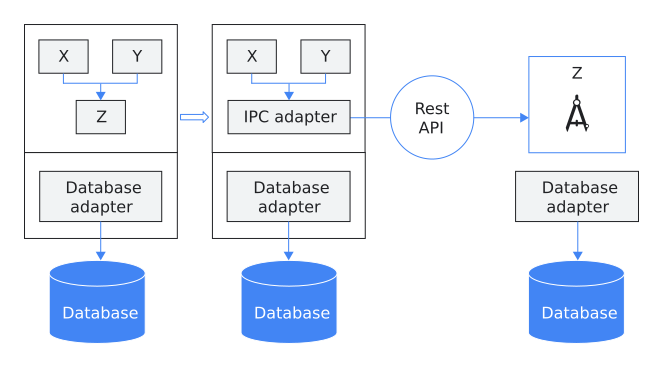
After you identify the ideal service candidate, you must identify a way for both microservice and monolithic modules to coexist. One way to manage this coexistence is to introduce an inter-process communication (IPC) adapter, which can help the modules work together. Over time, the microservice takes on the load and eliminates the monolithic component. This incremental process reduces the risk of moving from the monolithic application to the new microservice because you can detect bugs or performance issues in a gradual fashion.
The following diagram shows how to implement the IPC approach:
Figure 2. An IPC adapter coordinates communication between the monolithic application and a microservices module.
In figure 2, module Z is the service candidate that you want to extract from the monolithic application. Modules X and Y are dependent upon module Z. Microservice modules X and Y use an IPC adapter in the monolithic application to communicate with module Z through a REST API.
When integrated with the TOGAF® framework, Microservices Architecture (MSA) provides a strong and adaptable method for handling intricate, distributed architectures. Implementing MSA enables businesses to boost their agility, scalability, and resilience, thereby increasing their capacity to adjust to shifting market trends.
During the vision phase, establish your fundamental principles.
Identify key business areas to concentrate on, such as E-Commerce or online services.
Utilize domain-driven design (code patterns) and event storming (practical approach) to delineate domains and subdomains, using this framework as a business reference model to establish the groundwork of your software architecture.
Develop migration strategies like IPC Adapters/Strangler Fig patterns for database decoupling.
In the Technology phase of the ADM, plan for container orchestration tools, for example, Kubernetes.
Subsequently, pass the project to Solution Architects to address the remaining non-functional requirements from observability to security during step F of the ADM. This enables them to define distinct work packages adhering to SMART principles.
TIP: When migrating databases sometimes the legacy will be the main data and the microservice DB will be the secondary until a full migration, do not underestimate tools like CDC to assist.
Change Data Capture (CDC) is an approach used by microservices for tracking changes made to the data in a database. It enables microservices to be notified of any modifications in the data so that they can be updated accordingly. This real-time mechanism saves a lot of time that would otherwise be spent on regular database scans. In this blog post, we will explore how CDC can be used with microservices and provide some practical use cases and examples.
Today, let’s decode the Government Reference Model (GRM) from the TOGAF Series Guide. This model is a game-changer for public sector organizations, aiming to standardize the maze of public sector business architecture.
What is the GRM? The GRM is an exhaustive, mutually exclusive framework designed for the public sector. It categorizes various government departments and provides a unified language to describe their business architecture. It’s split across sectors like Defense and Security, Health and Wellbeing, Education, and more.
Objective and Overview The GRM aims to provide a standard reference model template adaptable across different architectural approaches. It’s all about enabling collaboration between architecture service providers and fostering the Business Architecture profession.
Breaking Down the GRM The GRM is structured into three levels:
Level 1: Sectors defining business areas of the government.
Level 2: Functions detailing what the government does at an aggregated level.
Level 3: Services, further refining government functions at a component level.
Why does GRM matter? For tech folks in the public sector, the GRM is a toolkit to plan and execute effective transformational changes. It’s about understanding the big picture of public services and aligning technology to strategic objectives.
GRM and TOGAF ADM The GRM aligns with Phase B: Business Architecture of the TOGAF ADM (Architecture Development Method). It provides a pattern for accelerating the development of reference models within Business Architecture.
In a Nutshell, GRM is a breakthrough in organizing and understanding the complex ecosystem of public sector services. It’s about bringing consistency, collaboration, and clarity to how we view public sector architecture.
So, next time you’re navigating the complex world of public sector IT, remember that the GRM is your compass!
Let’s decode the TOGAF® Series Guide: Information Architecture – Customer Master Data Management (C-MDM). This document isn’t just about mastering data; it’s a journey into the heart of harmonizing customer data across an organization. C is for the stage in the ADM cycle, and MDM is all about the enterprises’ data.
The Core Idea: C-MDM is all about streamlining and enhancing how an organization manages its customer data. It’s like giving every customer information a VIP treatment, ensuring it’s accurate, accessible, and secure.
Generic Description of the Capabilities of the Organization
Why It Matters: In our tech-driven world, customer data is gold. But it’s not just about having data; it’s about making it work efficiently. C-MDM is the toolkit for ensuring this data is managed smartly, reducing duplication, and enhancing access to this vital resource.
The TOGAF Twist: The guide integrates C-MDM within TOGAF’s Architecture Development Method (ADM). This means it’s not just a standalone concept but a part of the larger enterprise architecture landscape. It’s like having a detailed map for your journey in data management, ensuring every step aligns with the broader organizational goals.
Key Components:
Information Architecture Capability: Think of this as the foundation. It’s about understanding and handling the complexity of data across the organization.
Data Management Capabilities: This is where things get practical. It involves managing the lifecycle of data – from its creation to its retirement.
C-MDM Capability: The star of the show. This section delves into managing customer data as a valuable asset, focusing on quality, availability, and security.
Process and Methodology: Here, the guide adapts TOGAF ADM for C-MDM, offering a structured yet flexible approach to manage customer data.
Reference Models: These models provide a clear picture of what C-MDM entails, including the scope of customer data and detailed business functions.
Integration Methodologies: It’s about fitting C-MDM into the existing IT landscape, ensuring smooth integration and operation.
What’s in It for Tech Gurus? As a tech enthusiast, this guide offers a deep dive into managing customer data with precision. It’s not just about handling data; it’s about transforming it into an asset that drives business value.
So, whether you’re an enterprise architect, data manager, or just a tech aficionado, this guide is your compass in navigating the complex world of customer data management. It’s about making data not just big, but smart and efficient.
Happy Data Managing!
PS: Fostering a culture of data-driven decisions at all levels of your organisation, from value streams in the Business Domain to Observability in the Technology Domain, will allow your stakeholders and teams to make better strategic and tactical decisions. Invest wisely here and ensure insights are accessible to all key stakeholders – those stakeholders that have the influence and vested interest. This is where AI will revolutionise data-driven decisions; instead of looking at reports, you can “converse” with AI about your data in a customised reference vector DB.
If you’ve ever wondered how enterprise architecture (EA) can be agile, you’re in for a treat. Let’s dive into the TOGAF® Series Guide on Enabling Enterprise Agility. This guide is not just about making EA more flexible; it’s about integrating agility into the very fabric of enterprise architecture.
First things first, agility in this context is all about being responsive to change, prioritizing value, and being practical. It’s about empowering teams, focusing on customer needs, and continuously improving. This isn’t just theory; it’s about applying these principles to real-life EA.
The guide stresses the importance of Enterprise Architecture in providing a structured yet adaptable framework for change. It’s about understanding and managing complexity, supporting continuous change, and minimizing risks.
One of the core concepts here is the TOGAF Architecture Development Method (ADM). Contrary to popular belief, the ADM isn’t a rigid, waterfall process. It’s flexible and can be adapted for agility. The ADM doesn’t dictate a sequential process or specific phase durations; it’s a reference model defining what needs to be done to deliver structured and rational solutions.
The guide introduces a model with three levels of detail for partitioning architecture development: Enterprise Strategic Architecture, Segment Architecture, and Capability Architecture. Each level has its specific focus and detail, allowing for more manageable and responsive architecture development.
Transition Architectures play a crucial role in Agile environments. They are architecturally significant states, often including several capability increments, providing roadmaps to desired outcomes. They are key to managing risk and understanding incremental states of delivery, especially when implemented through Agile sprints.
The guide also talks about a hierarchy of ADM cycles, emphasizing that ADM phases need not proceed in sequence. This flexibility allows for concurrent work on different segments and capabilities, aligning with Agile principles.
Key takeaways for the tech-savvy:
Enterprise Architecture and Agility can coexist and complement each other.
The TOGAF ADM is a flexible framework that supports Agile methodologies.
Architecture can be developed iteratively, with different levels of detail enabling agility.
Transition Architectures are essential in managing risk and implementing Agile principles in EA.
The hierarchy of ADM cycles allows for concurrent development across different architecture levels.
In short, this TOGAF Series Guide is a treasure trove for tech enthusiasts looking to merge EA with Agile principles. It’s about bringing structure and flexibility together, paving the way for a more responsive and value-driven approach to enterprise architecture. Happy architecting!
Are you ready to level up your understanding of business models within the TOGAF framework? Perfect, because today we’re slicing through the complexity and serving up some easy-to-digest insights into how business models can supercharge your architecture endeavors.
Let’s kick off with the basics: a business model is essentially a blueprint for how an organization operates. It’s the behind-the-scenes rationale that shows us how a company creates, delivers, and captures value. Now, why does that matter to you, the tech-savvy mastermind? Because understanding this blueprint is crucial for aligning IT projects with business strategy – and we all know how vital that alignment is for success.
Source: Business Model Generation, Alexander Osterwalder, Yves Pigneur, 2010
Diving into the TOGAF Series Guide, we find that business models are not just about creating a common language for the C-suite but also about setting the stage for innovation and strategic execution. They’re like a high-level visual snapshot of the business – depicting the current state and future aspirations.
But here’s the kicker: while a business model paints the bigger picture, it’s the Business Architecture that adds the fine details. Think of the business model as the sketch of a grand painting, and Business Architecture is the process of bringing that sketch to life with color and texture. It breaks down the business into digestible chunks – capabilities, value streams, organization structures – so that you can see how everything fits together and where IT can play a starring role.
Now, let’s talk about the TOGAF ADM (Architecture Development Method) because that’s where the magic happens. During Phase B: Business Architecture, you’ll use the business model to craft a set of architecture blueprints that outline what the business needs to transform into and how to get there. This is where your technical prowess meets business savvy, as you help define the scope and dive into the details of what’s needed for that transformation.
But what about innovation, you ask? The guide shows us that business model innovation is about steering the ship through the rough seas of change. Whether it’s rethinking customer segments, value propositions, or even cost structures, business models provide the structure for ideation and the testing ground for new strategies.
For example, take a retail business (relatable, right?). Say they’re moving from a brick-and-mortar focus to an online shopping haven. The business model helps leaders visualize this shift and understand the implications across the business. And for you, the tech expert, it’s about understanding those changes to help plot the IT roadmap, identify capability gaps, and ensure that the technology architecture supports this new direction.
So, there you have it
– a quick tour through the world of business models in TOGAF. Whether you’re a Platform Manager, Solutions Architect, or any tech role in between, grasping the concept of business models is like finding the Rosetta Stone for enterprise architecture. It helps you translate business strategy into IT action, ensuring that your technical expertise is not just impressive, but impactful.
Remember, as technical people, we’re not just about the bits and bytes; we’re about shaping the business through technology. So, embrace the business model – it’s your secret weapon for making IT integral to business success.
And that’s a wrap on our friendly tech blog! Stay curious, keep learning, and let’s continue to bridge the gap between business and technology. Cheers to innovation and alignment!
P.S. Don’t forget, it’s not about changing the entire business model on a whim; it’s about making informed, strategic adjustments that keep the company agile and ahead of the game. Keep innovating, my friends!
In the rapidly evolving world of software development, misconceptions often arise about the compatibility of different methodologies. A common misbelief is that TOGAF, a comprehensive framework for enterprise architecture, is inherently slow and rigid, akin to waterfall models. However, this overlooks TOGAF’s inherent flexibility and its potential synergy with Agile development practices.
In backlog grooming sessions, developers often prioritize creating a Minimum Viable Product (MVP) that may not align with established Business Architecture and Standards. For instance, they might opt for a custom authentication method instead of using standard protocols like OpenID/SAML and Code Authorization Flow with PKCE. To mitigate this, integrating architectural decisions and evaluations into backlog grooming and sprint planning, possibly extending to Scrum of Scrums, is crucial. This approach can significantly save time and effort by encouraging early collaboration and input from various teams, ensuring adherence to standards and a more cohesive project development phase.
TOGAF, with its structured approach in the Architecture Development Method (ADM), offers a solid foundation for long-term strategic planning. It ensures that all aspects of enterprise architecture are considered, from business strategy to technology infrastructure. Contrary to the notion of it being a static, waterfall-like process, TOGAF can be adapted to fit into Agile’s iterative and incremental model.
Agile, known for its flexibility and rapid response to change, complements TOGAF by injecting speed and adaptability into the architectural planning and execution process. The key lies in integrating Agile sprints within the phases of the ADM. This allows for continuous feedback and iterative development, ensuring that the architecture remains aligned with business needs and can adapt to changing requirements.
The synergy between TOGAF and Agile fosters a holistic approach to software development. It combines the strategic, big-picture perspective of TOGAF with the tactical, fast-paced nature of Agile. This integrated approach enables organizations to be both strategically aligned and agile in execution, ensuring that their architecture is not only robust but also responsive to the dynamic nature of business and technology.
In essence, TOGAF and Agile are not mutually exclusive but can be powerful allies in delivering effective and adaptable enterprise solutions. By understanding and leveraging the strengths of each, organizations can enhance their architectural practices, leading to more successful and sustainable outcomes.
E-Commerce ViewPoint
In an e-commerce setting, integrating Agile sprints within the TOGAF ADM cycle can be exemplified as follows:
Preliminary Phase: Define the scope and vision for the e-commerce project, focusing on key objectives and stakeholders.
Architecture Vision (Phase A): Develop a high-level vision of the desired architecture. An Agile sprint can be used to quickly prototype a customer-facing feature, like a new user interface for the shopping cart.
Business Architecture (Phase B): Detail the business strategy, governance, and processes. Sprints can focus on evolving business requirements, like integrating a new payment gateway.
Information Systems Architectures (Phase C): Define data and application architecture. Agile sprints could focus on implementing a recommendation system for products.
Technology Architecture (Phase D): Establish the technology infrastructure. Sprints might involve deploying cloud services for scalability.
Opportunities & Solutions (Phase E): Identify and evaluate opportunities and solutions. Use sprints to experiment with different solutions like chatbots for customer service.
Migration Planning (Phase F): Plan the move from the current to the future state. Agile methodologies can be used to incrementally implement changes.
Implementation Governance (Phase G): Ensure the architecture is being implemented as planned. Sprints can be used for continuous integration and deployment processes.
Architecture Change Management (Phase H): Manage changes to the new architecture. Agile sprints allow for quick adaptations to customer feedback or market trends.
This approach ensures that the strategic framework of TOGAF and the iterative, responsive nature of Agile work in tandem, driving the e-commerce project towards success with both long-term vision and short-term adaptability.
Agile Board Example
For the use case of integrating a shopping cart with a rewards program from an airline partner, here’s an example of Agile backlog items:
User Story: As a customer, I want to link my airline rewards account with my shopping profile so that I can earn miles on my purchases.
Tasks:
Design UI/UX for account linking process.
Develop API integration with the airline’s rewards system.
User Story: As a user, I want to see how many miles I will earn for each purchase.
Tasks:
Implement a system to calculate miles earned per purchase.
Update the shopping cart UI to display potential rewards.
User Story: As a customer, I want to redeem my miles for discounts on products.
Tasks:
Create functionality to convert miles into store credits.
Integrate this feature into the checkout process.
User Story: As a system administrator, I need a dashboard to monitor the integration and track transactions.
Tasks:
Develop a dashboard showing real-time data of linked accounts and transactions.
Implement reporting tools for transaction analysis.
User Story: As a customer, I want to securely unlink my airline rewards account when needed.
Tasks:
Develop a secure process for unlinking accounts.
Ensure all customer data related to the rewards program is appropriately handled.
User Story: As a marketing manager, I want to create promotions exclusive to customers with linked airline rewards accounts.
Tasks:
Develop a feature to create and manage exclusive promotions.
Integrate promotion visibility based on account link status.
These backlog items can be broken down into smaller tasks and tackled in sprints, allowing for iterative development and continuous feedback whilst still addressing the requirements at the Enterprise Level e.g. A Rewards reusable module that can be consumed across multiple brands within an enterprise addressing Business Architecture in a holistic fashion.
The approach described doesn’t necessarily have to follow a linear, waterfall methodology. It can be more interactive, with different stages addressed flexibly as the Product Owner deems appropriate, such as when defining new Epics.
Consider these examples:
Firstly, the core concept of the rewards program – should it span multiple brands for wider reusability and align with the Business Architecture, or should it concentrate on a single brand? This is where Enterprise is important, building solutions for business units in your organisation with a common goal? All too often there are silo’s with an organisation and this can be mitigated to a certain extent with a ADM framework such as TOGAF
Secondly, the choice of hosting environment for the compute runtime is crucial. Options range from VMs, Kubernetes, Azure Container Instances, AWS ECS to Micro-Kernels (High Frequency Trading solutions). Consulting the Technology Architecture phase will guide in allocating software runtime to the most suitable Compute platform.
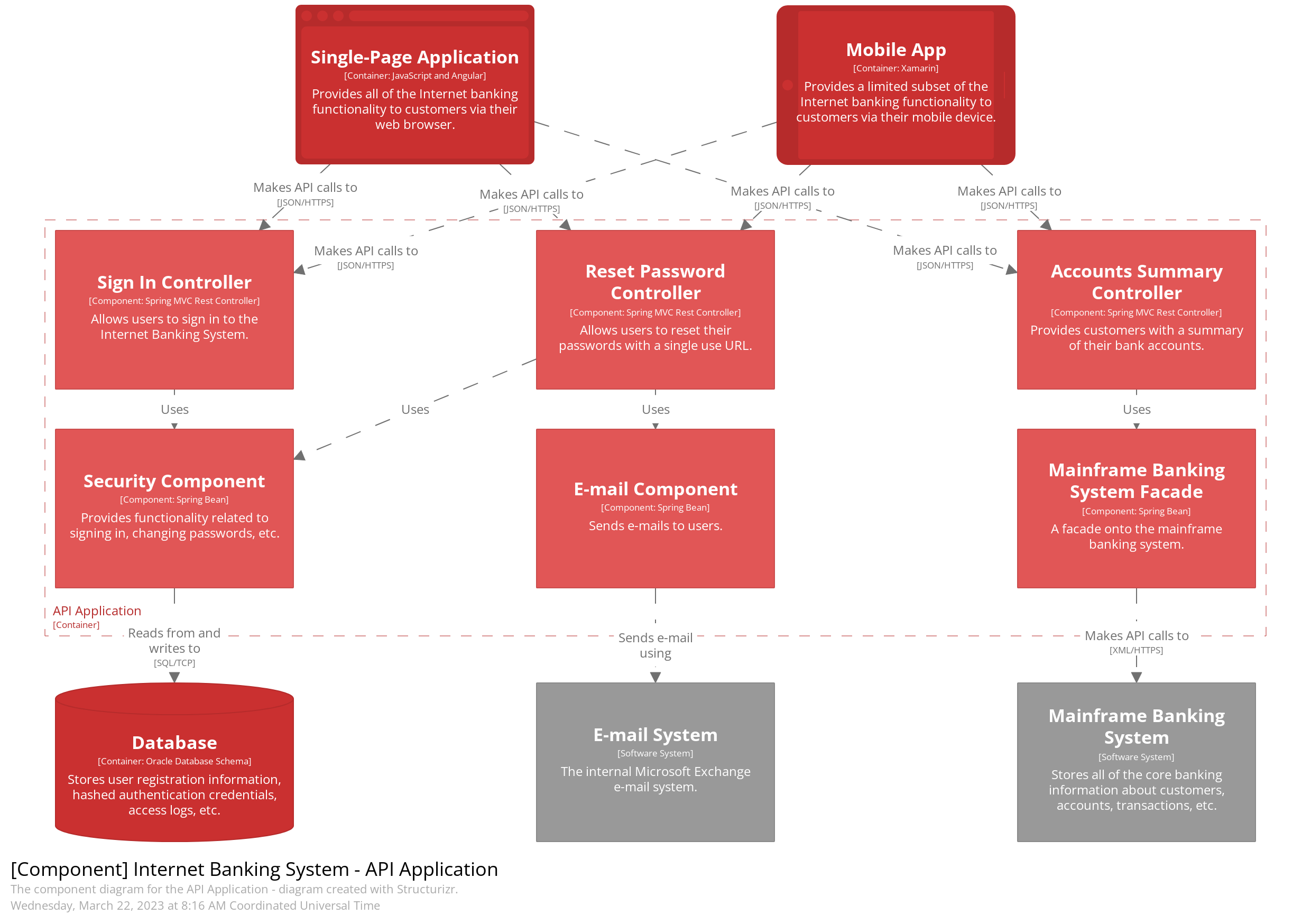
Your choice of tooling is totally up to you; UML can often be restrictive due to the skills of an agile Squad focussed on rapid development; you can adapt, bin tools like UML, and opt for tools such as the C4 Model.
I hope this helps you bring some level of Architecture Governance to your organisation – no matter how big or small, and yes, you can leverage these principles in a start-up.
Ladies and gentlemen, tech voyagers, and cloud explorers, fasten your seatbelts as we take you on a whimsical journey through the Cloud Adoption Framework (CAF) Landing Zones and Levels.
The Cloud Castle and Its Many Quirks Imagine the cloud as a majestic castle in the digital skies. To conquer this castle effectively, you need more than just a map; you need a well-organized treasure hunt! That’s where the CAF steps in – it’s like the guidebook to the cloud’s hidden treasures.
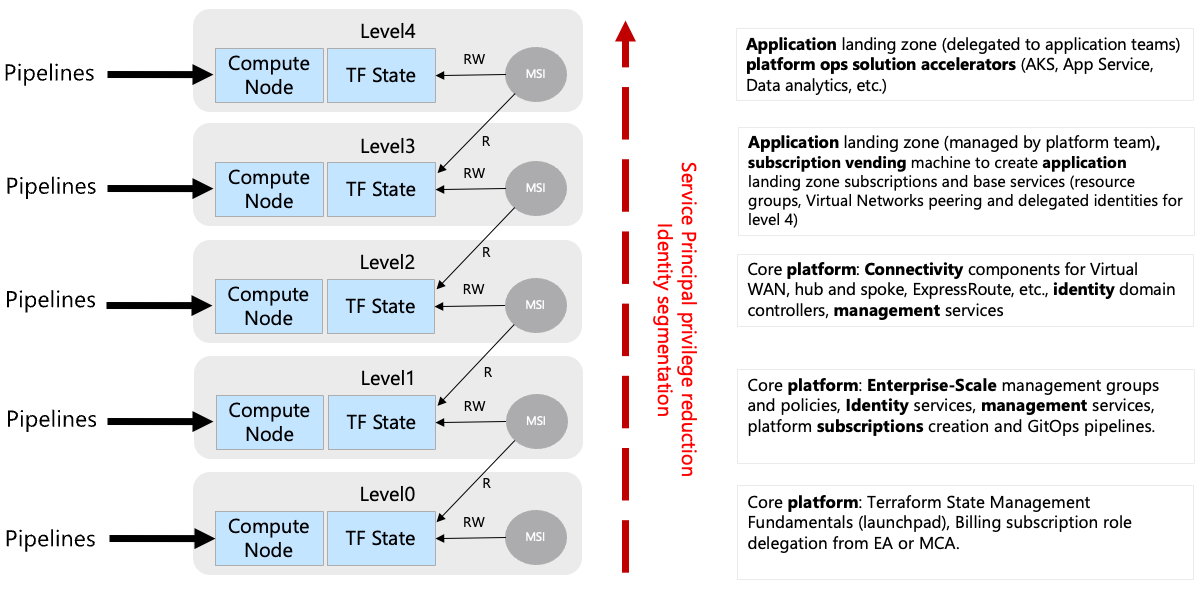
Level 0: Core Platform Automation Welcome to the cloud’s backstage – the place where the real magic happens, but you rarely see it. Level 0 is like the control room of a rock concert; it’s essential but hidden behind the scenes. Here, you’ll find the launchpad with storage accounts, Key Vault, RBAC, and more. It’s where Terraform state files are managed, subscriptions are created, and credentials are rotated. It’s basically the cloud’s secret lair.
Level 1: Core Platform Governance Up we go to the governance level – it’s like the castle’s council chamber. Here, you’ll find Azure management groups and policies, the rule-makers of the kingdom. They’re like the architects of the castle, designing its layout and enforcing the laws. You’ll also meet the GitOps services creating pipelines and summoning Virtual Networks and compute nodes for DevOps self-hosted agents. It’s where the cloud’s rule-makers and enforcers gather.
Level 2: Core Platform Connectivity This level is like the kingdom’s bustling market square. Here, you deal with virtual networking components, from classic Virtual Network-based Hubs to Azure Virtual WANs and ExpressRoute connections. It’s like managing the kingdom’s complex highway system. There are also additional identity and management subscription services to keep things running smoothly. It’s the kingdom’s backstage crew, making sure everything runs smoothly.
Level 3: Application Landing Zones (Vending Machine) Level 3 is where applications come to life – it’s the cloud’s vending machine. It’s where application teams get their subscriptions for different environments – Development, Test, UAT, DR, you name it. This level is like the cloud’s automated snack bar. It also handles privileged infrastructure services, supporting the application platform. Think of it as the royal kitchen, providing ingredients for the culinary masters in Level 4.
Level 4: Applications Landing Zone Welcome to the cloud’s gourmet restaurant! Here, you’ll find the application configurations delegated to application teams. It’s where Azure Kubernetes Services Cluster, API Management services, and other delicious offerings are prepared. This level is like the cloud’s Michelin-star restaurant, where each team creates their own cloud delicacies.
The following pictures illustrates the split between level 3 and 4:
How It All Operates In this grand castle, deployments are like a well-choreographed ballet. There are pipelines for each level, each with its own unique role:
Level 0 and 1 are the castle’s gatekeepers, ensuring the foundation is solid and the rules are clear. Level 2 springs into action when new regional hubs or connectivity needs arise – they’re like the kingdom’s travel agents. Level 3 steps in when a new service needs to be served up – they’re the cloud’s maître d’. Level 4, the gourmet kitchen, is always bustling with activity as application teams whip up their cloud creations.
Azure Subscription Vending Machine
The Cloud Comedy: Bringing It All Together In this cloud comedy, we’ve explored the whimsical world of CAF Landing Zones and Levels. It’s like a magical castle with different floors, each with its own quirks and responsibilities. As you journey through the cloud, remember that while it may seem complex, it’s also an adventure filled with opportunities for innovation and transformation.
So, whether you’re the cloud wizard behind the scenes or the master chef creating cloud delicacies, embrace the cloud with a twinkle in your eye. You’ll find that conquering the cloud castle can be an enchanting and delightful experience!
TIPS:
Use Azure Container Instances to spin up Azure DevOps Agents when deploying subscriptions and low-level resources instead of VMs and VM Scale Sets!
Use Managed Identity where you can and only use Service Principals if you cannot find a solution with Managed Identity
Hey there, savvy tech enthusiasts and cloud aficionados! If you’re anything like us, you’ve probably been keeping an eye on the economic tides as companies navigate the choppy waters of a recession. In times like these, every penny counts, and the IT world is no exception. With companies tightening their belts and trimming their workforces, it’s more important than ever to find creative ways to save big without sacrificing performance. Well, hold onto your keyboards, because we’ve got a cloud solution that’s about to make your wallets smile: Azure Spot Instances!
Azure Spot Instances: Catching the Cost-saving Wave
Picture this: azure skies, azure waters, and Azure Spot Instances—your ticket to slashing cloud costs like a pro. What are Azure Spot Instances, you ask? Well, they’re like the rockstar bargain of the cloud world, offering significant savings by leveraging unutilized Azure capacity. It’s like snagging a front-row seat at a concert for a fraction of the price, but instead of music, you’re rocking those cost-cutting beats.
So, here’s the scoop: Azure Spot Instances are like the cool kids in the virtual playground. They’re virtual machine scale sets that thrive on filling up the unused capacity gaps in the Azure cloud. Think of them as the ultimate budget-friendly roommates who crash on your couch when they’re not partying elsewhere. But wait, there’s a catch (of the best kind): they’re perfect for workloads that can handle a bit of a hiccup. We’re talking batch processing jobs, testing environments, and compute-intensive tasks that don’t mind a little dance with interruption.
Don’t Just Save, Make it Rain Savings
Now, imagine this scenario: you’ve got your AKS (Azure Kubernetes Service) cluster humming along, and you’re hosting your Dev and UAT environments. The spotlight is on your Spot Instances—they’re not the main act (that’s for staging and production), but they steal the show when it comes to saving money. So, let’s break it down.
With Azure Spot Instances, you’re not just pinching pennies; you’re saving big bucks. These instances are the economy class of the cloud world, with no high availability guarantees. If Azure needs space, the not-so-glamorous eviction notice might come knocking. But, hey, for Dev and UAT environments that can handle the occasional hiccup, it’s like getting bumped to first class on a budget.
Setting Sail with Spot Instances
Now that we’ve got your attention, let’s dive into the fun part—getting started! First things first, you need an AKS cluster that’s already playing nice with multiple node pools. And guess what? Your Spot Instance pool can’t be the default—it’s the star of the show, but it’s gotta know its role.
Using the Azure CLI, you’ll unleash the magic with a few commands. It’s like casting a spell, but way more practical. Picture yourself conjuring cost savings from thin air—pretty magical, right? Just create a node pool with the priority set to “Spot,” and voilà! You’re on your way to cloud cost-cutting greatness.
The Caveats, but Cooler
Now, before you go all-in on Spot Instances, remember, they’re not for every situation. These instances are the fearless daredevils of the cloud, ready to tackle evictions and interruptions head-on. But, just like you wouldn’t invite a lion to a tea party, don’t schedule critical workloads on Spot Instances. Set up taints and tolerations to ensure your instances dance only with the tasks that love a bit of unpredictability.
You can also leverage affinity roles to schedule your pod of dolphins on spot nodes with affinity labels.
Ready for the grand finale? Upgrading your Spot Instances is a breeze, and the best part is, AKS issues an eviction notice, not a complete storm-out. Plus, you can set a max price that works for you. Think of it like setting a budget for a shopping spree—except you’re not splurging on unnecessary costs.
So, there you have it, cloud trailblazers! Azure Spot Instances are the secret sauce to saving big during these recession times. With the right mindset, a sprinkle of taints, and a dash of tolerations, you’ll be riding the wave of cost-cutting success like a pro. Remember, it’s not just about saving money—it’s about making every cloud resource count. So go ahead, grab those Spot Instances by the horns and ride the cost-saving currents like the cloud-savvy superhero you were meant to be! 🚀🌩️
In recent years, OpenAI has revolutionized the field of natural language processing with its advanced language models like ChatGPT. These models excel at generating human-like text and engaging in conversations. However, sometimes we may want to customize the output to align it with specific reference data or tailor it to specific domains. In this blog post, we will explore how to leverage OpenAI and a VectorDB to achieve this level of customization.
Understanding OpenAI and VectorDB: OpenAI is a renowned organization at the forefront of artificial intelligence research. They have developed language models capable of generating coherent and contextually relevant text based on given prompts. One such model is ChatGPT, which has been trained on vast amounts of diverse data to engage in interactive conversations.
VectorDB, on the other hand, is a powerful tool that enables the creation of indexes and retrieval mechanisms for documents based on semantic similarity. It leverages vector embeddings to calculate the similarity between documents and queries, facilitating efficient retrieval of relevant information.
Using OpenAI and VectorDB Together: To illustrate the use of OpenAI and VectorDB together, let’s dive into the provided sample code snippet:
import os
import sys

import openai
from langchain.chains import ConversationalRetrievalChain, RetrievalQA
from langchain.chat_models import ChatOpenAI
from langchain.document_loaders import DirectoryLoader, TextLoader
from langchain.embeddings import OpenAIEmbeddings
from langchain.indexes import VectorstoreIndexCreator
from langchain.indexes.vectorstore import VectorStoreIndexWrapper
from langchain.llms import OpenAI
from langchain.vectorstores import Chroma

import constants

os.environ["OPENAI_API_KEY"] = constants.APIKEY
# Enable to save to disk & reuse the model (for repeated queries on the same data)
PERSIST = False

query = None
if len(sys.argv) > 1:
  query = sys.argv[1]

if PERSIST and os.path.exists("persist"):
  print("Reusing index...\n")
  vectorstore = Chroma(persist_directory="persist", embedding_function=OpenAIEmbeddings())
  index = VectorStoreIndexWrapper(vectorstore=vectorstore)
else:
  #loader = TextLoader("data/data.txt") # Use this line if you only need data.txt
  loader = DirectoryLoader("data/")
  if PERSIST:
    index = VectorstoreIndexCreator(vectorstore_kwargs={"persist_directory":"persist"}).from_loaders([loader])
  else:
    index = VectorstoreIndexCreator().from_loaders([loader])

chain = ConversationalRetrievalChain.from_llm(
  llm=ChatOpenAI(model="gpt-3.5-turbo"),
  retriever=index.vectorstore.as_retriever(search_kwargs={"k": 1}),
)

chat_history = []
while True:
  if not query:
    query = input("Prompt: ")
  if query in ['quit', 'q', 'exit']:
    sys.exit()
  result = chain({"question": query, "chat_history": chat_history})
  print(result['answer'])

  chat_history.append((query, result['answer']))
  query = None
Setting up the environment:
The code imports the necessary libraries and sets the OpenAI API key.
The PERSIST variable determines whether to save and reuse the model or not.
Loading and indexing the data:
The code loads the reference data using a TextLoader or DirectoryLoader, depending on the requirements.
If PERSIST is set to True, the code creates or reuses a VectorstoreIndexWrapper for efficient retrieval.
Creating a ConversationalRetrievalChain:
The chain is initialized with a ChatOpenAI language model and the VectorDB index for retrieval.
This chain combines the power of OpenAI’s language model with the semantic similarity-based retrieval capabilities of VectorDB.
Customizing the output:
The code sets up a chat history to keep track of previous interactions.
It enters a loop where the user can input prompts or queries.
The input is processed using the ConversationalRetrievalChain, which generates an appropriate response based on the given question and chat history.
The response is then displayed to the user.
Lets starts the program and see what the output is:
Dangers
The dangers of apps and social media is evident here. Utilising their own data sources (VectorDBs), the output of OpenAI can be massaged to align with a particular political party and contribute to the polarising nature social media and targeted advertising has had on our culture. A lot of challenges lie ahead to protect our language and cultural identity and influences.
Opportunity
This will super charge personalisation in the online e-commerce space. I am talking about the 2007 iPhone moment here. With very little changes to E-Commerce architecture, you can have super intelligent chatbots that understand the context of a customer based on the browsing history and order history alone. It will super charge tools that usually require expensive subscriptions to Zendesk. Google Dialogue Flow will move into a new real & meaningful conversation on websites. It could remind me if I forgot to order an item I usually order, make recommendations on cool events happening on the weekend based on the products and browsing patterns I have, with very little data ingestion!
Conclusion
In this blog post, we explored how to leverage OpenAI and VectorDB to customize the output from ChatGPT. By combining the strengths of OpenAI’s language model with the semantic similarity-based retrieval of VectorDB, we can create more tailored and domain-specific responses. This allows us to align the output with specific reference data and achieve greater control over the generated text. The provided code snippet serves as a starting point for implementing this customization in your own projects. So, go ahead and experiment with OpenAI and VectorDB to unlock new possibilities in natural language processing.
Tip: OpenAI subscription is NOT the same as OpenAI API subscriptions. To run this, you will need an API Key and a subscription if you have used your 3 month subscription quota.
You can set this all up and ensure you setup usage rates and limits.




















You must be logged in to post a comment.