Author: Romiko Derbynew

Windows Azure, which affinity group or region is best for you?

A nice tool to use to see which Azure Affinity Group to use e.g. South America, North America or Asia is to download this tool and run checks from where your clients will be based.

http://research.microsoft.com/en-us/downloads/5c8189b9-53aa-4d6a-a086-013d927e15a7/default.aspx

Once you got it installed, add your storage accounts and then get started.

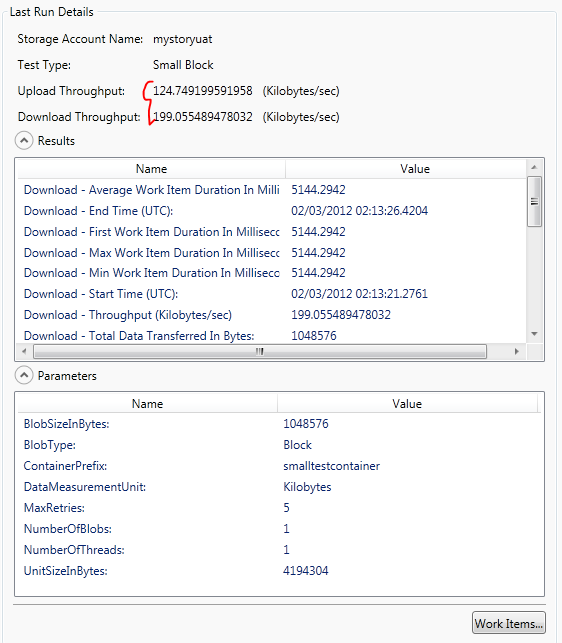
image

So above we will test from Sydney Australia to our UAT environment in America.

Lets click “run”

It will start executing the test, this is now a good time to plan a date, make a cup of coffee or write some JScript for your open source projects.

Results:

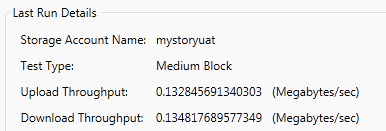
Sydney to North America

image

image


Sydney to South East Asia (Singapore)

image

image

Conclusion

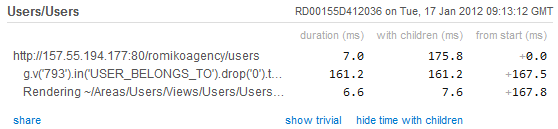
For us, South East Asia was far more better (Web site, download is more important than upload), and the proof was in the pudding when we measures web site response times with MVC MiniProfiler.

However, this is not the ultimate conclusion, I bet these response times will vary depending on time of day, perhaps when Asia is awake and US is asleep, it could be the other way round, so test it at different times of day and pick the affinity or region that is best for you!

Heroku Neo4j, App Harbor MVC4, Neo4jClient & Ruby Proxy

Overview

We going to outlay the process to deploy a 4 layers architecture using the above technologies.

architecture

Prerequisites

Sinatra and Rest-Client

Sinatra and the Rest-Client libraries are used in the Ruby Gem to proxy all Http requests to Neo4j.

Install Process

Install the Heroku client, run this from the heroku\Ruby\bin folder e.g. D:\Program Files (x86)\Heroku\ruby\bin

gem install heroku

We then need to use the Cedar stack (http://devcenter.heroku.com/articles/cedar) which supports ruby in Heroku,  so run:

heroku create –stack cedar

(Ensure git.exe is in your environment variables)

image

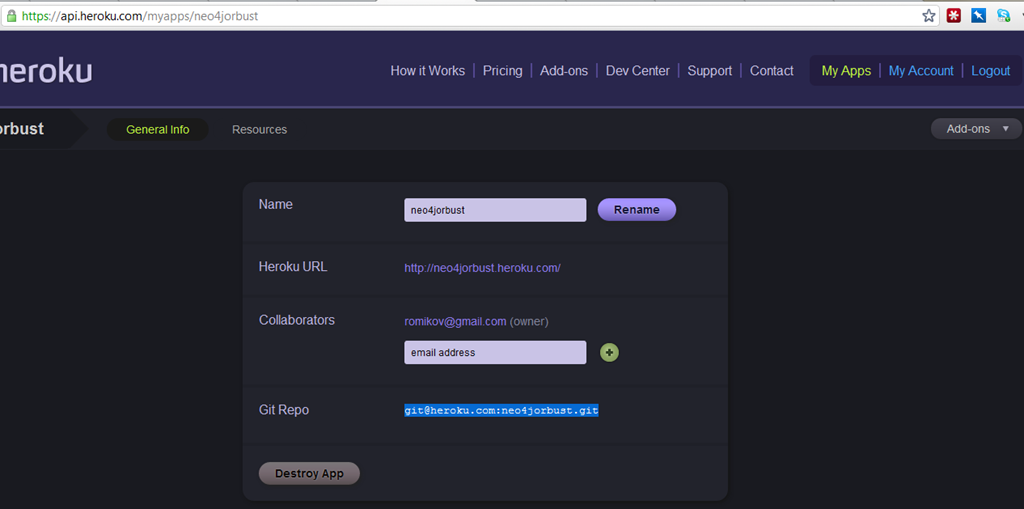
Once this is completed we then deploy our code to our Heroku git repository. You can see your git heroku repository in the app details for the app you created in Heroku:

image

We will use a public key that we created when first setting up Heroku, check blog post

https://romikoderbynew.com/2012/01/25/getting-started-with-heroku-toolbelt-on-windows-2/

if you changed your public key, then add it to Heroku

heroku keys:add

Ok, now we push the Gem files to our Heroku git repository. Your repsotory will be different to mine!

git push git@heroku.com:neo4jorbust.git master

image

Lets check the state of the application

E:\Projects\RubyRestProxy>heroku ps –app neo4jorbust
Process State Command
——- ———– ————————————
web.1 idle for 9h thin -p $PORT -e $RACK_ENV -R $HER..

Test HttpClient –> Ruby –> Neo4j Communication

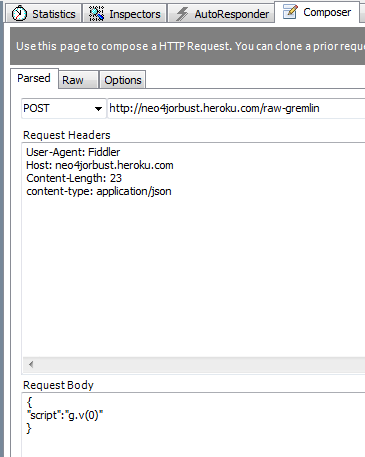
Nice, now we got this GEM file, which is our Ruby http proxy code for gremlin queries. Lets test this baby out with fiddler and run  gremlin query to the web app, which will then call neo4j!

Lets browse the Ruby Application on the Heroku server, so we can find out what URL we need to use to send Gremlin queries to Neo4j.

image

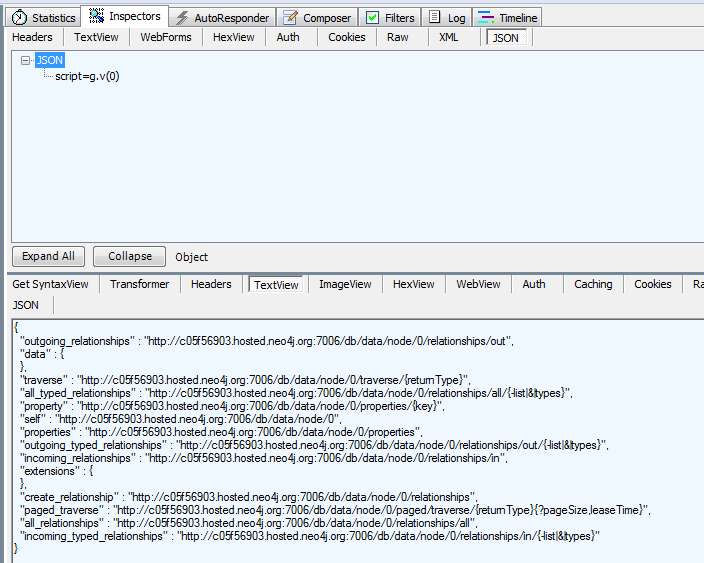
Beautiful, all we need to do now is send an HTTP POST to the added, you can use curl, but here is fiddler.

image

And the result, music to our eyes

image

ASP.NET MVC 4 APP with Neo4jClient

This application is hosted at

http://frictionfree.org

Source Code:

https://bitbucket.org/romiko/frictionfree/src

Now we going to fire up a .Net application that will use the Neo4jClient Rest Api to communicate with neo4j in Heroku. You can find out more about Neo4jClient here http://hg.readify.net/neo4jclient/wiki/Home

Clone the git repository to get the source code for our sample Neo4jClient .Net application. This is a MVC4 application and runs on the .Net Framework 4 runtime, so please ensure you have this installed on your windows machine.

About frictionfree.org

The application is used to find other people with similar interests to you and the opportunity to get their details and contact them to perhaps share your love of flying, surfing or whatever it is you like to do!

Bitbucket and AppHarbor integration

If you have your own ASP.NET application, you can store it in bitbucket and then configure bitbucket to auto deploy to AppHarbor when pushing back the repostory.

In the admin settings for your repository just add your appharbor token.

image

Neo4jClient gremlin Query syntax

Check the source code of the MVC application in the Logic library to see how to run queries to Neo4j. Here is sample code to get administrators of the system

private void CreateAdminAccountIfNoneExist() { var anyAdmins = graphClient .RootNode .In(Administers.TypeKey) .Any(); if (!anyAdmins) { provisionNewUserService.CreateAdmin(); } } 

Getting Started with Heroku ToolBelt/Neo4j on Windows

Hi Guys,

To get started with Heroku, you need a public key. If you do not have one in the

C:\Users\<YourUsername>\.ssh folder, then you get this error

D:/Program Files (x86)/Heroku/lib/heroku/auth.rb:195:in `read’: No such file or
directory – C:/Users/Romiko/.ssh/id_rsa.pub (Errno::ENOENT)
from D:/Program Files (x86)/Heroku/lib/heroku/auth.rb:195:in `associate_key’

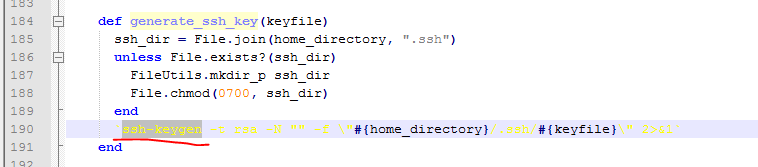
looking at the source code, line 195 is ssh key generation. So what we need to do is use a utility like GitBash to do this for us:

image

Instructions

TO get up and running with the Heroku Toolbelt on windows ensure you read:

http://devcenter.heroku.com/articles/quickstart

Once you have read that and installed Heroku toolbelt

http://assets.heroku.com/heroku-toolbelt/heroku-toolbelt.exe

then install Git (Or use the Git bash if already installed)

http://msysgit.googlecode.com/files/Git-1.7.8-preview20111206.exe

Now, what you do is follow all the instructions here, you might as well ensure you have a GitHub account, its nice to put your code in a repository if developing:

http://help.github.com/win-set-up-git/

You should then have these files (you might not have known hosts), if you did not connect into git

image

The Heroku batch file will look for the id_rsa.pub file and use it to connect to the cloud servers.

Once this is done, you can then go back to the heroku.cmd execution and login

D:\Program Files (x86)\Heroku>heroku login
Enter your Heroku credentials.
Email: ROMxxx@xxx.COM
Password:
Found existing public key: C:/Users/Romiko/.ssh/id_rsa.pub
Uploading ssh public key C:/Users/Romiko/.ssh/id_rsa.pub

That is it, so hope this gets you started on Heroku Smile

Neo4j

Once you ran the above command, then create an application

Create Heroku Applicaton in the Cloud

D:\Program Files (x86)\Heroku>heroku apps:create Neo4jOrBust
Creating neo4jorbust… done, stack is bamboo-mri-1.9.2
http://neo4jorbust.heroku.com/ | git@heroku.com:neo4jorbust.git

Notice the appname is lowercase always!

Install Neo4j Addon

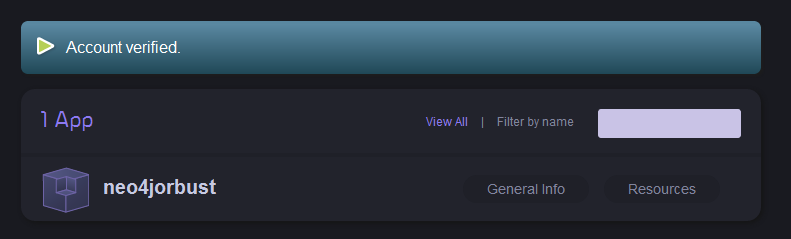
For this to work, you must verify the account and you will need a credit card, it will NOT be billed. Don’t sue me if it does!

Then for Neo4j, just install the addon like so

D:\Program Files (x86)\Heroku>heroku addons:add neo4j –app neo4jorbust
—–> Adding neo4j to neo4jorbust… failed
!    Please verify your account to install this add-on
!    For more information, see http://devcenter.heroku.com/categories/billing
!    Confirm now at https://heroku.com/confirm

Go verify your account and then come back and run the command again

https://api.heroku.com/myapps

image

D:\Program Files (x86)\Heroku>heroku addons:add neo4j –app neo4jorbust
—–> Adding neo4j to neo4jorbust… done, (free)

image

Thats it!

You can then go check your addons on the web site at heroku under resources. Click databases and scroll to bottom.

image

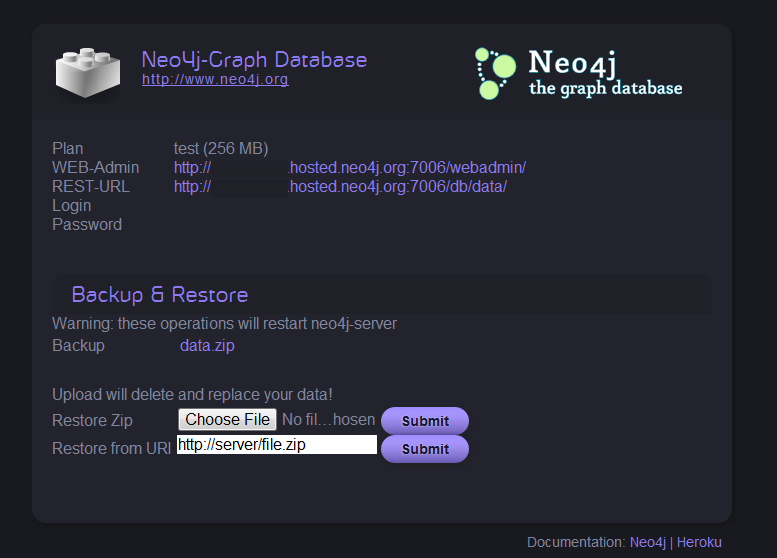
Notice neo4jTest and it is free Smile Lets enable it

image

Notice, the urls for the webadmin site and rest url, you all set to work with Neo4j now Smile

Thats it, have fun!

Getting Started with Heroku ToolBelt on Windows

Hi Guys,

To get started with Heroku, you need a public key. If you do not have one in the

C:\Users\<YourUsername>\.ssh folder, then you get this error

D:/Program Files (x86)/Heroku/lib/heroku/auth.rb:195:in `read’: No such file or
directory – C:/Users/Romiko/.ssh/id_rsa.pub (Errno::ENOENT)
        from D:/Program Files (x86)/Heroku/lib/heroku/auth.rb:195:in `associate_key’

looking at the source code, line 195 is ssh key generation. So what we need to do is use a utility like GitBash to do this for us:

image

Instructions

TO get up and running with the Heroku Toolbelt on windows ensure you read:

http://devcenter.heroku.com/articles/quickstart

Once you have read that and installed Heroku toolbelt

http://assets.heroku.com/heroku-toolbelt/heroku-toolbelt.exe

then install Git (Or use the Git bash if already installed)

http://msysgit.googlecode.com/files/Git-1.7.8-preview20111206.exe

Now, what you do is follow all the instructions here, you might as well ensure you have a GitHub account, its nice to put your code in a repository if developing:

http://help.github.com/win-set-up-git/

You should then have these files (you might not have known hosts), if you did not connect into git

image

The Heroku batch file will look for the id_rsa.pub file and use it to connect to the cloud servers.

Once this is done, you can then go back to the heroku.cmd execution and login

D:\Program Files (x86)\Heroku>heroku login
Enter your Heroku credentials.
Email: ROMIKOV@GMAIL.COM
Password:
Found existing public key: C:/Users/Romiko/.ssh/id_rsa.pub
Uploading ssh public key C:/Users/Romiko/.ssh/id_rsa.pub

That is it, so hope this gets you started on Heroku Smile

Papua New Guinea, Boiling Point–Part 2

Imagine a day out on a banana boat, landing on a local island and picking chicken eggs for the day, and boiling them in a ocean volcano, followed by pine apple picking and to finally finish the day off with some ocean fishing.

It was a really fun experience hanging out with some local people on Mushu Island, and spending an awesome day out “shopping” for food.

We found some wonderful and friendly people to host us on Mushu Isalnd, which is just off the coast from Wewak. I have decided to post  bits and bobs of our experience in PNG without having a chronological order, it just makes it more fun!

image

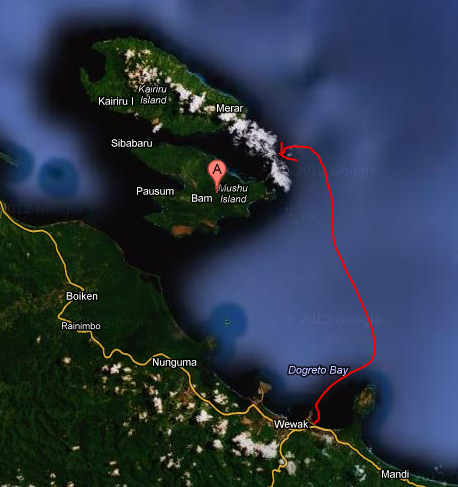
Above is a map of how we get their, basically phone George and he will pick you up on a Banana boat. Let me warn you Wewak has nasty pick pockets, not violent, but they opportunists, so keep your stuff in FRONT POCKETS. We had no issues at all.

IMG_7287

A roaming banana boat

IMG_7273

We found some pine apples with our local friend Jorge, who lives on Mushu Isalnd.

IMG_7268IMG_7266

Above we boil our eggs in the ocean volcano in Victoria Bay, by Kairiru Island.

IMG_7299

Caught some mackerel for dinner, I used a traditional PNG fish wooden stick, if you may call it that Smile

 IMG_7256IMG_7257IMG_7258IMG_7259IMG_7260

We were well looked after with food on Mushu Island as well. We ate Bread Fruit, Fish, Chicken (Their is a chicken farm on Kairiru), Sagore and lots of other nice foods.

IMG_7286


Accommodation

Again, lets keep it local, you can live with George, and he has an amazing Guest House on the island, well it is his home and he runs the guest house faultlessly.

You can contact George on:

+675 729 78746

Surfing

There is great surf to be had here, best time to come is mid January to mid March. The kids here are passionate about surfing, the problem is…..and this gets to me…they do not have enough surfboards.

Has anyone thought of using the local chinese traders to get help get second surf boards over on containers? I think this can be a solution. We working with George to perhaps send him to Sydney to learn how the craft of making surfboards, so it is a possibility, either way, we should be aware that kids in PNG LOVE surfing, but don’t have the equipment, and I seen these guys surf on little wooden boards and getting barrelled off their heads!

Chronicles of Papua New Guinea–Part 1

17th December 2012

Port Moresby – Gordon

After a decent flight from Sydney to Port Moresby via Brisbane we were left with no transport from the Airport to our hotel (Flying Fox Inn – 311 2551), which is near Gordons Market in PM. The accommodation was basic, and only locals from different parts of PNG were staying there. We took a stroll in Gordon’s Market and tasted Betel Nut for the first time, a bit of a crowd gathered around us, whilst Jamal and I started chewing and spitting this nut for the first time. I got a bit of a high to be honest and started feeling dizzy and very very talkative!

So, as I was saying, back at the airport, we had no transport arranged, so if you going, I highly recommend to arrange transport beforehand, we eventually got some of the friendly guys from the Flying Fox Inn to pick us up.

That evening we went to the chinese restaurant opposite the Flying Fox Inn, food was pretty good and the waiter was super friendly, who offered to take us on the Kokoda trail if we ever came back to PNG.

18th December 2012

Vanimo Airport

3AM wake up call and we were off to Vanimo!

We landed in Vanimo really early in the morning, and had again not arrange any plans, so there we were at Vanimo airport loitering about with the locals, when a white guy (Peter) approached us and recommended we stay with them at their Lodge. Now our plans was not to stay at any surf lodge, mainly because it is very expensive ($200-$400 / Day), however, since we were a bit tired from all the flights, we thought it might be a good idea for one night and then we will try find accommodation in one of the local villages, of course near as possible to the surf!

Vanimo Surf Lodge

IMG_3125

We got to the surf lodge, which was a 5 minute drive from the airport, and it was pretty nice, but K300 for one night is way too much money, and frankly a rip off, the food was mainly noodles and local fruits and we could not justify the amount of money we had to pay each to stay there for ONE NIGHT. They also charge a Reef Fee which is 30K per day, we found out later that the locals that we lived with who own the reed never get the money, so it seems it goes somewhere else, to some other association perhaps, we don’t know, but we feel the locals get no benefit from these reef fees.

We did some surfing and the waves were ok, around 3ft, We surfed at a place in Lido Village called “Lefties”.

So, in Lido, there is two main surf breaks “Righties” and “Lefties”, it is great, since usually if the right is not working, then the left will be.

19th December 2012

Lido Village

IMG_3126

This village, which is located next door to the Vanimo Surf Lodge is awesome, the people are friendly and to be honest, I never met such nice, friendly and hospitable people like this for a long time. We might a local guy by the name of Solomon who gave up his house for us to stay in, and all we had to pay was 75K a day, that is around $32 a day, much better than K300 at the surf lodge. So we were ecstatic to find such a cool place to live.

Solomon was awesome, he even made us a toilet by breaking down his patio to use the wood for the toilets, I would never find this sort of helpfulness anywhere else I have been before.

I managed to get my Hammock setup between some trees as well, and slept outside as it was much cooler outside than living inside the hut. The local kids loved the hammock to, and they followed me around and tried to help whilst I got it pitched up.

We were so taken back by the cool people in the village, and contemplated on why back home we don’t even speak to our neighbours, where, here, in one evening, we had gathered neighbours from all parts of the village and spent a wonderful evening together.

Solomon’s Guest House

IMG_3141IMG_3143

Phone: +675 715 101 27

So, this is the official day that Solomon’s guest house was born, and we were honoured to be the first guests of such a wonderful host family! If you planning on going to Vanimo in Papua New Guinea, then I highly recommend to live with them, expect to pay them between 75-95 Kina per day. Which is $30-$45 /Day. Just get a PMV (Public Motor Vehicle) from Vanimo town, outside the bank to Lido Village ask for Solomon or Adam, in fact Adam runs a PMV transport mini bus business from Vanimo to Lido, and is Solomons uncle, so you might be lucky and meet him on the way to Lido, his PMV is blue. You can phone him on 715 101 27.

IMG_3758IMG_3759IMG_3776

We had a very early surf today, and then went off to Vanimo Town, it is very small, and the people in town are amazingly friendly, but be warned, the town is very dirty and Bet Nut spit is everywhere!

Reef Fees – GoodBye

Solomon’s uncle owns the reef “lefties” and “righties” so we did not have to pay any reef fees per day anymore, which we were happy about, so here we are living cheap and surfing uncrowded waves, what more can you ask for?


Food

_MG_3539

The food was absolutely amazing, they treated us like kings and cooked us 3 meals a day. We ate:

Sagore, PineApples, Paw Paw, Bread Fruit, Tare, Sweat Potatoes, Fish and lots of other local grown fruits and vegetables.


IMG_3613_MG_3795

Above is a picture of Sagore and a piece of chicken as well as sipping on coconut water.

Summary

The first few days, proved to show that PNG has some awesome people, food, culture and uncrowded surf, but you need to LIVE WITH THE LOCALS to get the benefit.

This ends part one of my blog post, in future posts we will look at some videos of Lido and talk about all the adventures we went on there Smile Perhaps post a video or two on as well. Until then…..

Slow HttpWebRequest.GetResponse()

In the development of the Neo4jClient, we noticed that all DB queries to Neo4j were taking roughly 150ms longer than on my local development machine. after using Fiddler and ApacheBench, it was clear the performance issue was inside the .Net Code.

What we use in Neo4jClient (http://hg.readify.net/neo4jclient/wiki/Home) is the RestSharp open source library. Fiddler proved to be very unreliable to produce consistent results due to it caching and reuse of connections, even when disabling them, also, when requests went via fiddler, the response time was quick, so queries taking over 150ms without fiddler were taking 10-15ms within fiddler.

Profiling

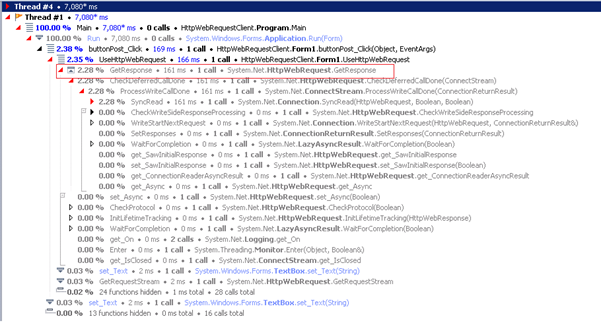
The solution was to build a custom .Net tool to send Http POSTS, and using the JetBrains DotTrace utility, we were able to see an issue where, if we FIRST bypassed RestSharp and just used HttpWebRequest, the response time was quick, as soon as we used RestSharp it went slow, and even after using it, going back to HttpWebeRequest was then slow.

Somewhere, a Static Class was causing an issue that RestSharp uses.

image

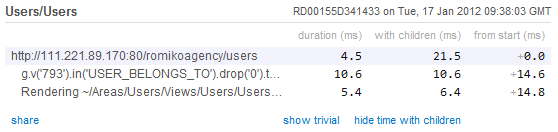
Notice the 150ms overhead in the above screenshot

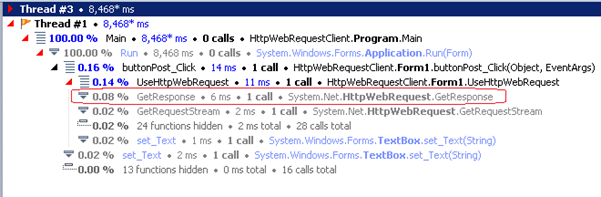
Here is a profile where restsharp is bypassed

image

In the above profile, the http response time is fast.

ServicePointManager

RestSharp sets the ServicePointManager, which is a static class, and what we found was that this algorithm was causing 150ms delays in our Neo4j DB calls.

ServicePointManager.UseNagleAlgorithm

I noticed in wire shark the difference between a fast stream and a slow one, it affected the number of packets which pointed to either

ServicePointManager.Expect100Continue

or

ServicePointManager.UseNagleAlgorithm

we found changing Expect100Continue not to cause any changes, however setting UseNagleAlgorithm to false, solved the issue, and now all DB calls to Neo4j are 150ms quicker!


(HttpWebRequest) – SLOW – After a RestSharp call (Poisoned system)

FAST TCP STREAM (HTTPWebRequest)

This is due to UseNagleAlgorithm being off

POST /db/data/ext/GremlinPlugin/graphdb/execute_script HTTP/1.1

Content-Type: application/json

Host: 10.25.234.67:20001

Content-Length: 65

{"script":"g.v(793).in(‘USER_BELONGS_TO’).drop(0).take(100)._()"}HTTP/1.1 200 OK

Content-Length: 5316

Content-Encoding: UTF-8

Content-Type: application/json

Access-Control-Allow-Origin: *

Server: Jetty(6.1.25)

POST /db/data/ext/GremlinPlugin/graphdb/execute_script HTTP/1.1

Content-Type: application/json

Host: 10.25.234.67:20001

Content-Length: 65

Expect: 100-continue

HTTP/1.1 100 Continue

{"script":"g.v(793).in(‘USER_BELONGS_TO’).drop(0).take(100)._()"}HTTP/1.1 200 OK

Content-Length: 5316

Content-Encoding: UTF-8

Content-Type: application/json

Access-Control-Allow-Origin: *

Server: Jetty(6.1.25)

Before Optimisation in Azure

image

After Optimisation in Azure

image

Conclusion

If you doing allot of small HTTP POSTS, it might be a good idea to turn off the Nagle Algorithm.

http://www.winsocketdotnetworkprogramming.com/xmlwebservicesaspnetworkprogramming11e.html

When using the Neo4j REST API(http://docs.neo4j.org/chunked/snapshot/rest-api.html), be aware of the response times, and if you notice response times greater than 150ms for all DB calls, then perhaps you have the same issue with the ServicePointManager confguration.

Nagle Algorithm

The Nagle algorithm increases network efficiency by decreasing the number of packets sent across the network. It accomplishes this by instituting a delay on the client of up to 200 milliseconds when small amounts of data are written to the network. The delay is a wait period for additional data that might be written. New data is added to the same packet. The practice of compiling data is not always ideal for Web services, however, because a POST request often contains a small amount of data in the HTTP headers without the body (because of 100 Continue, as described earlier). The Nagle algorithm can be turned off for Web services calls via the System.Net.ServicePointManager.UseNagleAlgorithm property. Yet disabling the Nagle algorithm might not provide the best performance either, you’ll need to experiment with disabling the algorithm to fine- tune your application. Whether you should disable the algorithm in this case depends on several factors, including the size of the Web services call, the latency of the network, and whether HTTP authentication is involved.

Neo4j application performance profiling management with New Relic

Hi,

We currently need a way to have performance profiling management solution in place for Neo4j running in Windows Azure cloud. The benefits of course is on going data analysis and performance statistics, not to mention assisting in debugging issues with performance. The best part of it all, is the agent that collects the data just runs as part of the JVM and the data is automatically uploaded to the website where you can view it online.

New Relic Account

The first thing you will need to do is create a new relic account at:

http://newrelic.com/

Once, this is done, you can then download the java agent which will contain two files:

newrelic.jar

newrelic.yml

The yml file contains the license key and the application name to display on the new relic performance dashboard website. When you use New Relic it has a trial option, so it is easy to test out.

Infrastructure

What we do is store these zip files in blob storage and when the worker role is bootstrapping, it will then download the zip file, and then automatically edit the neo4j config files before starting up neo4j.

image

Neo4j configuration

It is extremely simple to configure the relic agent to run and profile neo4j, all you need to do is edit the neo4j-wrapper.conf file and add this line of code.

wrapper.java.additional.2=-javaagent:..\newrelic.jar

We use a relative path, as we store the newrelic jar relative to the neo4j binaries, so all you need to do is store the newrelic.jar file in a location where neo4j can access it from when starting up.

Dashboard

Once this has been deployed to the cloud, we then have performance statistic automatically made available to use via the neo4j JVM on the New Relic web site!

image

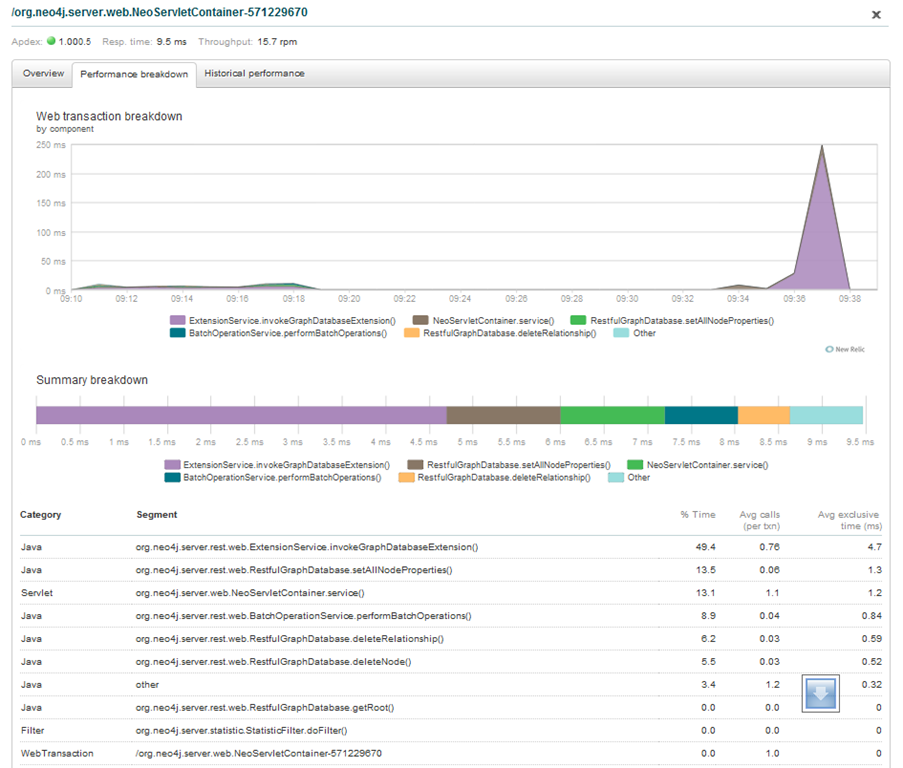
From here, you can actually click a segment on the graph and drill into the method level calls that occurred in the JVM.

image

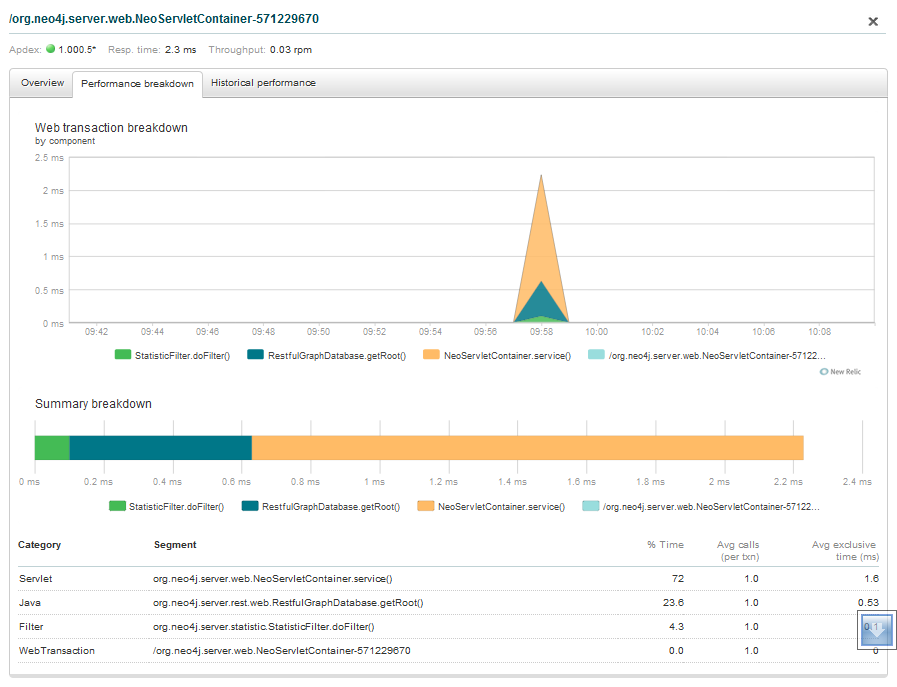
Notice that you can get details about the timing of method invocation timings.

image

Comparing environments

What is really cool, is comparing response times between environments, so you can see how fast UAT/Prod/Dev are compared to one another

image

Conclusion

It is a relatively easy task to get application performance statistics for neo4j running in or out of the cloud and New Relic seems to be a really useful tool with minimal overhead to get up and running, so I would highly recommend using the combination together. This coupled with VisualJM should provide enough performance data and profiling when collecting performance data and compiling reports.