BizTalk SQL Receive Location – Deadlocks, Dirty Reads and Isolation Levels

Hi Folks,

Imagine you have a SQL Receive location, that is pulling data from SQL on a regular interval. Also let’s say the receive location is pulling data every 5 seconds or so. There is a good chance, when BizTalk decides to throttle the system resources that multiple receive location queries (same query), will be running at the same time.

In fact I use the SQL receive location and my custom SQL send port (see blog on this, allows you to send XML data directly to SQL from BizTalk, and it is free to download, since the aggregator pattern is flawed.). So it is imperative that I can ensure deadlocks do not occur and dirty reads done dirt cheap.

One of the first things you can do when pulling data from SQL is change the isolation level, as the BizTalk SQL adapter has it’s own isolation level (Serializable), which loves to cause deadlocks. Here is a nice blog about it:

http://geekswithblogs.net/gwiele/archive/2004/11/25/15974.aspx

So here is our sample BizTalk SQL receive location:

image

Here is how I configure the SQL code to pull data without causing deadlocks.


CREATE  PROCEDURE [dbo].[GetWorkflowRecord]
@BatchSize int,
@Stage varchar(3) = null
AS
BEGIN
    — TO OVERRIDE THE BIZTALK ADPATER ISOLATION LEVEL
    SET TRANSACTION ISOLATION LEVEL READ COMMITTED
    DECLARE @ids TABLE (id BIGINT PRIMARY KEY CLUSTERED, wfs_Code_Previous VARCHAR(3))

    UPDATE    dbo.wfr_WorkflowRecord
    SET        wfr_wfs_code = ‘PRO’
    ,        wfr_Username = system_user
    OUTPUT    inserted.wfr_id
    ,        deleted.wfr_wfs_Code INTO @ids
    FROM dbo.wfr_WorkflowRecord WITH (READPAST) –do not update records that are read by other processes
        JOIN
        (
            SELECT TOP(@BatchSize) wfr_id AS tmp_wfr_id
            FROM    fee_Feed
            INNER JOIN    dbo.wfr_WorkflowRecord ON wfr_fee_id = fee_id
            LEFT OUTER JOIN    dbo.imp_ImportBatch ON imp_id = wfr_imp_id
            WHERE    wfr_wfs_code = (‘SUC’)
            AND        wfr_Batch is null
            AND        wfr_stg_code = @Stage
            AND        ISNULL(imp_Finished, 1) = 1    –Only pick up records for a finished import batch (or no batch)
            AND        fee_isActive = 1 –Only pick up records that are activated
            ORDER BY fee_Priority
        ) tmp ON wfr_id = tmp_wfr_id
    WHERE    wfr_wfs_code = (‘SUC’)
            AND        wfr_Batch is null
            AND        wfr_stg_code = @Stage

    ;WITH XMLNAMESPACES (DEFAULT ‘http://Workflow.Common.Schemas’)
    SELECT    wfr_wfs_Code    AS "WorkflowData/Status"
    ,        wfs_Code_Previous AS "WorkflowData/PreviousStatus"
    ,        wfr_stg_Code    AS "WorkflowData/Stage"
    ,        rou_Name        AS "WorkflowData/Route"
    ,        ”                AS "WorkflowData/Error"
    ,        wrd_XMLData        AS "MMITData"
    FROM    dbo.wfr_WorkflowRecord (NOLOCK) wfr
    INNER JOIN dbo.wrd_WorkflowRecordData (NOLOCK) ON wrd_id = wfr_wrd_id
    INNER JOIN dbo.fee_Feed (NOLOCK) ON fee_id = wfr_fee_id
    INNER JOIN dbo.cfs_ConfigurationSet (NOLOCK) ON cfs_code = fee_cfs_code
    INNER JOIN dbo.rou_Route (NOLOCK) ON rou_code = cfs_rou_code
    INNER JOIN @ids ON id = wfr_id
    FOR XML PATH(‘WorkflowRecord’)

    UPDATE    dbo.wfr_WorkflowRecord
    SET        wfr_stg_code = ‘BIZ’
    FROM    @Ids
    WHERE    wfr_id = id
END

First a more relaxed isolation level should be cool to pull data. So we choose Read Committed.

READ COMMITTED: Specifies that statements cannot read data that has been modified but not committed by other transactions. This prevents dirty reads. Data can be changed by other transactions between individual statements within the current transaction, resulting in nonrepeatable reads or phantom data. This option is the SQL Server default.
Ok, the next thing I do is use a READPAST hint when updating data, this ensures I do not acquire locks by other update statements. The advantage of this table hint is that, like NOLOCK, blocking does not occur when issuing queries. In addition, dirty reads are not present in READPAST because the hint will not return locked records. The downside of the statement is that, because records are not returned that are locked, it is very difficult to determine if your result set, or modification statement, includes all of the necessary rows. You may need to include some logic in your application to ensure that all of the necessary rows are eventually included.
 
Since we using BizTalk receive location, it will eventually get records that a ReadPast forgot, so no hassle, here.
 
Thirdly if my update has an Inner and an Outer query, I ensure the filter is placed in both, this avoids allot of locking issues when concurrent updates are running on the same data table. See the bold wfr_wfs_code filters on ‘SUC’ in the outer and inner query for the update.
 
Lastly, ANY selects I am doing, I use a WITH (NOLOCK) to ensure my so innocent select statements do not acquire Shared Locks on SQL resources.

I chose the above query, as it has a bit of everything in it.  I hope you find this as useful as I did. I have a good SQL guru sitting next to me at work, so thanks to Christodoulos Koukoulidis for all his SQL Geek tips, without him, I think I would have a dirty read done dirt cheap solution 🙂

Ensure you using TCP and not Shared memory as well for performance!

Cheers

Automating Hosts, Host Instances and Adapter Handlers configuration in BizTalk 2006

Hi Folks,

I am going to be focusing on automating BizTalk Server 2006 configuration for the creation of Adapters, Hosts and Host Instances. The current project I am working on, we use multiple Host Instances and various send/receive adapter for the applications we have installed on BizTalk Server.

Overview

BizTalk has some nice built in features to make our lives easier, the following are the main features we use as BizTalk developers or administrators when deploying a clean solution.

  • Binding Files – Automate binding your logical ports in Orchestrations to physical ports, creating send and receive ports and linking them to Adapter handlers via Host Instances.

  • Policy Files – Business Rule Engine installation of Vocabularies, Rules and Policies.

  • BTSNTSvc.exe.config – A place where you can add custom settings, fine tune and retrieve them programmatically, I prefer Enterprise Single Sign-On database for this, more about that in later blogs.

What about Hosts, Host Instances and Adapters?

Today I will be focusing on automating Host Instances and Adapter Installation and provide sample code that can be used, since it is not on the above list.

Purpose

This blog is to introduce you to the power of combining C# and WMI and creating a custom admin tool for your BizTalk 2006 environment, to fill in the gaps.

Scenario

Before we start let’s focus on how one would actually go about in setting up Host Instances and Adapters. The current tool used for this is Microsoft BizTalk Server 2006 Administrative Console.

  1. Create a Host
  2. Create a Host Instance and link it to the Host
  3. Create a Send/Receive Handler for each adapter that will be using the Host

So, you if you use 3 Adapters (MSMQ, File and Soap), you will have allot of work set out for you, and this can become rather tedious when rebuilding your development or test environment.

So let’s get down and dirty!

Technical Details

I am going to use a very basic example, where we want a different service process to manage Orchestrations, Send Ports and Receive Ports. So in a nutshell you can have a BizTalk Application use different host instances for hosting Send/Receive Ports and Orchestrations, for performance, since you allocate more threads to a single BizTalk application to use

It is common for people to get confused with this sort of grouping, the above is for performance. Another grouping that one can do is by Application, this is more for management and deployment benefits. Microsoft has mentioned that it is efficient to sometimes group common Artifacts in BizTalk at the application level for ease of deployment. So for example your entire Schema’s in one application, all Orchestrations in another and so on.

WMI

bts_WMINameSpace = @"root\MicrosoftBizTalkServer";

bts_HostSettingNameSpace = "MSBTS_HostSetting";

bts_ServerAppTypeNameSpace = "MSBTS_ServerHost";

bts_HostInstanceNameSpace = "MSBTS_HostInstance";

bts_AdapterSettingNameSpace = "MSBTS_AdapterSetting";

bts_ReceiveHandlerNameSpace = "MSBTS_ReceiveHandler";

bts_SendHandlerNameSpace = "MSBTS_SendHandler2";

Class Diagram

Let’s be honest, all you OO geeks out there can probably do some encapsulation and all the other nifty tricks to make this program GREAT! However, I have kept the code pure functional.

Assumptions

I have assumed your BizTalk server is in windows domain called Dev, and that you follow the best practices and use domain groups for the configuration of your Host Instances. The configuration file has the following, which you will need to change to suite your environment.

username="Dev\BizTalkSVC" password="mypassword"

ntgroupname="Dev\BizTalk Application Users"


The code generates a command console application, and the xml configuration file is required to be in the same directory as the executable.

The command to type is BizTalkAdministration.exe and it will then look for the configuration file in the same directory. Simple, no arguments etc.

Configuration File

Below is a copy of the configuration file, you can see that we want to create:

  • Four Hosts
  • 4 Host Instances
  • For each instance a corresponding Send or Receive Handler or both

<?xml version="1.0" encoding="utf-8"?>

<BtsAdminConfiguration>

<Hosts>

<Host hostname="Orchestrations" ntgroupname="Dev\BizTalk Application Users" isdefault="false" hosttracking="false" authtrusted="true" hosttype="1"/>

<Host hostname="RecievePorts" ntgroupname="Dev\BizTalk Application Users" isdefault="false" hosttracking="false" authtrusted="true" hosttype="1"/>

    <Host hostname="SendPorts" ntgroupname="Dev\BizTalk Application Users" isdefault="false" hosttracking="false" authtrusted="true" hosttype="1"/>

    <Host hostname="WorkFlowEngine" ntgroupname="Dev\BizTalk Application Users" isdefault="false" hosttracking="false" authtrusted="true" hosttype="1"/>

</Hosts>

<HostInstances>

<HostInstance servername="." hostname="Orchestrations" username="Dev\BizTalkSVC" password="mypassword" startinstance="true"/>

<HostInstance servername="." hostname="RecievePorts" username="Dev\BizTalkSVC" password="mypassword" startinstance="true"/>

    <HostInstance servername="." hostname="SendPorts" username="Dev\BizTalkSVC" password="mypassword" startinstance="true"/>

    <HostInstance servername="." hostname="WorkFlowEngine" username="Dev\BizTalkSVC" password="mypassword" startinstance="true"/>

</HostInstances>

<Adapters>

<Adapter name="FILE" type="FILE" comment="FILE adapter">

<ReceiveHandler hostname="Orchestrations"/>

<ReceiveHandler hostname="RecievePorts"/>

<ReceiveHandler hostname="WorkFlowEngine"/>

<SendHandler hostname="Orchestrations"/>

<SendHandler hostname="RecievePorts"/>

     <SendHandler hostname="WorkFlowEngine"/>

</Adapter>

<Adapter name="MSMQ" type="MSMQ" comment="MSMQ adapter">

<ReceiveHandler hostname="WorkFlowEngine"/>

<SendHandler hostname="WorkFlowEngine"/>

</Adapter>

<Adapter name="SOAP" type="SOAP" comment="SOAP adapter">

<SendHandler hostname="WorkFlowEngine"/>

<SendHandler hostname="SendPorts"/>

<SendHandler hostname="Orchestrations"/>

</Adapter>

</Adapters>

</BtsAdminConfiguration>


Result

Here is the result of your hard work, if you run the application with the default settings, and of course you remembered to change the account and group settings in the configuration file.

Hosts Created

Host Instances Created

TIP: Notice the Not installed status above, this usually occurs if you provide and incorrect username and password in the configuration file, since it tries to create a windows service for you. To solve it, ensure you get your username and password right first time; else it is time to get out the helmets, elbow pads and knee pads for full contact double clicking and fixing the account credentials.

File Adapters

Soap Adapters

MSMQ Adapters


Download Source Code

The sample code for this can be found here:

Developed using Microsoft Visual Studio 2005 in C#.

http://biztalkconfigloader.codeplex.com/


I hope you found this blog helpful and wish you the best of times with the new tool.

SSO fails after VS2010 Install RC1

Hi Folks,

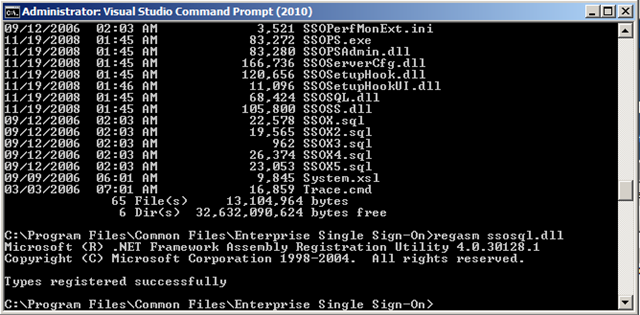
After I installed VS2010 RC1, BizTalk 2009 fails, the reason is the Enterprise Single Sign on service fails.

To fix it go to the Enterprise Single Sign_On folder in VS command prompt and re-register the dll.

Errors in event log:

The description for Event ID 7023 from source Service Control Manager cannot be found. Either the component that raises this event is not installed on your local computer or the installation is corrupted. You can install or repair the component on the local computer.

If the event originated on another computer, the display information had to be saved with the event.

The following information was included with the event:

Enterprise Single Sign-On Service
%%2148734720

The locale specific resource for the desired message is not present

image

Use

Regasm  “C:\Program Files\Common Files\Enterprise Single Sign-On\ssosql.dll”

Cheers!

BizTalk Server and Renaming the machine – Development Templates

Hi Folks,

I would like to clear something up about this, without being too rude.

I am currently watching this video, and it is very unclear about renaming BizTalk server development environments.#

http://channel9.msdn.com/posts/johanlindfors/BizTalk-Server-Development-Best-Practices-12/

I am going to make it clear, you CAN do it and will not have problems if:

  1. Optional (Virtualised on Server 2003/2008)
  2. BizTalk is installed but not configured
  3. SQL Server is installed

This is what you do. You can give a copy of the virtual machine to another purpose, you can either sysprep, or just use the VM clone utilities like Virtual Box has. In fact I develop on Virtual Box, and all I do is take a VM template and IMPORT it using the Virtual Box Import facility, this will take care of SIDS etc.

I really have no clue, why people get into a fuss with it.

Anyways, whatever you do to “clone” the machine, once it is cloned, renamed SQL Server in Query Analyzer with this command:

sp_dropserver <old_name>

GO

sp_addserver <new_name>, local GO

And then Configure BizTalk.

I will admit that Virtual Box has been the most stable development platform for BizTalk from my experience, VMWare has been the worst.

Easy as that.

Ok, so if anyone tells you it is not supported or causes problems, it is not true! It really irritates me when you get someone waving the MS banner and repeating others without trying it out right?

Ok cool, now that we sorted this out. You got DEV templates that can be cloned and up and running within an hour 🙂

Keep it SIMPLE! Why TIGHTLY couple a VM to a HOST? No need for Hyper-V when you can use Virtual Box, this means you can keep them on a portable drive and run it from practically any host box (MAC, LINUX, Windows).

It is amazing, we talk about loose coupling and then you get some wise cracks developing on Hyper-V. Sigh….

Use an SSD for laptop Host and run the VM off a standard second drive or if you have the cash another SSD. Have fun!

Download it here:

http://www.virtualbox.org/wiki/Downloads

If you need any help setting up DEV’s for BizTalk, drop me a mail!