Automate #Azure Blob Snapshot purging/deletes with @Cerebrata

The pricing model for snapshots can get rather complicated, so we need a way to automate the purging of snapshots.
Read how snapshots can accrue additional costs

Lets minimize these costs! We use this script to backup and manage snapshot retention for all our Neo4j Databases hosted in the Azure Cloud.

So a solution I have is that:
We have a retention period in days for all snapshots e.g. 30 days
We have a retention period for the last day of the month backups e.g. 180 days

Rules:
1. The purging will always ensure that there is always at least ONE snapshot, so it will never delete a backup if it is the only backup for a base blob.

2. The purging will delete snapshots greater than the retention period, respecting rule 1

3. The purging will delete snapshots greater than the last day month retention period, respecting rule 1

You can then schedule this script to run after the Backup Script in TeamCity or some other build server scheduler.

param(
	[parameter(Mandatory=$true)] [string]$AzureAccountName,
	[parameter(Mandatory=$true)] [string]$AzureAccountKey,
	[parameter(Mandatory=$true)] [array]$BlobContainers, #Blob Containers to backup
	[parameter(Mandatory=$true)] [int]$BackupRetentionDays, #Days to keep snapshot backups
	[parameter(Mandatory=$true)] [int]$BackupLastDayOfMonthRetentionDays # Days to keep last day of month backups
)


if( $BackupRetentionDays -ge $BackupLastDayOfMonthRetentionDays )
{
	$message = "Argument Exception: BackupRentionDays cannot be greater than or equal to BackupLastDayOfMonthRetentionDays"
	throw $message
}

Add-Type -Path 'C:\Program Files\Windows Azure SDK\v1.6\ref\Microsoft.WindowsAzure.StorageClient.dll'

$cred = New-Object Microsoft.WindowsAzure.StorageCredentialsAccountAndKey($AzureAccountName,$AzureAccountKey)
$client = New-Object Microsoft.WindowsAzure.StorageClient
.CloudBlobClient("https://$AzureAccountName.blob.core.windows.net",$cred)

function PurgeSnapshots ($blobContainer)
{
	$container = $client.GetContainerReference($blobContainer)
	$options = New-Object  Microsoft.WindowsAzure.StorageClient.BlobRequestOptions
	$options.UseFlatBlobListing = $true
	$options.BlobListingDetails = [Microsoft.WindowsAzure.StorageClient.BlobListingDetails]::Snapshots

	$blobs = $container.ListBlobs($options)
	$baseBlobWithMoreThanOneSnapshot = $container.ListBlobs($options)| Group-Object Name | Where-Object {$_.Count -gt 1} | Select Name

	#Filter out blobs with more than one snapshot and only get SnapShots.
	$blobs = $blobs | Where-Object {$baseBlobWithMoreThanOneSnapshot  -match $_.Name -and $_.SnapshotTime -ne $null} | Sort-Object SnapshotTime -Descending

	foreach ($baseBlob in $baseBlobWithMoreThanOneSnapshot )
	{
		 $count = 0
		 foreach ( $blob in $blobs | Where-Object {$_.Name -eq $baseBlob.Name } )
		    {
				$count +=1
				$ageOfSnapshot = [System.DateTime]::UtcNow - $blob.SnapshotTime
				$blobAddress = $blob.Uri.AbsoluteUri + "?snapshot=" + $blob.SnapshotTime.ToString("yyyy-MM-ddTHH:mm:ss.fffffffZ")

				#Fail safe double check to ensure we only deleting a snapshot.
				if($blob.SnapShotTime -ne $null)
				{
					#Never delete the latest snapshot, so we always have at least one backup irrespective of retention period.
					if($ageOfSnapshot.Days -gt $BackupRetentionDays -and $count -eq 1)
					{
						Write-Host "Skipped Purging Latest Snapshot"  $blobAddress
						continue
					}

					if($ageOfSnapshot.Days -gt $BackupRetentionDays -and $count -gt 1 )
					{
					    #Do not backup last day of month backups
						if($blob.SnapshotTime.Month -eq $blob.SnapshotTime.AddDays(1).Month)
						{
							Write-Host "Purging Snapshot "  $blobAddress
							$blob.Delete()
							continue
						}
						#Purge last day of month backups based on monthly retention.
						elseif($blob.SnapshotTime.Month -ne $blob.SnapshotTime.AddDays(1).Month)
						{
							if($ageOfSnapshot.Days -gt $BackupLastDayOfMonthRetentionDays)
							{
							Write-Host "Purging Last Day of Month Snapshot "  $blobAddress
							$blob.Delete()
							continue
							}
						}
						else
						{
							Write-Host "Skipped Purging Last Day Of Month Snapshot"  $blobAddress
							continue
						}
					}
					
					if($count % 5 -eq 0)
					{
						Write-Host "Processing..."
					}
				}
				else
				{
					Write-Host "Skipped Purging "  $blobAddress
				}
		    }
	}
}

foreach ($container in $BlobContainers)
{
	Write-Host "Purging snapshots in " $container
	PurgeSnapshots $container
}

Automate #Azure Blob Snapshot backups with @Cerebrata

Hi,

Leveraging the cerebrata cmdlets for Azure, we can easily backup our blob containers via snapshot, this will prove useful for Page Blobs that are Random Access i.e. VHD’s on Cloud Drive

Here is how Purging Snapshots works

#requires -version 2.0
param (
	[parameter(Mandatory=$true)] [string]$AzureAccountName,
	[parameter(Mandatory=$true)] [string]$AzureAccountKey,
	[parameter(Mandatory=$true)] [array]$BlobContainers
)

$ErrorActionPreference = "Stop"

if ((Get-PSSnapin -Registered -Name AzureManagementCmdletsSnapIn -ErrorAction SilentlyContinue) -eq $null)
{
	throw "AzureManagementCmdletsSnapIn missing. Install them from Https://www.cerebrata.com/Products/AzureManagementCmdlets/Download.aspx"
}

Add-PSSnapin AzureManagementCmdletsSnapIn -ErrorAction SilentlyContinue

function SnapShotBlobContainer 
{
	param ( $containers, $blobContainerName )
	Write-Host "Starting snapshot $blobContainerName"

	$container = $containers | Where-Object { $_.BlobContainerName -eq $blobContainerName }

	if ($container -eq $null)
	{
		Write-Host  "Container $blobContainerName doesn't exist, skipping snapshot"
	}
	else
	{
        Write-Host  "Found blob container $blobContainerName"
Checkpoint-BlobContainer -Name $container.BlobContainerName -SaveSnapshotInformation -AccountName $AzureAccountName -AccountKey $AzureAccountKey
	Write-Host  "Snapshot complete for $blobContainerName"
	}
}

$containers = Get-BlobContainer -AccountName $AzureAccountName -AccountKey $AzureAccountKey
foreach($container in $BlobContainers)
{
	SnapShotBlobContainer $containers $container
}

Then just call the script with the params. remember an array of items is parsed in like this:

-BlobContainers:@(‘container1’, ‘contaner2’) -AzureAccountName romikoTown -AzureAccountKey blahblahblahblahblehblooblowblab==

Neo4jClient Cypher ResultSet Support

Sometimes when doing Cypher queries the result is only one column and not multiple columns, therefore it makes sense to have a method in the fluent API to let this be known, so we do not have to map the column to an object type.

So fluent support to deserialize common result sets where cypher returns a result with only 1 column with the help of Tatham Oddie is completed.

So in the Neo4jClient you can do this, when the result from Cypher is one column via REST:

var result = agencySource
                        .StartCypher("a1")
                        .AddStartPoint("a2", agency.Reference)
                        .Match("p = allShortestPaths( a1-[*..20]-a2 )")
                        .Return<PathsResult>("p")
                        .ResultSet;

So, if you need cypher results with only one column then use .ResultSet instead of .Results, thus no need for expression tree column matches to assist the deserializer with multiple column names.

Here is a sample rest response with 1 column result that is suited perfectly for ResultSet.

{
  "data" : [ [ {
    "start" : "http://localhost:20001/db/data/node/215",
    "nodes" : [ "http://localhost:20001/db/data/node/215", "http://localhost:20001/db/data/node/0", "http://localhost:20001/db/data/node/219" ],
    "length" : 2,
    "relationships" : [ "http://localhost:20001/db/data/relationship/247", "http://localhost:20001/db/data/relationship/257" ],
    "end" : "http://localhost:20001/db/data/node/219"
  } ], [ {
    "start" : "http://localhost:20001/db/data/node/215",
    "nodes" : [ "http://localhost:20001/db/data/node/215", "http://localhost:20001/db/data/node/1", "http://localhost:20001/db/data/node/219" ],
    "length" : 2,
    "relationships" : [ "http://localhost:20001/db/data/relationship/248", "http://localhost:20001/db/data/relationship/258" ],
    "end" : "http://localhost:20001/db/data/node/219"
  } ] ],
  "columns" : [ "p" ]
}

If you wondering what the hell is agencySource, it is just node references, that I got using gremlin, which can spin off cypher queries, cool is it not?

var agencies = graphClient
                .RootNode
                .Out<Agency>(Hosts.TypeKey)
                .ToList();

This just enumerate through the list of nodes to run your cypher queries off the node directly! Have these imports declarations:

using Neo4jClient.ApiModels.Cypher;
using Neo4jClient.Gremlin;
using Neo4jClient.Cypher;

Summary

Use .ResultSet for single column result sets and use .Results when dealing with multiple column results.

Working with time zones in ASP.NET MVC

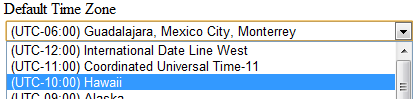
You would like a dropdown list of time zones that a user can select from and perhaps use it for a user profile or multi tenant profile.

image

Our second objective is that we do not want to manage this reference data, it should come from the system.

So what we going do is.

  • DisplayFor template to deal with data types of TimeZoneInfo, so that whenever a model or viewmodel contains a property of type TimeZoneInfo, we can then use the Html.DisplayFor helper method.
  • Custom Model Binder that will take the TimeZone value (TZID) in the drop down list and create an instance of a new TimeZoneInfo object that can be bound to the model property

Remember, the value stored in the drop down list is just the TimeZoneID:

image

See above, the value is the TZID. So we need to somehow convert this to a TimeZoneInfo object, there is the following static method which we can use.

http://msdn.microsoft.com/en-us/library/system.timezoneinfo.findsystemtimezonebyid.aspx

Excellento, lets geek it up.

Display Template

@model TimeZoneInfo

@{
    var timeZoneList = TimeZoneInfo
        .GetSystemTimeZones()
        .Select(t => new SelectListItem
        {
            Text = t.DisplayName,
            Value = t.Id,
            Selected = Model != null && t.Id == Model.Id
        });
}
@Html.DropDownListFor(model => model, timeZoneList)
@Html.ValidationMessageFor(model => model)

Model Binder and Model Binder Provider

 
using System;
using System.Web.Mvc;

namespace MyStory.Web.ModelBinders
{
    public class TimeZoneInfoModelBinder : IModelBinder
    {
        public object BindModel(ControllerContext controllerContext, ModelBindingContext bindingContext)
        {
            var valueProviderResult = bindingContext.ValueProvider.GetValue(bindingContext.ModelName);
            bindingContext.ModelState.SetModelValue(bindingContext.ModelName, valueProviderResult);

            if (valueProviderResult == null) return null;

            var attemptedValue = valueProviderResult.AttemptedValue;

            return ParseTimeZoneInfo(attemptedValue);
        }

        public static TimeZoneInfo ParseTimeZoneInfo(string attemptedValue)
        {
            return TimeZoneInfo.FindSystemTimeZoneById(attemptedValue);
        }

        public class TimeZoneModelBinderProvider : IModelBinderProvider
        {
            public IModelBinder GetBinder(Type modelType)
            {
                return modelType == typeof(TimeZoneInfo)
                    ? DependencyResolver.Current.GetService<TimeZoneInfoModelBinder>()
                    : null;
            }
        }
    }
}

Register Model Binder

Here I am using Autofac to automatically register all concrete types that implement IModelBinder in my assembly or IModelBinderProvider, via dependency injection in the global.asax.cs

  builder
                .RegisterAssemblyTypes(typeof(MvcApplication).Assembly)
                .Where(t => typeof(IModelBinder).IsAssignableFrom(t))
                .AsSelf()
                .InstancePerLifetimeScope();

            builder
                .RegisterAssemblyTypes(typeof(MvcApplication).Assembly)
                .Where(t => typeof(IModelBinderProvider).IsAssignableFrom(t))
                .As<IModelBinderProvider>();

Sample Model

  
    public class MyModel
    {
        [Required]
        [StringLength(100)]
        public string Name { get; set; }

        [Required]
        [Display(Name = "Default Time Zone" )]
        public TimeZoneInfo DefaultTimeZone { get; set; }
    }   

Now whatever view need to use this model just needs to call the DisplayFor helper.

  
@Html.LabelFor(model => model.DefaultTimeZone)  
<div>  @Html.DisplayFor(m => m.DefaultTimeZone, "TimeZones")  
</div> 

Print Friendly Web Pages

Hi,

I am currently using ASP.NET MVC3 and wanted a way to style printing views of web pages, all I really needed was a way to remove:

  • Headers
  • Footers
  • Navigation

The trick is to use the @media declaration in CSS to specify the styling for media type printing. All we do is set the headers, footers and Nav items to display none.

Below is sample CSS that I used to complete this based on http://www.w3.org/TR/CSS2/media.html

@media print{
    header,
    footer,
    nav
    {
        display: none;
    }
}

@media screen{
    header,
    footer,
    nav,
    section {
        display: block;
    }
}

@media screen{
    header
    {
        display: block;
        width: 100%;
        height: 50px;
        line-height: 50px;
        vertical-align: middle;
        background: #ddd;
        position: relative;
        overflow: hidden;
    }
}

Appfabric Topics–Pub/Sub Messaging Service Bus

Overview

We will build a very simple Pub/Sub messaging system using the Azure sdk 1.6. I built this for a demo, so for production ready solutions you will need to alter how you define your message types, e.g. interfaces etc.

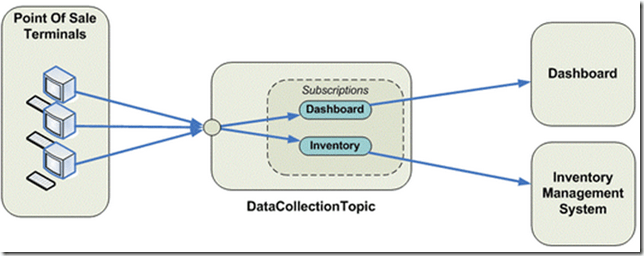
Below is an idea how topics work, basically they similar to queues, except a topic is broken down into subscriptions, so the publisher pushes messages to the Topic (Just like you would with a queue) and the subscriber will subscribe to a subscription.
image

So, in the above, we can see a publisher/subscriber messaging bus.

Filtering

Another nice feature is that you can attach metadata to messages via a IDictionary<string, object> property to include additional metadata for messages, e.g. messageType

This means, you can then create subscription rule filters based on properties that are on the message, all messages are cast to BrokeredMessage before they are sent on the bus. Generics are used on the subscriber to cast the message back to it’s original type.

This sample code that I have provided has filtering on the CUSTOMER subscription, which only takes messages with a MessageType = ‘BigOrder’.

Domain Modelling Rules

I like the idea of the service bus filtering ONLY on MessageType and NEVER on business domain rules e.g. Quantity > 100 etc, why? The Service Bus should never have rules that belong to a business domain, all logic for deciding what “TYPE” of message it is should be done before it is pushed onto the bus, if you stick to this, you will keep your service bus lean and mean.

The Code

I have a sample application you can download from:

https://bitbucket.org/romiko/appfabricpubsubdemo

or clone it with mecurial.

I also included asynchronous operations. Remember that Azure Appfabric Topics only support partial transactions. If you want full transaction support, check out NServiceBus. I highly recommend the use of NServiceBus with AppFabric for full transactional and guaranteed message delivery for .Net publishers and subscribers.

hg clone https://bitbucket.org/romiko/appfabricpubsubdemo

Sample output

Below are screenshots of what you should see when running the code, after updating the AcountDetails.cs file with your appfabric account details.
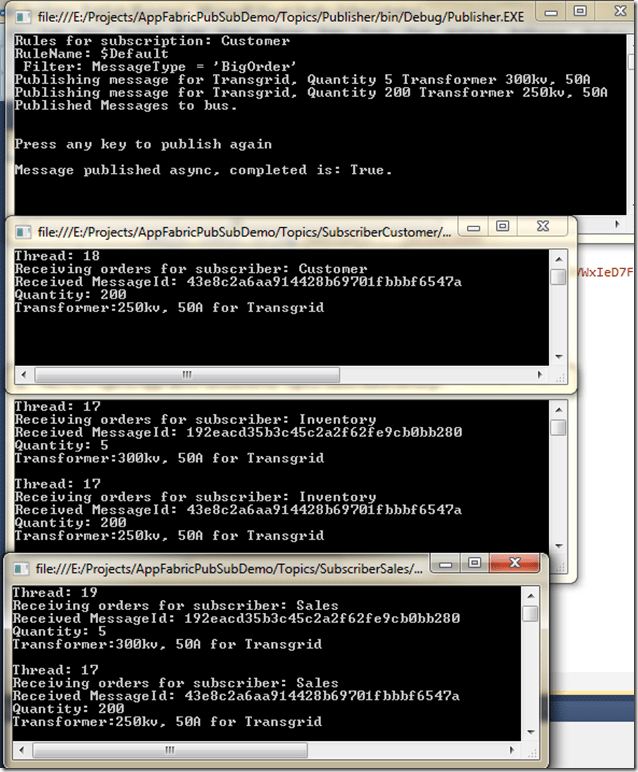
image

Notice:

One publisher – sending a small and big order

2 subscribers that get both messages

1 subscriber only getting the big order using the subscription filtering.

Subscription

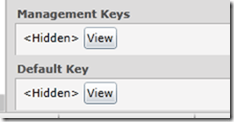
You will need an Azure subscription to try out the demo, once you have the subscription, update the AccountDetails.cs file with your credentials. Namespace, Name and Key, this can all be found in the Azure portal management. Check the default key.

.


image

One the right pain will be the properties for the namespace, including the Management keys which you can use to get started, by using the default name of owner, or you can play with access control and create a user account and key.
image

Service Bus Explorer

I recommend you check out Servicebus Explorer

Here I use the explorer tool to see the message filters on the customer subscription, which only takes big orders.

image

Message Factory

using System;
using Microsoft.ServiceBus;
using Microsoft.ServiceBus.Messaging;

namespace Logic
{
    public class MyMessagingFactory : IDisposable
    {
        private MessagingFactory factory;
        public NamespaceManager NamespaceManager { get; set; }

        public MyMessagingFactory()
        {
            var credentials =
               TokenProvider.CreateSharedSecretTokenProvider
                   (AccountDetails.Name, AccountDetails.Key);

            var serviceBusUri = ServiceBusEnvironment.CreateServiceUri
                ("sb", AccountDetails.Namespace, string.Empty);

            factory  = MessagingFactory.Create
                (serviceBusUri, credentials);

            NamespaceManager = new NamespaceManager(serviceBusUri, credentials);
        }


        public TopicClient GetTopicPublisherClient()
        {
            var topicClient =
                factory.CreateTopicClient("romikostopictransgrid");

            return topicClient;
        }

        public SubscriptionClient GetTopicSubscriptionClient(SubscriptionName subscription)
        {
            var topicSubscriptionClient =
                factory.CreateSubscriptionClient("romikostopictransgrid", subscription.ToString(), ReceiveMode.ReceiveAndDelete);


            return topicSubscriptionClient;
        }

        public void Dispose()
        {
            factory.Close();
        }
    }
}

Publisher

using System;
using Microsoft.ServiceBus.Messaging;
using Messages;

namespace Logic.Publish
{
    public class PublisherClient
    {
        public void SendTransformerOrder(TopicClient topicClient)
        {
            const string format = "Publishing message for {0}, Quantity {1} Transformer {2}";
            var orderIn1 = new TransformerOrder
                               {
                    Name = "Transgrid",
                    Transformer = "300kv, 50A",
                    Quantity = 5,
                    MessageType = MessageType.SmallOrder
                };

            var orderInMsg1 = new BrokeredMessage(orderIn1);
            orderInMsg1.Properties["MessageType"] = orderIn1.MessageType.ToString();
            Console.WriteLine(format, orderIn1.Name, orderIn1.Quantity, orderIn1.Transformer);

            topicClient.Send(orderInMsg1);

            var orderIn2 = new TransformerOrder
                               {
                    Name = "Transgrid",
                    Transformer = "250kv, 50A",
                    Quantity = 200,
                    MessageType = MessageType.BigOrder
                };

            var orderInMsg2 = new BrokeredMessage(orderIn2);
            orderInMsg2.Properties["MessageType"] = orderIn2.MessageType.ToString();

            orderInMsg2.Properties["Quatity"] = orderIn2.Quantity;


            Console.WriteLine(format, orderIn2.Name, orderIn2.Quantity, orderIn2.Transformer);

            //topicClient.Send(orderInMsg2);
            topicClient.BeginSend(orderInMsg2, a => 
                Console.WriteLine(string.Format("\r\nMessage published async, completed is: {0}.", a.IsCompleted)), 
                topicClient);

        }
    }
}

Subscriber

using System;
using System.Linq;
using Microsoft.ServiceBus.Messaging;
using Messages;

namespace Logic.Subscription
{
    public class SubscriptionManager
    {
        public static void CreateSubscriptionsIfNotExists(string topicPath, MyMessagingFactory factory)
        {
            var sales = SubscriptionName.Sales.ToString();
            if (!factory.NamespaceManager.SubscriptionExists(topicPath, sales))
                factory.NamespaceManager.CreateSubscription(topicPath, sales);

            var customer = SubscriptionName.Customer.ToString();
            if (!factory.NamespaceManager.SubscriptionExists(topicPath, customer))
            {
                var rule = new RuleDescription
                {
                    Name = "bigorder",
                    Filter = new SqlFilter(string.Format("MessageType = '{0}'", MessageType.BigOrder))
                };
                factory.NamespaceManager.CreateSubscription(topicPath, customer, rule);
            }

            var inventory = SubscriptionName.Inventory.ToString();
            if (!factory.NamespaceManager.SubscriptionExists(topicPath, inventory))
                factory.NamespaceManager.CreateSubscription(topicPath, inventory);
        }

        public static void ShowRules(string topicPath, MyMessagingFactory factory)
        {
            var currentRules = factory.NamespaceManager.GetRules(topicPath, SubscriptionName.Customer.ToString()).ToList();

            Console.WriteLine(string.Format("Rules for subscription: {0}", "Customer"));
            foreach (var result in currentRules)
            {
                var filter = (SqlFilter)result.Filter;
                Console.Write(string.Format("RuleName: {0}\r\n Filter: {1}\r\n", result.Name, filter.SqlExpression));
            }
        }
    }
}
using System;
using System.Threading;
using Microsoft.ServiceBus.Messaging;
using Messages;

namespace Logic.Subscription
{
    public class Subscriber
    {
        public void ReceiveTransformerOrder(SubscriptionClient client)
        {
            GetMessages(client);
        }

        private static void GetMessages(SubscriptionClient client)
        {
                //var orderOutMsg = client.Receive(TimeSpan.FromSeconds(5));
                client.BeginReceive(ReceiveDone, client);
        }

        public static void ReceiveDone(IAsyncResult result)
        {
            var subscriptionClient = result.AsyncState as SubscriptionClient;
            if (subscriptionClient == null)
            {
                Console.WriteLine("Async Subscriber got no data.");
                return;
            }

            var brokeredMessage = subscriptionClient.EndReceive(result);

            if (brokeredMessage != null)
            {
                var messageId = brokeredMessage.MessageId;
                var orderOut = brokeredMessage.GetBody<
                    TransformerOrder>();

                Console.WriteLine("Thread: {0}{6}" +
                                  "Receiving orders for subscriber: {1}{6}" +
                                  "Received MessageId: {2}{6}" +
                                  "Quantity: {3}{6}" +
                                  "Transformer:{4} for {5}{6}", 
                                  Thread.CurrentThread.ManagedThreadId,
                                  subscriptionClient.Name, messageId,
                                  orderOut.Quantity, orderOut.Transformer, orderOut.Name, Environment.NewLine);
            }
            subscriptionClient.Close();
        }
    }
}

Message

using System.Runtime.Serialization;

namespace Messages
{
    [DataContract]
    public class TransformerOrder
    {
        [DataMember]
        public string Name { get; set; }

        [DataMember]
        public string Transformer { get; set; }

        [DataMember]
        public int Quantity { get; set; }

        [DataMember]
        public string Color { get; set; }

        [DataMember]
        public MessageType MessageType{ get; set; }
    }
}

Sample Publisher

using System;
using Logic;
using Logic.Publish;
using Logic.Subscription;

namespace Publisher
{
    class Program
    {
        const string TopicPath = "romikostopictransgrid";
        static void Main()
        {

            using (var factory = new MyMessagingFactory())
            {
                SubscriptionManager.CreateSubscriptionsIfNotExists(TopicPath, factory);
                SubscriptionManager.ShowRules(TopicPath, factory);
                PublishMessage(factory);
            }
        }

        private static void PublishMessage(MyMessagingFactory factory)
        {
            var queue = factory.GetTopicPublisherClient();
            var publisher = new PublisherClient();
            publisher.SendTransformerOrder(queue);
            Console.WriteLine("Published Messages to bus.");
            Console.WriteLine(Environment.NewLine);
            Console.WriteLine("Press any key to publish again");
            Console.ReadLine();
            PublishMessage(factory);
        }

    }
}

Sample Subscriber

using System;
using System.Threading;
using Logic;
using Logic.Subscription;

namespace SubscriberCustomer
{
    class Program
    {
        static void Main()
        {
            using (var factory = new MyMessagingFactory())
            while (true)
            {
                SubscribeToMessages(factory);
                Thread.Sleep(TimeSpan.FromMilliseconds(500));
            }
        }

        private static void SubscribeToMessages(MyMessagingFactory factory)
        {
            var subscriptionCustomer = factory.GetTopicSubscriptionClient(SubscriptionName.Customer);
            var subscriber = new Subscriber();
            subscriber.ReceiveTransformerOrder(subscriptionCustomer);
        }
    }
}

Dropbox

Hi,

I highly recommend the use of DropBox to store your files that you need when travelling, it is also great for sharing photos and large files.  Download from here http://db.tt/BHIgoaB

So a great tool for file sharing and I find it useful for all my critical files on my laptop, this means my laptop can get busted and I still have all my critical data.

Cheers

ASP.NET MVC Rendering Enum DropDownLists, Radio Buttons and ListBoxes

Hi Folks,

Sometimes you will want to display Enums for your lists. This can easily be done with some HTML extensions and then evaluating the member expression.

It is a two step process.

  1. Get the expression and and get the type
  2. If the Model has data, then compile the expression to get the value
  3. If the Model does not have data, then parse the expression and get the enum values via reflection

Here is some HTML Helper extensions that you can find useful. It also has support for place holders, where you can provide a hint or tip as the first element in the list for non HTML 5 support.

Remember this important rule.

  1. Your model for single select items from a DropDownList should NEVER be an IEnumerable, it should just be a string or int or enum etc, since it is only ONE value going in the form post.
  2. Use the ViewBag to store the entire list of items to CHOOSE from
  3. Use the model to STORE the single value item SELECTED
  4. For multiple selects, like ListBox, then you can have an IEnumerable in the model, since the user will select multiple values.

Allot of people get confused and assume that because they need a drop down list for a typed view, that it must be IEnumerable or IList or whatever sort of collection in the model, this is not true for single select items from lists.

By understanding the fundamentals of HTTP GET and HTTP POST, you will then realise that if only single item form a list needs to be selected that the form values is only going to be one item, and hence your model can represent how the HTTP FORM DATA coming over the wire looks like. Perhaps a blog post soon on HTML and MVC Model Bindings….

Note, that ordering of enum values is supported with Display attributes. Also, since you can have nullable enums, the EnumRadioButtonFor support none option, turn it off with explicit false.

@Html.EnumRadioButtonFor(m => m.Gender, false)
public enum Gender {
 [Display(Name="Male", Order=0)]
 Male,
 [Display(Name="Female", Order=1)]
 Female,
 [Display(Name="WhoTheHellKnows", Order=2)]
 Both
}

public class MyModel
{
 public string User {get; set;}
 public Gender Gender {get; set;}
 public IEnumerable {get; set;} //This is ok for multi select lists, like ListBox
}

Remember HTTP GET –>Controller–> ViewBag.Users(Populate from database in controller for non enums) –> @Html.DropDownListFor(m => m.User, ViewBag.Users)

For Enums
@Html.EnumDropDownListFor(m => m.Gender)

See above, the SINGULAR property in the model for m.User.

The ViewBag.Users has an IEnumerble of users.

Right, now here is your HTML extensions for ENUM lists

using System;
using System.Collections;
using System.Collections.Generic;
using System.ComponentModel.DataAnnotations;
using System.Linq;
using System.Linq.Expressions;
using System.Reflection;
using System.Text;
using System.Web;
using System.Web.Mvc;
using System.Web.Mvc.Html;

namespace Web
{
    public static class HtmlHelperExtensions
    {
        public static MvcHtmlString EnumDropDownList<TEnumType>(this HtmlHelper htmlHelper, string name, TEnumType value)
        {
            var selectItems = GetSelectItemsForEnum(typeof(TEnumType), value);
            return htmlHelper.DropDownList(name, selectItems);
        }

        public static MvcHtmlString EnumDropDownListPlaceholder<TEnumType>(this HtmlHelper htmlHelper, string name, TEnumType value, string placeholderName = null)
        {
            var selectItems = GetSelectItemsForEnum(typeof(TEnumType), value);

            AddPlaceHolderToSelectItems(placeholderName, selectItems);
            return htmlHelper.DropDownList(name, selectItems, new { @class = "placeholder" });
        }

        public static MvcHtmlString GenerateHiddenFieldsForIncomingModel<TModel, TProperty>(
        this HtmlHelper<TModel> htmlHelper,
        Expression<Func<TModel, TProperty>> expression,
        object model)
        {
            var sb = new StringBuilder();

            foreach (PropertyInfo info in model.GetType().GetProperties())
            {
                if (info.CanRead)
                {
                    var o = info.GetValue(model, null);

                    if (o is DateTimeOffset || o is DateTime)
                        sb.Append("<input type='hidden' name='" + info.Name + "' value='" + string.Format("{0:dd MMM yyyy}", o) + "'/>");
                    else if (!(o is IList))
                        sb.Append("<input type='hidden' name='" + info.Name + "' value='" + o + "'/>");
                }
            }
            return MvcHtmlString.Create(sb.ToString());
        }

        public static MvcHtmlString EnumRadioButtonFor<TModel, TProperty>(
        this HtmlHelper<TModel> htmlHelper,
        Expression<Func<TModel, TProperty>> expression,
        bool includeNoneOption = true,
        bool isDisabled = false,
        string cssClass = null
    ) where TModel : class
        {
            var memberExpression = expression.Body as MemberExpression;
            if (memberExpression == null)
                throw new InvalidOperationException("Expression must be a member expression");

            var name = ExpressionHelper.GetExpressionText(expression);
            var fullName = htmlHelper.ViewContext.ViewData.TemplateInfo.GetFullHtmlFieldName(name);
            ModelState currentValueInModelState;
            var couldGetValueFromModelState = htmlHelper.ViewData.ModelState.TryGetValue(fullName, out currentValueInModelState);
            object selectedValue = null;
            if (!couldGetValueFromModelState && htmlHelper.ViewData.Model != null)
            {
                selectedValue = expression.Compile()(htmlHelper.ViewData.Model);
            }

            var enumNames = GetSelectItemsForEnum(typeof(TProperty), selectedValue).Where(n => !string.IsNullOrEmpty(n.Value)).ToList();

            if (includeNoneOption)
            {
                if(!enumNames.Any(e => e.ToLowerInvariant() == "none"))
                    enumNames.Add("None");
            }

            var metaData = ModelMetadata.FromLambdaExpression(expression, htmlHelper.ViewData);
            var sb = new StringBuilder();
            sb.AppendFormat(
                "<ul class=\"radio-button-list{0}\">",
                string.IsNullOrEmpty(cssClass) ? string.Empty : " " + cssClass);
            foreach (var enumName in enumNames)
            {
                var id = string.Format(
                    "{0}_{1}_{2}",
                    htmlHelper.ViewData.TemplateInfo.HtmlFieldPrefix,
                    metaData.PropertyName,
                    enumName.Value
                    );

                if (id.StartsWith("-"))
                    id = id.Remove(0, 1);

                var value = enumName;
                if (includeNoneOption && enumName == "None")
                    value = string.Empty;

                sb.AppendFormat(
                    "<li>{2} <label for=\"{0}\">{1}</label></li>",
                    id,
                    HttpUtility.HtmlEncode(enumName),
                    isDisabled
                        ? htmlHelper.RadioButtonFor(expression, value, new {id, disabled = "disabled"}).ToHtmlString()
                        : htmlHelper.RadioButtonFor(expression, value, new {id}).ToHtmlString()
                    );
            }
            sb.Append("</ul>");
            return MvcHtmlString.Create(sb.ToString());
        }

        public static MvcHtmlString GuidanceNoteFor<TModel, TProperty>(
        this HtmlHelper<TModel> htmlHelper,
        Expression<Func<TModel, TProperty>> expression,
        string guidanceText)
        {
            var memberExpression = expression.Body as MemberExpression;
            if (memberExpression == null)
                throw new InvalidOperationException("Expression must be a member expression");

            //var metaData = ModelMetadata.FromLambdaExpression(expression, htmlHelper.ViewData);
            var sb = new StringBuilder();
            var name = ExpressionHelper.GetExpressionText(expression);
            var outterType = expression.Parameters[0].Type;
            var attributes = outterType.GetProperty(name).GetCustomAttributesData();
            var displayText = "";

            foreach(var attr in attributes)
            {
                if (attr.NamedArguments != null)
                foreach (var namedArg in attr.NamedArguments.Where(namedArg => namedArg.MemberInfo.Name == "Name"))
                {
                    displayText = (string)namedArg.TypedValue.Value;
                }
            }

            if (String.IsNullOrEmpty(guidanceText))
                guidanceText = displayText;

            sb.Append("<div class=\"guidance-img\"></div>");
            sb.Append("<div class=\"guidance-box\">");
            sb.Append("    <table class=\"infobox\" width=\"250\" cellspacing=\"0\" cellpadding=\"0\">");
            sb.Append("    <tbody>");
            sb.Append("        <tr>");
            sb.Append("            <td class=\"left\" width=\"14\" rowspan=\"3\">");
            sb.Append("                <div></div>");
            sb.Append("            </td>");
            sb.Append("            <td class=\"top\" colspan=\"2\"><div></div>");
            sb.Append("            </td>");
            sb.Append("        </tr>");
            sb.Append("        <tr>");
            sb.Append("            <td class=\"info\" width=\"356\">");
            sb.Append("                <a href=\"javascript: void(0);\">close<div></div></a>");
            sb.AppendFormat("                <p>{0}</p>", guidanceText);
            sb.Append("            </td>");
            sb.Append("            <td class=\"right\" width=\"3\"><div></div>");
            sb.Append("            </td>");
            sb.Append("        </tr>");
            sb.Append("        <tr>");
            sb.Append("            <td class=\"bottom\" colspan=\"2\"><div></div>");
            sb.Append("            </td>");
            sb.Append("        </tr>");
            sb.Append("    </tbody>");
            sb.Append("</table>");
            sb.Append("</div>");

            return MvcHtmlString.Create(sb.ToString());
        }

        public static MvcHtmlString EnumDropDownListFor<TModel, TProperty>(this HtmlHelper<TModel> htmlHelper, Expression<Func<TModel, TProperty>> expression, IDictionary<string, object> htmlAttributes = null) where TModel : class
        {
            var memberExpression = expression.Body as MemberExpression;
            if (memberExpression == null)
                throw new InvalidOperationException("Expression must be a member expression");

            var name = ExpressionHelper.GetExpressionText(expression);
            var fullName = htmlHelper.ViewContext.ViewData.TemplateInfo.GetFullHtmlFieldName(name);
            ModelState currentValueInModelState;
            var couldGetValueFromModelState = htmlHelper.ViewData.ModelState.TryGetValue(fullName, out currentValueInModelState);
            object selectedValue = null;
            if (!couldGetValueFromModelState &&
                htmlHelper.ViewData.Model != null)
            {
                selectedValue = expression.Compile()(htmlHelper.ViewData.Model);
            }

            var placeholderName = PlaceholderName(memberExpression);

            htmlAttributes = ApplyHtmlAttributes(htmlAttributes, placeholderName);

            var selectItems = GetSelectItemsForEnum(typeof(TProperty), selectedValue).ToList();
            AddPlaceHolderToSelectItems(placeholderName, selectItems);

            return htmlHelper.DropDownListFor(expression, selectItems, htmlAttributes);
        }

        public static MvcHtmlString PlaceholderDropDownListFor<TModel, TProperty>(this HtmlHelper<TModel> htmlHelper, Expression<Func<TModel, TProperty>> expression, IEnumerable<SelectListItem> selectList, string optionLabel, IDictionary<string, object> htmlAttributes = null)
            where TModel : class
        {
            var memberExpression = expression.Body as MemberExpression;
            if (memberExpression == null)
            throw new InvalidOperationException("Expression must be a member expression");

            IList<SelectListItem> list = selectList.ToList();
            var placeholderName = PlaceholderName(memberExpression);
            AddPlaceHolderToSelectItems(placeholderName, list);

            htmlAttributes = ApplyHtmlAttributes(htmlAttributes, placeholderName);

            return htmlHelper.DropDownListFor(expression, list, string.IsNullOrEmpty(optionLabel) ? null : optionLabel, htmlAttributes);
        }

        public static IList<SelectListItem> GetSelectItemsForEnum(Type enumType, object selectedValue)
        {
            var selectItems = new List<SelectListItem>();

            if (enumType.IsGenericType &&
                enumType.GetGenericTypeDefinition() == typeof(Nullable<>))
            {
                enumType = enumType.GetGenericArguments()[0];
                selectItems.Add(new SelectListItem { Value = string.Empty, Text = string.Empty });
            }

            var selectedValueName = selectedValue != null ? selectedValue.ToString() : null;
            var enumEntryNames = Enum.GetNames(enumType);
            var entries = enumEntryNames
                .Select(n => new
                {
                    Name = n,
                    DisplayAttribute = enumType
                        .GetField(n)
                        .GetCustomAttributes(typeof(DisplayAttribute), false)
                        .OfType<DisplayAttribute>()
                        .SingleOrDefault() ?? new DisplayAttribute()
                })
                .Select(e => new
                {
                    Value = e.Name,
                    DisplayName = e.DisplayAttribute.Name ?? e.Name,
                    Order = e.DisplayAttribute.GetOrder() ?? 50
                })
                .OrderBy(e => e.Order)
                .ThenBy(e => e.DisplayName)
                .Select(e => new SelectListItem
                {
                    Value = e.Value,
                    Text = e.DisplayName,
                    Selected = e.Value == selectedValueName
                });

            selectItems.AddRange(entries);

            return selectItems;
        }

        public static IEnumerable<string> GetNamesForEnum(Type enumType, object selectedValue)
        {
            if (enumType.IsGenericType &&
               enumType.GetGenericTypeDefinition() == typeof(Nullable<>))
            {
                enumType = enumType.GetGenericArguments()[0];
            }

            var enumEntryNames = Enum.GetNames(enumType);
            var entries = enumEntryNames
                .Select(n => new
                {
                    Name = n,
                    DisplayAttribute = enumType
                        .GetField(n)
                        .GetCustomAttributes(typeof(DisplayAttribute), false)
                        .OfType<DisplayAttribute>()
                        .SingleOrDefault() ?? new DisplayAttribute()
                })
                .Select(e => new
                {
                    Value = e.Name,
                    DisplayName = e.DisplayAttribute.Name ?? e.Name,
                    Order = e.DisplayAttribute.GetOrder() ?? 50
                })
                .OrderBy(e => e.Order)
                .ThenBy(e => e.DisplayName)
                .Select(e => e.Value);
            return entries;
        }

        static string PlaceholderName(MemberExpression memberExpression)
        {
            var placeholderName = memberExpression.Member
                .GetCustomAttributes(typeof(DisplayAttribute), true)
                .Cast<DisplayAttribute>()
                .Select(a => a.Prompt)
                .FirstOrDefault();
            return placeholderName;
        }

        static void AddPlaceHolderToSelectItems(string placeholderName, IList<SelectListItem> selectList)
        {
            if (!selectList.Where(i => i.Text == string.Empty).Any())
                selectList.Insert(0, new SelectListItem { Selected = false, Text = placeholderName, Value = string.Empty });

            if (!selectList.Any() || selectList[0].Text != string.Empty) return;

            selectList[0].Value = "";
            selectList[0].Text = placeholderName;
       }

        static IDictionary<string, object> ApplyHtmlAttributes(IDictionary<string, object> htmlAttributes, string placeholderName)
        {
            if (!string.IsNullOrEmpty(placeholderName))
            {
                if (htmlAttributes == null)
                {
                    htmlAttributes = new Dictionary<string, object>();
                }

                if(!htmlAttributes.ContainsKey("class"))
                    htmlAttributes.Add("class", "placeholder");
                else
                {
                    htmlAttributes["class"] += " placeholder";
                }
            }
            return htmlAttributes;
        }
    }
}

Gremlin vs Cypher Initial Thoughts @Neo4j

Hi,

The Neo4jClient now supports Cypher as a query language with Neo4j. However I noticed the following:

  • Simple graph traversals are much more efficient when using Gremlin
  • Queries in Gremlin are 30-50% faster for simple traversals
  • Cypher is ideal for complex traversals where back tracking is required
  • Cypher is our choice of query language for reporting
  • Gremlin is our choice of query language for simple traversals where projections are not required
  • Cypher has intrinsic table projection model, where Gremlins table projection model relies on AS steps which can be cumbersome when backtracking e.g. Back(), As() and _CopySplit, where cypher is just comma separated matches
  • Cypher is much better suited for outer joins than Gremlin, to achieve similar results in gremlin requires parallel querying with CopySplit, where as in Cypher using the Match clause with optional relationships
  • Gremlin is ideal when you need to retrieve very simple data structures
  • Table projection in gremlin can be very powerful, however outer joins can be very verbose

So in a nutshell, we like to use Cypher when we need tabular data back from Neo4j and is especially useful in outer joins.

Here are two queries that return the exact same data from Neo4j, one in Cypher and one in Gremlin.

Cypher Report Query

var resultSet = graphClient.RootNode
                .StartCypher("root")
                .Match(@"root-[:HOSTS]->(agency)
                       <-[:USER_BELONGS_TO]-(user)-[:USER_LINKED_TO_PROGRAM]
                       ->(program)
                       <-[:HAS_PROGRAM]-(centre),
                       (program)<-[:HAS_SUGGESTED_PROGRAM]-(referralDecisionsSection)
                       <-[:REFERRAL_HAS_DECISIONS_SECTION]-(referral)-[:CREATED_BY]
                       ->(createdByUser), (referral)-[:REFERRAL_HAS_WHO_SECTION]
                       ->(whoSection)-[:HAS_PARTICIPANT]->(participant)")
                .Where<Agency>(agency => agency.Key == userIdentifier.AgencyKey)
                .And()
                .Where<User>(user => user.Username == userIdentifier.Username)
                .And()
                .Where<Referral>(referral => referral.Completed == false)
                .Return((user, program, centre, createdByUser, referral, whoSection, participant) => 
                new ReferralByGroup
                {
                    UserFamilyName = createdByUser.As<User>().FamilyName,
                    UserGivenName = createdByUser.As<User>().GivenName,
                    Program = program.As<Program>().Name,
                    Centre = centre.As<Centre>().Name,
                    ReferralId = referral.As<Referral>().UniqueId,
                    ReferralDate = whoSection.As<ReferralWhoSection>().ReferralDate,
                    ParticipantName = participant.As<ReferralParticipant>().Name,
                    ParticipantDisplayOrder = participant.As<ReferralParticipant>().DisplayOrder,
                })
                .Results
                .ToArray();

Gremlin Report Query using Table Projections

            var resultSet = graphClient
                .RootNode
                .Out<Agency>(Hosts.TypeKey, a => a.Key == userIdentifier.AgencyKey)
                .In<User>(UserBelongsTo.TypeKey, u => u.Username == userIdentifier.Username)
                .Out<Program>(UserLinkedToProgram.TypeKey)
                .As("Program")
                .In<Centre>(HasProgram.TypeKey)
                .As("Centre")
                .BackV<Program>("Program")
                .In<ReferralDecisionsSection>(HasSuggestedProgram.TypeKey)
                .In<Referral>(ReferralHasDecisionsSection.TypeKey, r => r.Completed == false)
                .As("ReferralId")
                .Out<User>(CreatedBy.TypeKey)
                .As("UserGivenName")
                .As("UserFamilyName")
                .BackV<Referral>("ReferralId")
                .Out<ReferralWhoSection>(ReferralHasWhoSection.TypeKey)
                .As("ReferralDate")
                .Out<ReferralParticipant>(HasParticipant.TypeKey)
                .As("ParticipantDisplayOrder")
                .As("ParticipantName")
                .Table
                <ReferralByGroup, Program, Centre, Referral, User, User, ReferralWhoSection, ReferralParticipant,
                    ReferralParticipant>(
                        program => program.Name,
                        centre => centre.Name,
                        referral => referral.UniqueId,
                        user => user.FamilyName,
                        user => user.GivenName,
                        who => who.ReferralDate,
                        participant => participant.Name,
                        participant => participant.DisplayOrder
                )
                .ToArray();

Below is the converted parameterised script sent for cypher and gremlin respectively for those not familiar with the Neo4jClient.

Cypher

START root=node({p8})
MATCH root-[:HOSTS]->(agency)
                       <-[:USER_BELONGS_TO]-(user)-[:USER_LINKED_TO_PROGRAM]->(program)
                       <-[:HAS_PROGRAM]-(centre),
                       (program)<-[:HAS_SUGGESTED_PROGRAM]-(referralDecisionsSection)
                       <-[:REFERRAL_HAS_DECISIONS_SECTION]-(referral)-[:CREATED_BY]
                       ->(createdByUser), (referral)-[:REFERRAL_HAS_WHO_SECTION]
                       ->(whoSection)-[:HAS_PARTICIPANT]
                       ->(participant)
WHERE (agency.Key? = {p0}) AND (user.Username? = {p1}) AND (referral.Completed? = {p2})
RETURN createdByUser.FamilyName? AS UserFamilyName, createdByUser.GivenName? AS UserGivenName, program.Name? AS Program, centre.Name? AS Centre, referral.UniqueId? AS ReferralId, whoSection.ReferralDate? AS ReferralDate, participant.Name? AS ParticipantName, participant.DisplayOrder? AS ParticipantDisplayOrder

Gremlin

g.v(p0)
.out(p1).filter{ it[p2].equalsIgnoreCase(p3) }
.in(p4).filter{ it[p5].equalsIgnoreCase(p6) }
.out(p7).as(p8).in(p9).as(p10).back(p11)
.in(p12).in(p13).filter{ it[p14] == p15 }.as(p16)
.out(p17).as(p18).as(p19).back(p20)
.out(p21).as(p22).out(p23).as(p24).as(p25)
.table(new Table()){it[p26]}{it[p27]}{it[p28]}{it[p29]}{it[p30]}{it[p31]}{it[p32]}{it[p33]}
.cap

I have included below the non-paramerterised cypher and gremlin query respectively.

Cypher

START root=node(0)
MATCH root-[:HOSTS]->(agency)<-[:USER_BELONGS_TO]-(user)-[:USER_LINKED_TO_PROGRAM]
->(program)
<-[:HAS_PROGRAM]-(centre),(program)
<-[:HAS_SUGGESTED_PROGRAM]-(referralDecisionsSection)
<-[:REFERRAL_HAS_DECISIONS_SECTION]-(referral)-[:CREATED_BY]->(createdByUser), (referral)-[:REFERRAL_HAS_WHO_SECTION]
->(whoSection)-[:HAS_PARTICIPANT]
->(participant)   WHERE (agency.Key? = romikoagency) AND (user.Username? = romiko.derbynew) AND (referral.Completed? = false)   
RETURN createdByUser.FamilyName? AS UserFamilyName, createdByUser.GivenName? AS UserGivenName, program.Name? AS Program, centre.Name? AS Centre, referral.UniqueId? AS ReferralId, whoSection.ReferralDate? AS ReferralDate, participant.Name? AS ParticipantName, participant.DisplayOrder? AS ParticipantDisplayOrder

Gremlin

g.v('0').out('HOSTS').filter{ it['Key'].equalsIgnoreCase('romikoagency') }
.in('USER_BELONGS_TO').filter{ it['Username'].equalsIgnoreCase('romiko.derbynew') }
.out('USER_LINKED_TO_PROGRAM').as('Program')
.in('HAS_PROGRAM').as('Centre').back('Program')
.in('HAS_SUGGESTED_PROGRAM')
.in('REFERRAL_HAS_DECISIONS_SECTION').filter{ it['Completed'] == false }.as('ReferralId')
.out('CREATED_BY').as('UserGivenName').as('UserFamilyName').back('ReferralId')
.out('REFERRAL_HAS_WHO_SECTION').as('ReferralDate')
.out('HAS_PARTICIPANT').as('ParticipantDisplayOrder').as('ParticipantName')
.table(new Table()){it['Name']}{it['Name']}{it['UniqueId']}{it['FamilyName']}{it['GivenName']}{it['ReferralDate']}{it['Name']}{it['DisplayOrder']}.cap

#Neo4j Neo4jClient Cypher support added

Cypher support has now been added to the Neo4jClient

The Neo4jClient also has a built in custom Cypher REST result deserializer, so you do not need to worry about all the serialization/deserialization logic, courtesy to Tatham Oddie.

Below are some sample queries to get you going.

You can look at the Source Code for other code samples in the Test project.

Simple Query from API

            return graphClient.RootNode
                .StartCypher("root")
                .Match("root-[:BELONGS]->(user)")
                .Return<SimpleResultDto>("user")
                .Results
                .OrderBy(u => u.Username);
Simple Query

        [Test]
        public void WhereBooleanOperations()
        {
            // http://docs.neo4j.org/chunked/1.6/query-where.html#where-boolean-operations
            // START n=node(3, 1)
            // WHERE (n.age < 30 and n.name = "Tobias") or not(n.name = "Tobias")
            // RETURN n

            var client = Substitute.For<IGraphClient>();
            var query = new CypherFluentQuery(client)
                .Start("n", (NodeReference)3, (NodeReference)1)
                .Where<FooNode>(n => (n.Age < 30 && n.Name == "Tobias") || n.Name != "Tobias")
                .Return<object>("n")
                .Query;

            Assert.AreEqual("START n=node({p0}, {p1})\r\nWHERE (((n.Age < {p2}) AND (n.Name = {p3})) OR (n.Name != {p4}))\r\nRETURN n".Replace("'","\""), query.QueryText);
            Assert.AreEqual(3, query.QueryParameters["p0"]);
            Assert.AreEqual(1, query.QueryParameters["p1"]);
            Assert.AreEqual(30, query.QueryParameters["p2"]);
            Assert.AreEqual("Tobias", query.QueryParameters["p3"]);
            Assert.AreEqual("Tobias", query.QueryParameters["p4"]);
        }
Simple Query Column Aliases
 [Test]
        public void ReturnColumnAlias()
        {
            // http://docs.neo4j.org/chunked/1.6/query-return.html#return-column-alias
            // START a=node(1)
            // RETURN a.Age AS SomethingTotallyDifferent

            var client = Substitute.For<IGraphClient>();
            var query = new CypherFluentQuery(client)
                .Start("a", (NodeReference)1)
                .Return(a => new ReturnPropertyQueryResult
                {
                    SomethingTotallyDifferent = a.As<FooNode>().Age
                })
                .Query;

            Assert.AreEqual("START a=node({p0})\r\nRETURN a.Age AS SomethingTotallyDifferent", query.QueryText);
            Assert.AreEqual(1, query.QueryParameters["p0"]);
        }

Below is deserialization code, note this is Internal to the client and you would never explicitly call it directly, you would always use one of the Return overloads instead. I have put it here for those coders interested in deserialzing Cypher Rest results from Neo4j using expressions.

Deserialization Test Sample
        [Test]
        public void ShouldDeserializeTableStructureWithRelationships()
        {
            // Arrange
            const string queryText = @"
                START x = node({p0})
                MATCH x-[r]->n
                RETURN x AS Fooness, type(r) AS RelationshipType, n.Name? AS Name, n.UniqueId? AS UniqueId
                LIMIT 3";
            var query = new CypherQuery(
                queryText,
                new Dictionary<string, object>
                {
                    {"p0", 123}
                });

            var httpFactory = MockHttpFactory.Generate("http://foo/db/data", new Dictionary<RestRequest, HttpResponse>
            {
                {
                    new RestRequest
                    {
                        Resource = "/",
                        Method = Method.GET
                    },
                    new HttpResponse
                    {
                        StatusCode = HttpStatusCode.OK,
                        ContentType = "application/json",
                        Content =
                            @"{
                                'cypher' : 'http://foo/db/data/cypher',
                                'batch' : 'http://foo/db/data/batch',
                                'node' : 'http://foo/db/data/node',
                                'node_index' : 'http://foo/db/data/index/node',
                                'relationship_index' : 'http://foo/db/data/index/relationship',
                                'reference_node' : 'http://foo/db/data/node/0',
                                'extensions_info' : 'http://foo/db/data/ext',
                                'extensions' : {
                                'GremlinPlugin' : {
                                    'execute_script' : 'http://foo/db/data/ext/GremlinPlugin/graphdb/execute_script'
                                }
                                }
                            }".Replace('\'', '"')
                    }
                },
                {
                    new RestRequest
                    {
                        Resource = "/cypher",
                        Method = Method.POST,
                        RequestFormat = DataFormat.Json
                    }.AddBody(new CypherApiQuery(query)),
                    new HttpResponse
                    {
                        StatusCode = HttpStatusCode.OK,
                        ContentType = "application/json",
                        Content =
                            @"{
                                'data' : [ [ {
                                'start' : 'http://foo/db/data/node/0',
                                'data' : {
                                    'Bar' : 'bar',
                                    'Baz' : 'baz'
                                },
                                'property' : 'http://foo/db/data/relationship/0/properties/{key}',
                                'self' : 'http://foo/db/data/relationship/0',
                                'properties' : 'http://foo/db/data/relationship/0/properties',
                                'type' : 'HAS_REFERENCE_DATA',
                                'extensions' : {
                                },
                                'end' : 'http://foo/db/data/node/1'
                                }, 'HOSTS', 'foo', 44321 ], [ {
                                'start' : 'http://foo/db/data/node/1',
                                'data' : {
                                    'Bar' : 'bar',
                                    'Baz' : 'baz'
                                },
                                'property' : 'http://foo/db/data/relationship/1/properties/{key}',
                                'self' : 'http://foo/db/data/relationship/1',
                                'properties' : 'http://foo/db/data/relationship/1/properties',
                                'type' : 'HAS_REFERENCE_DATA',
                                'extensions' : {
                                },
                                'end' : 'http://foo/db/data/node/1'
                                }, 'LIKES', 'bar', 44311 ], [ {
                                'start' : 'http://foo/db/data/node/2',
                                'data' : {
                                    'Bar' : 'bar',
                                    'Baz' : 'baz'
                                },
                                'property' : 'http://foo/db/data/relationship/2/properties/{key}',
                                'self' : 'http://foo/db/data/relationship/2',
                                'properties' : 'http://foo/db/data/relationship/2/properties',
                                'type' : 'HAS_REFERENCE_DATA',
                                'extensions' : {
                                },
                                'end' : 'http://foo/db/data/node/1'
                                }, 'HOSTS', 'baz', 42586 ] ],
                                'columns' : [ 'Fooness', 'RelationshipType', 'Name', 'UniqueId' ]
                            }".Replace('\'', '"')
                    }
                }
            });
            var graphClient = new GraphClient(new Uri("http://foo/db/data"), httpFactory);
            graphClient.Connect();

            //Act
            var results = graphClient.ExecuteGetCypherResults<ResultWithRelationshipDto>(query);

            //Assert
            Assert.IsInstanceOf<IEnumerable<ResultWithRelationshipDto>>(results);

            var resultsArray = results.ToArray();
            Assert.AreEqual(3, resultsArray.Count());

            var firstResult = resultsArray[0];
            Assert.AreEqual(0, firstResult.Fooness.Reference.Id);
            Assert.AreEqual("bar", firstResult.Fooness.Data.Bar);
            Assert.AreEqual("baz", firstResult.Fooness.Data.Baz);
            Assert.AreEqual("HOSTS", firstResult.RelationshipType);
            Assert.AreEqual("foo", firstResult.Name);
            Assert.AreEqual(44321, firstResult.UniqueId);

            var secondResult = resultsArray[1];
            Assert.AreEqual(1, secondResult.Fooness.Reference.Id);
            Assert.AreEqual("bar", secondResult.Fooness.Data.Bar);
            Assert.AreEqual("baz", secondResult.Fooness.Data.Baz);
            Assert.AreEqual("LIKES", secondResult.RelationshipType);
            Assert.AreEqual("bar", secondResult.Name);
            Assert.AreEqual(44311, secondResult.UniqueId);

            var thirdResult = resultsArray[2];
            Assert.AreEqual(2, thirdResult.Fooness.Reference.Id);
            Assert.AreEqual("bar", thirdResult.Fooness.Data.Bar);
            Assert.AreEqual("baz", thirdResult.Fooness.Data.Baz);
            Assert.AreEqual("HOSTS", thirdResult.RelationshipType);
            Assert.AreEqual("baz", thirdResult.Name);
            Assert.AreEqual(42586, thirdResult.UniqueId);
        }
    }
Conclusion

The Neo4jClient now supports both Gremlin and Cypher query language in one logical graphClient, this should prove to be sufficient for all graph client query needs and CRUD operations, we now get the best of both worlds. You have intrinsic Neo4j CRUD + Gremlin + Cypher.

We find a balance where Gremlin is used for simple Graph Traversals and Cypher is used as our reporting tool.